The Wiert Corner – irregular stream of stuff

Jeroen W. Pluimers on .NET, C#, Delphi, databases, and personal interests

  • My badges

  • Twitter Updates

  • My Flickr Stream

  • Pages

  • All categories

  • Enter your email address to subscribe to this blog and receive notifications of new posts by email.

    Join 1,835 other subscribers

Archive for the ‘Chrome’ Category

I consider stealing the user’s time because of a bad UX design among the Dark Patterns

Posted by jpluimers on 2022/02/22

I an with [Wayback] Craig Buckler to consider Dark Patterns being wider than the strict sense.

For me anything that costs a user extra time or makes accessibility harder is a Dark Pattern.

So I agree with the issues he explains at [Wayback] The Web’s Most Annoying Dark Patterns – SitePoint

Does the web delight or displease you? Craig lists his least favourite UI and marketing dark patterns. Have you developed on the dark side?

Paste is enabled, but does not function

Paste is enabled, but does not function

A while ago, I got into one myself. Let me explain.

Having had RSI, I’m dependent on keeping my hands and arms in good shape. This means minimising the use of pointing devices and also trying to minimise typing.

In addition, I have heavily segmented my use of email addresses (among others for cutting down SPAM). Basically any point of contact gets a new email address.

This means I realy on tooling like password managers and email address generators. It means copying and pasting information.

So I bumped into a web-site that disallowed pasting the (unique and long!) email address into the email verification field.

[Archive.is] Jeroen Wiert Pluimers on Twitter: “The @olvg #mijnOLVG site is now on my Dark Patterns list as they make #accessibility harder by blocking pasting into the email address verification field. Blocking the paste-blocker. CC some people advocating mijnolvg.nl @MauricevdBosch @ronklitsie63 @kyntha”

Despite the popup menu, paste didn’t work. Chrome autofill did, but didn’t have the information for this particular (new and unique) email address yet, so could not be used yet.

Disabling the paste block

It is relatively easy to disable a paste block. In this case, I was using chrome, but this can be done with any browser. Some browsers even have optional extensions that can do this for you.

In the case of Chrome, when right clicking, there is an “Inspect” option

Inspect is enabled and actually works.
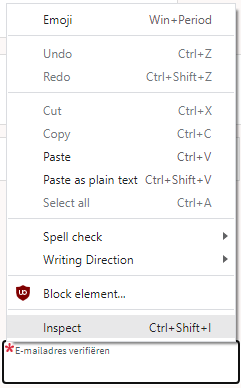
Inspect is enabled and actually works.

It inspects the current element, which on this site looks like this:

The element does not contain event handlers. But the code hooks them behind our backs.

The element does not contain event handlers. But the code hooks them behind our backs.

On the “Event Listeners” tab on the right, you can see there are two JavaScript methods hooked to the paste handler:

The paste handlers. The first is OK, the second blocks paste.

The paste handlers. The first is OK, the second blocks paste.

The first one is OK, though I did not really look into what the proxy does.

Second paste event handler: remove this one.

First paste event handler: keep this one.

First paste event handler: keep this one.

The second is not OK, as it effectively prevents the event from being handled any further at all by calling preventDefault

Second paste event handler: remove this one.

Second paste event handler: remove this one.

By clicking on the second Remove button above, the paste blocker is gone and you can paste again.

–jeroen

Read the rest of this entry »

Posted in Chrome, Chrome, Dark Pattern, Development, Google, JavaScript/ECMAScript, Power User, Scripting, Software Development, User Experience (ux), Web Browsers | Leave a Comment »

Some links on Chrome not prompting to save passwords (when Firefox and Safari do)

Posted by jpluimers on 2022/01/20

For quite some time now, Chrome (think years) refuses to prompt for saving passwords whereas Firefox and Safari do prompt and save them, even for site types that it used to save passwords for in the past.

It has been annoying enough for too long now that I tried to do better than the Google searches I used back when I saw this happen first.

Below are some links based on new searches (starting with [Wayback] adding a password in chrome settings – Google Search); hopefully I can try them after I made a list of sites that Chrome does not show the password save prompt for.

Solutions I tried that failed (but maybe useful for others):

Solutions still to try:

Read the rest of this entry »

Posted in Chrome, Chrome, Communications Development, Development, Encryption, ESXi6, ESXi6.5, ESXi6.7, Firefox, Fritz!, Fritz!Box, Fritz!WLAN, Google, https, HTTPS/TLS security, Internet, Internet protocol suite, Let's Encrypt (letsencrypt/certbot), Power User, routers, Safari, Security, TCP, TLS, Virtualization, VMware, VMware ESXi, Web Browsers, Web Development | Leave a Comment »

How to Delete Specific Chrome Autofill Suggestions

Posted by jpluimers on 2022/01/14

If use the Chrome web browser, it’s fairly likely you will find Chrome autofill suggestions recommending things for various forms and text entry points. Sometimes those autofill suggestions c…

[Wayback] How to Delete Specific Chrome Autofill Suggestions

Most important are the steps:

  1. Open the related website which has a form entry where autofill suggestions appear
  2. Start typing so that the suggestion shows up as an option in Chrome
  3. Using the keyboard arrows, navigate down the suggestion list to the item(s) you want to remove from the Chrome autofill suggestions
  4. With the suggestion highlighted, use the appropriate keystroke sequence to delete the Chrome suggestion:
    • Mac: Shift + FN + Delete
    • Windows: Shift + Delete
    • Chromebook / Chrome OS: Alt + Shift + Delete
  5. Repeat with other suggestions to delete if desired

Via: [WayBack] edit google chrome autocomplete list – Google Search

–jeroen

Posted in Chrome, Chrome, Google, Power User, Web Browsers | Leave a Comment »

First/Last-Tab: Ctrl-1/9 (or Command-1/9): Switch Between Tabs in Any Browser Using Shortcut Keys

Posted by jpluimers on 2021/12/10

Only recently, I learned this works on just about any web-browser:

  • Ctrl-9 (macOS: Command-9) goes to LAST tab
  • Ctrl-1 (macOS: Command-1) goes go FIRST tab

Via: [WayBack] Switch Between Tabs in Any Browser Using Shortcut Keys

For those keyboard ninjas who hate using the mouse, switching between tabs in your browser window is essential since most people probably have a bunch of tabs open at once. […]

If you want to go to a specific tab, you can press CTRL + N, where N is a number between 1 and 8. Unfortunately, you can’t go past 8, so if you have more than eight tabs, you’ll have to use a different keyboard shortcut or just click on it. CTRL + 9 will take you to the last tab, even if there are more than 8!

–jeroen

Posted in Chrome, Firefox, Internet Explorer, Keyboards and Keyboard Shortcuts, Opera, Power User, Safari, Web Browsers | Leave a Comment »

To bypass a Chrome certificate/HSTS error, you can type ‘badidea’ (previously ‘thisisunsafe’) without quotes (this might change in the future)

Posted by jpluimers on 2021/11/11

For expired or self-signed certificates with an untrusted chain, you might want to by base the Chrome certificate/HSTS error message.

Instead of clicking a few times, you can also type ‘badidea’ (this used to be ‘thisisunsafe’ and might change again someday).

Based on: [WayBack] security – Does using ‘badidea’ or ‘thisisunsafe’ to bypass a Chrome certificate/HSTS error only apply for the current site? – Stack Overflow

Found via [WayBack] KPN-klanten kunnen Experiabox V10A niet benaderen door verlopen certificaat – Computer – Nieuws – Tweakers

Source code that handles this: [WayBack] components/security_interstitials/core/browser/resources/interstitial_v2.js – chromium/src – Git at Google

/**
 * This allows errors to be skippped by typing a secret phrase into the page.
 * @param {string} e The key that was just pressed.
 */
function handleKeypress(e) {
  var BYPASS_SEQUENCE = 'badidea';
  if (BYPASS_SEQUENCE.charCodeAt(keyPressState) == e.keyCode) {
    keyPressState++;
    if (keyPressState == BYPASS_SEQUENCE.length) {
      sendCommand(SecurityInterstitialCommandId.CMD_PROCEED);
      keyPressState = 0;
    }
  } else {
    keyPressState = 0;
  }
}

–jeroen

Posted in Chrome, Development, Encryption, https, HTTPS/TLS security, Power User, Security, Web Browsers, Web Development | Leave a Comment »

How to prepare your IdentityServer for Chrome’s SameSite cookie changes – and how to deal with Safari, nevertheless – Thinktecture

Posted by jpluimers on 2021/09/15

For my link archive:

Via:

–jeroen

Posted in .NET, .NET Core, ASP.NET, C#, Chrome, Chrome, Development, Firefox, Google, Power User, Safari, Software Development, Web Browsers | Leave a Comment »

html – How can I scale the content of an iframe? – Stack Overflow

Posted by jpluimers on 2021/08/19

I used [WayBack] html – How can I scale the content of an iframe? – Stack Overflow as starting point to scale some iframes.

In my case, I had to scale up (by a 25% so a factor 1.25) instead of scale down.

What I observed so far in recent Chrome versions is:

  1. The wrapping div is still needed, otherwise the outer size and inner size of the frame mismatches
  2. The wrapping div and the wrapped iframe need to have the same dimensions (so unlike the Stack Overflow answers, no need to scale the width/height of the div; keep the same values as the iframe)

The div uses class calendar_wrap.

The iframe uses class calendar_iframe.

This is part of my CSS:

body {
      margin: 0; /* override browser setting for body `margin: 8px;` */
      overflow: hidden; /* remove scroll bars; does not work for iframes  */
    }

    /* ... */

    iframe {
      border-width: 0; /* override browser setting for iframe `border-width: 2px; */
      height: 100vh;
      width:   50vw;
      overflow: hidden; /* remove scroll bars; does not work for iframes  */
    }

     /* wrap and iframe zoom as per https://stackoverflow.com/questions/166160/how-can-i-scale-the-content-of-an-iframe */
    .calendar_wrap {
      float: left;

      height: 70vh;
      width:  35vw; /* calc(35vw / 1.25); */

      padding: 0;
      background-color: blue;
    }

    .calendar_iframe {
      float: left;

      width:  35vw;

      -ms-transform: scale(1.25);
      -moz-transform: scale(1.25);
      -o-transform: scale(1.25);
      -webkit-transform: scale(1.25);
      transform: scale(1.25);

      -ms-transform-origin: 0 0;
      -moz-transform-origin: 0 0;
      -o-transform-origin: 0 0;
      -webkit-transform-origin: 0 0;
      transform-origin: 0 0;
    }

    /* ... */

–jeroen

Posted in Chrome, CSS, Development, HTML, Power User, Software Development, Web Browsers, Web Development | Leave a Comment »

google chrome – How can I selectively disable paste blockers – Super User

Posted by jpluimers on 2021/04/16

For my link archive: [WayBack] google chrome – How can I selectively disable paste blockers – Super User.

Preliminary testing shows that Chrome Extension [Archive.is] “Don’t Fuck with Paste” works with eendagskentekenbewijsaanvragen.rdw.nl

–jeroen

Posted in Chrome, Chrome, Firefox, Google, Power User, Web Browsers | Leave a Comment »

Reminder: check if LUMC Privacy Statement and Gebruiksvoorwaarden are printable or downloadable as PDF.

Posted by jpluimers on 2021/02/26

Reminder to check out the results of this thread: [WayBack] Thread by @jpluimers: “Jammer dat het Privacy Statement op mijnlumc.lumc.nl/mijnlumc/?#/co… als een pop-up zichtbaar is, waardoor je het niet volledig kunt afdrukk […]”.

Related:

Thread:

Jammer dat het Privacy Statement op mijnlumc.lumc.nl/mijnlumc/?#/co… als een pop-up zichtbaar is, waardoor je het niet volledig kunt afdrukken of als PDF opslaan.

Vreemd ook dat de tekst op lumc.nl/12367/ anders is dan in de consent hierboven.

Kan @LUMC_Leiden dat oplossen?

Idem voor de Gebruiksvoorwaarden. Daar is geen alternatieve tekst van.
mentions In onderstaande code gaan de aanpassingen in beide <span>…</span> blokken zitten.

–jeroen

Read the rest of this entry »

Posted in Chrome, Development, LifeHacker, Power User, Software Development, Web Browsers, Web Development | Leave a Comment »

ColumnCopy – Chrome Web Store

Posted by jpluimers on 2021/02/19

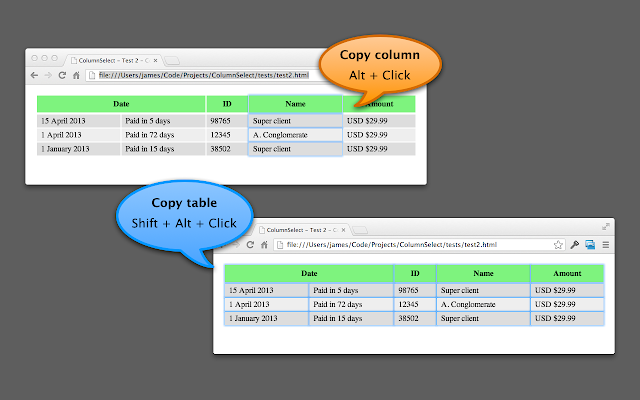
[Archive.is] ColumnCopy – Chrome Web Store: Enables copying columns from tables.

It can read anything on any web page, and it uses modifier keys, so I usually have it disabled until I need it.

You can disable/enable it on this page:

chrome://extensions/?id=lapbbfoohlcmlbdaakldmmallcbcbpjb

Via [WayBack] Select column from a table with Google Chrome – Super User

Sorry to dig up an old thread, but this might help someone in the future. I wrote a Chrome extension called ColumnCopy which accomplishes this task.

–jeroen

Posted in Chrome, LifeHacker, Power User, Web Browsers | Leave a Comment »