The Wiert Corner – irregular stream of stuff

Jeroen W. Pluimers on .NET, C#, Delphi, databases, and personal interests

  • My badges

  • Twitter Updates

  • My Flickr Stream

  • Pages

  • All categories

  • Enter your email address to subscribe to this blog and receive notifications of new posts by email.

    Join 1,860 other subscribers

Archive for the ‘Firefox’ Category

google chrome – How can I selectively disable paste blockers – Super User

Posted by jpluimers on 2021/04/16

For my link archive: [WayBack] google chrome – How can I selectively disable paste blockers – Super User.

Preliminary testing shows that Chrome Extension [Archive.is] “Don’t Fuck with Paste” works with eendagskentekenbewijsaanvragen.rdw.nl

–jeroen

Posted in Chrome, Chrome, Firefox, Google, Power User, Web Browsers | Leave a Comment »

A choco install list

Posted by jpluimers on 2021/02/03

Sometimes I forget the choco install mnemonics for various tools, so here is a small list below.

Of course you have to start with an administrative command prompt, and have a basic Chocolatey Installation in place.

If you want to clean cruft:

choco install --yes choco-cleaner

Basic install:

choco install --yes 7zip
choco install --yes everything
choco install --yes notepadplusplus
choco install --yes beyondcompare
choco install --yes git.install --params "/GitAndUnixToolsOnPath /NoGitLfs /SChannel /NoAutoCrlf /WindowsTerminal"
choco install --yes hg
choco install --yes sourcetree
choco install --yes sysinternals

For VMs (pic one):

choco install --yes vmware-tools
choco install --yes virtio-drivers

For browsing (not sure yet about Chrome as that one has a non-admin installer as well):

choco install --yes firefox

For file transfer (though be aware that some versions of Filezilla contained adware):

choco install --yes filezilla
choco install --yes winscp

For coding:

choco install --yes vscode
choco install --yes atom

For SQL server:

choco install --yes sql-server-management-studio

For web development / power user:

choco install --yes fiddler

For SOAP and REST:

choco install --yes soapui

If you don’t like manually downloading SequoiaView at gist.github.com/jpluimers/b0df9c2dba49010454ca6df406bc5f3d (e8efd031d667de8a1808d6ea73548d77949e7864.zip):

choco install --yes windirstat

For drawing, image manipulation (paint.net last, as it needs a UI action):

choco install --yes gimp
choco install --yes imagemagick
choco install --yes paint.net

For ISO image mounting in pre Windows 10:

choco install --yes wincdemu

For hard disk management:

choco install --yes hdtune
choco install --yes seatools
choco install --yes speedfan

For Fujitsu ScanSnap scanners (not sure yet this includes PDF support):

choco install --yes scansnapmanager

–jeroen

Posted in 7zip, atom editor, Beyond Compare, Chocolatey, Compression, Database Development, Development, DVCS - Distributed Version Control, Everything by VoidTools, Fiddler, Firefox, Fujitsu ScanSnap, git, Hardware, Mercurial/Hg, Power User, Scanners, SOAP/WebServices, Software Development, Source Code Management, SQL Server, SSMS SQL Server Management Studio, SysInternals, Text Editors, Versioning, Virtualization, VMware, VMware ESXi, vscode Visual Studio Code, Web Browsers, Web Development, Windows | Leave a Comment »

PassProtect – Chrome Web Store

Posted by jpluimers on 2021/01/25

[Archive.is] PassProtect – Chrome Web Store:

Stop using bad passwords. PassProtect alerts you about breached credentials. Powered by “Have I Been Pwned?”.

Interesting plugin. Will try this soon.

Via:

–jeroen


Posted in Authentication, Chrome, Firefox, LifeHacker, Power User, Security, Web Browsers | Leave a Comment »

browser – How to connect a website has only IPv6 address without domain name? – Super User

Posted by jpluimers on 2020/06/22

For my link archive: [WayBack] browser – How to connect a website has only IPv6 address without domain name? – Super User (thanks haimg):

According to RFC2732, literal IPv6 addresses should be put inside square brackets in URLs, e.g. like this:

http://[1080:0:0:0:8:800:200C:417A]/index.html

If you also need to specify a port other then 80 to access the server it has to be placed after the closing bracket:

http://[1080:0:0:0:8:800:200C:417A]:8888/index.html

Of course, you have to have end-to-end IPv6 connectivity to that host. E.g. if the server is not inside your own local network, you need to have IPv6 connectivity, either via your ISP (rare), or via some kind of IPv6 in IPv4 encapsulation (tunnel).

Related: [WayBack] RFC 2732 – Format for Literal IPv6 Addresses in URL’s

–jeroen

Posted in Chrome, Firefox, Internet Explorer, Opera, Power User, Web Browsers | Leave a Comment »

Firefox 29 and up: “The connection has timed out”

Posted by jpluimers on 2019/04/24

A few years ago, Firefox changed the default “network.http.response.timeout” value from zero to 300 seconds (5 minutes).

Display style systems that show refreshing web pages, this can be a problem as when the connection to the web-server is unavailable for more than 5 minutes, then the page will show “The connection has timed out” and stop refreshing.

The solution – apart from fixing each and every connection problem – is to either restore the value or make it very long:

  • network.http.response.timeout=0
  • network.http.response.timeout=30000

Changing this works similarly like in A way to skip the Firefox “Well, this is embarrassing” during a sudden reboot « The Wiert Corner – irregular stream of stuff:

  • Open Firefox
  • Type about:config in the addressbar
  • Confirm the
    This might void your warranty!
    by clicking
    I accept the risk!
  • Search for network.http.response.timeout
  • Double click it so the value changes from the default value 0 to the user set value 0

–jeroen

Via:

Posted in Development, Firefox, Power User, Scripting, Software Development, Web Browsers, Web Development | Leave a Comment »

AlessandroZ/LaZagne: Credentials recovery project

Posted by jpluimers on 2019/04/15

Just when I thought I made a note of a password I hardly ever use, I didn’t, luckily this open source tools understands how to recover many kinds of passwords: AlessandroZ/LaZagne: Credentials recovery project.

–jeroen

Posted in *nix, *nix-tools, Chrome, Development, DVCS - Distributed Version Control, Firefox, git, Internet Explorer, Office, Opera, Outlook, Power User, Python, Scripting, Skype, Software Development, Source Code Management, Web Browsers, WiFi, Windows | Leave a Comment »

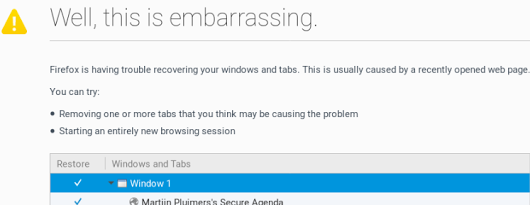
A way to skip the Firefox “Well, this is embarrassing” during a sudden reboot

Posted by jpluimers on 2019/03/04

A while ago, I asked about [WayBack] “Is there a way to skip the Firefox “Well, this is embarrassing” during a sudden reboot and just continue with the loading of the default pages? – Jeroen Wiert Pluimers – Google+

Later I found the workaround at both and [WayBackWell this is embarrassing message | Firefox Support Forum | Mozilla Support with more elaboration at [WayBackDon’t give Chance for Firefox to Show ‘Well, this is embarrassing” message next time again | Techdows:

  1. Open Firefox
  2. Type about:config in the addressbar
  3. Confirm the
    This might void your warranty!
    by clicking
    I accept the risk!
  4. Search for browser.sessionstore.resume_from_crash
  5. Double click it so the value changes from the default value true to the user set value false

Now after a sudden reboot of the machine, a start of Firefox just loads the default page.

–jeroen

Posted in Firefox, Power User, Web Browsers | Leave a Comment »

Privacy badger: blocks spying ads and invisible trackers. Not just for Facebook, but for every site.

Posted by jpluimers on 2018/03/29

[WayBackPrivacy Badger | Electronic Frontier Foundation: Privacy Badger blocks spying ads and invisible trackers.

Chrome first run settings are at

chrome-extension://pkehgijcmpdhfbdbbnkijodmdjhbjlgp/skin/firstRun.html

Via: [WayBack] Arjen Lentz on Twitter: “EFF’s Privacy Badger does this for any site. Also available for Chrome/Chromium.… “

There is a really interesting Y-combinator thread at [WayBack] Facebook Container Extension: Take control of how you’re being tracked | Hacker News which goes way deeper in how various browsers and extension combinations can help you getting more hold of your privacy.

A few links via that hacker news link:

–jeroen

Posted in Chrome, Firefox, Google, Power User, Privacy | Leave a Comment »

Chrome Store Foxified: Enables the Google Chrome Store and Opera Addons Website for Firefox.

Posted by jpluimers on 2017/11/27

Most of my browser life is in Chrome, but the memory consumption and CPU usage has increased so much over time so it, err, become less than optimal.

Given the new FireFox is supposed to use far less memory and CPU than previous FireFox versions, I want to try it, but since so much of my Chrome life is about Chrome Extensions, I was glad to discover [WayBackChrome Store Foxified

by Nicolas AragoneNoitidart
Enables the Google Chrome Store and Opera Addons Website for Firefox. Point and click to install Opera/Chrome extensions straight into Firefox.

via:

–jeroen

Read the rest of this entry »

Posted in Chrome, Chrome, Firefox, Google, Power User, Web Browsers | Leave a Comment »

How to enable JavaScript in your browser and why

Posted by jpluimers on 2017/03/02

Just in case it’s not enabled yet: How to enable JavaScript in your browser and why

It even has some html to redirect to it, which I’ve replaced with the wayback machine (and put into a gist as WordPress kills noscript tag blocks and everything they contain.


<noscript>
For full functionality of this site it is necessary to enable JavaScript.
Here are the <a href="http://web.archive.org/web/20160402005258/http://www.enable-javascript.com/&quot; target="_blank">
instructions how to enable JavaScript in your web browser</a>.
</noscript>

I needed it as at a client site, one of the embedded devices would show the message “Javascript is required to use this web portal” in various web browsers so I had to check the JavaScript status in each browser.

–jeroen

Posted in Chrome, Chrome, Development, Firefox, Google, Internet Explorer, JavaScript/ECMAScript, Opera, Power User, Safari, Scripting, Software Development, Web Browsers | Leave a Comment »