


The CSS from [WayBack/Archive.is] Naughty naughty no alt that shows the below red moving rendering of images that do not have an alt-text is simple:
Archive for the ‘Web Browsers’ Category
Naughty naughty no alt: CSS style to clearly show which images lack an alt-text
Posted by jpluimers on 2021/10/05

Posted in Bookmarklet, CSS, Development, HTML, HTML5, Power User, Software Development, Web Browsers, Web Development | Leave a Comment »
How to prepare your IdentityServer for Chrome’s SameSite cookie changes – and how to deal with Safari, nevertheless – Thinktecture
Posted by jpluimers on 2021/09/15
For my link archive:
- [WayBack] How to prepare your IdentityServer for Chrome’s SameSite cookie changes – and how to deal with Safari, nevertheless – Thinktecture
- [WayBack] How to correctly delete your SameSite Cookies in Chrome (80+) – Thinktecture
Via:
- [WayBack] Nick Craver on Twitter: “The current best plan I can think of for the SameSite cookie crap in Chrome 80 is uploading a SHA1 collision to the Chromium build server to stop it from shipping.”
- [WayBack] craigfis on Twitter: “How is this breaking a legitimate scenario for you?… “
- [WayBack] Nick Craver on Twitter: “Hey anyone remember a good decade or so where where we all finally agreed “don’t test against user agents, that’s bad!”, but then Google decided to break the internet with SameSite cookie shenanigans and we’re over here writing regexes against user agents in 2020? Good times.”
- [WayBack] Sebastian Gingter on Twitter: “You don’t need regexes. You really don’t :) Have a look at our example implementation: … “
- [WayBack] Nick Craver on Twitter: “This is for VCL :), but the code you posted is from the article with a big warning – how are you considering that warning? … “
- [WayBack] Sebastian Gingter on Twitter: “That warning is more of a “don’t blame us if this still breaks for your users”. We double checked that for most of ours customers (based on their http access logs of UAs), and did quite intense testing and figured it is pretty much complete for what’s out there in the wild. And..…
- [WayBack] Sebastian Gingter on Twitter: “… we also maintain that (at least for our customers) when we find that there’s an issue with that. And I will update the article if need be ;)…
- [WayBack] Nick Craver on Twitter: “Okay awesome info – thank you! That gives me some confidence in it – will likely land in SO code soon.… “
–jeroen
Share this:

Posted in .NET, .NET Core, ASP.NET, C#, Chrome, Chrome, Development, Firefox, Google, Power User, Safari, Software Development, Web Browsers | Leave a Comment »
Overview of Client Libraries · Internet Archive
Posted by jpluimers on 2021/09/14
Besides manual upload at [Archive.is] Upload to Internet Archive, there are also automated ways of uploading content.
One day I need this to archive pages or sites into the WayBack machine: [WayBack] Overview of Client Libraries · Internet Archive (most of which is Python based):
Share this:
Posted in Bookmarklet, Development, Internet, InternetArchive, Power User, Python, Scripting, Software Development, WayBack machine, Web Browsers | Leave a Comment »
html – How can I scale the content of an iframe? – Stack Overflow
Posted by jpluimers on 2021/08/19
I used [WayBack] html – How can I scale the content of an iframe? – Stack Overflow as starting point to scale some iframes.
In my case, I had to scale up (by a 25% so a factor 1.25) instead of scale down.
What I observed so far in recent Chrome versions is:
- The wrapping
divis still needed, otherwise the outer size and inner size of the frame mismatches - The wrapping
divand the wrappediframeneed to have the same dimensions (so unlike the Stack Overflow answers, no need to scale thewidth/heightof thediv; keep the same values as theiframe)
The div uses class calendar_wrap.
The iframe uses class calendar_iframe.
This is part of my CSS:
body {
      margin: 0; /* override browser setting for body `margin: 8px;` */
      overflow: hidden; /* remove scroll bars; does not work for iframes  */
    }

    /* ... */

    iframe {
      border-width: 0; /* override browser setting for iframe `border-width: 2px; */
      height: 100vh;
      width:   50vw;
      overflow: hidden; /* remove scroll bars; does not work for iframes  */
    }

     /* wrap and iframe zoom as per https://stackoverflow.com/questions/166160/how-can-i-scale-the-content-of-an-iframe */
    .calendar_wrap {
      float: left;

      height: 70vh;
      width:  35vw; /* calc(35vw / 1.25); */

      padding: 0;
      background-color: blue;
    }

    .calendar_iframe {
      float: left;

      width:  35vw;

      -ms-transform: scale(1.25);
      -moz-transform: scale(1.25);
      -o-transform: scale(1.25);
      -webkit-transform: scale(1.25);
      transform: scale(1.25);

      -ms-transform-origin: 0 0;
      -moz-transform-origin: 0 0;
      -o-transform-origin: 0 0;
      -webkit-transform-origin: 0 0;
      transform-origin: 0 0;
    }

    /* ... */
–jeroen
Share this:
Posted in Chrome, CSS, Development, HTML, Power User, Software Development, Web Browsers, Web Development | Leave a Comment »
Firefox: disable DNS over HTTPS (which they call TTR)
Posted by jpluimers on 2021/08/03
There are many reasons to disable DNS over HTTPS (DoH), of which enough are discussed in the links below.
Disabling DoH always talks about setting TTR (the abbreviation Mozilla uses for it) to 5 (like [WayBack] Thread by @isotopp: “Firefox is about to break DNS by enabling DNS-over-HTTP by default […]”), but hardly ever explains the meaning of 5, or any other potential values.
After some searching, I found [WayBack] Firefox disable trr | Knowledge Base:
0: Off by default1: Firefox chooses faster2: TRR default w/DNS fallback3: TRR only mode5: DisabledI imagine the setting we’re all looking for is:
user_pref(“network.trr.mode”, 5);(emphasis mine)
It pointed me to [WayBack] Trusted Recursive Resolver – MozillaWiki:
Share this:
Posted in Cloud, Cloudflare, Communications Development, Development, DNS, Firefox, Infrastructure, Internet protocol suite, Power User, TCP, Web Browsers | Leave a Comment »
How do i get the old CTRL + TAB function back
Posted by jpluimers on 2021/07/19
I hate those updates (this time around FireFox 65) where suddenly the UX changes without an obvious way to switch back to the old behaviour. [WayBack] How do i get the old CTRL + TAB function back? | Firefox Support Forum | Mozilla Support led me to the proper name (“browser.ctrlTab.recentlyUsedOrder”), and a confirmation of the below steps in:
- [WayBack] Changing Firefox Tab Cycle Order – Super User
- [WayBack] How to get old tab switching behavior back in Firefox? – Super User
- [WayBack] [Firefox Tip] Disable Ctrl+Tab Thumbnail Previews and Cycle Through Recently Used Tabs – AskVG
I by now know this is only for new user profiles, but since I do not sync profiles (as almost all of my equipment servers different use cases), but still have the same physical user (me), I want consistent behaviour. See [WayBack/Archive.is] Enable “Ctrl+Tab cycles through tabs in recently used order” feature by default in new profiles
Script needed
Too bad I could not find a way to script this: my [WayBack] Mozilla Bugzilla “browser.ctrlTab.recentlyUsedOrder” “script” – Google Search turned no useful results.
If you have a scripting workaround, please let me know.
Resetting to the old tab behaviour
For me, the easiest way is to
- browse to
about:config, - confirm “I accept the risk!”,
- type “tab” in the “Search” pane,
- select
browser.ctrlTab.recentlyUsedOrder, - double click on the “browser.ctrlTab.recentlyUsedOrder” entry to switch from non-bold true (default value; wrong) to
false(actual value; correct).
No need for any save button: the change is immediate.
These might help me script it:
- [WayBack] GitHub – ghacksuserjs/ghacks-user.js: An ongoing comprehensive user.js template for configuring and hardening Firefox privacy, security and anti-fingerprinting
- [WayBack] ToDo: diffs FF62-FF63 · Issue #501 · ghacksuserjs/ghacks-user.js · GitHub
- [WayBack] configure a new Windows profile · GitHub
Share this:

Posted in Firefox, Power User, Web Browsers | Leave a Comment »
google chrome – How can I selectively disable paste blockers – Super User
Posted by jpluimers on 2021/04/16
For my link archive: [WayBack] google chrome – How can I selectively disable paste blockers – Super User.
Preliminary testing shows that Chrome Extension [Archive.is] “Don’t Fuck with Paste” works with eendagskentekenbewijsaanvragen.rdw.nl
–jeroen
Share this:
Posted in Chrome, Chrome, Firefox, Google, Power User, Web Browsers | Leave a Comment »
Reminder: check if LUMC Privacy Statement and Gebruiksvoorwaarden are printable or downloadable as PDF.
Posted by jpluimers on 2021/02/26
Reminder to check out the results of this thread: [WayBack] Thread by @jpluimers: “Jammer dat het Privacy Statement op mijnlumc.lumc.nl/mijnlumc/?#/co… als een pop-up zichtbaar is, waardoor je het niet volledig kunt afdrukk […]”.
Related:
- [WayBack] Twitter thread.
- [WayBack] Privacy statement | LUMC (the text differs from the actual Privacy Statement you have to consent to)
- [WayBack] Geef uw mening over deze website
- [WayBack] Klacht indienen | LUMC
- [WayBack] Medische gegevens | LUMC
Thread:
Jammer dat het Privacy Statement op mijnlumc.lumc.nl/mijnlumc/?#/co… als een pop-up zichtbaar is, waardoor je het niet volledig kunt afdrukken of als PDF opslaan.
Vreemd ook dat de tekst op lumc.nl/12367/ anders is dan in de consent hierboven.
Kan @LUMC_Leiden dat oplossen?
Idem voor de Gebruiksvoorwaarden. Daar is geen alternatieve tekst van.In onderstaande code gaan de aanpassingen in beide <span>…</span> blokken zitten.


–jeroen
Share this:

Posted in Chrome, Development, LifeHacker, Power User, Software Development, Web Browsers, Web Development | Leave a Comment »
ColumnCopy – Chrome Web Store
Posted by jpluimers on 2021/02/19
[Archive.is] ColumnCopy – Chrome Web Store: Enables copying columns from tables.
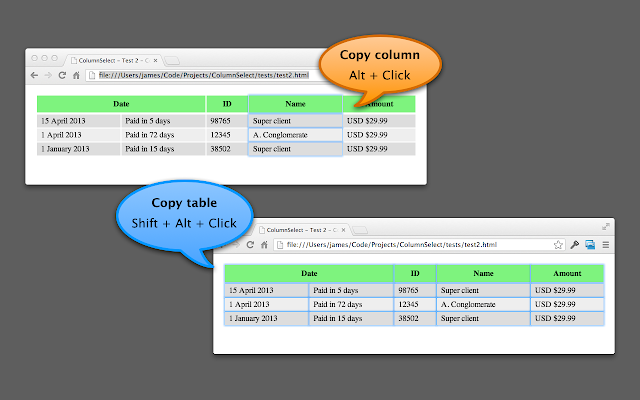
It can read anything on any web page, and it uses modifier keys, so I usually have it disabled until I need it.
You can disable/enable it on this page:
chrome://extensions/?id=lapbbfoohlcmlbdaakldmmallcbcbpjb
Via [WayBack] Select column from a table with Google Chrome – Super User
Sorry to dig up an old thread, but this might help someone in the future. I wrote a Chrome extension called ColumnCopy which accomplishes this task.
–jeroen
Share this:
Posted in Chrome, LifeHacker, Power User, Web Browsers | Leave a Comment »
Deleting the WebCache database – The IE browser cache | Apttech’s Blog
Posted by jpluimers on 2021/02/15
[WayBack] Deleting the WebCache database – The IE browser cache | Apttech’s Blog quotes from WayBack: C drive space is using up on terminal server after upgrading to IE10 or IE11 – AsiaTech: Microsoft Azure & Development:
With the new cache implementation, the cache files are saved in
%LocalAppData%\Microsoft\Windows\WebCache\folder. And, the cache files will be created when a new user logs on.Actually, the database is a file named
WebCacheV01.datin the cache folder, and its initial size could be around 20-32MB. The size of this file will keep increasing along with you browse more and more websites.…
save the below contents into
ClearIECache.cmdfile and try to fun this file.echo OFF net stop COMSysApp taskkill /F /IM dllhost.exe taskkill /F /IM taskhost.exe taskkill /F /IM taskhostex.exe del /Q %LocalAppData%\Microsoft\Windows\WebCache\*.* net start COMSysApp echo ONFurthermore, you’d better deploy the batch file to a logoff script of your local GPO, here are the steps.
Related:
- [WayBack] NirBlog » Blog Archive » A few words about the cache / history on Internet Explorer 10
- [WayBack] Eric Lawrence: IE10’s index.dat files replaced with a cache database
–jeroen
Share this:
Posted in Internet Explorer, Power User, Web Browsers, Windows, Windows 10 | Leave a Comment »
 The Wiert Corner - irregular stream of stuff