The Wiert Corner – irregular stream of stuff

Jeroen W. Pluimers on .NET, C#, Delphi, databases, and personal interests

  • My badges

  • Twitter Updates

  • My Flickr Stream

  • Pages

  • All categories

  • Enter your email address to subscribe to this blog and receive notifications of new posts by email.

    Join 1,835 other subscribers

Archive for the ‘Web Browsers’ Category

iOS/Android Privacy: InAppBrowser.com – see what JavaScript commands get injected through an in-app browser · Felix Krause

Posted by jpluimers on 2022/08/31

Especially on Archive, but also on Android and other mobile operating systems, mobile apps can have their in-app browsers to circumvent the OS provided wrapper around the system browser.

On iOS, the Safari is the only system browser engine whereas on Android you can have other engines too, so less Android applications have in-app browsers.

Most of those in-app browsers are in social media applications that go to great length to keep their users inside a walled garden.

The site [Wayback/Archive] inAppBrowser.com helps checking how severely information is leaked through the in-app browser as those potentially have a lot of control. TikTok is worst capturing all input including credentials like user names and passwords.

Read the rest of this entry »

Posted in Chrome, Conference Topics, Conferences, Development, Event, Firefox, iOS Development, JavaScript/ECMAScript, Mobile Development, Power User, Privacy, Safari, Scripting, Security, Software Development, Web Browsers, Web Development | Leave a Comment »

Converting inline svg xml to png

Posted by jpluimers on 2022/07/19

A while ago, I had a web page showing the logo as inline svg xml code.

Edit 20231209: [Wayback/Archive] Render SVG to PNG: Edit fiddle – JSFiddle – Code Playground (explained in [Wayback/Archive] html – Convert embedded SVG to PNG in-place – Stack Overflow by [Wayback/Archive] User anatoly techtonik – Stack Overflow) works way better than the InfoHeap link:

  1. Replace the svg element in it (but keep the id="inputSvg" attribute!),
  2. Run the fiddle,
  3. Save the rendered PNG file by right-clicking the “PNG (Save link as..)” link then saving the file.

Original content

It took a while to find a place to convert that on-line: [Wayback/Archive.is] inline svg xml to png – online html sandbox – InfoHeap (via [Wayback/Archive.is] Convert svg xml text to png image using canvas – InfoHeap):

The solution is a bit of JavaScript (quoted below) that you can run-online: modify the svg bit in it, then run it, scroll down in the result and verify if the canvas fits (when not: adapt the canvas side, then re-run).

The svg xml code needs to be all on one line, so remove any line breaks in it before running.

I have tested it in Chrome, but it should work in non-Chromium browsers like Firefox as well.

The inner workings of the JavaScript conversion code is explained in [Wayback/Archive.is] html – Convert embedded SVG to PNG in-place – Stack Overflow with more demo code at [Archive.is] Rasterizing In-Document SVG (thanks [Wayback] Phrogz!).

Related: [Archive.is] Jeroen Wiert Pluimers on Twitter: “Nieuwe logo, oude logo. Vrijwel alle werknemers werden een halve dag naar huis gestuurd om ruimte te maken voor de genodigden voor de zodat die de introductie van naam en logo konden bijwonen. Heel goed om verbinding te verliezen met je echte doelgroep. … “

Provalu logo

MareGroep logo

--jeroen


<div id="diagram_image">
<svg id="inputSvg" xmlns="http://www.w3.org/2000/svg&quot; xmlns:inkspace="http://www.inkscape.org/namespaces/inkscape&quot; xmlns:xlink="http://www.w3.org/1999/xlink&quot; viewBox="0 0 640 120">
<defs id="defs_block">
<filter height="1.504" id="filter_blur" inkspace:collect="always" width="1.1575" x="-0.07875" y="-0.252">
<feGaussianBlur id="feGaussianBlur3780" inkspace:collect="always" stdDeviation="4.2" />
</filter>
</defs>
<title>blockdiag</title>
<desc/>
<rect fill="rgb(0,0,0)" height="40" stroke="rgb(0,0,0)" style="filter:url(#filter_blur);opacity:0.7;fill-opacity:1" width="128" x="67" y="46" />
<rect fill="rgb(0,0,0)" height="40" stroke="rgb(0,0,0)" style="filter:url(#filter_blur);opacity:0.7;fill-opacity:1" width="128" x="259" y="46" />
<rect fill="rgb(0,0,0)" height="40" stroke="rgb(0,0,0)" style="filter:url(#filter_blur);opacity:0.7;fill-opacity:1" width="128" x="451" y="46" />
<rect fill="rgb(255,255,255)" height="40" stroke="rgb(0,0,0)" width="128" x="64" y="40" />
<text fill="rgb(0,0,0)" font-family="sans-serif" font-size="11" font-style="normal" font-weight="normal" text-anchor="middle" textLength="55" x="128" y="66">discovery</text>
<rect fill="rgb(255,255,255)" height="40" stroke="rgb(0,0,0)" width="128" x="256" y="40" />
<text fill="rgb(0,0,0)" font-family="sans-serif" font-size="11" font-style="normal" font-weight="normal" text-anchor="middle" textLength="55" x="320" y="66">execution</text>
<rect fill="rgb(255,255,255)" height="40" stroke="rgb(0,0,0)" width="128" x="448" y="40" />
<text fill="rgb(0,0,0)" font-family="sans-serif" font-size="11" font-style="normal" font-weight="normal" text-anchor="middle" textLength="55" x="512" y="66">reporting</text>
<path d="M 192 60 L 248 60" fill="none" stroke="rgb(0,0,0)" />
<polygon fill="rgb(0,0,0)" points="255,60 248,56 248,64 255,60" stroke="rgb(0,0,0)" />
<path d="M 384 60 L 440 60" fill="none" stroke="rgb(0,0,0)" />
<polygon fill="rgb(0,0,0)" points="447,60 440,56 440,64 447,60" stroke="rgb(0,0,0)" />
</svg>
</div>
<img id="outputPngImage" src="data:image/png;base64,iVBORw0KGgoAAAANSUhEUgAAAAUAAAAFCAYAAACNbyblAAAAHElEQVQI12P4
//8/w38GIAXDIBKE0DHxgljNBAAO9TXL0Y4OHwAAAABJRU5ErkJggg=="/>
<span id="outputPngLinkSpan">
<a href="">PNG (Save link as..)</a>
</span>

view raw

page-body.html

hosted with ❤ by GitHub


class SVGtoPNGDataURL {
constructor() {
this.canvas = document.createElement('canvas'); // Not shown on page
this.canvas2DContext = this.canvas.getContext('2d');
this.loaderImage = new Image; // Not shown on page
}
// Generate PNG data URL from SVG and send it to callback function when ready
go(svgElement, dataUrlCallback) {
var svgAsXML = (new XMLSerializer).serializeToString( svgElement );
this.loaderImage.width = this.canvas.width = svgElement.clientWidth;
this.loaderImage.height = this.canvas.height = svgElement.clientHeight;
var self = this;
this.loaderImage.onload = function() {
self.canvas2DContext.drawImage( self.loaderImage, 0, 0, self.loaderImage.width, self.loaderImage.height );
dataUrlCallback(self.canvas.toDataURL());
};
this.loaderImage.src = 'data:image/svg+xml,' + encodeURIComponent( svgAsXML );
}
};
var converter = new SVGtoPNGDataURL();
var inputSvgElement = document.querySelector('#inputSvg'), // Inline SVG element
outputPngImage = document.querySelector('#outputPngImage'), // Where to draw the result
outputPngLink = document.querySelector('#outputPngLinkSpan a');
converter.go(inputSvgElement, dataUrlCallback=function(dataURL) {
outputPngImage.src = dataURL;
outputPngLink.href = dataURL;
});

Posted in Chrome, Development, Firefox, JavaScript/ECMAScript, Power User, Scripting, Software Development, Web Browsers, Web Development | Leave a Comment »

Automatically reload page in Chrome without plugin – Super User

Posted by jpluimers on 2022/07/14

Below is a cool solution to refresh a page using a bookmarklet is to embed it into an iframe, then automatically reload it every interval.

It for instance works for the [Wayback/Archive.is] Woonveilig and often in Fritz!Box environments.

[Wayback] Jon described the below method as a solution for his own question, 6 years after asking it in [Wayback/Archive.is] Automatically reload page in Chrome without plugin – Super User.

So I made this a bookmark:


javascript:document.getElementsByTagName("body")[0].innerHTML = "<iframe id=\"testFrame\" src=\""+window.location.toString()+"\" style=\"position: absolute; top:0; left:0; right:0; bottom:0; width:100%; height:100%;\"><\/iframe>";reloadTimer = setInterval(function(){ document.getElementById("testFrame").src=document.getElementById("testFrame").src },5*60*1000)

(it is in a gist as the WordPress editors keep killing the embedded html code, despite it being escaped within <code> tags.

–jeroen

Posted in Bookmarklet, Chrome, Chrome, Development, Firefox, Google, HTML, JavaScript/ECMAScript, Power User, Scripting, Software Development, Web Browsers, Web Development | Leave a Comment »

A twitter call to say nice things about technology sparked interesting threads

Posted by jpluimers on 2022/05/27

A while ago [Archive.is] Adam Jacob on Twitter: “Let’s say nice things about technology today. I’ll start. If it wasn’t for @lkanies and @puppetize, there is no way we would have been able to adapt as an industry to the rise of the cloud. Quote tweet me with your own.” sparked some interesting threads.

First posts are below; click on them to see the full threads.

Read the rest of this entry »

Posted in Chrome, Configuration Management, Development, DevOps, Firefox, History, IaC - Infrastructure as Code, Infocom and Z-machine, Infrastructure, KVM Kernel-based Virtual Machine, LSI/3ware, Open Source, PDP-11, Power User, PowerShell, Puppet, Python, Qemu, Rust, Safari, Scripting, Software Development, UCSD Pascal, Vagrant, Veewee, Virtualization, Web Browsers, Xen | Leave a Comment »

How to view the html page source of a website in Safari – Macintosh How To

Posted by jpluimers on 2022/04/14

[Wayback] How to view the html page source of a website in Safari – Macintosh How To

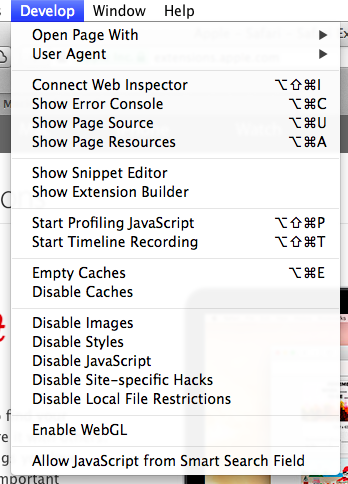
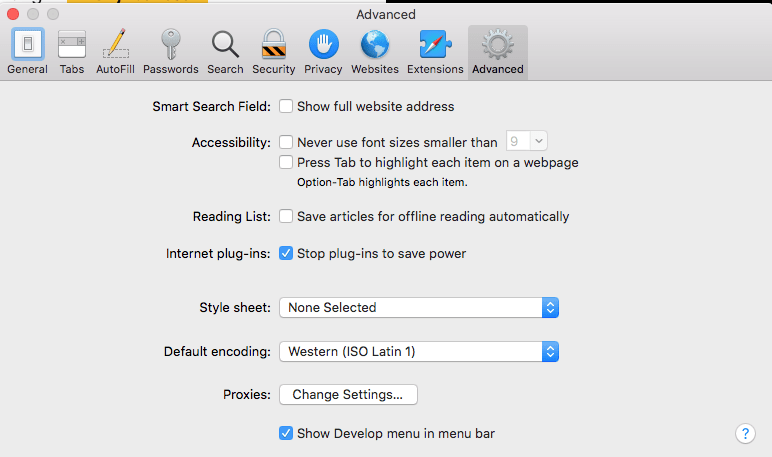
You can enable the extra menu in Safari by selecting ‘Preferences’ under Safari in the OS X menu bar  and then under the ‘Advanced’ pane select the checkbox that says ‘Show Develop menu in menu bar.’

This is the option you need:

a

MacOS - Safari - Show Develop menu in menu bar

MacOS – Safari – Show Develop menu in menu bar

–jeroen

Posted in Apple, Development, Mac OS X / OS X / MacOS, Power User, Safari, Software Development, Web Browsers, Web Development | Leave a Comment »

Prevent link rot before the public condemns you

Posted by jpluimers on 2022/04/05

I’ve written about link rot quite a few times (it even has a category on my blog).

Preventing it is important, as it improves user experience.

For most users this is an unconscious thing when it works and becomes consciously annoying when it fails.

Some user groups are vocal enough to force you to fix link rot after the fact, causing brand reputation damage.

One good example was last year: [Wayback] Users condemn Microsoft for removing KB IDs from some bug documentation | Computerworld.

Read the rest of this entry »

Posted in Bookmarklet, Development, Internet, link rot, Power User, Software Development, Web Browsers, Web Development, Windows, WWW - the World Wide Web of information | Leave a Comment »

Mumen Rusto: “Ceci n’est pas une Captcha.… “

Posted by jpluimers on 2022/04/01

Every site should present this as a captcha today.

Via [WayBack] Mumen Rusto on Twitter: “Ceci n’est pas une Captcha.… “

The captcha is by [WayBack] Senior Oops Engineer on Twitter: “Captcha: select all squares that contain a pipe Magritte: 😓”.

He posted it about 2 years ago as [WayBack] Senior Oops Engineer on Twitter: “oh fuck oh no… “.

–jeroen

Read the rest of this entry »

Posted in Apri1st, Development, Fun, Hosting, Power User, Software Development, Web Browsers, Web Development | Leave a Comment »

Bookmarklet to force WordPress classic-editor

Posted by jpluimers on 2022/03/29

A while ago, WordPress.com heavily started to de-emphasise the Classic Editor in order to boost the Gutenberg editor which is bloaty (in both browser DOM usage (heavily slowing down editing) and content (lots of meta tags that are added to blog source) and is missing essential features (especially nesting of blocks often breaks things).

With 7000+ blog posts in the Classic Editor format (a few in still supported markdown format: that experiment failed horribly!) that still require editing  (especially because of link rot)

So here is the Bookmarklet code to switch back an editing URL that you can use for as long as the Classic Editor is there:

javascript:location.href=document.location.href+'&classic-editor';

Yup, it is that simple: it appends &classic-editor to the URL.

Read the rest of this entry »

Posted in Bookmarklet, Classic editor, Development, Gutenberg editor, Internet, link rot, Power User, Software Development, Web Browsers, Web Development, WordPress, WWW - the World Wide Web of information | Leave a Comment »

The Delphi documentation site docwiki.embarcadero.com has been down/up oscillating for 4 days is now down for almost a day.

Posted by jpluimers on 2022/03/08

The [Wayback/Archive] Embarcadero/IDERA Documentation Wiki has been mostly down since March 3rd, 2022 (not the main page, but almost all other pages are).

I modified [Wayback/Archive] Docwiki https – EmbarcaderoMonitoring to show the actual status of a deeper page as the (mostly static) top page is up, so monitoring that is useless as the deeper pages are down.

The deeper pages are dynamic and require a functioning MySQL database connection. That connection is mostly down (the error message is not clear, so this could be a network or a database server problem, or maybe even a loadbalancer gradually entering bit heaven).

Since it had been down for like 6 days in February*, I’d expect Idera to keep an eye on it and prepare for more downtime. Apparently that’s either not a 24×7 thing for them or  they missed the “pre” in preparation as it is dead-silent on .

It also runs on an unsupported version of Mediawiki 1.31** which by itself does not explain the outage, but does indicate that their idea of handling their internal lifetime management is different than what they advocate to clients in their software subscription model, see [Wayback/Archive] Delphi – Embarcadero store, [Wayback/Archive] Update Subscription – Embarcadero and [Wayback/Archive] Special Offers on RAD Studio, Delphi & C++Builder – Embarcadero:

Read the rest of this entry »

Posted in *nix, Bookmarklet, Delphi, Development, JavaScript/ECMAScript, Lightweight markup language, MediaWiki, Monitoring, Power User, Scripting, SocialMedia, Software Development, Twitter, Uptimerobot, Web Browsers | Leave a Comment »

Force downloading Windows 10 ISOs instead of Media Creation Tool

Posted by jpluimers on 2022/02/25

When downloading Windows 10 builds, I usually want them as ISO files because I test them out as Virtual Machines before running on real hardware.

Downloading can be done from [WayBack] www.microsoft.com/en-us/software-download/windows10, however what you get depends on what machine you start browsing.

The above WayBack link, because it got archived from a non-Windows machine redirects from https://web.archive.org/web/20210321163339/https://www.microsoft.com/en-us/software-download/windows10 to https://web.archive.org/web/20210321143203/https://www.microsoft.com/en-us/software-download/windows10ISO.

On Windows systems the redirect goes from https://web.archive.org/web/20210321143203/https://www.microsoft.com/en-us/software-download/windows10ISO to https://web.archive.org/web/20210321163339/https://www.microsoft.com/en-us/software-download/windows10

By default, when you are on a Windows machine, the download link only provides the Media Creation tool. This forces an extra step into getting the ISO file on the virtual machine host.

When downloading from a non-Windows machine, you get a possibility to download the ISO file directly after selecting which kind of build and language you need. This provides you with a time limited https link to download the ISO (in practice this seems to last at least an hour).

I didn’t dig into this before, but luckily others did, and the difference is as easy as changing the User-Agent in your browser, as these posts describe:

Luckily, since ESXi 6.7, VMware ESXi added https as protocol to wget, so now you can download the https link you get via the above trick without hassle.

Oh, this answers my question from a few years back too: How can I get Win10_1511_1_English_x64.iso or Win10_1511_1_EnglishInternational_x64.iso ?

jeroen

Posted in Chrome, ESXi6.7, Power User, Virtualization, VMware, VMware ESXi, Web Browsers, Windows, Windows 10 | Leave a Comment »