The Wiert Corner – irregular stream of stuff

Jeroen W. Pluimers on .NET, C#, Delphi, databases, and personal interests

  • My badges

  • Twitter Updates

  • My Flickr Stream

  • Pages

  • All categories

  • Enter your email address to subscribe to this blog and receive notifications of new posts by email.

    Join 1,860 other subscribers

Archive for the ‘Windows’ Category

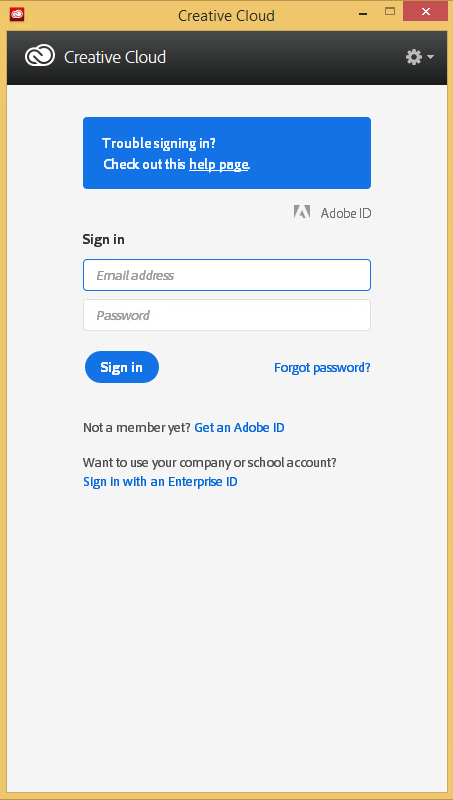
Automating the closing of the Creative Cloud signing and ABBY FindReader for ScanSnap 5.0 dialogs

Posted by jpluimers on 2021/01/06

Every time my scan VM logs on I get the dialog on the right.
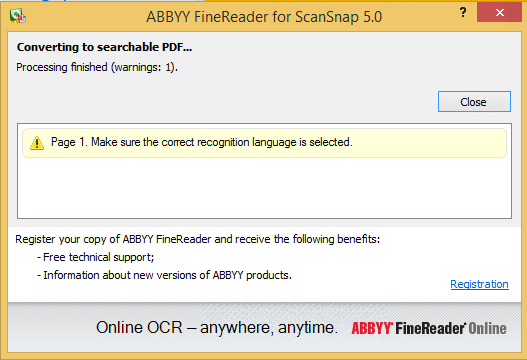
Every time I finish an OCR scan, I get the dialog below.

There are two reasons I want to close the ABBY dialog:

  1. While open, it will keep both the original PDF and OCR PDF files alive.When after a while, Windows updates auto-reboots the machine, before clicking the OK buttons I have to manually check if the conversion succeeded before removing the non-OCR PDF.This is time consuming.
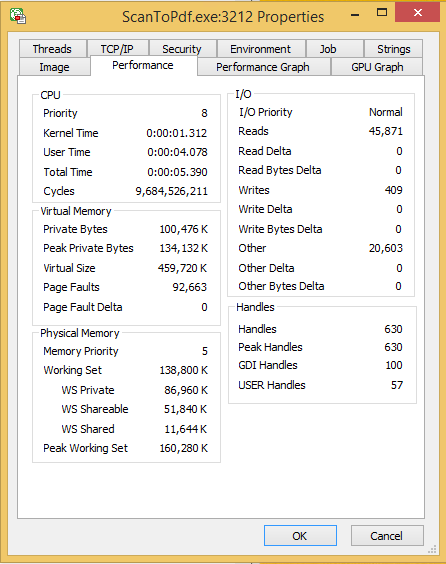
  2. While open, it still consumes a lot of system resources: about 100 megabyte for a simple single monochrome A4 page. Much more for complex, multi-page or colour documents.When scanning a lot of document this causes the system to run out of memory, after becoming much much slower because the truckload of Window handles and underlying threads drags Windows down.

I do not want to fully get rid of these dialogs, as often being aware of the progress is important, and I always forget how to re-enable things. If you can do without the dialogs, then try these:

Finding the Windows and controls

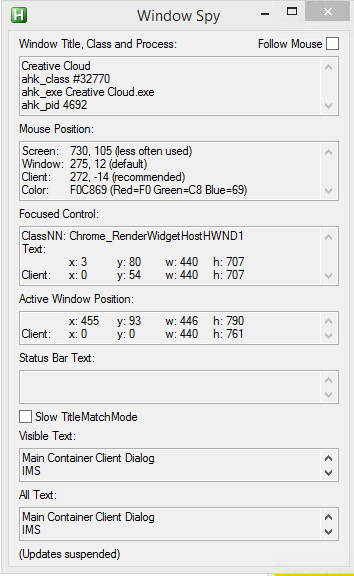
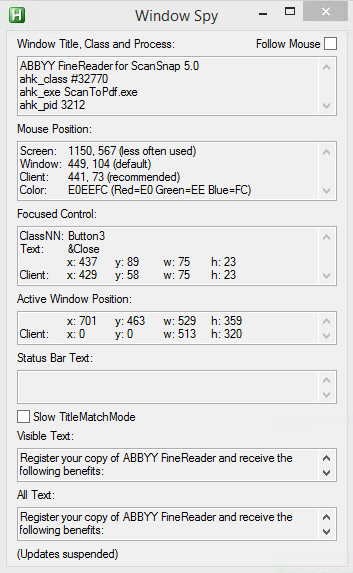
I did use one nice feature of AutoHotKey: their Windows Spy utility, which is implemented as a AHK script: [WayBack] AutoHotKey-scripts/WindowSpy.ahk at master · elig0n/AutoHotKey-scripts · GitHub. In the past this was a separate executable, so do not start looking for that any more. You can get it either after a full install of the [WayBack] Releases · Lexikos/AutoHotkey_L · GitHub, or by extracting from the most current AutoHotKey.zip from [Archive.is] AutoHotkey Downloads.

Related:

This gets these for the Create Cloud and ABBY windows:

Automating the click

I contemplated about using AutoIt (freeware, but closed source) or AutoHotKey_L (the current active fork of AutoHotKey).

AutoIt is now closed source, forked in the past as AutoHotKey, which has a lot of half backed – usually poorly documented – scripts needing you to learn a new API wrapper around existing Windows API functionality.

So I reverted back to using the Windows API using Delphi: a simple repeat loop, to check for the existence of the underlying processes, windows and controls, plus some logic to terminate then the user stops the application (Ctrl-C, Ctrl-Break), logs off, or Windows shuts down.

Releated Windows API  keywords and posts:


I could have used AutoHotKey with these hints to get it working:

MacOS

Note that when you run on MacOS, you need an alternative like for instance the video below shows via [WayBack] Stop ScanSnap From Prompting You When You Scan.

–jeroen

Read the rest of this entry »

Posted in Development, Fujitsu ScanSnap, Hardware, ix100, ix500, Power User, Scanners, Scripting, Software Development, Windows, Windows 10, Windows 8.1 | Leave a Comment »

Releases · upx/upx · GitHub

Posted by jpluimers on 2021/01/04

I totally forgot that upx – UPX – the Ultimate Packer for eXecutables has been on GitHub for quite a while, which meant I was running a really old version 3.91.

There have been quite a few things updated and documented in [Archive.is] upx-news.txt covering these milestones:

  1. [Archive.is] milestone 1 (for version 3.92)
  2. [Archive.is] milestone 2 (for version 3.93)
  3. [Archive.is] milestone 3 (for version 3.94)

Via UPX – Wikipedia

–jeroen

Posted in Development, Power User, Software Development, Windows, Windows Development | Leave a Comment »

Windows command prompt: decrementing loop

Posted by jpluimers on 2020/12/30

I needed a decrementing loop on the Windows command prompt, but that seems very hard from batch files without programming your own kind of while loop:

PowerShell to the rescue to loop back from and including 463 down to and including 290:

PowerShell -Command "for ($i=463; $i -ge 290; $i--) { Write-Host "Value " $i}"

This outputs:

Value 463
Value 462
...
Value 291
Value 290

In a similar way, you can execute a cmd command, but then you need to be careful on how to pass parameters: the \" is important to you can have quotes within quoted strings..

PowerShell -Command "for ($i=463; $i -ge 290; $i--) { & echo \"Value $i\"}"

gives this:

Value 463
Value 462
...
Value 291
Value 290

Read the rest of this entry »

Posted in Batch-Files, CommandLine, Console (command prompt window), Development, PowerShell, PowerShell, Scripting, Software Development, Windows | 1 Comment »

Windows Sandbox – Microsoft Tech Community – 301849

Posted by jpluimers on 2020/12/21

For my link archive, as I totally missed it when it was released: [WayBack] Windows Sandbox – Microsoft Tech Community – 301849:

  1. Install Windows 10 Pro or Enterprise, Insider build 18305 or newer
  2. Enable virtualization:
    • If you are using a physical machine, ensure virtualization capabilities are enabled in the BIOS.
    • If you are using a virtual machine, enable nested virtualization with this PowerShell cmdlet:
    • Set-VMProcessor -VMName <VMName> -ExposeVirtualizationExtensions $true
  3. Open Windows Features, and then select Windows Sandbox. Select OK to install Windows Sandbox. You might be asked to restart the computer.
  4. Optional Windows Features dlg.png
  5. Using the Start menu, find Windows Sandbox, run it and allow the elevation
  6. Copy an executable file from the host
  7. Paste the executable file in the window of Windows Sandbox (on the Windows desktop)
  8. Run the executable in the Windows Sandbox; if it is an installer go ahead and install it
  9. Run the application and use it as you normally do
  10. When you’re done experimenting, you can simply close the Windows Sandbox application. All sandbox content will be discarded and permanently deleted
  11. Confirm that the host does not have any of the modifications that you made in Windows Sandbox.

–jeroen

Posted in Power User, Windows, Windows 10 | Leave a Comment »

mkcert: valid HTTPS certificates for localhost (Windows/Mac/Linux) — a short blog post about it, by FiloSottile

Posted by jpluimers on 2020/12/21

Cool: [WayBack] Filippo Valsorda on Twitter: “mkcert: valid HTTPS certificates for localhost — a short blog post mkcert now that it’s almost done 🔒 “

Blog post: [WayBackmkcert: valid HTTPS certificates for localhost:

The web is moving to HTTPS, preventing network attackers from observing or injecting page contents. But HTTPS needs TLS certificates, and while deployment is increasingly a solved issue thanks to the ACME protocol and Let’s Encrypt, development still mostly ends up happening over HTTP because no one can get an…

Code: [WayBack] GitHub – FiloSottile/mkcert: A simple zero-config tool to make locally trusted development certificates with any names you’d like.

It is cross platform and works way better than good old Windows makecert (which is from the 2000’s era: [Archive.is] Public Key Infrastructure: Second European PKI Workshop: Research and … – David Chadwick, Greece) European PKI Workshop: Research and Applications (1st : 2004 : Samos Island – Google Books).

Related:

–jeroen

Read the rest of this entry »

Posted in *nix, Apple, Encryption, HTTPS/TLS security, Linux, Mac OS X / OS X / MacOS, Power User, Security, Windows | Leave a Comment »

high sierra – Remote Desktop 10.2.3 Database Creation Error; 10.2.1 runs fine; 10.2.2 crashes: how to find actual cause(s)? – Ask Different

Posted by jpluimers on 2020/12/21

From a while back:

What would be good steps to find the cause of the below errors?

I get this error when running Microsoft Remote Desktop 10.2.3 or higher on MacOS High Sierra:

Database Creation Error

"An error occurred during persistent store migration.

[Domain: NSCocoaErrorDomain, Code: 134110]"

[WayBack] high sierra – Remote Desktop 10.2.3 Database Creation Error; 10.2.1 runs fine; 10.2.2 crashes: how to find actual cause(s)? – Ask Different

Related Twitter thread: [WayBackJeroen Pluimers on Twitter: “Help! Stuck at @msremotedesktop 10.2.1 (that cannot add new users) on High Sierra because 10.2.2 keeps crashing, and both 10.2.3 and 10.2.4 cannot migrate: “An error occurred during persistent store migration. [Domain: NSCocoaErrorDomain, Code: 134110]””

Tried beta: 10.2.6 (1529) at [WayBackMicrosoft_Remote_Desktop_Beta.app.zip from [WayBack] Microsoft Remote Desktop for Mac – HockeyApp

--jeroen

Read the rest of this entry »

Posted in Apple, Mac OS X / OS X / MacOS, macOS 10.13 High Sierra, Power User, Remote Desktop Protocol/MSTSC/Terminal Services, Windows | Leave a Comment »

Copy files on Mac OS X using drag-and-drop | alvinalexander.com: secret is to hold the Option key

Posted by jpluimers on 2020/12/14

The Finder pure keyboard way of file copy+paste is using CommandC at the source position followed by CtrlCommandV in the destination position (in the destination position,  CommandV will do only a cut+paste) as the paste/copy decision is determined in the final stage.

This is unlike Windows, where CtrlC means copy, CtrlX means cut, and CtrlV finishes the initial action to copy+paste or cut+paste

If you combine mouse dragging, on the Mac it becomes Optiondrag, whereas on Windows it still is Ctrldrag.

I think the Windows ones are more consistent, especially when looking at them in table form:

Action Windows Mac
Keyboard-Only Mouse-drag Keyboard-Only Mouse-drag
copy+paste CtrlC; CtrlV Ctrldrag CommandC; Ctrl+CommandV Optiondrag
cut+paste (or move) CtrlX; CtrlV drag CommandC; CommandV drag

(table with help of HTML Table generator – TablesGenerator.com)

Mac shortcuts via:

–jeroen

Posted in Apple, Mac, Mac OS X / OS X / MacOS, Power User, Windows | Leave a Comment »

FAQ Desk: Autosaving “unnamed” `new 1` files | Notepad++ Community

Posted by jpluimers on 2020/12/14

From [WayBack] FAQ Desk: Autosaving “unnamed” new 1 files | Notepad++ Community:

Check your directory %AppData%\Notepad++\backup\

–jeroen

Posted in Power User, Windows | Leave a Comment »

Win32 build of less 530

Posted by jpluimers on 2020/12/11

Since I do not have a C or C++ build environment, I was looking for the less 530 release for Windows.

I found it via these links:

Searching for less 530, I bumped in these links as well:

  • [WayBack] `less` performs differently when invoked from Bash and from Git – Unix & Linux Stack Exchange 
    • When invoked via git, it does not restore screen content
  • Cause: [WayBack] Git – git-config Documentation: core.pager

    core.pager

    Text viewer for use by Git commands (e.g., less). The value is meant to be interpreted by the shell. The order of preference is the $GIT_PAGER environment variable, then core.pager configuration, then $PAGER, and then the default chosen at compile time (usually less).

    When the LESS environment variable is unset, Git sets it to FRX (if LESS environment variable is set, Git does not change it at all). If you want to selectively override Git’s default setting for LESS, you can set core.pager to e.g. less -S. This will be passed to the shell by Git, which will translate the final command to LESS=FRX less -S. The environment does not set the S option but the command line does, instructing less to truncate long lines. Similarly, setting core.pager to less -+F will deactivate the F option specified by the environment from the command-line, deactivating the “quit if one screen” behavior of less. One can specifically activate some flags for particular commands: for example, setting pager.blame to less -S enables line truncation only for git blame.

    Likewise, when the LV environment variable is unset, Git sets it to -c. You can override this setting by exporting LV with another value or setting core.pager to lv +c.


–jeroen

Posted in Power User, Windows | Leave a Comment »

On Windows 7 and 8.x too: Completely disable Windows 10 telemetry collection – twm’s blog

Posted by jpluimers on 2020/12/10

From [WayBack] Completely disable Windows 10 telemetry collection – twm’s blog:

So I don’t forget: According to an article in c’t magazine, disabling the “DiagTrack” service (“Connected User Experience and Telemetry”) will completely disable user tracking in Windows 10. They also say that they did not see any negative effects.

Source: [WayBack] Telefonierverbot in c’t 01/2019 page 172 (in German)

I saw at least one system where the service is not shown when you run Services.msc: it did not list DiagTrack, nor Connected User Experience and Telemetry. How awful is that!

The service can also be installed non older Windows versions: [WayBack] Just found DiagTrack running in Services – Tips and Tricks

Sometimes, it gets re-enabled. I think this happens during major Windows updates.

To inspect, stop and disable

Run all commands from the console the below bold commands. The non-bold text was the output on my system. If instead of the cmd.exe console, you run a PowerShell console, then remove the bits PowerShell -Command " and " at the start and end of each command.

The first command does not require an Administrative (UAC Elevated) command prompt; the last one does.

However, the first command, needs the | Select-Object * bit as otherwise most of the fields will not be displayed, excluding for instance StartType.

powershell -Command "Get-Service -Name DiagTrack | Select-Object *"


Name                : DiagTrack
RequiredServices    : {RpcSs}
CanPauseAndContinue : False
CanShutdown         : True
CanStop             : True
DisplayName         : Connected User Experiences and Telemetry
DependentServices   : {}
MachineName         : .
ServiceName         : DiagTrack
ServicesDependedOn  : {RpcSs}
ServiceHandle       :
Status              : Running
ServiceType         : Win32OwnProcess
StartType           : Automatic
Site                :
Container           :

On an Administrative command-prompt:

powershell -Command "Set-Service -Name DiagTrack -StartUpType Disabled"
powershell -Command "Get-Service -Name DiagTrack | Stop-Service"

Two notes:

Read the rest of this entry »

Posted in Batch-Files, CommandLine, Development, Power User, PowerShell, PowerShell, Scripting, Software Development, Windows | Leave a Comment »