HP Printers, PCL6 and drivers are always a fight to get right.
In this case the Microsoft stock Windows 8.1 x64 drivers always result in my HP LaserJet 9500 HDN printing a page like this from the same tray the last print job ran:
PCL XL error

        Warning: IllegalMediaSource
I’ve seen similar results with other Windows, printer and driver combinations (not limited to Microsoft drivers, but always PCL related), but never knew the solution.
Reading the answer, I totally recognise it: always some form of PCL6 driver was involved, and switching to PostScript solved it.
The article I quote from is about Windows Server 2003 and Windows XP, but still holds for modern Windows Server and Client versions:
After you enable roaming profiles for a couple of users, the first thing that you will probably notice is that logins and log offs become extremely slow for those users. […]
The solution to obscenely long logons and log offs is to use folder redirection. Folder redirection allows you to save portions of the user’s profile in a different location on the network. […]
You can’t redirect every folder in a user’s profile.[…] The folders that you can redirect are:
Application Data,
Desktop,
My Documents, and
Start Menu.
[…] I recommend creating a share point on the server to which you can redirect these folders. […]
To redirect a folder, open the Group Policy Editor and navigate to User Settings | Windows Settings | Folder Redirection. The group policy requires you to redirect each of the four folders separately, but the procedure for doing so is the same for each folder:
Set the folder’s Setting option to “Basic – Redirect Everyone’s Folder To The Same Location”.
Next, select the Create A Folder For Each User Under The Root Path option from the Target Folder Location drop down list.
Finally, enter your root path in the place provided.
RegJump.exe is really cool, and has already there for more than a year (:
This little command-line applet takes a registry path and makes Regedit open to that path. It accepts root keys in standard (e.g. HKEY_LOCAL_MACHINE) and abbreviated form (e.g. HKLM).
Usually I use the old Borland grep.exe that still ships with Delphi. Too bad it is 16-bit app which does not recognise Unicode.
FindStr does. Though much slower and with limited regular expression capabilities, can do recursive searches too:
findstr /spin /c:"string to find" *.*
The /spin is a shortcut for these case insensitive command-line options (the full list of possible options is below):
  /S         Searches for matching files in the current directory and all
             subdirectories.
  /I         Specifies that the search is not to be case-sensitive.
  /N         Prints the line number before each line that matches.
  /P         Skip files with non-printable characters.
Sometimes I leave out the /P to include binary files.
Anyone who knows a trick to prevent Java 8 from installing the Yahoo search/toolbar in Chrome and Internet Explorer?
This trick used to work in the past, but fails as of Java 8:
This file contains hidden or bidirectional Unicode text that may be interpreted or compiled differently than what appears below. To review, open the file in an editor that reveals hidden Unicode characters. Learn more about bidirectional Unicode characters
; this switch not only disables the Ask.com toolbar installation and prompt, but disables all of the sponsors potentially bundled with the Auto-update setup/Online setup (Google toolbar, Yahoo toolbar, McAfee something, etc…)
Two tricks when creating MSC files that contain the snap-in configuration of the MMC (Management Console).
Normally you do this once:
Start MMC
Add some snap-ins
Save your configuration as an MSC file
And then when you need that particular configuration, each time:
Open the MSC file
Perform some actions
Close the MMC
Answer No to this question:
---------------------------

Microsoft Management Console

---------------------------

Save console settings to [filename].msc?

---------------------------

Yes No Cancel

---------------------------
When browsers are experiencing network problems, generally the first thing to test is your network proxy settings. Misconfigured settings, or misbehaving settings, can have a profound impact on your network traffic possibly resulting in pages not loading at all.
A lot of the links below have died due to link rot (sometimes even the domains have gone), but most of the WayBack machine links marked [Wayback] still work.
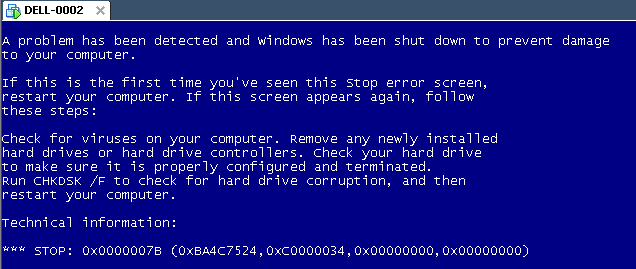
The same stop [Wayback] stop 0x0000007B can happen when converting a physical machine to VMware (I will schedule a separate post about this):
Windows XP Virtual Machine failing with stop 0x0000007B
Steps:
Put the SATA disk of the XP machine in a different one.
Disk2Vhd on the new machine to create a VHDX of the XP hard disk.
Install Hyper-V on the target Windows 8.1 machine (you need at least Pro for that).
Setup the base VM directory.
Setup a virtual network switch (decide if you want it to be internal, external or private, then bind it to a network adapter if needed).
Add a new VM.
Assign a new directory to it.
Assign memory to it.
Assign the virtual network switch to it.
Save it.
Edit the settings, then bind the DVD drive on the IDE controller 1 to C:\Windows\System32\vmguest.iso.
Connect to the VM.
Start it.
If you get a stop 0x0000007B (usually because of SATA/AHCI/IDE or other MassStorage controller driver issues), then read [Wayback] Jon’s Project Blog » disk2vhd using [Wayback] UBCD for Windows to solve the issue as there is no BIOS screen in Hyper-V that allows you to switch from AHCI to SATA and back.
As a follow up on the Cntlm configuration post last week, here is a small batch file that will find Cntlm.exe (on x86 and x64 systems) then start it in verbose mode.
This file contains hidden or bidirectional Unicode text that may be interpreted or compiled differently than what appears below. To review, open the file in an editor that reveals hidden Unicode characters. Learn more about bidirectional Unicode characters



 The Wiert Corner - irregular stream of stuff