The Wiert Corner – irregular stream of stuff

Jeroen W. Pluimers on .NET, C#, Delphi, databases, and personal interests

  • My badges

  • Twitter Updates

  • My Flickr Stream

  • Pages

  • All categories

  • Enter your email address to subscribe to this blog and receive notifications of new posts by email.

    Join 1,854 other subscribers

Bookmarklet to force WordPress classic-editor

Posted by jpluimers on 2022/03/29

A while ago, WordPress.com heavily started to de-emphasise the Classic Editor in order to boost the Gutenberg editor which is bloaty (in both browser DOM usage (heavily slowing down editing) and content (lots of meta tags that are added to blog source) and is missing essential features (especially nesting of blocks often breaks things).

With 7000+ blog posts in the Classic Editor format (a few in still supported markdown format: that experiment failed horribly!) that still require editing  (especially because of link rot)

So here is the Bookmarklet code to switch back an editing URL that you can use for as long as the Classic Editor is there:

javascript:location.href=document.location.href+'&classic-editor';

Yup, it is that simple: it appends &classic-editor to the URL.

Read the rest of this entry »

Posted in Bookmarklet, Classic editor, Development, Gutenberg editor, Internet, link rot, Power User, Software Development, Web Browsers, Web Development, WordPress, WWW - the World Wide Web of information | Leave a Comment »

Some links on Tailscale / Wiregard

Posted by jpluimers on 2022/03/29

For my link archive:

Related: [Wayback] Using Tailscale on Windows to network more easily with WSL2 and Visual Studio Code – Scott Hanselman’s Blog

–jeroen

Posted in Hardware, Network-and-equipment, Power User, Tailscale, VPN, Wireguard | Leave a Comment »

Hatig all these on-line portals of banks, mortgage/insurance companies, energy/water suppliers to get yearly information out: too disparate, too many UX steps

Posted by jpluimers on 2022/03/28

In the past, life was simple: you got yearly statements of many institutions like banks, mortgage/insurance companies, energy/water suppliers.

Those statements all had the same process:

  1. sent in an envelope
  2. statement were on scannable paper (A4 over here in The Netherlands)
  3. my Fujitsu ScanSnap ix1500 scanner (in the past a somewhat less fast Fujitsu ScanSnap ix500 scanner) scans and OCRs the statement into a portable and reasonable named PDF file in less than 30 seconds
  4. copy paste the required information into my administration software

Now it is a disparate mess of processes:

  • some come by email, but in various formats, often getting automatically deleted or bounced because some marketing person got their KPI, put too much trackers in it or made it look too much like advertisements
  • most by now are to be manually downloaded via portals
    • in all sorts of forms and user experience
    • having credentials that often expire within a year and need to be renewed (a lengthy process as incoming email need to go through a greylist in order to lessen SPAM)
    • demonstrating slow PDF generation (often 10s of seconds)
    • download them in formats needing post processing (like ZIP files containing the PDF files, filenames with names like “Download.pdf” )
  • often getting bitmap PDFs that have no OCR: just a plain bitmap that you have to type all information from

Based on [Wayback] Thread by @jpluimers: Ik wordt doodmoe van al die on-line omgevingen van banken, verzekeraars en al die andere shit die je voor de belastingdienst bij elkaar moet zoeken. Je bent gewoon een dag bezig……

–jeroen

Read the rest of this entry »

Posted in LifeHacker, Power User | Leave a Comment »

WordPress undocumented Classic-Editor shortcut “Shift-Ctrl-F” that goes full screen

Posted by jpluimers on 2022/03/28

Suddenly, a while ago, because of a stuck modifier key I suddenly had the WordPress classic editor running in full screen without any indication to go back, nor an opportunity to save the content.

It wasn’t the usual “Shift-Alt-W” [Wayback] Distraction Free Writing – Make WordPress Support (which still allows you to hover over the sidebars to make them visible, and has a visual indication of the mode).

After lot’s of trying, I figured out the toggle “Shift-Ctrl-F” toggles between normal and full screen mode. It seems unavailable in the new editor, so that might be a reason ([Wayback] Keyboard Shortcuts | WordPress.org)

The shortcut is odd too, as in most tooling “Ctrl-F” modifications like “Shift-Ctrl-F” have something to do with find or replace operations.

It was quite tough finding any reference to this shortcut, as my initial search revealed none: [Wayback] “WordPress” “Shift-Ctrl-F” full screen – Google Search.

Later I reversed the modifiers in [Wayback] “WordPress” “Ctrl-Shift-F” full screen – Google Search and found [Wayback] How to disable non-system hotkeys on Windows – gHacks Tech News

Simple Disable Key is a free software program for Microsoft Windows devices that enables you to block non-system hotkeys.

Not all hotkeys are useful however. When I work on a WordPress site for instance, I sometimes press the shortcut Ctrl-Shift-F by accident. This switches the editor to full screen view which I never use.

First time I invoked the full screen editor I had to look up the shortcut as I could not reproduce it.

–jeroen

Posted in Development, SocialMedia, Software Development, Web Development, WordPress, WordPress | Leave a Comment »

I Am Devloper on Twitter: “> why did you become a programmer? me: because I read code better than I can read social clues”

Posted by jpluimers on 2022/03/28

[Archive.is] I Am Devloper on Twitter: “> why did you become a programmer? me: because I read code better than I can read social clues”

–jeroen

Posted in About, Autistic Spectrum/Autism, Conference Topics, Conferences, Event, Personal | Leave a Comment »

Increase audio quality in Remote Desktop Connections – Increase audio quality in Remote Desktop Connections

Posted by jpluimers on 2022/03/25

I wish mstsc.exe had a command-line parameter for this, but you have to either change it server-wide, or for each client using a .rdp file as per [Wayback] Increase audio quality in Remote Desktop Connections – Increase audio quality in Remote Desktop Connections

I really dislike fuzzy/tinny audio. Sometimes RDP connections with RDC clients results in laggy and/or poor quality audio. A two step tip that you can use to try and solve these problem in Windows7:

#1 on the server (the machine you are connecting to)

Using the Group Policy editor, Go to Computer Configuration:Administrative Templates:Windows Components: Remote Desktop Session Host:Device and Resource Redirection. Set “Limit audio playback quality.”  to “Enabled,” and set “Audio Quality” option “to High”.

#2 on the client (the machine you are connecting FROM) save and edit the RDP file for the connection and add  set audioqualitymode:i:2 to the file (you can use Notepad or a similar text editor to do this)

I got there via [Wayback] Remote Desktop software that works with audio (Windows) – Software Recommendations Stack Exchange which also taught me this (thanks [Wayback] Basj):

The last one is backed up by [Wayback] Audio FAQ – RealVNC Help Center

What can and can’t I do with audio?

Audio is available for [Wayback] Professional and Enterprise users, and allows the user to play audio on the Server and hear it on the Viewer. Now, in addition to seeing what is displayed on the Viewer and controlling the remote computer as though you were sitting in front of it, you can also hear what is playing on its speakers.

How do I turn the audio feature on or off?

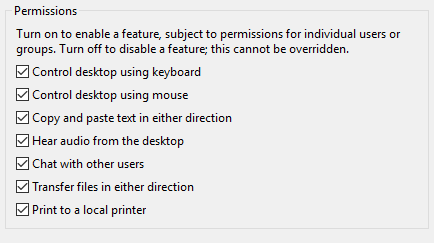
The audio feature can be controlled from both the Server and the Viewer and must be activated on both for sound to work. On the Server, you can allow connected Viewer users to hear audio using “Global Permissions” in Options > Users & Permissions. (You can also set audio on a per-user basis.)
mceclip1.png

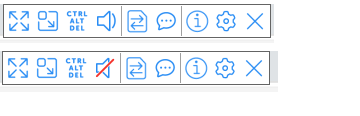
The audio permissions can be controlled per connected user account via the Server options page. On the Viewer, there is a mute/unmute setting to tick.
mceclip0.png

From [Wayback] audio – How can I forward sound over VNC? – Unix & Linux Stack Exchange, I learned that on Linux, PulseAudio might help, but requires SSH access:

You can use PulseAudio to move sound over SSH, though, which may be better than nothing for you.

Check out this post: [Wayback] https://razor.occams.info/blog/2009/02/11/pulseaudio-sound-forwarding-across-a-network/

–jeroen

Posted in Power User, Remote Desktop Protocol/MSTSC/Terminal Services, Windows | Leave a Comment »

Belastingaangifte 2021 met Excel gratis downloaden | Computer Idee

Posted by jpluimers on 2022/03/25

Helaas gaf [Wayback/Archive] excel inkomstenbelasting 2021 – Google Search niet de directe link naar de downloadpagina.

Gelukkig [Wayback/Archive] belastingaangifte 2022 site:www.computeridee.nl – Google Search wel:

Read the rest of this entry »

Posted in Excel, LifeHacker, Power User | Leave a Comment »

Jan-Pieter Cornet on Twitter: “@rckjnsn @KarinSpaink @jpluimers @Jan_WdeVries @JeroenFrijters @xs4all @corbosman Zodra je lijn gemigreerd is naar KPN, werken de xs4allnl DNS entries niet meer. Zie punt I3 op …”

Posted by jpluimers on 2022/03/25

[Wayback/Archive] Jan-Pieter Cornet on Twitter: “@rckjnsn @KarinSpaink @jpluimers @Jan_WdeVries @JeroenFrijters @xs4all @corbosman Zodra je lijn gemigreerd is naar KPN, werken de xs4all.nl DNS entries niet meer. Zie punt I3 op …”

met verwijzing naar [Wayback/Archive] Overzicht – XS4ALL:

Read the rest of this entry »

Posted in Internet, ISP, KPN, Power User, xs4all | Leave a Comment »

Chocolatey 1.0.0 got released last week (chocolatey/choco · GitHub)

Posted by jpluimers on 2022/03/24

Last week finally there was the stable [Wayback/Archive] Release version 1.0.0 · chocolatey/choco · GitHub.

So I fixed the Wikipedia page

It was a few days after the 11th birthday “Celebration”: [Wayback/Archive] Chocolatey Software Blog | This One Goes To 11! Celebrating 11 Years Of Chocolatey. Not a really festive post, though it does have a really nice overview of 11 years of Chocolatey history and clearly showing the momentum of it has been a few years behind us.

The thing is: hardly anybody noticed the celebration nor the 1.0.0 release. Being at various 0.* versions for like a decade makes people not follow sudden version bumps closely. I only noticed when updating a bunch of testing VMs of which one had a problem, so I inspected the logs and saw the 1.0.0 version.

So these recent tweets did not gain much attention:

Anyway: the release notes indicate a few things scheduled for 2.0.0. Given the sudden 0.12.0 -> 1.0.0 bump, I have no clue far (or near!) in the future that will be.

It is kind of both a saddening and relieved feeling: like for instance Stack Overflow/Stack Exchange (both in the same age cohort as Chocolatey), Chocolatey is just there and mostly works.

–jeroen

Posted in .NET, Batch-Files, C#, Chocolatey, CommandLine, Development, Power User, PowerShell, PowerShell, Scripting, Software Development, Windows | Leave a Comment »

MSI Z77A-G43 support and downloads

Posted by jpluimers on 2022/03/24

For my link archive: [Wayback] MSI Z77A-G43 support and downloads

Note that Windows 10 does not seem to need additional drivers, even Wake-on-LAN works with the stock Windows 10 drivers (but does require two BIOS settings and three Windows driver settings, see [Wayback] Wake-on-LAN (WoL) | MSI HQ User-to-User FAQ.

Max processor information based on the below links.

  • Max processor that supports VT-d (for virtualisation), but no manual overclocking: i7 3770.
  • Max processor that supports manual overclocking, but not VT-d: i7 3770K

From:

Via: [Wayback] MSI Z77A-G43 – Kenmerken – Tweakers

–jeroen

Posted in Hardware, Mainboards, MSI, Power User, Z77A-G43 | Leave a Comment »