The Wiert Corner – irregular stream of stuff

Jeroen W. Pluimers on .NET, C#, Delphi, databases, and personal interests

  • My badges

  • Twitter Updates

  • Pages

  • All categories

  • Enter your email address to subscribe to this blog and receive notifications of new posts by email.

    Join 1,854 other subscribers

Google Maps Hacks by Simon Weckert – YouTube

Posted by jpluimers on 2021/10/05

This is from almost 2 years back, so I wonder if the physical and virtual Google Maps spoofing still works.

Via:

–jeroen

Read the rest of this entry »

Posted in Android, Development, Google, GoogleMaps, Mobile Development, Power User, Software Development | Leave a Comment »

Naughty naughty no alt: CSS style to clearly show which images lack an alt-text

Posted by jpluimers on 2021/10/05

The CSS from [WayBack/Archive.is] Naughty naughty no alt that shows the below red moving rendering of images that do not have an alt-text is simple:

Read the rest of this entry »

Posted in Bookmarklet, CSS, Development, HTML, HTML5, Power User, Software Development, Web Browsers, Web Development | Leave a Comment »

UniFi USG link dump

Posted by jpluimers on 2021/10/04

I wanted to setup a UniFi USG (Ubiquiti Unifi Security Gateway) with round robin multi-WAN and incoming port forwarding on both WAN connections.

Quite a few links were the result:

Adoption was another headache. Some links on that too:

If you end up in a cannot adopt state, then a reset is the only practical way to go:

–jeroen

Posted in Network-and-equipment, Power User, Unifi-Ubiquiti, USG Ubiquiti Unifi Security Gateway | Leave a Comment »

Solved: ‘Answering Yes to “You have an older version of PackageManagement known to cause issues with the PowerShell extension. Would you like to update PackageManagement (You will need to restart the PowerShell extension after)?” hung my Visual Studio Code.…’

Posted by jpluimers on 2021/10/04

From a while back: [Archive.is] Jeroen Wiert Pluimers on Twitter: ‘Answering Yes to “You have an older version of PackageManagement known to cause issues with the PowerShell extension. Would you like to update PackageManagement (You will need to restart the PowerShell extension after)?” hung my Visual Studio Code.… ‘

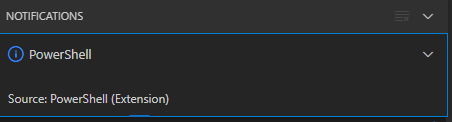
After clicking “Yes”, the the only thing visible was this notification that had an ever running “progress bar”:

Notifications - Powershell - Source: Powershell (Extension)

Notifications – Powershell – Source: Powershell (Extension)

The first part of the solution was relatively simple: restart Visual Studio code, then the original notification showed, and after clicking “Yes”, the “Panel” (you can toggle it with Ctrl+J) showed the “Terminal” output (yes, I was working on [Wayback/Archive.is] PowerShell script for sending Wake-on-LAN magic packets to given machine hardware MAC address, more about that later):

Read the rest of this entry »

Posted in .NET, Communications Development, Development, Encryption, HTTP, HTTPS/TLS security, Internet protocol suite, Power User, Security, Software Development, TCP, Visual Studio and tools, vscode Visual Studio Code, Windows, Windows 10 | Leave a Comment »

UCM6200 series IP PBX for Unified Communications- Grandstream Networks

Posted by jpluimers on 2021/10/04

The UCM6200 IP PBX series allows businesses to unify multiple communication technologies, such as voice, video calling, video conferencing, video surveillance, data tools, mobility options and facility access management onto one common network.

[WayBack] UCM6200 series IP PBX for Unified Communications- Grandstream Networks

–jeroen

Posted in Hardware, Network-and-equipment, Power User, Telephony, VoIP | Leave a Comment »

Word: have part of Heading 1/2/3 not show up in the table of contents

Posted by jpluimers on 2021/10/01

Every now and then, for instance with a document including other documents, like in a homework assignment, you might want to exclude part of your Heading 1 (or Heading 2/Heading 3) entries from the table of contents.

Since presence in the Table of Contents is a ToC feature, not a style feature, you have to set the correct options in the ToC.

This is how you do it:

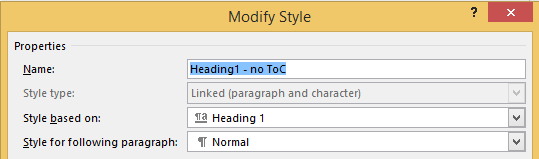
  1. Create new styles for the headings you do not want in the ToC (I call them “Heading 1, no ToC”; “Heading 2, no ToC”; etcetera) and base each on the corresponding style “Heading 1” or “Heading 2”

  2. Modify your Table of Contents to exclude these new styles (as they are automatically included)

This is contrary to many advices to use the “Reference” toolbar, then “Add Text” marked “Do Not Show In Table Of Contents”. That advice will remove the heading formatting completely and remove it from the navigation pane, so do not follow [WayBack] Quick Tip: How to exclude headings from the Table of Contents in Microsoft Word – jeffreykusters.nl.

The above solution both keeps the formatting, and the appearance in the navigation pane. It only disappears from the Table of Contents.

It is based on:

Following the above steps, you get styles like this:

Read the rest of this entry »

Posted in Office, Office 2010, Office 2011 for Mac, Office 2013, Office 2016, Power User, Word | Leave a Comment »

Some Alulux links videos for my archive

Posted by jpluimers on 2021/10/01

Since we have a similar garage door, below the fold some videos.

Before the fold some links.

Manual control is optional: [WayBack] Nothandkurbel (NHK) | Alulux

Remote control:

Generic:

Read the rest of this entry »

Posted in LifeHacker, Power User | Leave a Comment »

Unwanted non-breaking spaces (&nbsp) | WordPress.org

Posted by jpluimers on 2021/10/01

Having spurious non-breaking spaces seems to be unavoidable: [WayBack] Unwanted non-breaking spaces (&nbsp) | WordPress.org.

Deleting them is tough:

  • in the visual editor, deleting a non-breaking spaces will mess up at least lists, pre and code blocks.
  • the text editor is the only reliable place to remove them. Search for  .

–jeroen

Posted in Blogging, Power User, SocialMedia, WordPress | Leave a Comment »

Use the System File Checker tool to repair missing or corrupted system files

Posted by jpluimers on 2021/09/30

[WayBack] Use the System File Checker tool to repair missing or corrupted system files:

Read the rest of this entry »

Posted in Development, Power User, Software Development, Windows, Windows 10, Windows 7, Windows 8, Windows 8.1, Windows Development | Leave a Comment »

One of the Let’s Encrypt’s Root Certificates expired today (and their corresponding intermediate yesterday); how is your infrastructure doing?

Posted by jpluimers on 2021/09/30

Last weekend I published 5 days before the Let’s Encrypt’s Root Certificate is expiring!

It basically was a post trying to amplify the [Wayback/Archive.isLet’s Encrypt’s Root Certificate is expiring! message by [WaybackScott Helme .

Yesterday and today, he is maintaining a Twitter thread on things that have broken.

Quite a few things have, including some versions of curl, on which a lot of infrastructure relies (the certificate for it got fixed later on 20120930), see:

Two important starting points in his thread:

  1. [Archive.is] Scott Helme on Twitter: “🚨🚨🚨 5 minutes until the Let’s Encrypt R3 intermediate expires 🚨🚨🚨 29 September 2021 19:21:40 UTC”
  2. [Archive.is] Scott Helme on Twitter: “🚨🚨🚨 30 minute warning 🚨🚨🚨 IdentTrust DST Root CA X3 Expires: Sep 30 14:01:15 2021 UTC… “

If you want to check from one of your own clients, try [Archive.is] Scott Helme on Twitter: “I’ve created a test site to help identify issues with clients. If you can connect to https://t.co/bXHsnlRk8D then your client can handle being served the expired R3 Intermediate in the server chain!… “

[Wayback/Archive.is] https://expired-r3-test.scotthelme.co.uk/

Note that neither SSLabs, nor Cencys, nor CertCheckkerApp do show the expired certificate, only the new one:

Yes, I know the pluimers.com web server is rated B from a TLS perspective. Will be working on it, but I’m still recovering from rectum cancer treatments, and have an almost 1.5 year backlog to get through.

–jeroen

Posted in Communications Development, Development, Encryption, HTTP, https, HTTPS/TLS security, Internet protocol suite, Let's Encrypt (letsencrypt/certbot), Power User, Security, Software Development, TCP, TLS, Uncategorized, Web Development | Leave a Comment »