The Wiert Corner – irregular stream of stuff

Jeroen W. Pluimers on .NET, C#, Delphi, databases, and personal interests

  • My badges

  • Twitter Updates

  • Pages

  • All categories

  • Enter your email address to subscribe to this blog and receive notifications of new posts by email.

    Join 1,854 other subscribers

Delphi …hide the scrollbars of a DBGrid?

Posted by jpluimers on 2021/05/04

Recently I needed a plain TDBGrid without a horizontal scrollbar. I based it on the below solutions, but using an interposer class (type TDBGrid = class(TDBGrid) ... end;).

Another solution is to redirect the WinProc for a single grid component to a different method (you can apply it to the similar TDBCtrlGrid class as well):

unit DBGridFormUnit;
uses
  Winapi.Messages,
  Vcl.DBGrids,
  Vcl.Forms;

type
  TDBGridForm = class(TForm)
    DBGrid: TDBGrid;
    procedure FormCreate(Sender: TObject);
    procedure FormDestroy(Sender: TObject);
  strict private
    OriginalDBGridWindowProc : TWndMethod;
    procedure DBGridWindowProc(var Message: TMessage);
  end;

implementation

uses
  Winapi.Windows;
procedure TDBGridForm.FormCreate(Sender: TObject);
begin
  OriginalDBGridWindowProc := DBGrid.WindowProc;
  DBGrid.WindowProc := DBGridWindowProc;
end;

procedure TDBGridForm.FormDestroy(Sender: TObject);
begin
  DBGrid.WindowProc := OriginalDBGridWindowProc;
end;

procedure TDBGridForm.DBGridWindowProc(var Message: TMessage);
const 
  ScrollStylesToExclude = WS_VSCROLL or WS_HSCROLL;
var 
  Style: Integer;
begin
  if Message.Msg = WM_NCCALCSIZE then
  begin
    Style := GetWindowLong(Handle, GWL_STYLE);
    if (Style and ScrollStylesToExclude) <> 0 then // any scroll style to exclude present?
      SetWindowLong(Handle, GWL_STYLE, Style and not ScrollStylesToExclude);
  end
  else
    OrigWndProc(Message);
end;
end.

I think the SwissDelphiCenter solution in [WayBack] …hide the scrollbars of a DBGrid? originally has been copied from the 2003 post by Peter Below at [WayBack] how to hide DBCtrlGrid scrollbars – delphi.

(*
Q:
I want to hide the vertical scrollbar on a dbgrid when the record count
exceed a number. How can I do that?

A:
Make a descendent of the TDBGrid class. Add a handler for the
WM_NCCALCSIZE message.

Title: ...hide the scrollbars of a DBGrid?

Author: P. Below 

Category: VCL
*)
type
  TNoScrollDBGrid = class(TDBGrid)
  private
    procedure WMNCCalcSize(var Msg: TMessage);
    message WM_NCCALCSIZE;
  end;

procedure TNoScrollDBGrid.WMNCCalcSize(var Msg: TMessage);
const
  Scrollstyles = WS_VSCROLL or WS_HSCROLL;
var
  Style: Integer;
begin
  Style := GetWindowLong(Handle, GWL_STYLE);
  if (Style and Scrollstyles) <> 0 then
    SetWindowLong(Handle, GWL_STYLE, Style and not Scrollstyles);
  inherited;
end;

//This removes both scrollbars. If you want to remove only the vertical one
//change the scrollstyles constant accordingly.

I like this derived class from [WayBack] Delphi VCL Component • View topic • Hiding Scrollbars in DBGRID by Chris Luck based on the code from Peter Below more (I slightly condensed it from non-relevant code):

unit NoScrollDBGrid;

interface

uses
  Windows, Messages, DBGrids;

type
  TNoScrollDBGrid = class(TDBGrid)
  private
    FVertScroll: Boolean;
    FHorzScroll: Boolean;
    procedure WMNCCalcSize(var msg: TMessage); message WM_NCCALCSIZE;
    procedure SetVertScroll(Value: Boolean);
    procedure SetHorzScroll(Value: Boolean);
  published
    property VertScroll: Boolean read FVertScroll write SetVertScroll;
    property HorzScroll: Boolean read FHorzScroll write SetHorzScroll;
  end;

procedure Register;

implementation

uses
  Classes;
procedure TNoScrollDBGrid.SetVertScroll(Value: Boolean);
begin
  if FVertScroll <> Value then
  begin
    FVertScroll := Value;
    RecreateWnd;
  end;
end;

procedure TNoScrollDBGrid.SetHorzScroll(Value: Boolean);
begin
  if FHorzScroll <> Value then
  begin
    FHorzScroll := Value;
    RecreateWnd;
  end;
end;

procedure TNoScrollDBGrid.WMNCCalcSize(var msg: TMessage);
var
  style: Integer;
begin
  style := getWindowLong( handle, GWL_STYLE );

  if (NOT(FHorzScroll)) AND ((style and WS_HSCROLL) <> 0) then
    SetWindowLong( handle, GWL_STYLE, style and not WS_HSCROLL );

  if (NOT(FVertScroll)) AND ((style and WS_VSCROLL) <> 0) then
    SetWindowLong( handle, GWL_STYLE, style and not WS_VSCROLL );

  inherited;
end;

procedure Register;
begin
  RegisterComponents('Samples', [TNoScrollDBGrid]);
end;

end.

–jeroen

Posted in Delphi, Development, Software Development | Leave a Comment »

authentication – Bypassing Windows 10 password with Utilman.exe trick – fixed? – Information Security Stack Exchange

Posted by jpluimers on 2021/05/03

It is debatable if these tricks are vulnerabilities or not: [WayBack] authentication – Bypassing Windows 10 password with Utilman.exe trick – fixed? – Information Security Stack Exchange.

There are arguments that leaving a system open to physical access or allow operating system manipulation, it means it is busted.

On the other hand, making systems more resilient to modification, helps alleviate these problems.

So it pays for developers to harden operating systems against modification.

From the question:

Of the sethc.exe, Utilman.exe, and osk.exe ones in Windows, Utilman.exe seems to have been fixed.

Related:

–jeroen

Posted in Power User, Windows, Windows 10, Windows 7, Windows 8, Windows 8.1 | Leave a Comment »

Supermicro: 5 BIOS beeps might just mean internal VGA is disabled

Posted by jpluimers on 2021/05/03

A while ago, I got a second hand Supermicro workstation and wondered why the IPMI KVM would not show anything.

The video card in it worked fine, so I used it as a desktop machine setup for a while, happily running VMS.

I finally decided to move into a closet, so I removed the video card, and rebooted.

Then it beeped 5 times, which was odd: I expected it to switch from the video card to the internal video. It didn’t.

Older BIOS codes: [WayBack] AMI BIOS Beep Codes – Thomas-Krenn-Wiki

From PDF [WayBack] BIOS POST Codes for C7/X9/X10/X11/B9/B10/B1/A1 Motherboards

PEI Beep Codes

# of Beeps Description
1 Memory not Installed
1 Memory was installed twice (InstallPeiMemory routine in PEI Core called twice)
2 Recovery started
3 DXEIPL was not found
3 DXE Core Firmware Volume was not found
4 Recovery failed
4 S3 Resume failed
7 Reset PPI is not available

DXE Beep Codes

# of Beeps Description
1 Invalid password
4 Some of the Architectural Protocols are not available
5 No Console Output Devices are found
5 No Console Input Devices are found
6 Flash update is failed
7 Reset protocol is not available
8 Platform PCI resource requirements cannot be met

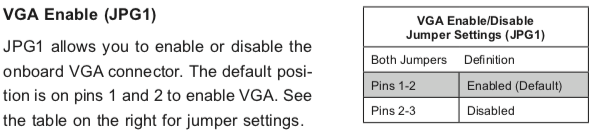
So I did a bit of reading in the manual, then found about a jumper which had happily been living out of view, under the video card:

VGA Enable (JPG1)

JPG1 allows you to enable or disable the onboard VGA connector. The default position is on pins 1 and 2 to enable VGA.

Setting the jumper to pins 1&2 made internal VGA available again, it happily booted and showed in the IPMI KVM.

Later I understood why the jumper was set to VGA disabled: when having two video cards, by default Windows will extend your desktop to an invisible monitor.

The easiest workaround for that is just to disable VGA. However, you can also change Windows

Older versus newer boards

It appears that most older SuperMicro systems have a hardware switch, but for newer chipsets supporting Intel Quick Sync Video a there is a BIOS setting: [WayBack] Enable internal graphics in SUPERMICRO servers | Any IT here? Help Me!

Windows 10 fixing video cards and ACPI_BIOS_ERROR

The reboot did not work fine: Windows 10 would not initialise properly, but hung when detecting video cards.

Read the rest of this entry »

Posted in Hardware, IPMI, Mainboards, Power User, SuperMicro, X10SRH-CF, X9SRi-3F, X9SRi-F | Leave a Comment »

Windows 10: when “wmic path SoftwareLicensingService get OA3xOriginalProductKey” fails, try ProduKey from NirSoft.

Posted by jpluimers on 2021/05/03

Somehow, many Windows 10 systems, when I try on an Administrative command prompt wmic path SoftwareLicensingService get OA3xOriginalProductKey, the result is empty:

Microsoft Windows [Version 10.0.17763.475]
(c) 2018 Microsoft Corporation. All rights reserved.

C:\WINDOWS\system32>wmic path SoftwareLicensingService get OA3xOriginalProductKey
OA3xOriginalProductKey


C:\WINDOWS\system32>

On those systems, [Wayback] NirSoft ProduKey always works.

Having a product key at hand is a great help when re-installing Windows 10: often it does not automatically obtain a digital license on the same hardware.

Most of those systems have been upgrades from previous Windows versions, but not all of them: even some new systems have this behaviour.

Related:

–jeroen

Read the rest of this entry »

Posted in Power User, Windows, Windows 10 | Leave a Comment »

VMware ESXi console: viewing all VMs, suspending and waking them up: part 5

Posted by jpluimers on 2021/04/30

Yesterday’s post got a bit longer than anticipated as there were most steps than I hoped for to create the listing script vim-cmd-list-all-VMs.sh:

#!/bin/sh
# https://wiert.me/2021/04/29/vmware-esxi-console-viewing-all-vms-suspending-and-waking-them-up-part-4/
vmids=`vim-cmd vmsvc/getallvms | sed -n -E -e "s/^([[:digit:]]+)\s+((\S.+\S)?)\s+(\[\S+\])\s+(.+\.vmx)\s+(\S+)\s+(vmx-[[:digit:]]+)\s*?((\S.+)?)$/\1/p"`
for vmid in ${vmids} ; do
    powerState=`vim-cmd vmsvc/power.getstate ${vmid} | sed '1d'`
    name=`vim-cmd vmsvc/get.config ${vmid} | sed -n -E -e '/\(vim.vm.ConfigInfo\) \{/,/files = \(vim.vm.FileInfo\) \{/ s/^ +name = "(.*)",.*?/\1/p'`
    vmPathName=`vim-cmd vmsvc/get.config ${vmid} | sed -n -E -e '/files = \(vim.vm.FileInfo\) \{/,/tools = \(vim.vm.ToolsConfigInfo\) \{/ s/^ +vmPathName = "(.*)",.*?/\1/p'`
    echo "VM with id ${vmid} has power state ${powerState} (name = ${name}; vmPathName = ${vmPathName})."
done

This means that today there is a new try to cover the rest of these lists I started yesterday with:

Available commands

  • vim-cmd vmsvc/power.getstate vmid
  • vim-cmd vmsvc/power.hibernate vmid
  • vim-cmd vmsvc/power.off vmid
  • vim-cmd vmsvc/power.on vmid
  • vim-cmd vmsvc/power.reboot vmid
  • vim-cmd vmsvc/power.reset vmid
  • vim-cmd vmsvc/power.shutdown vmid
  • vim-cmd vmsvc/power.suspend vmid
  • vim-cmd vmsvc/power.suspendResume vmid

Unavailable commands

  • vim-cmd vmsvc/power.startup vmid
  • vim-cmd vmsvc/power.resume vmid
  • vim-cmd vmsvc/power.wakeup vmid

So here we go:

vim-cmd-hibernate-running-VMs.sh and vim-cmd-suspend-running-VMs.sh

These files are almost the same: the echo and command are different (Hibernating versus Suspending and power.hibernate versus suspend)

#!/bin/sh
# https://wiert.me/2021/04/30/vmware-esxi-console-viewing-all-vms-suspending-and-waking-them-up-part-5/
vmids=`vim-cmd vmsvc/getallvms | sed -n -E -e "s/^([[:digit:]]+)\s+((\S.+\S)?)\s+(\[\S+\])\s+(.+\.vmx)\s+(\S+)\s+(vmx-[[:digit:]]+)\s*?((\S.+)?)$/\1/p"`
for vmid in ${vmids} ; do
    powerState=`vim-cmd vmsvc/power.getstate ${vmid} | sed '1d'`
    name=`vim-cmd vmsvc/get.config ${vmid} | sed -n -E -e '/\(vim.vm.ConfigInfo\) \{/,/files = \(vim.vm.FileInfo\) \{/ s/^ +name = "(.*)",.*?/\1/p'`
    vmPathName=`vim-cmd vmsvc/get.config ${vmid} | sed -n -E -e '/files = \(vim.vm.FileInfo\) \{/,/tools = \(vim.vm.ToolsConfigInfo\) \{/ s/^ +vmPathName = "(.*)",.*?/\1/p'`
    # echo "VM with id ${vmid} has power state ${powerState} (name = ${name}; vmPathName = ${vmPathName})."
    if [ "${powerState}" == "Powered on" ] ; then
        echo "Powered on  VM with id ${vmid} and name: $name"
        echo "Hibernating VM with id ${vmid} and name: $name"
        vim-cmd vmsvc/power.hibernate ${vmid}
    fi
done

This hibernates all VMs with power state Powered on and waits for each VM to complete hibernation.

#!/bin/sh
# https://wiert.me/2021/04/30/vmware-esxi-console-viewing-all-vms-suspending-and-waking-them-up-part-5/
vmids=`vim-cmd vmsvc/getallvms | sed -n -E -e "s/^([[:digit:]]+)\s+((\S.+\S)?)\s+(\[\S+\])\s+(.+\.vmx)\s+(\S+)\s+(vmx-[[:digit:]]+)\s*?((\S.+)?)$/\1/p"`
for vmid in ${vmids} ; do
    powerState=`vim-cmd vmsvc/power.getstate ${vmid} | sed '1d'`
    name=`vim-cmd vmsvc/get.config ${vmid} | sed -n -E -e '/\(vim.vm.ConfigInfo\) \{/,/files = \(vim.vm.FileInfo\) \{/ s/^ +name = "(.*)",.*?/\1/p'`
    vmPathName=`vim-cmd vmsvc/get.config ${vmid} | sed -n -E -e '/files = \(vim.vm.FileInfo\) \{/,/tools = \(vim.vm.ToolsConfigInfo\) \{/ s/^ +vmPathName = "(.*)",.*?/\1/p'`
    # echo "VM with id ${vmid} has power state ${powerState} (name = ${name}; vmPathName = ${vmPathName})."
    if [ "${powerState}" == "Powered on" ] ; then
        echo "Powered on VM with id ${vmid} and name: $name"
        echo "Suspending VM with id ${vmid} and name: $name"
        vim-cmd vmsvc/power.suspend ${vmid}
    fi
done

This suspends all VMs with power state Powered on and waits for each VM to complete suspending.

vim-cmd-resume-suspended-VMs.sh and vim-cmd-wakeup-suspended-VMs.sh

#!/bin/sh
# https://wiert.me/2021/04/30/vmware-esxi-console-viewing-all-vms-suspending-and-waking-them-up-part-5/
vmids=`vim-cmd vmsvc/getallvms | sed -n -E -e "s/^([[:digit:]]+)\s+((\S.+\S)?)\s+(\[\S+\])\s+(.+\.vmx)\s+(\S+)\s+(vmx-[[:digit:]]+)\s*?((\S.+)?)$/\1/p"`
for vmid in ${vmids} ; do
    powerState=`vim-cmd vmsvc/power.getstate ${vmid} | sed '1d'`
    name=`vim-cmd vmsvc/get.config ${vmid} | sed -n -E -e '/\(vim.vm.ConfigInfo\) \{/,/files = \(vim.vm.FileInfo\) \{/ s/^ +name = "(.*)",.*?/\1/p'`
    vmPathName=`vim-cmd vmsvc/get.config ${vmid} | sed -n -E -e '/files = \(vim.vm.FileInfo\) \{/,/tools = \(vim.vm.ToolsConfigInfo\) \{/ s/^ +vmPathName = "(.*)",.*?/\1/p'`
    # echo "VM with id ${vmid} has power state ${powerState} (name = ${name}; vmPathName = ${vmPathName})."
    if [ "${powerState}" == "Suspended" ] ; then
        echo "Suspended VM with id ${vmid} and name: $name"
        echo "Resuming  VM with id ${vmid} and name: $name"
        vim-cmd vmsvc/power.on ${vmid}
    fi
done

This resumes (as there is no vim-cmd vmsvc/power.resume vmid) all VMs with power state Suspended and waits for each VM to complete resume.

vim-cmd-power-off-powered-on-VMs.sh

#!/bin/sh
# https://wiert.me/2021/04/30/vmware-esxi-console-viewing-all-vms-suspending-and-waking-them-up-part-5/
vmids=`vim-cmd vmsvc/getallvms | sed -n -E -e "s/^([[:digit:]]+)\s+((\S.+\S)?)\s+(\[\S+\])\s+(.+\.vmx)\s+(\S+)\s+(vmx-[[:digit:]]+)\s*?((\S.+)?)$/\1/p"`
for vmid in ${vmids} ; do
    powerState=`vim-cmd vmsvc/power.getstate ${vmid} | sed '1d'`
    name=`vim-cmd vmsvc/get.config ${vmid} | sed -n -E -e '/\(vim.vm.ConfigInfo\) \{/,/files = \(vim.vm.FileInfo\) \{/ s/^ +name = "(.*)",.*?/\1/p'`
    vmPathName=`vim-cmd vmsvc/get.config ${vmid} | sed -n -E -e '/files = \(vim.vm.FileInfo\) \{/,/tools = \(vim.vm.ToolsConfigInfo\) \{/ s/^ +vmPathName = "(.*)",.*?/\1/p'`
    # echo "VM with id ${vmid} has power state ${powerState} (name = ${name}; vmPathName = ${vmPathName})."
    if [ "${powerState}" == "Powered on" ] ; then
        echo "Powered on   VM with id ${vmid} and name: $name"
        echo "Powering off VM with id ${vmid} and name: $name"
        vim-cmd vmsvc/power.off ${vmid}
    fi
done

This powers off all VMs with power state Power on and waits for each VM to start powering off (but does not wait for them to complete powering off, so parts run in parallel).

vim-cmd-power-on-powered-off-VMs.shvim-cmd-power-on-shutdown-VMs.sh and vim-cmd-startup-shutdown-VMs.sh

#!/bin/sh
# https://wiert.me/2021/04/30/vmware-esxi-console-viewing-all-vms-suspending-and-waking-them-up-part-5/
vmids=`vim-cmd vmsvc/getallvms | sed -n -E -e "s/^([[:digit:]]+)\s+((\S.+\S)?)\s+(\[\S+\])\s+(.+\.vmx)\s+(\S+)\s+(vmx-[[:digit:]]+)\s*?((\S.+)?)$/\1/p"`
for vmid in ${vmids} ; do
    powerState=`vim-cmd vmsvc/power.getstate ${vmid} | sed '1d'`
    name=`vim-cmd vmsvc/get.config ${vmid} | sed -n -E -e '/\(vim.vm.ConfigInfo\) \{/,/files = \(vim.vm.FileInfo\) \{/ s/^ +name = "(.*)",.*?/\1/p'`
    vmPathName=`vim-cmd vmsvc/get.config ${vmid} | sed -n -E -e '/files = \(vim.vm.FileInfo\) \{/,/tools = \(vim.vm.ToolsConfigInfo\) \{/ s/^ +vmPathName = "(.*)",.*?/\1/p'`
    # echo "VM with id ${vmid} has power state ${powerState} (name = ${name}; vmPathName = ${vmPathName})."
    if [ "${powerState}" == "Powered off" ] ; then
        echo "Powered off VM with id ${vmid} and name: $name"
        echo "Powering on VM with id ${vmid} and name: $name"
        vim-cmd vmsvc/power.on ${vmid}
    fi
done

These powers on all VMs with power state Powered off and waits for each VM to complete power on (but does not wait for them to complete boot, so part runs in parallel!).

These are exactly the same, as you cannot distinguish a VM that has been shutdown by vim-cmd vmsvc/power.off vmid from vim-cmd vmsvc/shutdown vmid.

vim-cmd-reboot-powered-on-VMs.sh

#!/bin/sh
# https://wiert.me/2021/04/30/vmware-esxi-console-viewing-all-vms-suspending-and-waking-them-up-part-5/
vmids=`vim-cmd vmsvc/getallvms | sed -n -E -e "s/^([[:digit:]]+)\s+((\S.+\S)?)\s+(\[\S+\])\s+(.+\.vmx)\s+(\S+)\s+(vmx-[[:digit:]]+)\s*?((\S.+)?)$/\1/p"`
for vmid in ${vmids} ; do
    powerState=`vim-cmd vmsvc/power.getstate ${vmid} | sed '1d'`
    name=`vim-cmd vmsvc/get.config ${vmid} | sed -n -E -e '/\(vim.vm.ConfigInfo\) \{/,/files = \(vim.vm.FileInfo\) \{/ s/^ +name = "(.*)",.*?/\1/p'`
    vmPathName=`vim-cmd vmsvc/get.config ${vmid} | sed -n -E -e '/files = \(vim.vm.FileInfo\) \{/,/tools = \(vim.vm.ToolsConfigInfo\) \{/ s/^ +vmPathName = "(.*)",.*?/\1/p'`
    # echo "VM with id ${vmid} has power state ${powerState} (name = ${name}; vmPathName = ${vmPathName})."
    if [ "${powerState}" == "Powered on" ] ; then
        echo "Powered on VM with id ${vmid} and name: $name"
        echo "Rebooting  VM with id ${vmid} and name: $name"
        vim-cmd vmsvc/power.reboot ${vmid}
    fi
done

This reboots all VMs with power state Power on and waits for each VM to start rebooting (but does not wait for them to complete reboot, so parts run in parallel).

vim-cmd-reset-powered-on-VMs.sh

#!/bin/sh
# https://wiert.me/2021/04/30/vmware-esxi-console-viewing-all-vms-suspending-and-waking-them-up-part-5/
vmids=`vim-cmd vmsvc/getallvms | sed -n -E -e "s/^([[:digit:]]+)\s+((\S.+\S)?)\s+(\[\S+\])\s+(.+\.vmx)\s+(\S+)\s+(vmx-[[:digit:]]+)\s*?((\S.+)?)$/\1/p"`
for vmid in ${vmids} ; do
    powerState=`vim-cmd vmsvc/power.getstate ${vmid} | sed '1d'`
    name=`vim-cmd vmsvc/get.config ${vmid} | sed -n -E -e '/\(vim.vm.ConfigInfo\) \{/,/files = \(vim.vm.FileInfo\) \{/ s/^ +name = "(.*)",.*?/\1/p'`
    vmPathName=`vim-cmd vmsvc/get.config ${vmid} | sed -n -E -e '/files = \(vim.vm.FileInfo\) \{/,/tools = \(vim.vm.ToolsConfigInfo\) \{/ s/^ +vmPathName = "(.*)",.*?/\1/p'`
    # echo "VM with id ${vmid} has power state ${powerState} (name = ${name}; vmPathName = ${vmPathName})."
    if [ "${powerState}" == "Powered on" ] ; then
        echo "Powered on VM with id ${vmid} and name: $name"
        echo "Resetting  VM with id ${vmid} and name: $name"
        vim-cmd vmsvc/power.reset ${vmid}
    fi
done

This resets all VMs with power state Power on and waits for each VM to start rebooting (but does not wait for them to complete reboot, so parts run in parallel).

vim-cmd-suspendResume-powered-on-VMs.sh

#!/bin/sh
# https://wiert.me/2021/04/30/vmware-esxi-console-viewing-all-vms-suspending-and-waking-them-up-part-5/
vmids=`vim-cmd vmsvc/getallvms | sed -n -E -e "s/^([[:digit:]]+)\s+((\S.+\S)?)\s+(\[\S+\])\s+(.+\.vmx)\s+(\S+)\s+(vmx-[[:digit:]]+)\s*?((\S.+)?)$/\1/p"`
for vmid in ${vmids} ; do
    powerState=`vim-cmd vmsvc/power.getstate ${vmid} | sed '1d'`
    name=`vim-cmd vmsvc/get.config ${vmid} | sed -n -E -e '/\(vim.vm.ConfigInfo\) \{/,/files = \(vim.vm.FileInfo\) \{/ s/^ +name = "(.*)",.*?/\1/p'`
    vmPathName=`vim-cmd vmsvc/get.config ${vmid} | sed -n -E -e '/files = \(vim.vm.FileInfo\) \{/,/tools = \(vim.vm.ToolsConfigInfo\) \{/ s/^ +vmPathName = "(.*)",.*?/\1/p'`
    # echo "VM with id ${vmid} has power state ${powerState} (name = ${name}; vmPathName = ${vmPathName})."
    if [ "${powerState}" == "Powered on" ] ; then
        echo "Powered on      VM with id ${vmid} and name: $name"
        echo "SuspendResuming VM with id ${vmid} and name: $name"
        vim-cmd vmsvc/power.suspendResume ${vmid}
    fi
done

This suspends and resumes on all VMs with power state Power on and waits for each VM to start this shirt cycle (but does not wait for them to complete the suspend and resume cycle, so parts run in parallel).

Future episodes

For now, this is OK enough for me, but I might write a new installment trying to run more of these in parallel (as parts already are done on the ESXi side).

–jeroen

Posted in *nix, *nix-tools, ash/dash, ash/dash development, Development, ESXi6, ESXi6.5, ESXi6.7, ESXi7, Power User, Scripting, sed, sed script, Software Development, Virtualization, VMware, VMware ESXi | Leave a Comment »

Mac SE/30 recap links

Posted by jpluimers on 2021/04/30

Some links for my archive:

Via:

–jeroen

Read the rest of this entry »

Posted in Apple, Classic Macintosh, Macintosh SE/30, Power User | Leave a Comment »

AstraZeneca: tweede prik gaat gewoon door (via Rijksoverheid.nl)

Posted by jpluimers on 2021/04/30


Posted in About, LifeHacker, Personal, Power User | Leave a Comment »

Celebrate Email Debt Forgiveness Day!

Posted by jpluimers on 2021/04/30

If there’s an email response you’ve wanted to send but been too anxious to send, you can send it today

[Wayback] Celebrate Email Debt Forgiveness Day! | Email Debt Forgiveness Day

Via: [Archive.is] Ionica Smeets on Twitter: “Voor wie net als ik nog wat achterstallige mails heeft: komende vrijdag is het email debt forgiveness day”

–jeroen


Read the rest of this entry »

Posted in LifeHacker, Power User | Leave a Comment »

Thoughts on ix500; should I get an ix1500?

Posted by jpluimers on 2021/04/30

Some of my thoughts on [WayBack] AW: Netzwerkfähiger Dokumentenscanner?:

I use a Fujitsu ScanSnap ix500 scanner for this plus a Windows VM that automatically logs on.

It is out of production now, but I think most of the below holds as the successor ix1500 is very similar (ix500 announcement https://www.fujitsu.com/sg/about/res…-20181002.html)

Before the ix500, I used a Fujitsu ScanSnap S510 which had similar capabilities as the ix500 but was a lot slower.

Cool things:

  • included software can do OCR and scan to a path the Windows user has access to
  • the scanner is fast, and does a stack of A4 full duplex automatically at a few seconds per page scanning on the scanner and 5-10 seconds per page OCR on a 1.2 Ghz dual core VM
  • no fiddling from within the scanner to get network stuff working, or to keep it up-to-date on protocol changes

Drawbacks:

  • the software pops up a dialog after each scan, so I wrote this: https://bitbucket.org/jeroenp/wiert….onsoleProject/
  • you need a Windows PC that is logged on (so the software does work), which means I configured a VM to auto-logon
  • WiFi 2.4 Ghz only (no ethernet interface, no 5 Ghz WiFi)
  • you need USB on the same VM connected to the scanner once to configure WiFI
  • like any hardware/software combination, sometimes the scanner or Windows VM need a reboot, for instance when it looses network or USB connection

The ix1500 has a touch screen instead of 2 buttons, so it might be that it has more standalone functionalities than the ix500.

Since I need a second scanner in a second place, I might get an ix1500 after the summer.

–jeroen

–jeroen

Posted in Fujitsu ScanSnap, Hardware, ix500, LifeHacker, Power User, Scanners | Leave a Comment »

VMware ESXi console: viewing all VMs, suspending and waking them up: part 4

Posted by jpluimers on 2021/04/29

Yesterday we ended with an overview of available and unavailable vim-cmd vmsvc commands and the promise to try running the various power commands on all relevant VMs.

Let’s start with a summary of the commands, so it will be easier to make a list of scripts to run them on relevant VMs.

Available commands

  • vim-cmd vmsvc/power.getstate vmid
  • vim-cmd vmsvc/power.hibernate vmid
  • vim-cmd vmsvc/power.off vmid
  • vim-cmd vmsvc/power.on vmid
  • vim-cmd vmsvc/power.reboot vmid
  • vim-cmd vmsvc/power.reset vmid
  • vim-cmd vmsvc/power.shutdown vmid
  • vim-cmd vmsvc/power.suspend vmid
  • vim-cmd vmsvc/power.suspendResume vmid

Unavailable commands

  • vim-cmd vmsvc/power.startup vmid
  • vim-cmd vmsvc/power.resume vmid
  • vim-cmd vmsvc/power.wakeup vmid

List the vmid values, power status and name of all VMs

Getting the vmid

Yesterday I showed a small statement that gives the list of vmid values on an ESXi system:

vim-cmd vmsvc/getallvms | sed -n -E -e "s/^([[:digit:]]+)s+((S.+S)?)s+([S+])s+(.+.vmx)s+(S+)s+(vmx-[[:digit:]]+)s*?((S.+)?)$/1/p"

What I ideally want is not just the vmid and name for each VM from vim-cmd vmsvc/getallvms, but also get the power state information from vim-cmd vmsvc/power.getstate vmid.

For that, we need to parse the output of vim-cmd vmsvc/power.getstate vmid, which can be three outputs:

  • Retrieved runtime info
    Powered off
  • Retrieved runtime info
    Powered on
  • Retrieved runtime info
    Suspended

So basically it involves deleting the first line which was covered in part 2 of this installment, for example on my system:

# vim-cmd vmsvc/power.getstate 10 | sed '1d'
Powered on

Getting VM name

Extracting both vmid and name from vim-cmd vmsvc/getallvms at the same time is not easy, heck even impossible, so I decided to go the vim-cmd vmsvc/get.config vmid way.

Getting multiple values out of some output is already very hard in bash, where usually the less difficult way is to use arrays. Since Busybox has an ash shell (see Busybox sh (actually ash derivative dash): checking exit codes), and ash does not do arrays, that route is gone.

To give you an idea how hard this is in bash and how to sort of workaround the lack of array support in ash:

This partial vim-cmd vmsvc/get.config vmid sample output on one of my VMs that shows how to use head -n 31 to get just the first 31 lines of output:

# vim-cmd vmsvc/get.config 10 | head -n 31
Configuration:

(vim.vm.ConfigInfo) {
   changeVersion = "2021-04-07T22:08:30.548274Z", 
   modified = "1970-01-01T00:00:00Z", 
   name = "X9SRI-3F-W10P-EN-MEDIA", 
   guestFullName = "Microsoft Windows 10 (64-bit)", 
   version = "vmx-14", 
   uuid = "564d51ac-f6cf-e40b-b686-2f53a28a4bea", 
   createDate = "2019-05-17T21:37:11.408173Z", 
   instanceUuid = "52403d0e-7ccd-48da-bb21-7e966defccf7", 
   npivNodeWorldWideName = , 
   npivPortWorldWideName = , 
   npivWorldWideNameType = , 
   npivDesiredNodeWwns = , 
   npivDesiredPortWwns = , 
   npivTemporaryDisabled = true, 
   npivOnNonRdmDisks = , 
   locationId = "564d6b18-ecd1-2261-0127-146b3f3bc636", 
   template = false, 
   guestId = "windows9_64Guest", 
   alternateGuestName = "", 
   annotation = "", 
   files = (vim.vm.FileInfo) {
      vmPathName = "[EVO860_500GB] VM/X9SRI-3F-W10P-EN-MEDIA/X9SRI-3F-W10P-EN-MEDIA.vmx", 
      snapshotDirectory = "[EVO860_500GB] VM/X9SRI-3F-W10P-EN-MEDIA", 
      suspendDirectory = "[EVO860_500GB] VM/X9SRI-3F-W10P-EN-MEDIA", 
      logDirectory = "[EVO860_500GB] VM/X9SRI-3F-W10P-EN-MEDIA", 
      ftMetadataDirectory = 
   }, 
   tools = (vim.vm.ToolsConfigInfo) {

The reason to go the vim-cmd vmsvc/get.config vmid way is that it contains all the configuration info in a kind of JSON format (except the first two lines) and should be relatively easy to parse. Or so at least I hoped.

Basically I am interested in the value of name = "X9SRI-3F-W10P-EN-MEDIA", however, there are multiple name fields in the total configuration:

# vim-cmd vmsvc/get.config 10 | sed -n -E '/name =/p'
   name = "X9SRI-3F-W10P-EN-MEDIA", 
         name = "EVO860_500GB",

So what I really want is the value of name = "X9SRI-3F-W10P-EN-MEDIA", in between the (vim.vm.ConfigInfo) { and files = (vim.vm.FileInfo) { parts.

This can be done using sed as it allows to specify a range using a start and end value using addresses:

  • [Wayback] sed: Addresses in sed

    An address is either a decimal number that counts input lines cumulatively across files, a '$' character that addresses the last line of input, or a context address (which consists of a BRE, as described in Regular Expressions in sed , preceded and followed by a delimiter, usually a slash).

    An editing command with no addresses shall select every pattern space.

    An editing command with one address shall select each pattern space that matches the address.

    An editing command with two addresses shall select the inclusive range from the first pattern space that matches the first address through the next pattern space that matches the second. (If the second address is a number less than or equal to the line number first selected, only one line shall be selected.) Starting at the first line following the selected range, sed shall look again for the first address. Thereafter, the process shall be repeated. Omitting either or both of the address components in the following form produces undefined results:

    [address[,address]]
  • Range Addresses (sed, a stream editor)[Wayback] Range Addresses (sed, a stream editor)

    An address range can be specified by specifying two addresses separated by a comma (,). An address range matches lines starting from where the first address matches, and continues until the second address matches (inclusively):

    $ seq 10 | sed -n '4,6p'
    4
    5
    6
    

    If the second address is a regexp, then checking for the ending match will start with the line following the line which matched the first address: a range will always span at least two lines (except of course if the input stream ends).

  • [Wayback] Regexp Addresses (sed, a stream editor)

For example (with some characters escaped because of [Wayback] ERE syntax (sed, a stream editor)):

# vim-cmd vmsvc/get.config 10 | sed -n -E -e '/\(vim.vm.ConfigInfo\) \{/,/files = \(vim.vm.FileInfo\) \{/p'
(vim.vm.ConfigInfo) {
   changeVersion = "2021-04-07T22:08:30.548274Z", 
   modified = "1970-01-01T00:00:00Z", 
   name = "X9SRI-3F-W10P-EN-MEDIA", 
   guestFullName = "Microsoft Windows 10 (64-bit)", 
   version = "vmx-14", 
   uuid = "564d51ac-f6cf-e40b-b686-2f53a28a4bea", 
   createDate = "2019-05-17T21:37:11.408173Z", 
   instanceUuid = "52403d0e-7ccd-48da-bb21-7e966defccf7", 
   npivNodeWorldWideName = , 
   npivPortWorldWideName = , 
   npivWorldWideNameType = , 
   npivDesiredNodeWwns = , 
   npivDesiredPortWwns = , 
   npivTemporaryDisabled = true, 
   npivOnNonRdmDisks = , 
   locationId = "564d6b18-ecd1-2261-0127-146b3f3bc636", 
   template = false, 
   guestId = "windows9_64Guest", 
   alternateGuestName = "", 
   annotation = "", 
   files = (vim.vm.FileInfo) { 

With [Wayback] BRE syntax (sed, a stream editor) the filter part would be easier: vim-cmd vmsvc/get.config 10 | sed -n -e '/(vim.vm.ConfigInfo) {/,/files = (vim.vm.FileInfo) {/p', but the print part would be more difficult:

  • # vim-cmd vmsvc/get.config 10 | sed -n -E -e '/\(vim.vm.ConfigInfo\) \{/,/files = \(vim.vm.FileInfo\) \{/ s/^ +name = "(.*)",.*?/1/p'
    X9SRI-3F-W10P-EN-MEDIA
    
  • # vim-cmd vmsvc/get.config 10 | sed -n -e '/(vim.vm.ConfigInfo) {/,/files = (vim.vm.FileInfo) {/ s/^ +name = "(.*)",.*?/1/p'
    X9SRI-3F-W10P-EN-MEDIA

Since I am used to extended regular expressions (ERE) over basica regular expressions (BRE), I prefer the first solution.

So getting the name in a variable now becomes this:

# name=`vim-cmd vmsvc/get.config 10 | sed -n -e '/(vim.vm.ConfigInfo) {/,/files = (vim.vm.FileInfo) {/ s/^ +name = "(.*)",.*?/1/p'`
# echo ${name}
X9SRI-3F-W10P-EN-MEDIA

List the vmid values, power status and name of all VMs

Back to the listing script vim-cmd-list-all-VMs.sh:

#!/bin/sh
# https://wiert.me/2021/04/29/vmware-esxi-console-viewing-all-vms-suspending-and-waking-them-up-part-4/
vmids=`vim-cmd vmsvc/getallvms | sed -n -E -e "s/^([[:digit:]]+)\s+((\S.+\S)?)\s+(\[\S+\])\s+(.+\.vmx)\s+(\S+)\s+(vmx-[[:digit:]]+)\s*?((\S.+)?)$/\1/p"`
for vmid in ${vmids} ; do
    powerState=`vim-cmd vmsvc/power.getstate ${vmid} | sed '1d'`
    name=`vim-cmd vmsvc/get.config ${vmid} | sed -n -E -e '/\(vim.vm.ConfigInfo\) \{/,/files = \(vim.vm.FileInfo\) \{/ s/^ +name = "(.*)",.*?/\1/p'`
    vmPathName=`vim-cmd vmsvc/get.config ${vmid} | sed -n -E -e '/files = \(vim.vm.FileInfo\) \{/,/tools = \(vim.vm.ToolsConfigInfo\) \{/ s/^ +vmPathName = "(.*)",.*?/\1/p'`
    echo "VM with id ${vmid} has power state ${powerState} (name = ${name}; vmPathName = ${vmPathName})."
done

As a bonus, next to powerState, the script also figures out vmPathName in a similar way to name.

–jeroen

Posted in *nix, *nix-tools, ash/dash, ash/dash development, Development, ESXi6, ESXi6.5, ESXi6.7, ESXi7, head, Power User, Scripting, sed, sed script, Software Development, tee, Virtualization, VMware, VMware ESXi | Leave a Comment »