The Wiert Corner – irregular stream of stuff

Jeroen W. Pluimers on .NET, C#, Delphi, databases, and personal interests

  • My badges

  • Twitter Updates

  • My Flickr Stream

  • Pages

  • All categories

  • Enter your email address to subscribe to this blog and receive notifications of new posts by email.

    Join 1,835 other subscribers

Debugging a Delphi – Format and Pointers/Hex Values (Memory Overwrite) – Stack Overflow

Posted by jpluimers on 2021/01/12

A long time ago (Delphi XE2 era), David Dubois and I helped out Doug find either the cause or a workaround of a memory overwrite in a 32-bit application.

The problem was that a call to Format for a pointe or hex value would give corrupt results, but with a regular integer value it would succeed.

Doug created an example [WayBack] overwriting some memory to simulate the problem.

I provided some steps [WayBack] to help trace such cases down.

In the and a rebuild – first withut madExcept, later with madExcept turned on again – solved the problem.

Likely this was the Delphi IDE becoming corrupt, something which I have seen intermittently over the last two decades.

Be sure to read both answers at [WayBack] delphi – Format and Pointers/Hex Values (Memory Overwrite) – Stack Overflow

–jeroen

Posted in Delphi, Development, Software Development | Leave a Comment »

Opensuse Community Account Migration

Posted by jpluimers on 2021/01/11

Apparently, during my 15 month rectum cancer fight, I missed the one month window of migrating my opensuse account (because of the sale of opensuse from Microfocus to a German investment company named EQT Partners).

I got the email on may 1st (right before my first surgery) and since I only just am recovering from the last surgery, discovered [Wayback] Community Account Migration:

The Community Accounts (aka. Bugzilla Accounts) will migration to the SUSE datacenter in Nuremberg

SUSE is the largest independent open source company.
We are finalizing this independence also on the technical level.
The Community Accounts (a.k.a. Bugzilla Accounts) were moved back to SUSE to a new system in our Nuremberg data center.

All accounts have been migrated. Except for the password.
To access your migrated account a migration tool was offered until June 18th
The migration is no longer possible.
To regain access to your account you have to request a password reset.
This requires that the account has your correct email address registered.
If this is not the case you will have to create a new account.

It looks like the account migration uses Okta (identity management) – Wikipedia as authentication service (quite odd for a German company to use a USA based company for authentication: hellp GDPR!), using mail servers having hostnames not ending in opensuse.org, but like o#.mailrelay.okta.com.

Hopefully identify emails do get through: they are now trying to get past my grey-list filters.

Edit:

The okta mail servers didn’t get through the grey-list, so I forced them to the secondary mail servers where they did get through.

It indicated migration is not possible any more and I should seek help:

At this time your password can only be reset by an administrator. To send them a request, go to your Sign-in Help page. Then click the Request help link.

So I did:

Hi,

Due to my 15 months fight with rectumcancer and the “SUSE Account Changes – Coming soon!” last May not indicating any deadline for the migration, I missed the one month account migration window (2020-05-18 to 2020-06-18) mentioned at https://idp-portal-info.suse.com/

Can you please re-activate the account jeroen.suffix@example.com and re-bind the forums.opensuse.org username accountname for me and send me a password reset email on that above email address?

Thanks,

–jeroen

Edit 20210112:

I got an account activation email, added password/question/mobile-phone-number, then got redirected to https://myaccount.suse.com/app/UserHome, then the “Forums” link allowed me to enter a forums alias the same as my old alias. So it looks it sort of works now: my old jpluimers posts have not been linked to my new account.

Some reading for when I have more energy:

I just checked and the email about migration did not indicate any deadline apart from that password reset links were valid for 90 days, a lot longer than one month window.

–jeroen

Posted in *nix, Linux, openSuSE, Power User, SuSE Linux | Leave a Comment »

How to remove (disable or hide) User Accounts on the Windows 10 Login Screen – Make Tech Easier

Posted by jpluimers on 2021/01/11

Works on my systems too (I think it works from Windows XP on) to hide users from the home screen: [WayBackHow to Hide User Accounts on the Windows 10 Login Screen – Make Tech Easier.

Show only the last logged on user, but add a switch-user dialog

Run the below .reg file on your machine, or manually add this key (does not need any value): HKEY_LOCAL_MACHINE\SOFTWARE\Microsoft\Windows NT\CurrentVersion\ProfileList\DomainStyleLogon

Windows Registry Editor Version 5.00

[HKEY_LOCAL_MACHINE\SOFTWARE\Microsoft\Windows NT\CurrentVersion\ProfileList\DomainStyleLogon]

Note the empty line at the end of the .reg file: that is by intention.

This will show the last logged-on user on the home screen, but still allows users to perform a switch to other users.

Related: [WayBack] ALWAYS display the last / default user Windows 7 welcome screen

Disable the users on the logon screen from interactive logon

Warning: do NOT disable your administrator user this way!

For why not, see the various users that lost access: [WayBackHide User Accounts on Windows 7 Logon – Windows 7 IT Pro > Windows 7 User Interface

  1. use net user on the command prompt to list the usernames and note the username you want to hide from the login screen
  2. run regedit to edit the registry
  3. ensure this registry key exists HKEY_LOCAL_MACHINE\SOFTWARE\Microsoft\Windows NT\CurrentVersion\Winlogon
  4. Under that key, create a new key SpecialAccounts
  5. Under the SpecialAccounts key, create a new key UserList
  6. Under the UserList key, create a new DWORD (32-bit) value with the Value name equal to the username and the Value data to zero (0, which is the default)
  7. Reboot
  8. Observe that user is not on the login window any more.

Example:

If you lost access because of SpecialAccounts

If you would like to unhide the hidden Administrator account on Windows 7:

  1. Boot a Windows 7 Installation DVD or ISO
  2. go to command prompt and type regedit -it
  3. click on HKLM hive and
  4. next navigate File>>Load hive
  5. navigate to C:\Windows\System32\config folder and choose `SOFTWARE` file load it and assign this hive any name for example REM_SOFTWARE
  6. open key HKEY_LOCAL_MACHINE\REM_SOFTWARE\Microsoft\Windows NT\CurrentVersion\Winlogon\SpecialAccounts\UserList
  7. remove the Administrator account
    • or better way remove the whole key HKEY_LOCAL_MACHINE\REM_SOFTWARE\Microsoft\Windows NT\CurrentVersion\Winlogon\SpecialAccounts

–jeroen

Posted in Power User, Windows, Windows 10, Windows 7, Windows 8, Windows 8.1 | Leave a Comment »

Test for modern Internet Standards like IPv6, DNSSEC, HTTPS, DMARC, STARTTLS and DANE.

Posted by jpluimers on 2021/01/11

Cool: [WayBack] Test for modern Internet Standards like IPv6, DNSSEC, HTTPS, DMARC, STARTTLS and DANE.

Their motivation and background: [WayBack] About Internet.nl

–jeroen

Posted in Encryption, HTTPS/TLS security, Power User, Security | Leave a Comment »

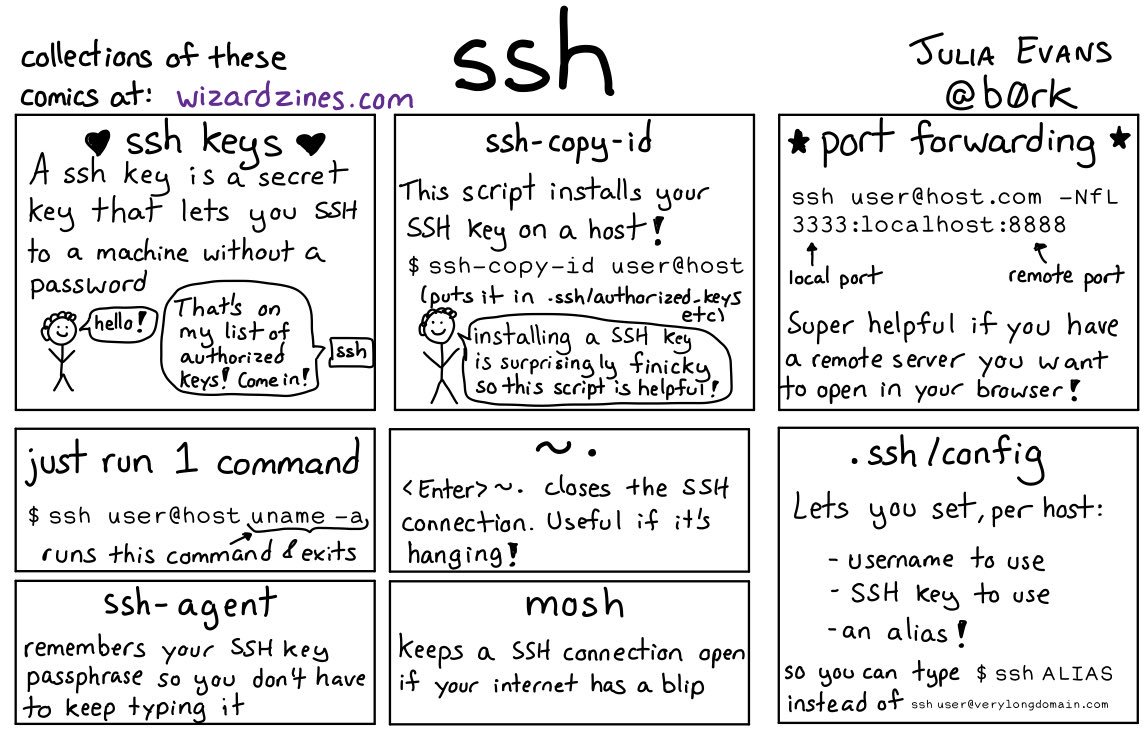
🔎Julia Evans🔍 on Twitter: “ssh tips… “

Posted by jpluimers on 2021/01/08

Great work by [WayBack]  🔎Julia Evans🔍 on Twitter: “ssh tips… “

[WayBackssh tips JPG

Via:

Some more tips:

Read the rest of this entry »

Posted in *nix, *nix-tools, Communications Development, Development, Internet protocol suite, Power User, SSH, ssh/sshd | Leave a Comment »

Roderick Gadellaa on Twitter: simple app that (re)sets the volume of the TV to 8% of the max volume every time you turn it on.

Posted by jpluimers on 2021/01/08

[WayBack] Roderick Gadellaa on Twitter: “In case anyone who owns an Android TV is interested: I’ve built a (very, very) simple app that (re)sets the volume of the TV to 8% of the max volume every time you turn it on.  #androidtv #tools…”

[WayBack] Roderick Gadellaa on Twitter: “Some instructions: – You have to sideload it (google is your friend: “how to sideload app on android tv”) – You have to start the app once. It won’t show up on Home, so go to Settings > Apps > TvVolsetr > Open – Android TV 7.0 Nougat or higher required”

[WayBackRoderick Gadellaa auf Twitter: “Some instructions: – You have to sideload it https://t.co/8aK0bmXXFl – You have to start the app once. It won’t show up on Home, so go to Settings > Apps > TvVolsetr > Open – Android TV 7.0 Nougat or higher required”

Follow only the images links from [Archive.is] “how to sideload app on android tv” – Google Search, as the others point to phishing sites.

This image link for instance is useful: [WayBack] How to Sideload Apps on Android TV: Android TV is an excellent product for anyone who wants to expand their current living room setup—it makes easy work of streaming most content, has a slew of games (that are actually worth playing), and is relatively inexpensive. But what happens when an app you want on your TV isn’t available for your device?

Download: [WayBacktvVolsetr.apk

–jeroen

Read the rest of this entry »

Posted in Android, Android Devices, Mobile Development, Power User, Software Development | Leave a Comment »

OKI C332/MC342 – reset (short) device name, location, asset number and contact name

Posted by jpluimers on 2021/01/08

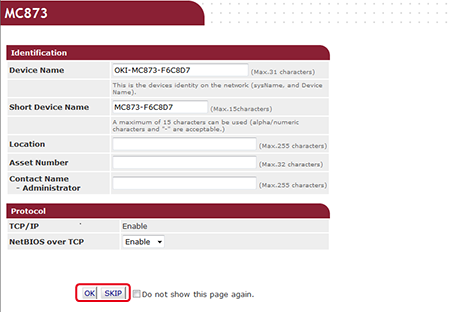
I’ve found out that the only way to reset the below fields on an OKI printer is to

  1. go to the printer main page at http://192.168.124.34 (use the IP address of your own printer here)
  2. logon as Administrator (on an OKI C332 that’s user admin which has default password 999999, on an OKI MC342 the password is aaaaaa)
  3. go to the page http://192.168.124.34/setupfrm.htm (use the IP address of your own printer here) as that page can potentially be skipped during login
  4. update these fields:
    • Device Name
    • Short Device Name
    • Asset Number
    • Contact Name – Administrator

Image source: [Archive.csChecking or Changing the Settings of This Machine from a Computer (MC853, MC873)

–jeroen


Posted in OKI C332, OKI Printers, Power User, Printers | Leave a Comment »

Why a study with only 7 respondents can be good – from Dutch paper “De Volkskrant”

Posted by jpluimers on 2021/01/07

[Archive.is] Waarom een onderzoek met maar 7 respondenten toch goed kan zijn | De Volkskrant: Denkfouten in het hedendaags ontwerp gefileerd door innovatie-expert (en cabaretier) Jasper van Kuijk. Deze week: gebruikstest.

Google translated in English.

TL;DR

Quantitative studies often require large numbers of respondents, but quantitative studies can be done with a very small group.

While quantitative studies often will get you just one result (I rate this application a 7 out of 10, or with this A/B change, click through increases by 5%), qualitative studies will get you much more specific comments like “the main menu is cluttered”, or “the design is slick” (translated from the Image in the article).

Extensive research was done for a 2003 published paper [Archive.is] Beyond the five-user assumption: Benefits of increased sample sizes in usability testing which you can read as PDF [WayBack].

Via

[WayBack] Jasper van Kuijk on Twitter: “Mijn ‘Hoe moeilijk kan het zijn?’ van vandaag. Waarom voor gebruiksgemak een gebruikstest met 7 participanten nuttiger is dan een enquête met 1500 respondenten. #HMKHZ via de @volkskrant”

Related

[WayBack] Ionica Smeets on Twitter: “Hear, hear! Aldus een wiskundige die heel wat jaren nodig had om waarde van kwalitatief onderzoek in te zien…”

and

and

–jeroen

Read the rest of this entry »

Posted in Development, Software Development, Testing, Usability, User Experience (ux) | Leave a Comment »

Fiber cables: speed and connectors

Posted by jpluimers on 2021/01/07

Similar to the CAT# designation for speed categories, fiber cables have an OM# designation. [WayBack] OM1 fiber, OM2 fiber, OM3 fiber and OM4 fiber overview explain this well, and has this quote and image tables:

There are four kinds of multimode fibers: OM1 fiber, OM2 fiber, OM3 fiber and OM4 fiber. The letters “OM” stand for optical multi-mode.

Both OM1 and OM2 work with LED based equipment that can send hundreds of modes of light down the cable, while OM3 and OM4 are optimized for laser (eg. VCSEL) based equipment.

I have combined the tables in html as:

OM1 OM2 OM3 OM4
Maximum distance for 100 Mbit/s 2000m 2000m 2000m 2000m 100BASE -FX
Maximum distance for 1 Gbit/s 275m 550m 550m 1000m 1000BASE-SX
Maximum distance for 10 Gbit/s 33m 82m 300m 550m 10GBASE-SR
Maximum distance for 40 Gbit/s not specified not specified 100m 150m 40GBASE-SR4
Maximum distance for 100 Gbit/s not specified not specified 100m 150m 100GBASE-SR10 / 100GBASE-SR4
Diameter 62.5/125µm 50/125µm 50/125µm 50/125µm
Jacket coulors (often also cable colours) Orange Orange Aqua Aqua
Optical source LED LED VCSEL VCSEL
Bandwidth 200MHz*km 500MHz*km 2000MHz*km 4700MHz*km


Unlike CAT cabling, fiber cables can have various connectors, of which SC and LC are the most common as explained in [WayBack] SC vs LC—What’s the difference? which has this quote and image table:

  • Size: LC is half the size of SC. Actually, one SC-adapter is exactly the same size as a duplex LC-adapter. Therefore LC is more and more common in central offices where packing density (number of connections per area) is an important cost factor
  • Handling: SC is a true “push-pull-connector” and LC is a “latched connector”, although there are very innovative, real “push-pull-LCs” available which have the same handling capabilities like SC.
  • The History of Connector: The LC is the “younger” connector of the two, SC is wider spread around the world but LC is catching up. Both connectors have the same insertion loss and return loss capabilities. Generally, it depends where in the network you want to use the connector, no matter SC or LC, even the other different kinds of connector.

In html:

Name Mating
cycles
Ferrule
size
Typical
insertion loss
(dB)
IEC
specification
Cost Ease
of
use
Application
features
SC 1000 Ø 2.5mm
ceramic
0.25-0.5 61754-4 $$ ••••• Mainstream, reliable, fast deployment, field fit
LC 500 Ø 1.25mm
ceramic
0.25-0.5 61754-20 $$ ••••◦ High density, cost effective, field fit

Related:

–jeroen

Posted in Ethernet, Network-and-equipment, Power User | Leave a Comment »

Named Pipes unit for Delphi | Mick’s Mix

Posted by jpluimers on 2021/01/07

[WayBack] Named Pipes unit for Delphi | Mick’s Mix  by Russell Libby, for which (Apr 7, 2013) Francoise Piette has updated this source code for Delphi XE3 and put it on his website at [WayBackOverByte – Blog Source Code as [WayBack] IpcUsingPipes.zip.

–jeroen

Posted in Delphi, Development, Software Development | Leave a Comment »