The Wiert Corner – irregular stream of stuff

Jeroen W. Pluimers on .NET, C#, Delphi, databases, and personal interests

  • My badges

  • Twitter Updates

  • My Flickr Stream

  • Pages

  • All categories

  • Enter your email address to subscribe to this blog and receive notifications of new posts by email.

    Join 1,835 other subscribers

ILockable/TLockable/Lockable. Similar to IManaged in Spring4D, but provides a Locked interface.

Posted by jpluimers on 2019/04/10

Had to use this to start solving threading issues in a project I inherited a while ago in a temporary way before doing a huge refactoring. Will likely need it in the future as well: ILockable/TLockable/Lockable. Similar to IManaged in Spring4D, but provides a Locked interface..

ILockable/TLockable/Lockable. Similar to IManaged(now IShared) in Spring4D, but provides a Locked interface.

Note this is very inefficient, but can be practical as a shotgun approach to start solving the mess when you inherit a project that has the “I know, I’ll use threads!” approach in it.

Replace the resource typed TNeedsLock that needs protection with a ILockable<TNeedsLock>, then route all references via a call to the Locked()() call to it.

If you need a simpler approach, then use [WayBack] Interfaced monitor lock — Bitbucket by Stefan Glienke.

–jeroen

Read the rest of this entry »

Posted in Conference Topics, Conferences, Delphi, Development, Event, Multi-Threading / Concurrency, Software Development | Leave a Comment »

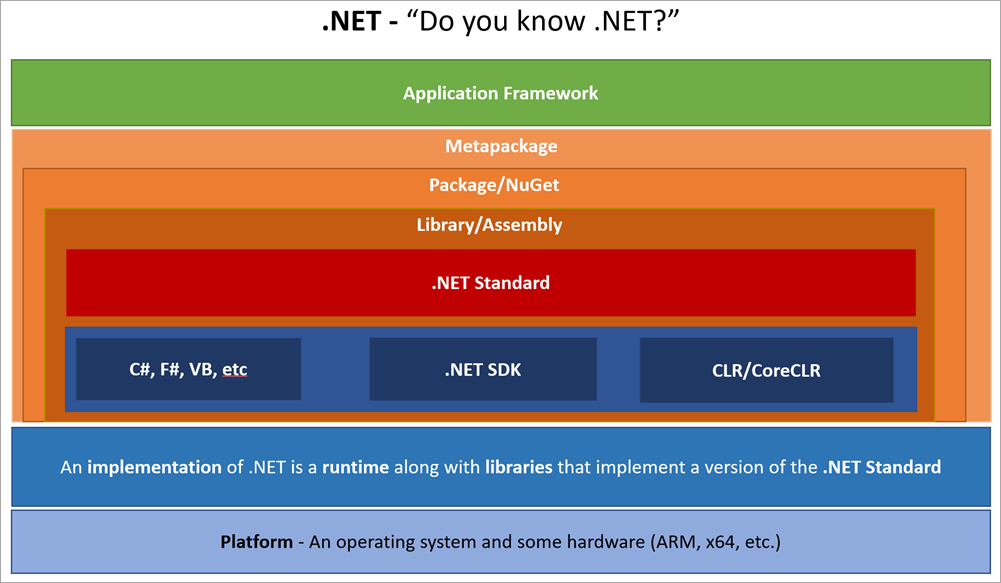
Draft – .NET Glossary Diagram – Scott Hanselman

Posted by jpluimers on 2019/04/10

By now this should be out of [WayBackDraft – .NET Glossary Diagram – Scott Hanselman: a list of common terms to describe various parts of the .NET ecosystem.

He has a nice list of sentences where each term is used.

I’ll try to use them myself as well, so I gave it a start at paulcbetts/refit: The automatic type-safe REST library for Xamarin and .NET.

–jeroen

Posted in .NET, C#, Development, F#, Software Development, VB.NET, Visual Studio and tools | Leave a Comment »

Detecting the Delphi edition that is installed

Posted by jpluimers on 2019/04/09

Via [WayBack] In what ways can you detect which edition of Delphi in installed from the installed files? I’m trying to distinguish between Standard, Professional, E… – Jeroen Wiert Pluimers – Google+

Different Delphi editions have different msbuild support files. For instance IDL is only available in Enterprise/Architect/Ultimate (which use the exact same binaries anyway).

IDL is old, see

So I updated my [WayBack] jeroenp / wiert.me / Run-Dependend-rsvars-From-Path.bat — Bitbucket (which besides running rsvars.bat, can start the various Delphi IDE personalities, or run msbuild with various configurations) with [WayBack] jeroenp / wiert.me / commit / 2c55fa1bf786 — Bitbucket:

Support 10.1 Berlin and 10.2 Berlin in Run-Dependend-rsvars-From-Path.bat, as well as Professional/Starter editions.

Thanks to Andrea Magni – Google+, Querying was simple: look for the value of the Edition entry under inside the *\X\BDS\Y.0 where Y is the BDS version, X is Borland, CodeGear or Embarcadero (depending on the BDS version) and * is the base key HKEY_CURRENT_USER\Software, HKEY_LOCAL_MACHINE\SOFTWARE , HKEY_LOCAL_MACHINE\SOFTWARE\Wow6432Node.

–jeroen

Posted in Delphi, Development, Software Development | Leave a Comment »

Continuous Integration Server performance

Posted by jpluimers on 2019/04/09

From a while back, but still relevant for any continuous integration system: [WayBack] Continuous Integration Server performance.

–jeroen

via: [WayBackBlogged – Continous Integration Server Performance – Vincent Parrett – Google+

Posted in Continua CI, Continuous Integration, Development, Software Development | Leave a Comment »

When generics and VCL controls bite you: memory overwrites when you show the control usually ending up in access violations

Posted by jpluimers on 2019/04/09

Recently I got bitten by the 2013 reported http://qc.embarcadero.com/wc/qcmain.aspx?d=112101 (too bad the site is gone and the WayBack machine doesn’t have it archived) as a result of [WayBackdelphi – Why do I get access violations when a control’s class name is very, very long? – Stack Overflow.

It got reentered as [RSP-18399] Buffer overflow in TWinControl.CreateParams() – Embarcadero Technologies but since that requires logon, it’s not search machine indexed so it’s very hard to find unless you know where to look.

So I spent a quite some time to find out what was wrong:

Since Delphi 1, the [WayBackControls.TCreateParams Record has a 64-byte WinClassName field that’s blindingly copied by the TWinControl.CreateParams without range checking.

The structure is used by the [WayBackTWinControl.CreateWnd Method to call the Windows API [WayBackRegisterClass function that takes a [WayBackWNDCLASS structure with a lpszClassName field that supports up to 256 characters and it fails when it’s longer.

That overwrite cause spurious other errors depending on the memory that gets overwritten. It took almost a day to figure out the cause of the error was this field, then an hour or to track that down to the long class names created by generic code.

To my surprise, I found back [WayBack] This issue caused coworkers and me quite a few hours wasted:Long story short – refactor some forms/frames to class names longer than 64 chars and boom… – Stefan Glienke – Google+.

As of Delphi 8 (yes, that version that a lot of people want to forget, but did bring a few good things), the structure was defined as below, and the code intialising also got improved:

Params.WinClassName := ClassName;
...
Params.WinClassName := Format('%s.%d', [Params.WinClassName, AppDomain.CurrentDomain.GetHashCode]);

So there it’s a string that – if it is too long – will get rejected by the Windows API anyway just like the native Delphi VCL implementation should have done 20+ years ago.

The sad part for FMX users: that structure and code got blindingly copied to the FMX.Controls.Win unit.

Read the rest of this entry »

Posted in Delphi, Development, Software Development | Leave a Comment »

Adobe Acrobat Reader – Content Preparation Progress window

Posted by jpluimers on 2019/04/08

I hope this gets rid of the content preparation progress window:

Disable the screen reader options in Adobe Acrobat:

  1. Within Adobe Acrobat, go to “Edit > Preferences > Reading”
  2. Locate the “Screen Reader Options” section.
  3. In the ‘Page vs Document’ dropdown box choose “Only read the currently visible pages”, and uncheck “Confirm before tagging documents”.

–jeroen

Read the rest of this entry »

Posted in Adobe, Adobe Acrobat, Adobe Reader, Power User | 2 Comments »

Research list: machine sometimes not visible on LAN

Posted by jpluimers on 2019/04/08

When one of the machine isn’t active for a while it seems to disappear. Even when it’s active some of the machines have intermittent errors pinging it as like every 10-30 seconds one of these ping results appear:

92 bytes from tl-er5120 (192.168.71.1): Redirect Host(New addr: 192.168.71.193)
Vr HL TOS  Len   ID Flg  off TTL Pro  cks      Src      Dst
 4  5  00 0054 05de   0 0000  40  01 644d 192.168.71.108  192.168.71.193

Sometimes even a simple

Request timeout for icmp_seq 6900

So I need to dig into  ICMP “Redirect Host” .

It might be a simple ARP thing like mac mini – Why the different results for ping? Or why is the Time Capsule getting involved? – Ask Different [WayBack] but like usual stuff I bump into is of a more complex kind so I’ve archived at least these:

–jeroen

Posted in Internet, MikroTik, Power User, routers | Leave a Comment »

Ich brauch gerade mal Nachhilfe in uBlock Syntax. Wo kann man Beispiele lese…

Posted by jpluimers on 2019/04/08

For my link archive:

On uBlock, uMatrix, Personal Blocklist, Google Chrome Site Settings and others.

–jeroen

Posted in Chrome, Google, Power User | Leave a Comment »

Blast from the past: “Advanced Pascal Programming Techniques” – Google Search

Posted by jpluimers on 2019/04/05

Back in my school days, this was the best Pascal book you could get: “Advanced Pascal Programming Techniques” – Google Search.

This is Apple Pasca, USD Pascal, first Turbo Pascal era.

Sadly, getting English books in The Netherlands was hard. So I had to do with books from Academic Press which not as good.

Via:

–jeroen

Posted in Apple Pascal, Borland Pascal, Development, History, Pascal, Software Development, Turbo Pascal, UCSD Pascal | 1 Comment »

How to activate ADB & Helium on OnePlus 2 on Mac – OnePlus Forums

Posted by jpluimers on 2019/04/05

The quoted link wasn’t in the end what I used to get my config from a OnePlus 2 to a OnePlus 5

How to activate ADB & Helium on OnePlus 2 on Mac – OnePlus Forums « The Wiert Corner – irregular stream of stuff.

This is what I had to do instead:

  1. On the OnePlus 2:
    1. Enable developer mode (see Android 4.2+: enable USB debug mode (Nexus 4, Nexus 7, etc) orA few OnePlus One CyanogenMod tips)
    2. Enable USB debugging
    3. Install the Helium Android App from play.google.com/store/apps/details?id=com.koushikdutta.backup
    4. Run Helium
    5. Wait for activation
  2. On my Mac:
    1. Install the Mac version of Helium from http://download.clockworkmod.com/carbon/carbon-mac.zip
    2. Run the Mac version of Helium from
    3. Connect the USB cable to the OnePlus 2
    4. Wait for the Mac version of Helium to have “enabled” Helium on the One Plus 2
    5. Quit the Mac version of Helium
    6. Install the Chrome version of Helium from https://chrome.google.com/webstore/detail/helium-backup/gpglbgbpeobllokpmeagpoagjbfknanl?authuser=1
    7. Run the Chrome version of Helium
    8. Wait for the Chrome version of Helium to complete the activation of Helium on the Ons Plus 2
  3. On the One Plus 2:
    1. Select the applications to backup
    2. Back up

Relevant links:

–jeroen

Posted in Android Devices, Helium, OnePlus Five, OnePlus Two, Power User | Leave a Comment »