Posted by jpluimers on 2018/11/14
I needed this during logon on Windows machines to set the sound volume: [WayBack] NirCmd – Windows command line tool set-soundvolume-25-percent.bat:
:: requires https://www.nirsoft.net/utils/nircmd.html

:: 100% = 65535

nircmd setsysvolume 16000
Works on all Windows versions (7-10) I tested so far.
Via
There are way sexier ways to do this, but they were all too convoluted for the time I had to get this to work.
For the future:
–jeroen
Posted in Batch-Files, Development, Power User, Scripting, Software Development, Windows | Leave a Comment »
Posted by jpluimers on 2018/11/14
Choosing label colours other than black or white is like making a dynamic mouse cursor that inverts the colours underneath it: it fails horribly in the low contrast regions, and looks very strange on pink-noise backgrounds.
This approach is uses black and white depending on the perceived brightness:
[WayBack] How to automatically choose a label color to contrast with background | TrendCT:
What would data viz be without labels? Just viz, that’s what. This guide aimed at web designers discusses how to choose a label text color with enough contrast.
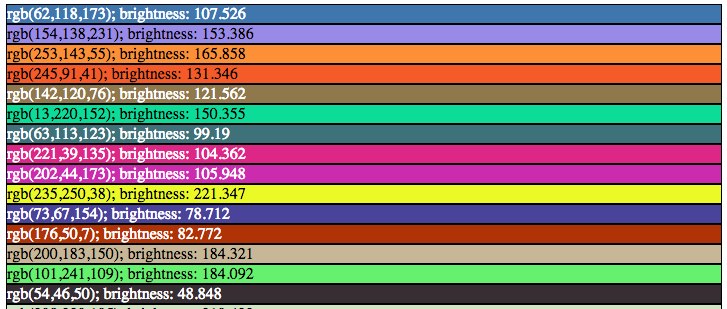
Via: [WayBack] For all those people incapable of choosing the right color combinations. – Thomas Mueller (dummzeuch) – Google+
–jeroen
Posted in Algorithms, Color (software development), Development, Software Development, Usability, User Experience (ux) | Leave a Comment »
Posted by jpluimers on 2018/11/14
Source: reStructuredText Directives – Images:
Inline images can be defined with an “image” directive in a substitution definition.
The |biohazard| symbol must be used on containers used to
dispose of medical waste.

.. |biohazard| image:: biohazard.png
–jeroen
Posted in Development, Lightweight markup language, reStructuredText, Software Development | Leave a Comment »
Posted by jpluimers on 2018/11/14
Dumping the command prompt history
From [WayBack] Saving windows command prompt history to a file – Charlie Arehart’s ColdFusion Troubleshooting Blog:
doskey /history
gives you the command history.
Redirecting with >, >> or piping with | allows you to save this to a file or filter the output.
Found via: [WayBack] How I can export the history of my commands in Windows(7) Command Prompt? – Stack Overflow
Shells that do support persistent history
Note that the command history is not persistent. If you want that, then there are two other shells that support persistent history:
Both of these found through [WayBack] windows – Is there a global, persistent CMD history? – Server Fault.
–jeroen
Posted in Microsoft Surface on Windows 7, MS-DOS, Power User, Windows, Windows 7, Windows 8, Windows 8.1 | Leave a Comment »
Posted by jpluimers on 2018/11/13
Cool: I never knew the Delphi debugger’s expression understood more than just expressions: compiler directives too!
[WayBack] @AndyHTech on Twitter:
The debugger’s expression evaluator can’t access an PInteger like an array because PInteger wasn’t declared with $POINTERMATH ON. But if you write “{$POINTERMATH ON} MyIntPtr[0]” into the evaluator the array access works. POINTERMATH ON should always be on in the expr evaluator.
… and if you did this, the option stays active until the compiler has to compile a project, the it is reset.
–jeroen
Posted in Delphi, Development, Software Development | Leave a Comment »
Posted by jpluimers on 2018/11/13
Reminder to self: check this when it re-occurs [WayBack] Delphi 10.1 Berlin Update 1 exit error · GitHub.
there is an Invalid pointer operation. inside System.TObject.FreeInstance with a stack trace involving multiple rounds of
[50BE9CC9]{vcl240.bpl  } Vcl.Forms.TCustomForm.CloseQuery (Line 7061, "Vcl.Forms.pas" + 8) + $14
[5393DDD4]{DDevExtensionsD101.dll} DSUFeatures.CloseForm + $28
[5393DEA2]{DDevExtensionsD101.dll} DSUFeatures.HookedTCustomFormClose + $42
[50BE8A80]{vcl240.bpl  } Vcl.Forms.TCustomForm.WMClose (Line 6398, "Vcl.Forms.pas" + 0) + $0
[50AA3B32]{vcl240.bpl  } Vcl.Controls.TControl.WndProc (Line 7313, "Vcl.Controls.pas" + 91) + $6
[1ACC4D50]{tmsdXE10.bpl} Advgrid. + $0
–jeroen
Read the rest of this entry »
Posted in Delphi, Delphi 10.1 Berlin (BigBen), Development, Software Development | Leave a Comment »
Posted by jpluimers on 2018/11/13
I need to check the outcome of this comment at [WayBack] Google analytics is no more avaliable for analytic Apps and send to firebase when you want to track a new App. How to do with firebase analytics? there … – Xavi P. – Google+:
I’m working on an implementation. It’ll be an extension of what I did with Firebase Cloud Messaging:
[WayBack] Adding Firebase Cloud Messaging to your mobile apps – part 1 – Delphi Worlds
However, my implementation may or may not become a part of a commercial solution that includes other Firebase services, including Firebase Database, using the Android and iOS SDKs
–jeroen
Posted in Delphi, Development, Software Development | 2 Comments »
Posted by jpluimers on 2018/11/13
Since ping has a more predictible output over Windows versions than ipconfig, I use this in a batch file:
for /f "delims=[] tokens=2" %%a in ('ping -4 -n 1 %ComputerName% ^| findstr [') do set NetworkIP=%%a

echo Network IP: %NetworkIP%
Source: [WayBack] How do I get the IP address into a batch-file variable? – Stack Overflow
Thanks [WayBack] bruce965.
–jeroen
Posted in Batch-Files, Development, Scripting, Software Development | Leave a Comment »
Posted by jpluimers on 2018/11/12
[WayBack] xcopy | Microsoft Docs has this:
| Exit code |
Description |
| 0 |
Files were copied without error. |
| 1 |
No files were found to copy. |
| 2 |
The user pressed CTRL+C to terminate xcopy. |
| 4 |
Initialization error occurred. There is not enough memory or disk space, or you entered an invalid drive name or invalid syntax on the command line. |
| 5 |
Disk write error occurred. |
Empirically, errorlevel 4 is also returned when the source file or source directory does not exist.
--jeroen
Posted in Power User, Windows | Leave a Comment »
Posted by jpluimers on 2018/11/12
 Cool tool: [WayBack] Windows Services Dependency Viewer – Home:
Windows Services Dependency Viewer is a simple tool that provides the following information:
- Windows service dependent and antecedent services
- Services grouped by process
- Service details (from Win32_Service WMI class)
- Service process details (from Win32_Process WMI class
This tremendously helps getting an overview of which Windows Services to monitor for running state: if for instance you need monitor SMTP, then you do not need to monitor Event Log as that is a requirement.
Related: [WayBack] What is Windows 7 service dependency tree? – Super User
Download: [Archive.is] https://download-codeplex.sec.s-msft.com/Download/Release?ProjectName=svcdependencyviewer&DownloadId=100584&FileTime=129075223089600000&Build=21050
–jeroen
Posted in Power User, Windows | Leave a Comment »


 The Wiert Corner - irregular stream of stuff