


Thanks +Stefan Glienke for pointing me at [WayBack] xkcd: Is It Worth the Time?
Background information: [WayBack] 1205: Is It Worth the Time? – explain xkcd
–jeroen
via: via: [WayBack] Just installed … and again I have to …
Posted by jpluimers on 2018/06/22
Thanks +Stefan Glienke for pointing me at [WayBack] xkcd: Is It Worth the Time?
Background information: [WayBack] 1205: Is It Worth the Time? – explain xkcd
–jeroen
via: via: [WayBack] Just installed … and again I have to …

Posted in LifeHacker, Power User | Leave a Comment »
Posted by jpluimers on 2018/06/21
Very often, I see people ask for how to embed multi-line strings in a Delphi source file.
The short answer is: you can’t.
The long answer is: you can’t and if you want you have to hack your way around.
The answer should be: just like any of these languages that do support multiline strings:
Many languages support this through a feature called HEREDOC.
Now in Delphi and other languages like Java are building ugly workarounds like for instance this one: [WayBack] RAD Studio Tip: Using resource scripts to organize project dependencies. – Chapman World.
–jeroen

Posted in .NET, C#, Delphi, Development, JavaScript/ECMAScript, Python, Ruby, Scripting, Software Development | 17 Comments »
Posted by jpluimers on 2018/06/21
Interesting take on Technical Debt: [WayBack] The Spilled Juice Analogy for Technical Debt | Disciplined Agile 2.X
Not just because of the analogy, but also because of this comment by Ramu Iyer:
–jeroen
via: [WayBack] Vivid and better analogy than interest payments.The Spilled Juice Analogy for Technical Debt http://buff.ly/2nax1Ng #technicaldebt – Marjan Venema – Google+
Posted in Development, Software Development, Technical Debt | Leave a Comment »
Posted by jpluimers on 2018/06/20
TestInsight is a great tool for automatically running your unit tests and seeing the results to make you more productive.
Two of the results treeview features you might not know make you even more productive:
You can get TestInsight at sglienke / TestInsight — Bitbucket
–jeroen
Posted in Conference Topics, Conferences, Delphi, Development, Event, Software Development | 1 Comment »
Posted by jpluimers on 2018/06/20
Reminder to self: if you want to stay compatible with old (Pre Delphi XE) source code, then do not use virtual methods in class helpers.
Technically you can, as class helpers can inherit from other class helpers, but this is only supported as of Delphi XE.
In lower versions you get these errors as apparently the Delphi compiler tags an IInterface to the class helper compiler result:
[Error] Project1.dpr(14): E2003 Undeclared identifier: 'QueryInterface'

[Error] Project1.dpr(14): E2003 Undeclared identifier: '_AddRef'

[Error] Project1.dpr(14): E2003 Undeclared identifier: '_Release'
Source: [WayBack] QualityCentral 9782
–jeroen
Posted in Delphi, Development, QC, Software Development | 2 Comments »
Posted by jpluimers on 2018/06/19
I never realised that Amazon Alexa has an open source account on GitHub: https://github.com/alexa
There are full instructions on getting a Java based Alexa Voice Service (AVS) – also used by Amazon Echo – to run on a Raspberri Pi (3 or better recommended, works on 2 as well) with this extra hardware:
Full instructions are at Raspberry Pi · alexa/alexa-avs-sample-app Wiki and a video is below: https://www.youtube.com/watch?v=baec1CbV6A0
I should find some time to try this out (:
–jeroen
Posted in Development, Hardware, Hardware Development, Hardware Interfacing, Software Development | Leave a Comment »
Posted by jpluimers on 2018/06/19
Thanks [WayBack] gbabu for the below PowerShell ide
As PowerShell command:
Get-EventLog System | Where-Object {$_.EventID -eq "1074" -or $_.EventID -eq "6008" -or $_.EventID -eq "1076"} | ft Machinename, TimeWritten, UserName, EventID, Message -AutoSize -Wrap
Based on it and my own experience, thse Event IDs can be interesting:
You can also run this as a batch file, but not you need to escape the pipe | into ^| like this:
PowerShell Get-EventLog System ^| Where-Object {$_.EventID -eq "1074" -or $_.EventID -eq "6008" -or $_.EventID -eq "1076"} ^| ft Machinename, TimeWritten, UserName, EventID, Message -AutoSize -Wrap
If you have PowerShell 3.0 or greater, then you can use the [Archive.is] -In operator:
PowerShell Get-EventLog System ^| Where-Object {$_.EventID -in "41", "109", "1074", "6008", "1076"} ^| ft Machinename, TimeWritten, UserName, EventID, Message -AutoSize -Wrap
–jeroen
Posted in Batch-Files, CommandLine, Development, Power User, PowerShell, PowerShell, Scripting, Software Development, Windows | Leave a Comment »
Posted by jpluimers on 2018/06/18
For my link archive: [WayBack] W5motorolja på Lidl
Ihr Fax vom 21.10.2009
Sehr geehrter Herr Stanusic,
gern bestätigen wir Ihnen, dass entsprechend der folgenden Aufstellung die Produkte identisch sind.
PENNASOL Multigrade Super HD 15W40 = W5 CARCARE Engine Oil 15W40
PENNASOL Super Light 10W40 = W5 Ecotech Engine Oil 10W40
PENNASOL Super Pace 5W40 = W5 Supertech Engine Oil 5W40
Mit freundlichen GrüßenMineralöl-Raffinerie Dollbergen GmbH
i.V. Hartmann i.A. Fricke
On the label:
Posted in cars, E46 320i touring, LifeHacker, Power User | Leave a Comment »
Posted by jpluimers on 2018/06/18
Interesting read:
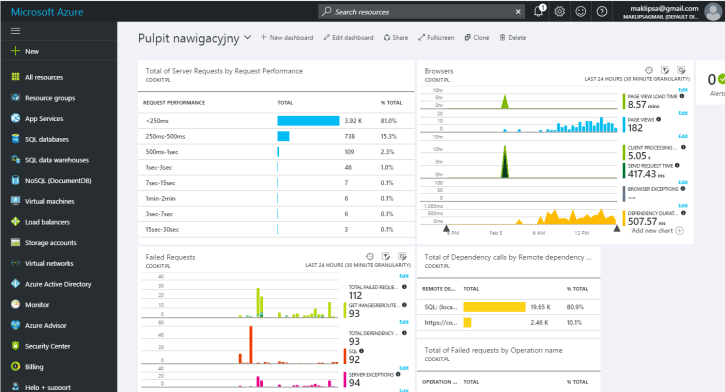
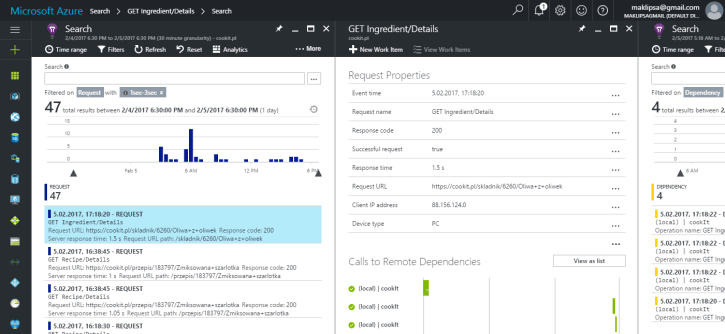
Searching through logs and remoting to a machine to check it’s load is not a fun thing to do. This is why I’ve decided to look for a centralized logging service. And what I’ve chosen.
It looks like Microsoft App Insight is very much worth trying.
–jeroen

Posted in *nix, Development, Monitoring, Power User | Leave a Comment »
Posted by jpluimers on 2018/06/18
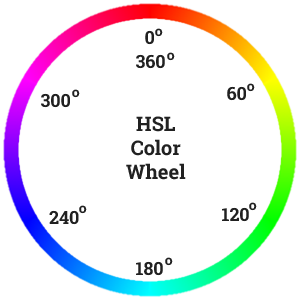 Recommented reading and playing: [Archive.is] Practical Color Theory for People Who Code which is not just about the colour wheel, but also about:
Oh: don’t forge the “Party Mode” (:
–jeroen
PS:

Posted in Color (science), Color (software development), Development, LifeHacker, Power User, science, Software Development, UI Design | Leave a Comment »
 The Wiert Corner - irregular stream of stuff