


Each time you hit an error URL, you get a different picture.
They are cool!
Source: Oops! Something Bad Happened – Stack Overflow

Posted by jpluimers on 2017/05/02
Each time you hit an error URL, you get a different picture.
They are cool!
Source: Oops! Something Bad Happened – Stack Overflow

Posted in Development, Pingback, Stackoverflow | Leave a Comment »
Posted by jpluimers on 2017/05/02
Sometimes msbuild will throw an error like this for an x86 project:
"C:\Users\Developer\Versioned\libssh2\build\libssh2.sln" (default target) (1) ->

(ValidateSolutionConfiguration target) ->

C:\Users\Developer\Versioned\libssh2\build\libssh2.sln.metaproj : error MSB4126: The specified solution configuration "Debug|X64" is invalid. Please specify a valid solution configuration using the Configuration and Platform properties

form="Any CPU") or leave those properties blank to use the default solution configuration. [C:\Users\Developer\Versioned\libssh2\build\libssh2.sln]
Cause:
vsvars64.bat will set the environment variable Platform=x64 but vsvars32.bat will not empty this environment variable.
Easiest is to run set Platform= then run vsvars32.bat.
Adopted from MSBuild creating an x64 solution configuration via sln.metaproj – Stack Overflow [WayBack]:
If you are running this in the Visual Studio x64 command window it will set an environment variable Platform=x64 that will be used by msbuild. You can verify this by running echo in the command prompt you are using.
echo %platform%So you will need to override the default when using x64 cmd, or run from the x86 cmd.
–jeroen

Posted in .NET, C++, Development, Software Development, Visual Studio 2015, Visual Studio and tools, Visual Studio C++ | Leave a Comment »
Posted by jpluimers on 2017/05/02
To get to the compare view, append
/compareto your repository’s path.
This brings you the basic comparison interface which is very flexible: just enter a branch, tag or history marker in the dropdowns for base and compare.
Examples from the user docs:
v2.3.3)–jeroen
Source: Comparing commits across time – User Documentation
Posted in Development, DVCS - Distributed Version Control, git, GitHub, Software Development, Source Code Management | Leave a Comment »
Posted by jpluimers on 2017/05/01
Als curator moet je af en toe een brief naar de Belastingdienst sturen.
Dat moet dan naar het Belastingkantoor behorend bij de woonplaats van de curandus.
Die lijst staat hier: [Archive.is] Adressen belasting- en douanekantoren
Wat 10 jaar geleden nog Leiden was, is inmiddels Den Haag, wat grappig is, want de brief gaat over wijziging toezendadres:
Kantoor Den Haag
Belastingkantoor bezoeken
Wilt u langskomen? Maak dan eerst een afspraak. Bel daarvoor de BelastingTelefoon.
Bezoekadres
Prinses Beatrixlaan 512
2595 BL ´s-GravenhageDe balie van het belastingkantoor is open op werkdagen van 08.00 tot 17.00 uur.
Postadres
Postbus 30206
2500 GE ´s-GravenhageContact
BelastingTelefoon
Telefoon: 0800 – 0543
Bereikbaar van maandag tot en met donderdag van 08.00 – 20.00 en vrijdag van 08.00 – 17.00.
–jeroen
Posted in LifeHacker, Power User | Leave a Comment »
Posted by jpluimers on 2017/05/01
Unbelievable: the demissionary cabinet in The Netherlands (which is only supposed to handle non-controversial matters as a new cabinet is being formed because of the election results) plans to use DNA stored in hospitals under the doctor-patient privilege for justice department use.
Even DNA materials stored in the past will be under the new proposed legislation.
Demissionair minister Schippers van Volksgezondheid (VVD) wil dat gegevens over afgenomen lichaamsmateriaal in de zorg beschikbaar komen voor politie en justitie. Ook in het verleden afgestaan materiaal valt hieronder. Patiënten wordt daarbij niet om toestemming gevraagd.
Source: [WayBack] Ziekenhuis wordt DNA-databank voor justitie – Privacy Barometer – De actuele stand van de politiek over privacy
Posted in Opinions, Power User, Privacy | Leave a Comment »
Posted by jpluimers on 2017/05/01
Details: Technology Chatting with Jack: SOLVED! – High CPU Usage of Microsoft Security Essentials
TL;DR:
if MsMpEng.exe uses a lot of CPU, it it to it’s own exclusion list.
–jeroen
Posted in Power User, Windows, Windows 10, Windows 7, Windows 8, Windows 8.1, Windows 9 | Leave a Comment »
Posted by jpluimers on 2017/05/01
In addition to the two methods mentioned at Two Quick Methods for Finding Shared Folders in Windows (use net share or compmgmt.msc) I like this one:
It directly gets you to the “Shared Folders” inside compmgmt.msc
–jeroen
Posted in Power User, Windows, Windows 7, Windows 8, Windows 8.1, Windows Server 2000, Windows Server 2003, Windows Server 2003 R2, Windows Server 2008, Windows Server 2008 R2, Windows Server 2012, Windows Server 2012 R2, Windows Vista, Windows XP | Leave a Comment »
Posted by jpluimers on 2017/04/29
I’d laugh if it wasn’t so embarrassing: [Archive.is] Troy Hunt: Reckon you’ve seen some stupid security things? Here, hold my beer….
It reminds me of a Dutch agency with > 1 million low income people paying for a service to be on a notification list for rental houses becoming available that was within their legal rental limits.
If you were not on the list, you’d never gain enough points to get a rental home at all.
If you were on the list, then they’d sent your credentials in plain text requiring very limited information.
Your credentials then would reveal name, date of birth, social security number, full address, bank account and some other personal information.
They never notified me if the security complaint I filed was ever addressed.
–jeroen
via:
[WayBack] Ready for some security nightmares? – This is why I Code – Google+
Posted in Power User, Security | Leave a Comment »
Posted by jpluimers on 2017/04/28
HowTo: Wget Command Examples – Wget is a free software package for retrieving files using HTTP, HTTPS and FTP, the most widely-used Internet protocols
Source: HowTo: Wget Command Examples [WayBack]
I totally forgot about
-c switch that continues an aborted download.-r -A combination to only download certain file types.–jeroen
Posted in *nix, *nix-tools, Power User, wget | Leave a Comment »
Posted by jpluimers on 2017/04/28
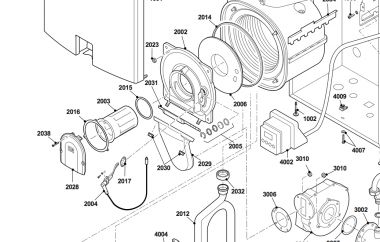
Some notes as we got an error code 5 (the display showing E5) a while ago.
Our solution was to keep the reset button pressed for a few seconds, then wait for a “reboot” to happen.
Videos from someone else having searched for the E5 cause for 2 months:
E6 was already hinting at a faulty transformer, but the ionisation current definitely confirms that.
Manuals (the first two are almost identical):
–jeroen
Need to contact these in case of trouble as they are experienced: loodgietersbedrijfjongen.nl
Later: we ran into the above problem as well; the problem was the ignition transformer that could not keep the gas ignition current between 3 and 9 µA. The solution was this Remeha part [WayBack] Remeha ontstekingstrafo (incl. ionisatieelectrode) S100012 | Warmteservice. We got there after replacing the burner gasket ring [WayBack] Remeha pakkingring voor brander S103172 | Warmteservice that often solves the problem, is much cheaper and should be replaced every 2 years anyway.
See also

Posted in LifeHacker, Power User | 2 Comments »
 The Wiert Corner - irregular stream of stuff