


This is golden: ShellCheck – shell script analysis tool.
It checks your shell scripts, either on-line or off-line (brew install shellcheck for Mac, apt, etc for Linuces)
–jeroen
via: regex – Read file line by line with bash script – Stack Overflow
Posted by jpluimers on 2017/03/09
This is golden: ShellCheck – shell script analysis tool.
It checks your shell scripts, either on-line or off-line (brew install shellcheck for Mac, apt, etc for Linuces)
–jeroen
via: regex – Read file line by line with bash script – Stack Overflow

Posted in bash, Development, Scripting, Sh Shell, Software Development | Leave a Comment »
Posted by jpluimers on 2017/03/08
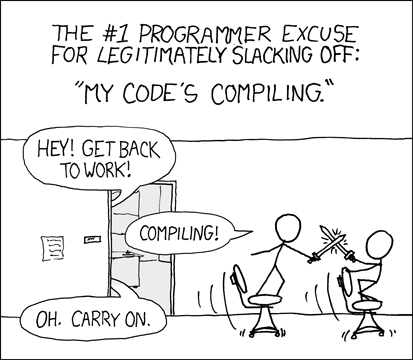
It resulted into a nice thread of strengths and weaknesses of the classic and nextgen compilers.
I’m emphasising a long term wish for the Win32 platform to have two compilers: a classic one and an LLVM nextgen one.
Reasons include this:
So, please please please Delphi team: provide an LLVM nextgen compiler for the Win32 platform.
via: [Archive.is] Using Delphi nextgen compilers … https://xkcd.com/303/
Recommended video: [WayBack] The recent next gen compiler debate reminded me of this nice talk.This is about c++ but it shows off nicely what a high quality compiler can achieve in terms of optimisation… – Christoph Hillefeld – Google+
–jeroen
Posted in Delphi, Development, Software Development | 1 Comment »
Posted by jpluimers on 2017/03/08
Most of my web-stuff is on Apache. Which works fine, has TLS/SSL enabled, etc.
But I wanted to do server-side JavaScript. Which somehow is a forrest without trees, or a nightmare to get started, especially on OpenSuSE.
First of all, virtually all examples explain how to run node as a script. But none explain where to save it, how to run it as a service (and restart when it crashes: it will crash) or how to run multiple sites under it. And the scripts seems to listen to a TCP port by themselves so they operate as a full server by themselves. Nice for a fully fledged portal, but not for some one-offs.
Some links below hopefully will get me re-started later on, but for now, I’ve given up: the out-of-the-box experience is totally non-intuitive.
Maybe what I really want is something else: I want JavaScript stuff that normally renders a page in the browser through the dom to run server side so I can run XMLHttpRequest to various places without bumping into CORS stuff but still render a page DOM.
If you know a better way to do what I want (serving small mostly single-page scripts written in an easy to debug/trace language) let me know.
So basically work around this:
XMLHttpRequest cannot load http://myApiUrl/login. No
'Access-Control-Allow-Origin' header is present on the requested
resource. Origin 'null' is therefore not allowed access.

Posted in *nix, Apache2, Development, JavaScript/ECMAScript, Linux, openSuSE, Power User, Scripting, Software Development, SuSE Linux | 1 Comment »
Posted by jpluimers on 2017/03/08
Some links:
And a great library: nodatime/nodatime: A better date and time API for .NET
--jeroen
Posted in .NET, Development, Jon Skeet, Software Development | Leave a Comment »
Posted by jpluimers on 2017/03/07
Heeft u last van hooikoorts? De pollentellingen van het LUMC geven informatie in hoeverre het pollen hooikoortsklachten kan veroorzaken.
Source: Pollentelling | LUMC
Posted in Uncategorized | Leave a Comment »
Posted by jpluimers on 2017/03/07
Two interesting blog entries to read for both sides of the interview:
–jeroen
Posted in Development, LifeHacker, Power User, Software Development | Leave a Comment »
Posted by jpluimers on 2017/03/07
Found out recently that next to rawgit.com there is also raw.githack.com which contrary to the name also supports bitbucket files:
–jeroen
Posted in BitBucket, Development, DVCS - Distributed Version Control, git, githack.com, GitHub, Mercurial/Hg, rawgit, Source Code Management | Leave a Comment »
Posted by jpluimers on 2017/03/07
Nice: “you can get both aliases and functions with compgen -a -A function”
It uses the compgen completion generator. Simply brilliant (:
Source: bash – how do I list the functions defined in my shell? – Stack Overflow
–jeroen
Posted in *nix, *nix-tools, bash, bash, Development, Power User, Scripting, Software Development | Leave a Comment »
Posted by jpluimers on 2017/03/07
The Blog of Josh Lospinoso: [WayBack] gargoyle, a memory scanning evasion technique
[WayBack] gargoyle, a memory scanning evasion technique – Joe C. Hecht – Google+
Source: gargoyle, a memory scanning evasion technique
–jeroen
Posted in Development, Security, Software Development | Leave a Comment »
Posted by jpluimers on 2017/03/06
In case you manually want to configure or have a web-server that’s not supported by certbot for letsencrypt (yet): Generate Mozilla Security Recommended Web Server Configuration Files.
At the time of writing, these were supported by the generator (* were not supported by certbot for letsencrypt yet):
–jeroen
via: Feature request: admin web interface over HTTPS · Issue #630 · pi-hole/pi-hole
Posted in *nix, *nix-tools, Apache2, Encryption, Let's Encrypt (letsencrypt/certbot), Power User, Security | Leave a Comment »

 The Wiert Corner - irregular stream of stuff