


For my own link history: Debugging a server configuration
Source: OpenSSH/Logging and Troubleshooting – Wikibooks, open books for an open world
Posted by jpluimers on 2016/09/19
For my own link history: Debugging a server configuration
Source: OpenSSH/Logging and Troubleshooting – Wikibooks, open books for an open world

Posted in Communications Development, Development, Internet protocol suite, SSH, TCP | Leave a Comment »
Posted by jpluimers on 2016/09/19
A solution for:
The problem with Google Now’s predictions though is that sometimes they can be inaccurate from the start or take a little longer to adapt to change. Moved your home? Switched jobs? Went for a month or two to a vacation house? Google Now might stubbornly want to keep your old addresses.
Source: PSA: Manually Assign Any Coordinates As Your Home Or Work Address In Google Maps And Google Now
–jeroen
Posted in Google, GoogleMaps, GoogleNow, Power User | Leave a Comment »
Posted by jpluimers on 2016/09/19
Interesting as foldable bills and around 12 plastic cars plus a few coins fit in: Very Small – Slim Leather Wallets by Bellroy.
–jeroen
Posted in LifeHacker, Power User | Leave a Comment »
Posted by jpluimers on 2016/09/19
See all the data your browser reveals about you by visting a website.
Source: What every Browser knows about you
Posted in Chrome, Firefox, Internet Explorer, Opera, Power User, Safari, Web Browsers | Leave a Comment »
Posted by jpluimers on 2016/09/18
http://ascii.textfiles.com/archives/5054
Posted in Uncategorized | Leave a Comment »
Posted by jpluimers on 2016/09/16
A modification to fit a 3.5 mm stereo socket to the front face of a Becker Mexico Cassette to allow use of mp3 players and the like but still retaining AM/FM radio and cassette functions.
Source: W116 : Mercedes-Benz S-Class – 280S, 280SE, 280SEL, 300SD, 350SE, 350SEL, 450SE, 450SEL & 450SEL 6.9
Interesting…
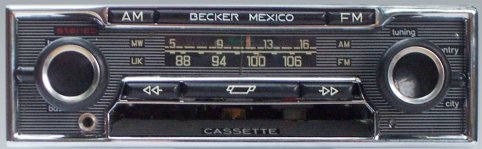
We’ve such a receiver in our classic car (see 1970 Becker Mexico AM-FM Cassette Car Radio showing operation & sound – YouTube « The Wiert Corner – irregular stream of stuff).
It would be a great way to add AUX to it, but I’d rather not modify the front-panel. Since the 450SEL69 has plenty of room, I will try to see if the above instructions can make the cable external so the AUX connector will be either near the arm rest or the glove compartment.
–jeroen

Posted in cars, LifeHacker, Power User, W116 | 2 Comments »
Posted by jpluimers on 2016/09/16
Often it is better to configure more than just a single pool.ntp.org server in case the IP-address of the name gets cached too long and it becomes unresponsive during that period.
So it is better to configure multiple, choose from this list from [WayBack] pool.ntp.org: How do I setup NTP to use the pool?.
0.pool.ntp.org

1.pool.ntp.org

2.pool.ntp.org

3.pool.ntp.org
Here are the steps for one server where you need to repeat the steps after entering pool.ntp.org:
To configure NTP on ESX/ESXi 4.1 and ESXi 5.x hosts using the vSphere Client:
- Connect to the ESX/ESXi host using the vSphere Client.
- Select a host in the inventory.
- Click the Configuration tab.
- Click Time Configuration.
- Click Properties.
- Click Options.
- Click NTP Settings.
- Click Add.
- Enter the NTP Server name. For example, pool.ntp.org.
- Note: When entering the multiple NTP Server names, use a comma (,) followed by a space ( ) between the entries.
- Click OK.
- Click the General tab.
- Click Start automatically under Startup Policy.
- Note: It is recommended to set the time manually prior to starting the service.
- Click Start and click OK.
- Click OK to exit.
–jeroen
via:
Posted in ESXi4, ESXi5, ESXi5.1, ESXi5.5, Power User, Virtualization, VMware, VMware ESXi | Leave a Comment »
Posted by jpluimers on 2016/09/15
7-zip can uncompress a truckload of formats, but what if you need formats it doesn’t support or you want to integrate decompression in your own software?
Then some libraries can be really useful provided you regularly update them (otherwise you – like Symantec – can run in substantial security risks).
Formats supported:
| File format | Year | Algorithm | Supported? |
|---|---|---|---|
| COMPRESS.EXE (SZDD) | 1990 | LZSS | Decompression |
| Microsoft Help (.HLP) | 1990 | LZSS | To-do |
| COMPRESS.EXE (KWAJ) | 1993 | LZSS, Huffman, DEFLATE | Decompression |
| Microsoft Cabinet (.CAB) | 1995 | DEFLATE, Quantum, LZX | Decompression |
| HTML Help (.CHM) | 1997 | LZX | Decompression |
| Microsoft eBook (.LIT) | 2000 | LZX, SHA, DES | To-do |
| Windows Imaging Format (.WIM) | 2007 | LZX, XPRESS | To-do |
| Exchange Offline Address Book (.LZX) | 2008 | LZX DELTA | Decompression |
Pre-compiled console wrappers around libmspack for many platforms.
Libraries and pre-compiled console applications for many platforms.
Background on CHM files.
–jeroen
Via:
Symantec dropped the ball here. A quick look at the decomposer library shipped by Symantec showed that they were using code derived from open source libraries like libmspack and unrarsrc, but hadn’t updated them in at least 7 years.
Source: Project Zero: How to Compromise the Enterprise Endpoint
Posted in 7zip, Compression, Development, Power User, Software Development | Leave a Comment »
Posted by jpluimers on 2016/09/15
If you want to inverse the work of newaliases, you can use makemap to convert them to text:
makemap -u hash access.db
This is quite handy to see if the newaliases indeed put all information into the db file (for instance if you use a script, you can verify it ran correctly).
It works for any db, but you need to be aware of the database format: hash type or btree type.
To my knowledge only one uses the btree type format:
All others use hash type format:
–jeroen
via: Reading Sendmail .db files.
Posted in *nix, *nix-tools, bash, Development, Linux, openSuSE, Power User, Scripting, Software Development, SuSE Linux | Leave a Comment »
Posted by jpluimers on 2016/09/14

Adobe marketing scam
I don’t want Acrobat/Adobe Reader on my Mac. Period.
But Preview will show some PDF files as “For the best experience, open this PDF portfolio in Acrobat 9 or Adobe Reader 9, or later.” or “For the best experience, open this PDF portfolio in Acrobat X or Adobe Reader X, or later.”
This is some Adobe marketing scam where they generate a PDF file actually as a portfolio of PDF files having the first PDF being “marketing” message.
So I needed the pdf-tools on my Mac for which many sites suggest to use brew install pdf-tools. That worked not so well:
$ brew install pdf-tools
Error: No available formula with the name "pdf-tools"
==> Searching for similarly named formulae...
This similarly named formula was found:
mupdf-tools
To install it, run:
  brew install mupdf-tools
==> Searching taps...
This formula was found in a tap:
homebrew/emacs/pdf-tools
To install it, run:
  brew install homebrew/emacs/pdf-tools
Searching for “Error: No available formula with the name” “pdf-tools” didn’t return useful results but looking for brew “pdf-tools” gone revealed pdf-tools: move to homebrew/emacs · wingyplus/homebrew@6e73af9 indicating the command should indeed be brew install homebrew/emacs/pdf-tools however that also ended up failing, in fact with multiple errors:
==> make server/epdfinfo
Error: No available formula with the name "homebrew/dupes/tcl-tk"
Please tap it and then try again: brew tap homebrew/dupes
==> Searching for similarly named formulae...
Error: No similarly named formulae found.
==> Searching taps...
Error: No formulae found in taps.
After doing abrew tap homebrew/dupes it finally worked.

Posted in Apple, Development, DVCS - Distributed Version Control, git, GitHub, Home brew / homebrew, Power User, Source Code Management | Leave a Comment »
 The Wiert Corner - irregular stream of stuff