Posted by jpluimers on 2016/10/10
Sometimes you don’t recognize how easy it is until you see it:
Add a column that is of type date with value =FLOOR(A2,1) .Then Insert -> Pivot Table. Then drag the date column on the right into the Rows box, and also drag it into values box. Done.
Thanks David d C e Freitas!
via How to group by date in excel? – Super User.
Posted in Excel, Office, Power User | Leave a Comment »
Posted by jpluimers on 2016/10/07
I’m a fan of sdelete, but the most recent v2.0 update seems – released alongside SysInternals support for nano server – to be a lot slower than the v1.61 version:
I have the same problem with Sdelete on my SSD.The resource monitor showed v.2 writing the disk at approx 40Mb p/swhile v.1.61 at 1,300 Mb p/s SDelete v.2.0 is faulty (shows 100% all the time) and dead slow, don’t use it.Google v.1.61 , it works just fine.
Source: SDelete hangs at 100% – Sysinternals Forums [WayBack]
–jeroen
Posted in Power User, sdelete, SysInternals, Windows | Leave a Comment »
Posted by jpluimers on 2016/10/07
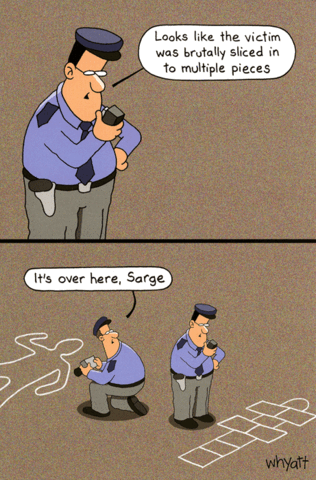
“Looks like the victim was brutally sliced in to multiple pieces”; “It’s over here, Sarge” Humorous cartoon by award winning Australian artist Tim Whyatt.
Source: Traces of Nuts – Brutally sliced in to multiple pieces | Comedy Card Company
Much better image quality than the one I saw floating around on G+ a while ago.
Even larger high quality images are at 1 and 2.
–jeroen
Posted in Fun | Leave a Comment »
Posted by jpluimers on 2016/10/07
The most recent versions of Joe don’t even build from stock in OS X any more and there are no direct installers for them.
But there are two most recent older versions that have installers, and a formula recent brew based HomeBrew installation:
- joe-3.7-0.pkg – rudix-snowleopard – JOE – Rudix: The hassle-free way to get Unix programs on Mac OS X – Google Project Hosting.
- PROJECT DETAIL for Joe’s Own Editor.
- Homebrew Formulas – Joe.
After experimenting for a while without brew preferring the first over second, I’ve installed the the third as:
- The first actually installs version 3.6, but has the syntax highlighting files installed in the correct place, so you get syntax highlighting.
- The second does install version 3.7, but since the syntax highlighting files are in the wrong place: you get no syntax highlighting.
- The brew formula has an up to date joe version 4.0 and installs the syntax highlighting in the right place: you get syntax highlighting.
Before making a choice, you might want to consider reading about joe versions in JOE – Joe’s own editor / … /NEWS.md.
Having a background partially in the Linux world, I tried building joe from source on my Mac following the steps at JOE – Joe’s own editor / Discussion / joe-editor-general:Mac binary for 3.3 does not run on OS/X 10.8. It failed because the Mercurial 3.8 branch required automake and autoconf which are not available on just a Mac + Xcode. So I’m happy that others have bit the bullet and make a good HomeBrew build.
What makes HomeBrew so great is that it is based on a fully versioned git/ruby combination, allows for multiple Python versions, allows for binaries through bintray served bottles and has zillions (well, thousands) of installable formulae, all versioned.
–jeroen
Posted in *nix, *nix-tools, Apple, joe, Mac OS X / OS X / MacOS, Mac OS X 10.4 Tiger, Mac OS X 10.5 Leopard, Mac OS X 10.6 Snow Leopard, Mac OS X 10.7 Lion, MacBook, MacBook Retina, MacBook-Air, MacBook-Pro, MacMini, OS X 10.10 Yosemite, OS X 10.8 Mountain Lion, OS X 10.9 Mavericks, Power User | Leave a Comment »
Posted by jpluimers on 2016/10/06
Allen Bauer (ex Delphi R&D team) wrote the brilliant piece about a year and a half ago. We can still dream, right?
Allen Bauer, May 25, 2015
Current working theory of Nullable<T>.
Nullable<T> = record
…
property Value: T read FValue; default;
…
end;
Using the default directive to “hoist” the operators of “T“. Currently the default directive only works for array properties by “hoisting” the ‘[]‘ operator. Marking a non-array property with default will make the containing type behave as that type.
This, coupled with some intrinsic compiler knowledge of the Nullable<T> type will make Nullable<T> work without any addition of keywords or other standard functions or procedures.
Using the “default” directive on a non-array property will work for any type, except for having the null-propagation semantics.
When considering language features, I try and not only make it work for the intended purpose, but also broaden reach of any supporting feature. In the above scenario, even user-defined operators on “T” will be properly hoisted and used.
This was part of a very interesting G+discussion at Delphi’s New Feature Desired: Nullable Types and Null Propagation….
It covered topics like these:
–jeroen
Posted in Delphi, Development, Software Development | 5 Comments »
Posted by jpluimers on 2016/10/05
Oh nice System.SysUtils.TCardinalHelper.Parse:
class function TCardinalHelper.Parse(const S: string): Cardinal;
begin
  Result := StrToInt(S);
end;
Which means you get this nice EConvertError with message ''4294967295' is not a valid integer value'. with this simple test (which doesn’t even reach the Assert):
uses
  System.SysUtils;

procedure Cardinal_Parse_High_Cardinal_Succeeds();
var
  Expected: Cardinal;
  Value: string;
  Actual: Cardinal;
begin
  Expected := High(Cardinal);
  Value := Expected.ToString();
  Actual := Cardinal.Parse(Value);
  Assert(Expected = Actual);
end;
So I write some unit tests (see below) of which helpers for these types fail in one way or the other:
- Cardinal
- NativeUInt
- Single
- Double
- Extended
These work for the boundary cases:
- SmallInt
- ShortInt
- Integer
- Int64
- NativeInt
- Byte
- Word
- UInt64
- Boolean
- ByteBool
- WordBool
- LongBool
–jeroen
via: Oh nice, in System.SysUtils: “` class function TCardinalHelper.Parse(const…
Read the rest of this entry »
Posted in Delphi, Delphi 10 Seattle, Delphi 10.1 Berlin (BigBen), Delphi XE4, Delphi XE5, Delphi XE6, Delphi XE7, Delphi XE8, Development, Software Development | 5 Comments »


 The Wiert Corner - irregular stream of stuff