Posted by jpluimers on 2015/04/17
In addition to the 1.5 year old Android Device Manager option to find your phone as of yesterday you can now also perform aFind My Phone from Google Search .
So you can now use these URLs to find your phone (or tablet):
For both you need to be logged in, so if you have 2-factor login requiring your phone, you’re out of luck (;
And it works only for Android, but does not work on Android (at least not on my KitKat powered phone).
–jeroen
Read the rest of this entry »
Posted in Android Devices , Chrome , Google , Power User | Leave a Comment »
Posted by jpluimers on 2015/04/17
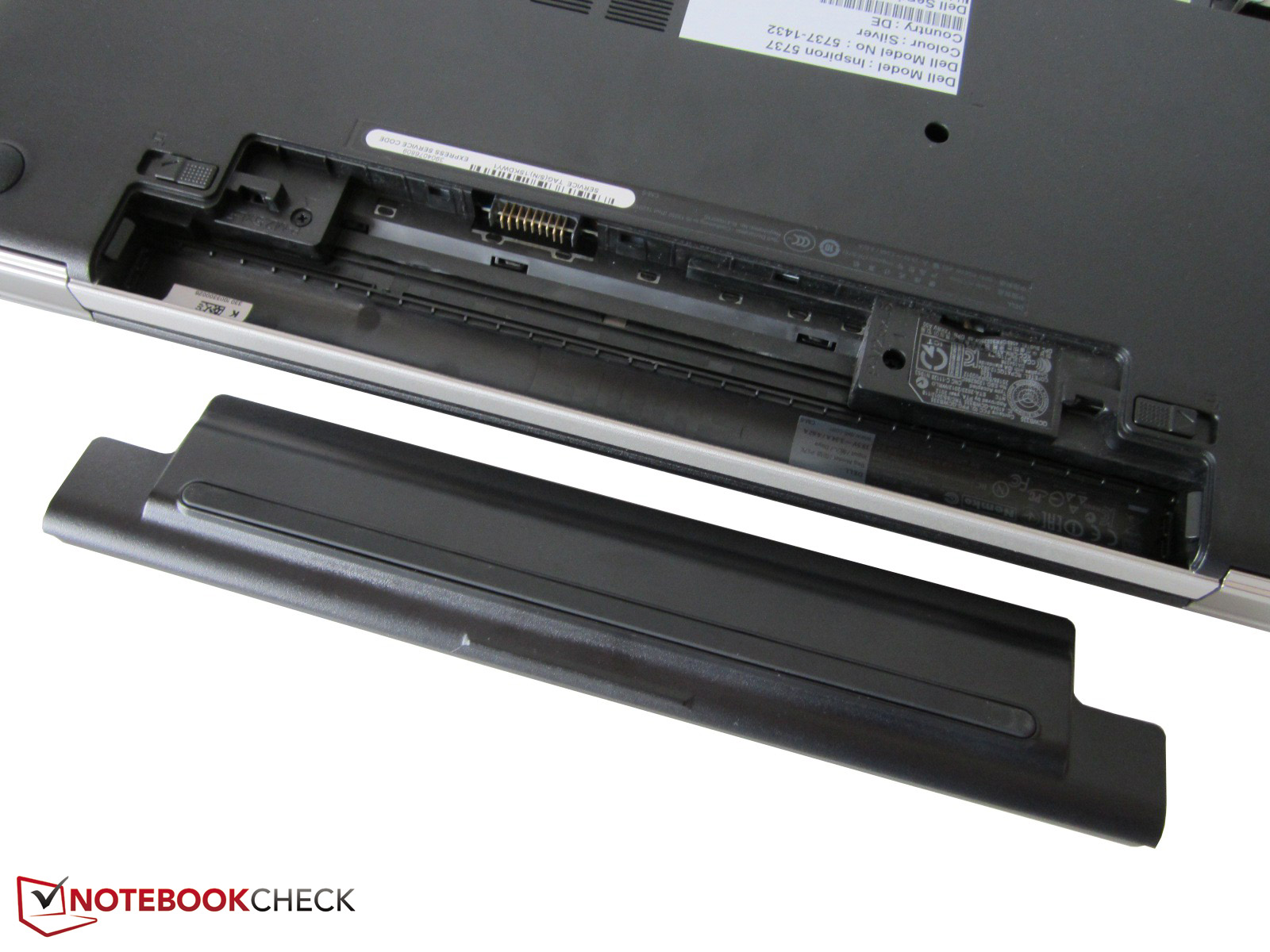
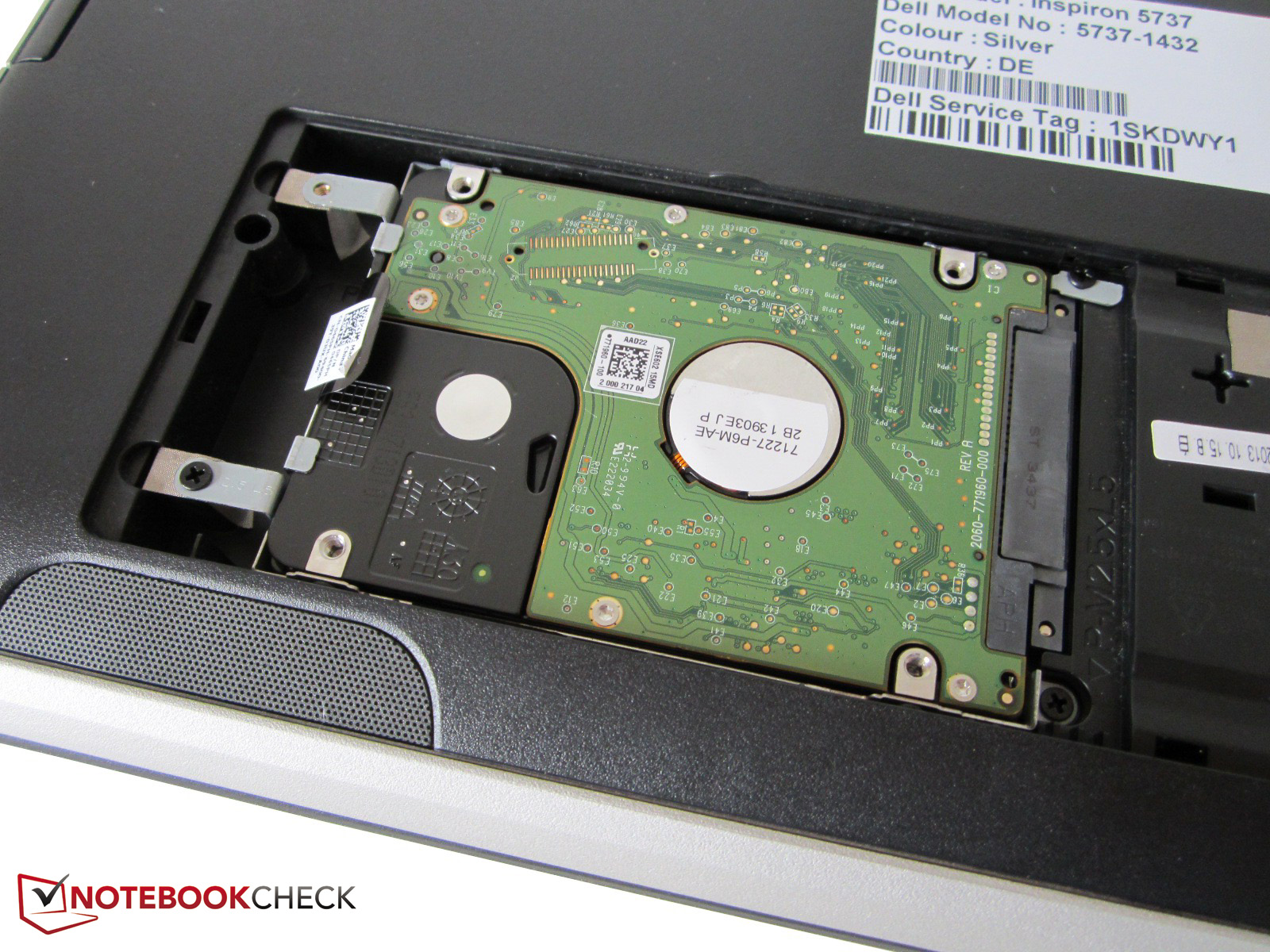
Though the Dell Inspiron 17R 5737 Owner’s Manual contains instructions on pages 24-26, it was easier to see how to access it on the photos at
Review Dell Inspiron 17R-5737 Notebook – NotebookCheck.net Reviews .
Steps (see also the pictures below):
– remove the battery
Now you can unscrew the hard drive from the bracket, and replace it with a new one or an SSD drive.
Removing the battery
Removing the wide bottom plate.
Remove the three screws of the hard-drive.
Pull the tab to remove the hard drive.
–jeroen
Posted in Hardware , Power User , SSD | Leave a Comment »
Posted by jpluimers on 2015/04/16
Interesting, especially the reasoning behind them:
UrlEcho permits the requestor to completely define the response it wants to receive, thus giving it the ability to “host” static HTTP resources within URLs themselves. Why is this cool/useful? #
You don’t need a Web server to host a simple resource — you just construct a URL and you’re set to go.
Since resources are cheap to create and throw away, you can create as many URLs as you want, when you want them.
This is especially useful for testing — you don’t want to configure many server-side resources to return hard-coded responses in order to test correct handling of that response. For example, imagine you need many simple iframes to test a JavaScript library, and you don’t want to modify the server hosting the iframes each time you add or change tests. Since you already know what the responses will be, why not define them in the requests and have a simpler testing process? It makes tests easier to maintain no need to modify the server and understand due to response visibility in the tests.
UrlEcho [ed: UrlReq] lets the requestor to wrap any HTTP request any method, with headers and body into a simple GET request with only an URL defined. Why is this cool/useful? #
You can make any HTTP request in situations where only a simple GET is possible, or where you can only define just the URL. For example, most systems that provide Web hook callbacks only let you define the callback URL only not the method, headers or body structure.
–jeroen
via: Experimenting with HTTP services – UrlEcho and UrlReq .
Posted in Communications Development , Development , HTTP , Internet protocol suite , Software Development , TCP | Leave a Comment »
Posted by jpluimers on 2015/04/15
Summary of the dark side:
Every app we tested saved the image in a grayscale JPEG format. Simply put, you scan your document, save it in “space saving” monochrome, then the app up-samples it to a now “space wasting” grayscale format, dials in a low quality lossy compression ratio to make you think you are saving space, and thereby throws away some of the pixels in your scan.
A very interesting read by Joe Hecht. Nothing new for old FAX, TIFF and PDF farts like me. Entertaining and hopefully teaching for the newer generations of software developers.
So if you ever do PDFs of paper scans:
use monochrome
use loss-less compression
look at what FAX machines did back in the days for pixel perfect legal proof documents
know about PDF/A
–jeroen
via Mobile Scanning Apps: A look Into The Dark Side By: Joe C. Hecht – Code4Sale,… .
Posted in Development , Software Development | 1 Comment »
Posted by jpluimers on 2015/04/15
It has CHM help. Yay! The best new feature in XE8 can be seen by pressing F1. Oh, how did I miss a… .
GetIt is cool. Not NuGet level yet, but a good start. Is there any way to change the default GetIt URL for the Rest API… .
App Analytics is nice. Finally someone listened to Why Software Sucks by David S Platt and introduced some measurement.
You need to pay for hotfixes. From the FAQ: Can I obtain updates and hotfixes without a subscription? An… .
This is causing some stir. Hello! I tried to add a new XE8 to the cart (I don’t actually have the money… .
Still ambivalent to VCS support in the IDE, but there are now Git Integration enhancements in RAD Studio XE8 .
Always install the full RAD studio; installing only limited personalities forgets a file: Do you have lib\iOSDevice64\Release\libsqlite.a in your XE8 installation? Or… .
Generics and arrays are slower. FireDAC has some incompatibilities: XE8 Findings Found some minor tweaks in XE8. Will add to this post as I find… .
Sort of transcript of the XE8 webinar: The Embarcadero webinar for what’s new in XE8 will start in about a minute.… .
Maybe Delphi apps become less design centric and easier to maintain:
F0248 error sometimes means you wrote invalid code: Porting from XE7 to XE8: Internal Compiler Error F2048 using a interface in a… .
DBField optimisations can make your data centric apps a lot faster: Happy about DBField optimization in XE8 … This leads to a 25% performance… .
{$IF defined(MSWINDOWS) and not defined(NEXTGEN)} – XE8 first impressions Installed RadStudio XE8 (Pro) last night and these are… .If they’d documented the #1 as being Unicode U+0001 START OF HEADING it would have made this much more clear: are you kidding me ? for years Embarcadero says that String is not a place to… .
Spring4D 1.2 will introduce the WeakReference type that does all that. Igor Belyh – Google+ .
Better disable Castalia for now. Anyone knows how to disable castalia in XE8? A lot of errors, IDE becomes… .
wuppdi·StylerXE8 tool for XE8 – Get rid of the wrong font size and blue toolbar | Andy’s Blog and Tools .DCU patches to get Byte-Strings for XE8’s mobile compilers | Andy’s Blog and Tools .
TerraData connection is called TData. Good that FireDAC and IBX support ChangeViews. Database updates in Delphi XE8 & C++ Builder XE8 .
Nice Blog post “What’s New in Delphi XE8 for VCL developers” at… .
Not all “Work-as-Expected” resolutions actually fix the problem: Can someone please check if following issues still exist in XE8. JSON… .
No torrents, though publishing these with good SHA-1 hashes could make downloads a lot faster. Delphi Insider: Download Links for Delphi XE8, RAD Studio XE8 and C++Builder XE8 .
FMX Application termination doesn’t fully terminate… I’ve just noticed that IFMXApplicationService.Terminate doesn’t… .
Interface and Generic Class Helper support for Delphi are still wanted .Few memory leaks fixed when compiling large projects so the people having Very very annoying, XE7 is unusable! Out of memory, exceptions, very slow, etc.… need to wait longer.
Castalia in XE8 does less than the full version for XE7 so What exactly are features in Castalia better than those in CnPack? but be careful: in XE8, CnPack 1.0.6.705 can bite Castalia: I have installed XE8 Trial ver. When starting XE8 I get an AV in… .
XE8 fixes the const string folding introduced in XE7: Is it already known that the XE7 Delphi compiler doesn’t collapse duplicate… .
REST.JSON (JsonObject) now breaks on Generic Lists with an EConversionError ‘Internal: Type tkPointer is not currently supported’: it seems in the DataSnap XE 8 transfer of TList class crashed, the problem… .
Components and tools that work with XE8:
Appmethod
--jeroen
Posted in Castalia , Delphi , Delphi XE8 , Development , Software Development | Tagged: 1 , Delphi , UniDAC , XE8 | 3 Comments »
Posted by jpluimers on 2015/04/14
A few people asked, so below is a picture of just a piece of my books closet.
From left to right:
Object Professional 1.0 manuals volume 1-3BTree Filer 5.0 manualTurbo Professional manual (from 1985 !)Borland Paradox Engine 3.0 manualsCrystal Reports Developers Edition
Borland Open Architecture Handbook for PascalTurbo Pascal 5.5 OOP GuideTurbo Pascal 5.5 Reference Guide
Turbo Pascal 5.5 User’s Guide
Turbo Pascal Quick Reference Programming with Turbo Vision
This is only the front-left portion of one shelve. Most shelves are two deep and about 4 times as wide as what you see here (:
I have floppies somewhere in my archive too. Need to dig them up some day.
–jeroen
via:
Read the rest of this entry »
Posted in Delphi , Delphi XE8 , Development , History , Pascal , Software Development , Turbo Pascal | 6 Comments »
Posted by jpluimers on 2015/04/13
As a follow up on the Cntlm configuration post last week , here is a small batch file that will find Cntlm.exe (on x86 and x64 systems) then start it in verbose mode.
Learn more about bidirectional Unicode characters
call :start %ProgramFiles%
call :start %ProgramFiles(x86)%
goto :end
:start
startlocal
set cntlm="%*\Cntlm\Cntlm.exe"
echo %cntlm%
if exist %cntlm% start "Cntlm verbose" %cntlm% -v
endlocal
goto :end
:end
–jeroen
Posted in Cntlm , Development , Fiddler , NTLM , Power User , Web Development , Windows , Windows 7 , Windows 8 , Windows 8.1 , Windows Server 2003 , Windows Server 2003 R2 , Windows Server 2008 , Windows Server 2008 R2 , Windows Vista , Windows XP , Windows-Http-Proxy | Leave a Comment »
Posted by jpluimers on 2015/04/10
This is an elaboration of How to fill proxy information in cntlm config file – Stack Overflow .
When digging around how to get authentication stuff going, I want as much information, so this was the command-line I used:
cntlm.exe -v -c cntlm.ini -I -M http://www.bbc.co.uk
The -v is important: it shows you why things fail, and where: It also shows you the NTLM headers sent back/forth over the wire.
These are the switches used:
-v verbose
-c configuration file
-I interactive (prompt for password)
-M magically detect the NTLM level used by the proxy
Since it is unsafe to store plain text passwords in configuration files, cntlm allows you to store the hashes .
Storing hashes not passwords locally is safer, but not much safer. See for instance Still Passing the Hash 15 Years Later: Guest Post: Let’s talk about Pass-the-Hash by Scriptjunkie the video How to own a Windows Domain or search for Mark Russinovich video windows hash ntlm hack .
Anyway: you can generate the password hashes using either Read the rest of this entry »
Posted in Development , DVCS - Distributed Version Control , Fiddler , git , HTTP , Internet protocol suite , Mercurial/Hg , NTLM , Power User , Software Development , Source Code Management , TCP , Web Development , Windows , Windows 7 , Windows 8 , Windows 8.1 , Windows Server 2008 , Windows Server 2008 R2 , Windows Vista | 1 Comment »
Posted by jpluimers on 2015/04/09
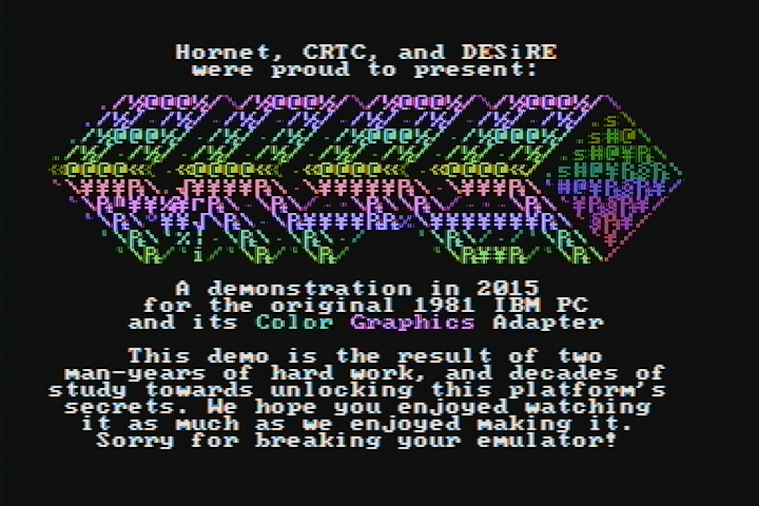
Oh Mein Gott… .
Demo party time. Amazing. As it runs on an early 4.77 Mhz IBM 8088 PC with CGA video.
–jeroen
Posted in History | Leave a Comment »
Posted by jpluimers on 2015/04/09
A while ago I wrote about Delphi XE7 is out with version 21.0.17017.3725; Spring4D is almost ready , now I can repeat parts of it for XE8.
The download links for Delphi XE8, C++Builder XE8 and RAD Studio XE8 are there: ftpd and altd . A whopping 7,217,184,768 bytes (compare that to XE7 update 1 at 5,649,917,952 bytes: almost 30% increase) that has been seeded a few days ago with the version time stamped at the end of last month (like xe7), here is the version number: 22.0.19027.8951 .
Before installing, note that in addition to the below documentation links:
Be sure to have at least 70 gigabytes of free disk space before you attempt to install.
This in addition to the almost 7 GiB ISO file (:
The download is fast as altd is on akamai: the 7 GiB downloaded in about 16 minutes. Google can do the math .
XE8 doc links
Spring4D
On the Spring4D side, Stefan and Honza have added XE8 support , so a new release of that can be near.
–jeroen
Posted in Delphi , Delphi XE8 , Development , Software Development | 9 Comments »






 The Wiert Corner - irregular stream of stuff