The Wiert Corner – irregular stream of stuff

Jeroen W. Pluimers on .NET, C#, Delphi, databases, and personal interests

  • My badges

  • Twitter Updates

  • My Flickr Stream

  • Pages

  • All categories

  • Enter your email address to subscribe to this blog and receive notifications of new posts by email.

    Join 1,862 other subscribers

Archive for August, 2012

Jazzy icons for Metropolis UI Applications that you can create with Delphi XE3

Posted by jpluimers on 2012/08/24

Now for some lighter Delphi XE3 related stuff:

These icons seem to go very well with the Metropolis UI Applications that you can create (and convert from VCL!) with Delphi XE3 (see the XE3 video at 0:30).

–jeroen

via:

Posted in Delphi, Delphi XE3, Development, Software Development, UI Design | 2 Comments »

Foto’s KatwijkBinse Truckrun 2012 tijdens doorkomst Sassenheim op van 12 augustus 2012 (set on Flickr)

Posted by jpluimers on 2012/08/24

Vorig weekeinde heb ik foto’s gemaakt van de KatwijkBinse Truckrun 2012 tijdens de doorkomst in Sassenheim.

De foto’s zijn genomen op de Wilhelminalaan vlakbij het gemeentehuis.

Helaas her en der wat onderbelicht – ik was uitgeput door de hitte en niet zo helder die dag.

Volgende keer moet ik met tegenlicht iets meer opletten (:

Oorspronkelijke route: www.oranjeverenigingkatwijk.nl/index.php?p=22&sub=36

–jeroen

via: 20120818 KatwijkBinse Truckrun 2012 tijdens doorkomst Sassenheim – a set on Flickr.

Posted in About, Event, Personal, Truckrun | Leave a Comment »

SSH tricks

Posted by jpluimers on 2012/08/24

SSH tricks

SSH tricks

Recommended reading:  SSH tricks

Quote:

SSH is a protocol for authenticating and encrypting remote shell sessions.

But, using SSH for just remote shell sessions ignores 90% of what it can do.

$ ssh home -L 80:reddit.com:80

This article covers less common SSH use cases, such as:

  • using passwordless, key-based login;
  • setting up local per-host configurations;
  • exporting a local service through a firewall;
  • accessing a remote service through a firewall;
  • executing commands remotely from scripts;
  • transfering files to/from remote machines;
  • mounting a filesystem through SSH; and
  • triggering admin scripts from a phone.

–jeroen

via: SSH tricks.

Posted in *nix, Apple, Cygwin, Endian, Internet, Mac OS X 10.5 Leopard, Mac OS X 10.6 Snow Leopard, Mac OS X 10.7 Lion, MacBook, MacBook-Air, MacBook-Pro, Power User | Leave a Comment »

iOS, Delphi XE3 and XE2

Posted by jpluimers on 2012/08/23

I hope I read these mobile and iOS parts of the XE3 and beyond : A look at mobile post by John Ray “JT” Thomas correctly: Read the rest of this entry »

Posted in Delphi, Delphi XE2, Delphi XE3, Development, Software Development | 7 Comments »

Is VMware Workstation 9.0.0 out, or is their auto-update system in an identity crisis?

Posted by jpluimers on 2012/08/23

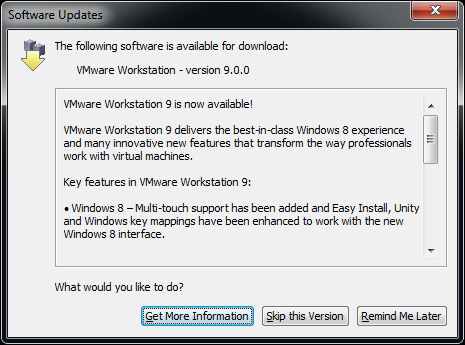
This morning, when starting VMware Workstation 8.0.4, it indicated that 9.0.0 was available.

No news on the VMware website (it still shows adverts for Workstation 8), nor on Wikipedia VMware Workstation page so is their auto-update system in an identity crisis or what?

Two links on VMware Workstation 9.0.0 Build 812388, but not sure if nsane is a good source of information. On the other hand, there is also news on the Bulgarian Kaldata about VMware Player 5.0.0 Build 812388.

Since VMware Player and Workstation share build numbers, and there has been a VMware Workstation Technology Preview 2012 for about 6 months, something could be in the midst of release in time zones where it is not yet 20120823.

VMware workstation checks https://softwareupdate.vmware.com/cds and https://ueip.vmware.com/, but I didn’t decrypt the traffic there yet.

Anyone with the latest official news on this?

Edit 20120823 0631UTC:

Two links I just found:

So yes, there was a temporary 2b || !2b crisis in the update service.

Edit 20120823 0711UTC:

Now it is 20120823 in California too, so now the VMware Workstation pages and VMware Workstation What”s new pages got updated and shows that VMware Workstation 9 is out.

This is the quote from the dialog on the right: Read the rest of this entry »

Posted in Power User, VMware, VMware Workstation | 1 Comment »

Solving the “Some projects have been bound to server locations that may be incorrect.” in Visual Studio 2010 when using Team Foundation System 2010 #VS2010 #TFS2010

Posted by jpluimers on 2012/08/23

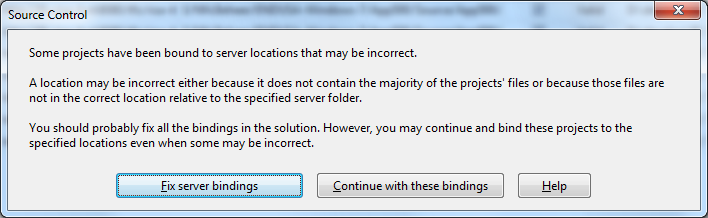
A while ago, I inherited a bunch of C# and VB.NET projects. One of them always generated the below error when including it in Team Foundation System (yes, the original projects were salvaged from Visual Source Shredder version 6.0c):

[Source Control]
Some projects have been bound to server locations that may be incorrect.
A location may be incorrect either because it does not contain the majority of the projects' files or because those files are not in the correct location relative to the specified server folder.
You should probably fix all the bindings in the solution. However, you may continue and bind these projects to the specified locations even when some may be incorrect.
[Fix server bindings] [Continue with these bindings] [Help]

First I tried the Help button: it links to a Help page on MSDN explaining the error can be cause with some statistics on projects not being in the source control system. Since all projects were, there, I looked for more information.

I tried finding a “Fix Server Bindings” or a 2010 “Some projects have been bound to server locations that may be incorrect” link that fitted my use case (getting projects from VSS into TFS), but the solutions I tried eventually all led to the same issue.

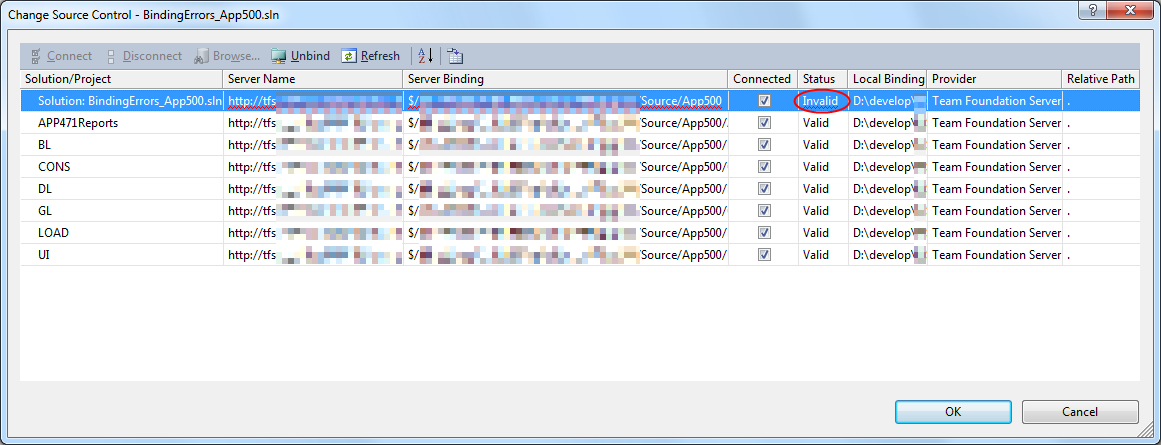
Fixing the server bindings would always fail: the solution (which itself is also a project) would get the status Invalid.

The next steps were these:

  1. add an empty solution in the same directory as the original one,
  2. add that solution to TFS
  3. add the projects from the original solution to this solution one by one
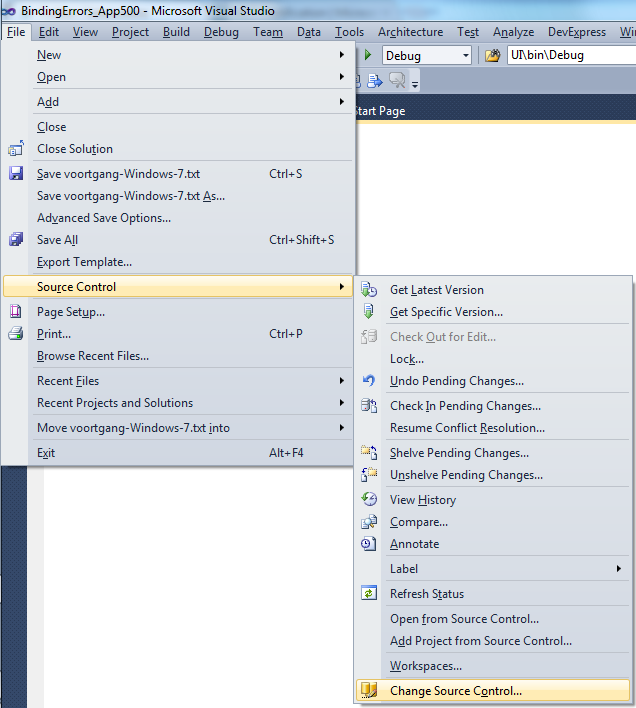
  4. check after each addition of the bindings were still OK using the “File”, “Source Control”, “Change Source Control” sequence on the right.
    (note that you don’t always see “Change Source Control”, if you don’t select the solution in the Solution Explorer before going to the File menu).
  5. text compare both .SLN solution files
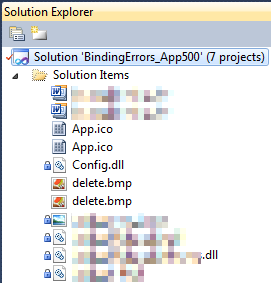
  6. observe that “Solution Items” actually is a project just like the others:
    Project("{2150E333-8FDC-42A3-9474-1A3956D46DE8}") = "Solution Items", "Solution Items", "{8D9964D4-6129-4B8F-9238-F9161A02B968}"
    ProjectSection(SolutionItems) = preProject
    ...
    Framework\Config.dll = Framework\Config.dll
    ...
    EndProjectSection
    EndProject
  7. add the existing solution item from the original solution to this solution one by one, check
  8. check after each addition of the bindings were still OK using the “File”, “Source Control”, “Change Source Control” sequence on the right.
    (note that you don’t always see “Change Source Control”, if you don’t select the solution in the Solution Explorer before going to the File menu).
  9. copy the non-existing solution items to the solution one by one using the text compare tool (yes, a lot of the projects are dirty and contain references to files that are not in the version control system)
    save after every copy, then reload the project in Visual Studio
  10. check after each addition of the bindings were still OK using the “File”, “Source Control”, “Change Source Control” sequence on the right.
    (note that you don’t always see “Change Source Control”, if you don’t select the solution in the Solution Explorer before going to the File menu).
  11. after a few files, suddenly the “Invalid” appeared, so the issue has to do with missing files.

Reading the Help more carefully, with in the back of my mind keeping “Solution Items” all as projects, I finally got the cause:

When some percentage of Solution Items cannot be found locally, and are not in the version control system, Visual Studio marks the solution binding to the version control system as “Invalid”.

The temporary solution is to ignore the error, until I have found all the missing files (they are scattered around some network shares), or made sure they are not needed at all.
There are many of those (you recognize them from the missing padlock icon in the Solution Explorer).

Version control rot is just like link rot, that’s why one of the high priority action items is to introduce for build automation at this client, then deploy those as clean builds into the Develop and Test stages of the DTAP, then verify if the solutions still work).

–jeroen

Posted in .NET, C#, C# 1.0, C# 2.0, C# 3.0, C# 4.0, C# 5.0, Development, Internet, link rot, Power User, Software Development, Source Code Management, TFS (Team Foundation System), VB.NET, Visual Studio 2010, Visual Studio and tools, WWW - the World Wide Web of information | Leave a Comment »

.NET/C#: Generating a WordPress posting categories page – part 2

Posted by jpluimers on 2012/08/22

In Generating a WordPress posting categories page – part 1, you learned how to

  1. get the HTML with all the category information from your WordPress.com blog,
  2. convert that to XHTML,
  3. generate an XSD for the XHTML,
  4. generate C# classes from that XSD

This episode, you will learn how the data read from the XHTML can be transformed to a simple tree in HTML suited for a posting categories page like mine.

In the final post, the same data will be transferred into a real category cloud with font sizes indicating the frequency of the category usage.

From there, you can go into other directions (for instance generating squarified treemaps from the data).

That’s the cool thing about data: there are many ways to visualize, and this series was meant – next to some groundwork on how to get the data – as inspiration into some forms of visualization.
Hope you had fun reading it!

Getting a HTML tree from the optionType items

                StringBuilder outputHtml = new StringBuilder();
                string rootUrl = args[1];
                foreach (optionType item in select.option)
                {
                    if (item.Level == optionType.RootLevel)
                        continue;

                    // <a style="font-size: 100.3986332574%; padding: 1px; margin: 1px;" title="XML/XSD (23)" href="https://wiert.me/category/development/xmlxsd/">XML/XSD</a>
                    string url = String.Format("{0}/category{1}", rootUrl, item.HtmlPath);
                    string prefix = new string('.', item.Level * 5);// optionType.NbspEscaped.Repeat(item.Level);
                    outputHtml.AppendFormat("{0}<a title="{2}" href="{1}">{2} ({3})</a>", prefix, url, item.Category, item.Count);
                    outputHtml.AppendLine();
                }

One way of generating an HTML tree, is to prefix every node with a series of dots corresponding with the level of that node. Not the most pretty sight, but it will suffice for this episode.

Inside each node, I want to show the Category and Count.

Since the optionType as generated from the XSD only contains the below properties, a major portion on this posting is how to decode the Value so we can generate HTML like this:

...............<a href='https://wiert.me/category/development/software-development/net/c-' title='C#'>C#&nbsp;(118)</a>
....................<a href='https://wiert.me/category/development/software-development/net/c-/c--2-0' title='C# 2.0'>C# 2.0&nbsp;(46)</a>
....................<a href='https://wiert.me/category/development/software-development/net/c-/c--3-0' title='C# 3.0'>C# 3.0&nbsp;(33)</a>
....................<a href='https://wiert.me/category/development/software-development/net/c-/c--4-0' title='C# 4.0'>C# 4.0&nbsp;(31)</a>
....................<a href='https://wiert.me/category/development/software-development/net/c-/c--5-0' title='C# 5.0'>C# 5.0&nbsp;(2)</a>

Decoding the optionType Value property

optionType only contains the these properties:

  1. class
    • the class used to reference the style in the stylesheet
    • example value: “level-4”
  2. value
    • internal unique WordPress ID for the category (this allows you to alter the Slug and Value without breaking the links between posts and categories
    • example value: “45149061”
  3. Value
    • string that WordPress uses to make the category combobox look like a tree structure
    • example value: “&nbsp;&nbsp;&nbsp;&nbsp;&nbsp;&nbsp;&nbsp;&nbsp;&nbsp;&nbsp;&nbsp;&nbsp;C# 5.0&nbsp;&nbsp;(2)”

The extra properties needed for the HTML generation logic above are these:

  1. Category
    • the Value undone from leading non breaking space character escapes, and the trailing count information
    • example value: C# 5.0
  2. Count
    • the Value undone from leading non breaking space character escapes, Caption information, separator non breaking space character escapes, and surrounding parenthesis
    • example value: 2
  3. Level
    • the class undone from the level- prefix
    • example value: 4
  4. Slug
    • the category slug is the unique value for a category that WordPress uses to form category urls. It is auto-generated from the Category, but you can also edit it. I don’t, as it is not in the combobox HTML, so I derive it from the Category. Note there are also posting slugs used in the permalink of each post.
    • example value: c--5-0 (it consists of lowercase letters and hyphens derived from the Category)
  5. HtmlPath
  6. parent (used internally for making the HtmlPath code much easier

The really cool thing about XSD2Code is that it generated the optionType C# code as a partial class.
Which means we can extend the generated partial classes in a seperate C# file like the code fragments below (you can download it from the WordPressCategoriesDropDown.cs file at BeSharp.CodePlex.com)

    partial class optionType
    {
        public const int RootLevel = -1;

        private const string slash = "/";
        private const char hyphen = '-';
        public const string NbspEscaped = "&nbsp;";
        private const string emptyCountInParenthesis = "(-1)";

        public optionType parent { get; set; }

        public string Category
        {
            get
            {
                string result;
                string countInParenthesis;
                splitValue(out result, out countInParenthesis);
                return result;
            }
        }

        public int Count
        {
            get
            {
                string category;
                string countInParenthesis;
                splitValue(out category, out countInParenthesis);
                string count = countInParenthesis.Substring(1, countInParenthesis.Length - 2);
                int result = int.Parse(count);
                return result;
            }
        }

        public int Level
        {
            get
            {
                if (string.IsNullOrWhiteSpace(@class))
                    return RootLevel;
                string[] split = @class.Split(hyphen);
                string number = split[1];
                int result = int.Parse(number);
                return result;
            }
        }

        /// <summary>
        /// This is the HTML part that WordPress uses to reference a Category
        /// </summary>
        public string Slug
        {
            get
            {
                StringBuilder result = new StringBuilder();
                foreach (char item in Category)
                {
                    if (char.IsLetterOrDigit(item))
                        result.Append(item.ToString().ToLower());
                    else
                        if (result.Length > 0)
                            result.Append(hyphen);
                }
                return result.ToString();
            }
        }

        public string HtmlPath
        {
            get
            {
                if (RootLevel == Level)
                    return string.Empty;

                string result = Slug;
                if (null != parent)
                    result = parent.HtmlPath + slash + result;
                return result;
            }
        }

        private void splitValue(out string category, out string countInParenthesis)
        {
            // might want to do this using RegEx, but that is a write-only language https://wiert.me/category/development/software-development/regex/
            string result = Value;
            int nbspCountToStripFromLeftOfValue = Level * 3; // strip 3 &nbsp; for each Level
            for (int i = 0; i < nbspCountToStripFromLeftOfValue; i++)
            {
                int nbspEscapedLength = NbspEscaped.Length;
                if (result.StartsWith(NbspEscaped))
                    result = result.Substring(nbspEscapedLength, result.Length - nbspEscapedLength);
            }
            string doubleNbspEscaped = NbspEscaped + NbspEscaped;
            if (result.Contains(doubleNbspEscaped))
            {
                string[] separators = new string[] { doubleNbspEscaped };
                string[] split = result.Split(separators, StringSplitOptions.None);
                category = split[0];
                countInParenthesis = split[1];
            }
            else
            {
                category = result;
                countInParenthesis = emptyCountInParenthesis;
            }
        }

        public override string ToString()
        {
            string result = string.Format("Level {0}, Count {1}, Slug {2}, HtmlPath {3}, Category '{4}'", Level, Count, Slug, HtmlPath, Category);
            return result;
        }
    }

The bulk of the above code is in the splitValue method (that could have used RegEx, but I try to avoid RegEx when I can do without it).
Note that the HtmlPath propererty uses the parent property. Without it, the HtmlPath code would have been very complex. The value of the parent properties for all optionType instances is generated in the selectType.FixParents method below since the selectType instance contains all the optionType instances in its’ option property.

    partial class selectType
    {
        public void FixParents()
        {
            Stack<optionType> itemStack = new Stack<optionType>();
            optionType parent = null;
            int previousLevel = optionType.RootLevel;

            foreach (optionType item in option)
            {
                int itemLevel = item.Level;
                if (itemLevel == previousLevel)
                {
                    if (optionType.RootLevel != itemLevel)
                    {
                        itemStack.Pop();
                        item.parent = parent;
                    }
                    itemStack.Push(item);
                }
                else
                {
                    if (itemLevel > previousLevel)
                    {
                        parent = itemStack.Peek();
                    }
                    else
                    {
                        do
                        {
                            itemStack.Pop();
                            parent = itemStack.Peek();
                            previousLevel = parent.Level;
                        }
                        while (previousLevel >= itemLevel);
                    }
                    itemStack.Push(item);
                    item.parent = parent;
                    previousLevel = itemLevel;
                }
            }
        }
    }

–jeroen

Posted in .NET, C#, C# 4.0, C# 5.0, Development, LINQ, Software Development, Usability, User Experience (ux), Web Development, WordPress, WordPress, XML, XML escapes, XML/XSD, XSD | 4 Comments »

INFORMATION_SCHEMA views in various databases

Posted by jpluimers on 2012/08/21

Few people know about the INFORMATION_SCHEMA views that have been there since SQL-92.

Two funny things about that standard:

A few reasons I can imagine not many people know about the INFORMATION_SCHEMA:

  • Not all relational database servers implement them, and of the ones that do implement them, not all versions implement all views.
    That’s what this article is about; currently it lists only SQL Server 2000 and 2008 R2 (tried both) and PostgreSQL (verified docs), but I will update it as soon as I have run the script on other versions of SQL server and database vendors.
  • It is hard to find the official ISO standards in a public way, and ISO itself sometimes puts things online, and at other times wants money for it

    I remember the Y2K preparation era where the ISO-8601 standard was freely available at http://www.iso.ch/markete/8601.pdf, soon after the Year 2000, the PDF got locked behind a payment engine.
    ISO suffers from heavy link rot too, for instance the ISO 3166 country codes used to be at http://www.iso.org/iso/prods-services/iso3166ma, but are now at http://www.iso.org/iso/home/standards/country_codes.htm. What about HTTP 303 or 302 redirect here guys?

Since SQL-92, the INFORMATION_SCHEMA (and its twin DEFINITION_SCHEMA) have been extended. The last extension in 2008. Together they allow SQL databases to be self-describing (I think no vendor has attained that) and the structures queryable in a standard way

In fact that is the main purpose: these views in INFORMATION_SCHEMA are a very convenient standard way to query – in a vendor agnostic way – about tables, views, columns, etc. Read the rest of this entry »

Posted in Database Development, Development, Firebird, InterBase, ISO 8601, MySQL, OracleDB, PostgreSQL, Power User, SQL, SQL Server, SQL Server 2000, SQL Server 2005, SQL Server 2008, SQL Server 2008 R2, SQL Server 2012, SQL Server 7, Sybase | Leave a Comment »

Recommended reading: “97 Things Every Programmer Should Know” – Programmer 97-things

Posted by jpluimers on 2012/08/21

Every so often, I come across a pearl that I hand’t read before. This time I was looking for the source of “nothing is more permanent than a temporary solution”, and somehow came across the book 97 Things Every Programmer Should Know.

It is full of interesting concepts phrased in easy to read chapters on important things like “Code in the Languae of the Domain“, “Don’t Repeat Yourself” and many (95 <g>) others.

For a small introduction, read the PDF presentation extract, and the 97 things website.

–jeroen

via: 97 Things Every Programmer Should Know – Programmer 97-things.

Posted in .NET, Delphi, Development, Software Development | 2 Comments »

Download: Office 2003 Update: Redistributable Primary Interop Assemblies – Microsoft Download Center – Confirmation

Posted by jpluimers on 2012/08/20

Hoping this is the most recent version: Download: Office 2003 Update: Redistributable Primary Interop Assemblies – Microsoft Download Center – Confirmation.

http://download.microsoft.com/download/8/3/a/83a40b5a-5050-4940-bcc4-7943e1e59590/O2003PIA.EXE

–jeroen

Posted in .NET, Development, Software Development | Leave a Comment »