The Wiert Corner – irregular stream of stuff

Jeroen W. Pluimers on .NET, C#, Delphi, databases, and personal interests

  • My badges

  • Twitter Updates

  • My Flickr Stream

  • Pages

  • All categories

  • Enter your email address to subscribe to this blog and receive notifications of new posts by email.

    Join 1,854 other subscribers

Archive for 2015

Installing the PIXMA mini260 – Canon Europe drivers under Windows 8.1 x64 – trying to say goodbye to Windows XP

Posted by jpluimers on 2015/02/23

Ditching Windows XP meant finding drivers for some older devices.

One of them is a [Archive.is] Canon PIXMA mini260 Photo Inkjet Printer which prints marvellous photos in a borderless way (so no post processing needed).

Installing drivers on Windows 8.1 x64 turned out to be really easy despite the fact that the Canon site does not offer them:  just install the “Windows Vista (64-bit)” drivers from this Canon link: [Wayback] PIXMA mini260 – Canon Europe.

This works as the printer driver model hasn’t changed much since Vista and the Vista drivers do not contain limits on future version numbers (see [Wayback] Getting older Windows drivers to work in Windows 8 for another example).

Now I need to find a way to get my [Archive.is] Olympus Camedia P-400 Digital Color Photo Printer. That is a lot harder: the most recent Windows P-400 Printer > Software Downloads are for Windows XP.

If anyone knows a workaround for this, I might connect this to an XP VM in a walled garden:

Under Windows XP, often the P-400 driver installer didn’t even want to install the USB part of the drivers.

How can I work around this?

Might it be that only the parallel LPTENUM is included in the [Wayback] Windows XP P400N.inf file, unlike the [Wayback] Windows 2000 driver P400N.INF file that contains both [Wayback] LPTENUM and [Wayback] USBPRINT and the [Wayback] P-440 INF file only has USBPRINT?

Other vendors seem to include both in their .INF files like this [Wayback] Dell 3130cn INF file.

–jeroen

via:

Posted in Power User, Vista, Windows, Windows 7, Windows 8, Windows 8.1, Windows 9, Windows Vista, Windows XP | Leave a Comment »

“PC Decrapifier” – via: Machines Plus Minds: Regarding Lenovo preinstalling SSL-breaking MITM on their machines

Posted by jpluimers on 2015/02/21

I didn’t even know there was a “PC Decrapifier”, but it exists: “PC Decrapifier” – Google Search.

Anyway: never use OEM Windows installs ever.

Would the Dutch Microsoft Store offer the same service?

–jeroen

via: Machines Plus Minds: Regarding Lenovo preinstalling SSL-breaking MITM on their machines.

Posted in Power User, Security, Windows | Leave a Comment »

[NL] Crucial BX100- en MX200-ssd Review commentaar: Samsung EVI 850 een serieus alternatief – Tweakers

Posted by jpluimers on 2015/02/21

Grappig in het Crucial review commentaar:

Kijk je naar de MX200 vs Evo 850 dan krijg je bij Samsung 5 ipv 3 jaar garantie, significant betere prestaties en een software suite met onder andere secure erase, overprovisioning en 1click optimalzatie settings voor Windows.

–jeroen

via Crucial BX100- en MX200-ssd Review – Conclusie: meer concurrentie – Tweakers.

Posted in Hardware, Power User, SSD | Leave a Comment »

The way a wiki should work: List of Delphi language features and version in which they were introduced/deprecated – Stack Overflow

Posted by jpluimers on 2015/02/21

This is the way a wiki should work:

List of Delphi language features and version in which they were introduced/deprecated – Stack Overflow.

Thanks Simon Stuart for asking, and many others (especially Johan) for providing the info.

Note the version that is missing (;

–jeroen

Posted in Delphi, Delphi 1, Delphi 2, Delphi 2005, Delphi 2006, Delphi 2007, Delphi 2009, Delphi 2010, Delphi 3, Delphi 4, Delphi 5, Delphi 6, Delphi 7, Delphi XE, Delphi XE2, Delphi XE3, Delphi XE4, Delphi XE5, Delphi XE6, Delphi XE7, Development, Software Development | Leave a Comment »

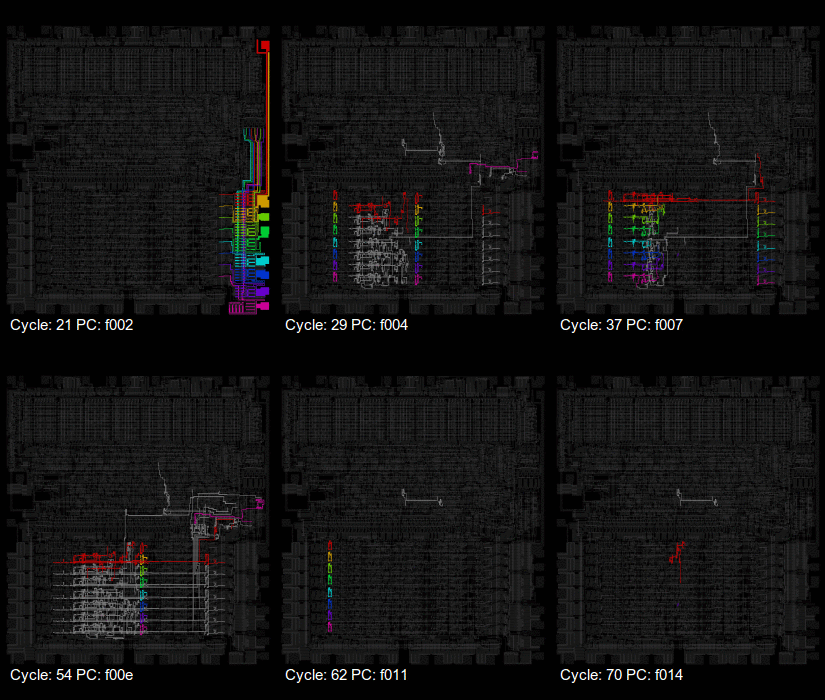
Visualisation of the 6502; awesome pictures – via: mos6502 – Google+

Posted by jpluimers on 2015/02/21

visual6502 pictures via: mos6502 – Google+.

I’ve edited their post below to embed all the links.

–jeroen

Original post with embedded links and edited for readablity:

This week, a new visualisation of the 6502, upcycled from an old favourite. Xray6502 uses the data from the visual6502 project to animate the flow of data values around the chip in rainbow colours. Wladimir has put the code up on github[1], and shared some animations on the 6502 forums too – see our featured link.

You may know that visual6502 is a transistor-level simulation of the NMOS 6502 for your browser.  We still see it referenced from time to time[2][3], to explore the circuit and to illustrate exact cycle by cycle behaviour of the chip, and also used to teach the workings of microprocessors in universities[4…7].  It first saw daylight when Greg James presented his findings at SIGGRAPH back in 2010[8], but Greg had been tracing the circuit for much of the previous year. Barry and Brian Silverman had been constructing the circuit simulator and the presentation as a web site. Later that year visual6502.org went live, and went through a series of performance improvements, enhancements and a few bug fixes. It now hosts several simulations, a wiki of notes about the 6502, and several other die photos.

Because visual6502 is open source, it’s been used before for related projects: Michael Steil has published perfect6502[9] which is a C port of the simulation.  Elsewhere we find visual2A03[10] which expands the simulation to the CPU chip in the NES. (But note, to save on duplicated effort, this is a real 6502 simulated, not the one with decimal mode ripped out[11] which is actually in the chip.)

Now Wladimir joins in, with this data-tracing visualisation – what can we expect next?  Have you played with your visual6502 today?

via mos6502 – Google+.

Posted in 6502 Assembly, Assembly Language, Development, Power User | Leave a Comment »

G+ now has completely stopped working: “Unusual traffic from your computer network” – Search Help

Posted by jpluimers on 2015/02/21

This is getting ridiculous: G+ now completely stopped working. No CAPTCHA every couple of seconds after my laptop wakes up, but the screenshot below.

The  “Unusual traffic from your computer network” – Search Help isn’t helping much either.

My computer isn’t sending automated queries. The Google related tabs (some 50+) in Chrome are, as they frantically try to refresh themselves when my laptop wakes up.

This is a Google and Chrome design decision:

  • each tab runs in a separate process
  • each tab keeps being active even when not visible
  • Google chooses to have each Google related tab to talk to Google Plus

It’s not my choice that this overloads the G+ system, so don’t bug me with that!

–jeroen


Posted in G+: GooglePlus, Google, Power User, SocialMedia | Tagged: , | 2 Comments »

Liz Kimber: My first computer, is responsible for who i am today.

Posted by jpluimers on 2015/02/21

Liz Kimber hits the nail on the head:

My first computer, is responsible for who i am today.

That’s one of the reaons I bought both an Applle //e and //c last summer (:

–jeroen

via: Alen Cox’ computer history reshare – Google+.

Posted in //e, About, Apple, Apple ][, Personal, Power User | Leave a Comment »

Binary builds of Win64 and Win32 OpenSSL (via: Shining Light Productions)

Posted by jpluimers on 2015/02/20

The quickest way to get Win64 and Win32 binary builds of the youngest OpenSSL, you should get them from Shining Light Productions – Win32 OpenSSL.

Despite the link name, you can get the Win64 binaries from there too..

Besides binaries, they also have the source to build them from, and any other redistributable you’d need.

They run on virtually any Windows version, though I only used them on NT based Windows versions of XP/2003 and younger.

Two notes:

  • you usually need the Visual C++ 2008 redistributables, of which there is both an x86 and an x64 version (the OpenSSL installer just tells you it is missing, and assumes you know if it is the x86 or x64 one).
  • unless you are a software developer wanting to link to OpenSSL, the “Light” versions of the installs suffice.

–jeroen

via: Shining Light Productions – Win32 OpenSSL.

Posted in OpenSSL, Power User, Security, Windows, Windows 7, Windows 8, Windows Server 2000, Windows Server 2003, Windows Server 2003 R2, Windows Server 2008, Windows Server 2008 R2, Windows Vista, Windows XP | 1 Comment »

One line browser notepad (via: Jose Jesus Perez Aguinaga)

Posted by jpluimers on 2015/02/19

Smart, it works in any modern html5 capable browser:


data:text/html, <html contenteditable>

Be sure to look at the blog post and comments at Jose Jesus Perez Aguinaga : One line browser notepad as they explain why this works, and how to extend it in a couple of really smart way.

–jeroen

via: Jose Jesus Perez Aguinaga : One line browser notepad.

Posted in Chrome, Development, Firefox, HTML, HTML5, Internet Explorer, Opera, Power User, Safari, Software Development, Web Browsers, Web Development | 1 Comment »

Mac OS X: Replicating md5sum Output Format (via: Raam Dev)

Posted by jpluimers on 2015/02/18

Mac OS X has md5, but no md5sum.

I agree with Mac OS X: Replicating md5sum Output Format that the second way of emulating md5 is better than the first one.

So here it is:


#!/bin/bash
/sbin/md5 -r "$@"

view raw

md5sum.bash

hosted with ❤ by GitHub

–jeroen

via: Mac OS X: Replicating md5sum Output Format – Raam Dev

Posted in Apple, bash, Development, Hashing, Mac, Mac OS X / OS X / MacOS, Mac OS X 10.4 Tiger, Mac OS X 10.5 Leopard, Mac OS X 10.6 Snow Leopard, Mac OS X 10.7 Lion, MacBook, MacBook Retina, MacBook-Air, MacBook-Pro, md5, OS X 10.8 Mountain Lion, Power User, Scripting, Security, Software Development | Leave a Comment »