The Wiert Corner – irregular stream of stuff

Jeroen W. Pluimers on .NET, C#, Delphi, databases, and personal interests

  • My badges

  • Twitter Updates

  • My Flickr Stream

  • Pages

  • All categories

  • Enter your email address to subscribe to this blog and receive notifications of new posts by email.

    Join 1,860 other subscribers

Archive for January, 2016

Default ID and Password on a 9500 MFP device – HP Support Forum – 126122

Posted by jpluimers on 2016/01/11

If I ever need to perform a COLD RESET of my HP CLJ9500, then these are the steps to follow, thanks sm00257 for posting them, same for the post by Kenneth Chan_2. Both quoted the service manual page 99.

You can choose to reset the HP JetDirect as well (either remove it so it won’t get reset or keep it in place to get it reset).

Cold reset

The cold reset clears all data from the printer memory and returns all of the defaults to the factory settings.

CAUTION Performing a cold reset resets the Jetdirect print server configuration. To avoid making changes to your network configuration, remove the HP Jetdirect print server before performing a cold reset.

Note The HP color LaserJet 9500mfp uses numeric buttons to accomplish the functions of the arrow and select buttons on the HP color LaserJet 9500 printer. On the MFP use the numeric button 3 as UPARROW, numeric button 5 as RETURN , numeric button 6 as TICK, and numeric button 9 as DOWNARROW on the MFP.

Note If possible, print a configuration page and menu map before performing a cold reset. This documents the current settings for later reference.

To perform a cold reset

  1. Turn off the printer, and then turn the printer on again.
  2. Press and hold TICK (the 6 button on the MFP) during the memory count.
  3. Continue to hold TICK (the 6 button on the MFP) until all three control panel lights illuminate steadily, and then release TICK (the 6 button on the MFP).
  4. When SELECT LANGUAGE appears on the control panel, press DOWNARROW (the 9 button on the MFP).
  5. COLD RESET appears.
  6. Press TICK (the 6 button on the MFP) while COLD RESET appears on the control panel. The cold reset is complete.

–jeroen

via:

Posted in Power User | Leave a Comment »

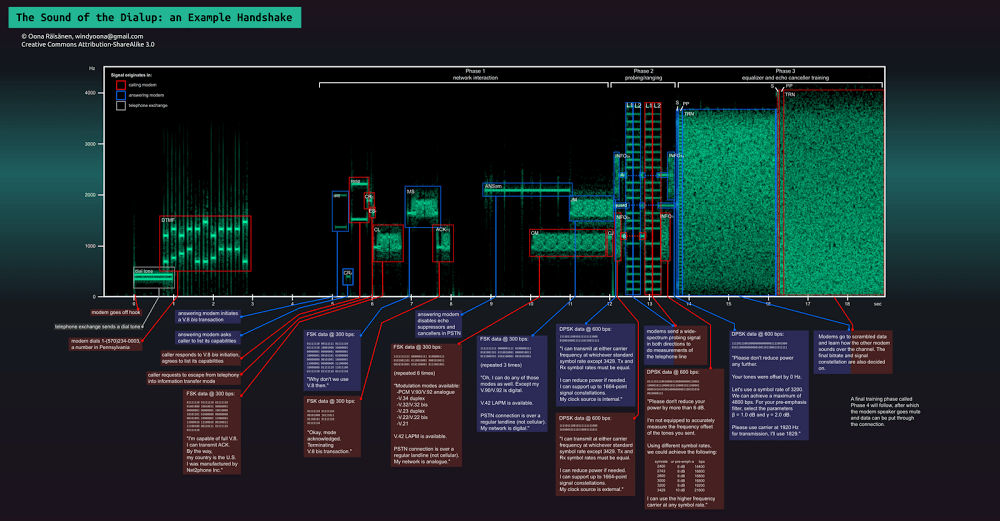
The Sounds of Dialup Modems and Related Equipment

Posted by jpluimers on 2016/01/10

While researching how to record analog PSTN call recording:

Via:

Edit 20250318: added Wayback/Archive archived links for the first three bullets above.

--jeroen

Posted in History, Power User, PSTN, Telephony | Leave a Comment »

Anyone knows an easy way to record PSTN calls at the line level? I’ve a probl…

Posted by jpluimers on 2016/01/09

Earlier I asked “Anyone knows an easy way to record PSTN calls at the line level?I’ve a problem with a PSTN device and want to listen in on what’s happening at the line…”

A few things I’ve found so far that should get me going:

–jeroen

Sources:

Posted in Power User, PSTN, Telephony | Leave a Comment »

Fighting with IPv6 – There and back again

Posted by jpluimers on 2016/01/09

Interesting:

During the last weeks I finally got my hands dirty with IPv6. A comment on my blog and an email informed me that my server (hosting this blog) is not reachable via IPv6, albeit it has an IPv6 address. That said, I tried to get that running and fell into several holes, due to firewalls, […]

Source: Fighting with IPv6 – There and back again

Posted in *nix, *nix-tools, Apache2, iptables, Linux, Power User | Leave a Comment »

TomTom RDS-TMC Antennas FAQ

Posted by jpluimers on 2016/01/08

Too bad my TomTom XXL IQ 540SWE won’t work with a model 4V00.014 RDS/TMC FM antenna (which sits in-between the USB charger cable and the TomTom)

That would have been a really nice way to get rid of some of the cabling in the car.

Model 4UUC.001.01 does work (but has a 12V plug).

These models should work:

3. The USB version :

More recent version, but slower than the jack version. Note also that there are 2 versions available depending on your location :
– 4V00.014 or 9V00.101 which is the Europe-Australia version working on FM band.

4. The combined car charger with traffic receiver :

– 9UUC.002.00 (part number on box is 9UUC.002.00 and part number on item is 4UUC.001.01) which is the part number sold in Europe-Australia.
– 9UUC.052.02 which is the part number sold in North America.

7. Alternate solution, non TomTom : The GNS Traffic box.

I might resort to cutting open the 4UUC.001.01 model and get rid of the 12V plug.

See this video:

Inside the TomTom RDS-TMC Traffic Receiver

Here is information about how you can modify your TomTom RDS-TMC traffic receiver for a hardwired installation. Use this information at your own risk. Have fun.

https://www.youtube.com/watch?v=5eYMzUcyII0

–jeroen

Source: TomTom RDS-TMC Antennas FAQ

Posted in LifeHacker, Navigation, Power User, TomTom | Leave a Comment »

hp clj9500 59.A0 Error – HP Enterprise Business Community

Posted by jpluimers on 2016/01/08

If my HP CLJ 9500 ever again gets the 59.A0 PRINTER ERROR the below helps by [Wayback/Archive] Seif.

For me the first half of the first step worked (remove the toner bottle, reseat the cleaning blade, put back the toner bottle).

If that fails, here are all of them:

  1. Reseat the cleaning blade, and ITB.
  2. Defeat the Toner Bottle flag and run without a Cleaning Blade to determine if the blade is causing the motor to stop or not.
  3. Remove ITB and verify that it rotates freely.
  4. Remove back and right side skins, and cover over the ITB motor – verify that the ITB drive assembly rotates freely. Verify that the ITB motor pinion is located correctly on the motor shaft (aligned with the second gear in the train).
  5. Remove the Image Transfer Roller, and pull the white gear off of the end of it. Verify that the drive train for this roller moves freely by removing the ITB, the HVPS, and turning the registration motor by hand while watching the gear train to the T2 roller for binding.
  6. Verify signal connectors between the ITB motor and DC Controller, particularly the FFC between the Process-driver and the DC controller.
  7. Check connector on lower right hand side (nearest 2 capacitors) for a solid connection. This connector goes to the HVPS.
  8. Replace the motor assembly.
  9. Replace the DC Controller.
  10. Replace the Image Drum Drive PCB Board

–jeroen

Edit 20231021: updated archival links; added related and queries sections

via:

Related:

Queries:

Posted in Power User | Leave a Comment »

World’s #0 Programmer Mug Basic White Mug | Zazzle

Posted by jpluimers on 2016/01/07

World’s #0 Programmer Mug Basic White Mug | Zazzle (and other mugs with quotes).

via: Anyone up for this mug?.

World's #0 Programmer Mug Basic White Mug

World’s #0 Programmer Mug Basic White Mug

Posted in Fun, Quotes | Leave a Comment »

In Memoriam: Peter Naur 1928-2016 | News | Communications of the ACM

Posted by jpluimers on 2016/01/06

Just learned that Peter Naur, a Danish computer scientist and 2005 recipient of the ACM A.M. Turing Award, died January 3 after a brief illness.

In memoriams:

Peter was the N in BNF; some more background info:


Posted in Development, History, Software Development | Leave a Comment »

Nikon D5 detailed specifications: CF and XQD versions confirmed | Nikon Rumors

Posted by jpluimers on 2016/01/06

D5 (CF-Type): 1415g

Too bad the price (USD 6500) is a bit prohibitive for me (:

Source: Nikon D5 detailed specifications: CF and XQD versions confirmed | Nikon Rumors

Posted in Uncategorized | Leave a Comment »

Figuring out Windows Registry Permissions: AccessCheck

Posted by jpluimers on 2016/01/06

I had to verify the rights on some parts of the registry were the same for a lot of machines. So I used AccessChk by SysInternals.

If there were difference, my plan was to use REGINI to fix them.

It appears that AccessCheck does not show the permissions for objects within the specified path, not for the path itself.

As I observed that

accesschk -k hklm\software\Microsoft\Windows\Shell

does not reveal results.

But

accesschk -k hklm\software\Microsoft\Windows

shows:

Read the rest of this entry »

Posted in Batch-Files, Development, Power User, Scripting, Software Development, Windows, Windows 7, Windows 8, Windows 8.1, Windows Server 2003, Windows Server 2003 R2, Windows Server 2008, Windows Server 2008 R2, Windows Server 2012, Windows Server 2012 R2 | Leave a Comment »