The Wiert Corner – irregular stream of stuff

Jeroen W. Pluimers on .NET, C#, Delphi, databases, and personal interests

  • My badges

  • Twitter Updates

  • My Flickr Stream

  • Pages

  • All categories

  • Enter your email address to subscribe to this blog and receive notifications of new posts by email.

    Join 1,854 other subscribers

Archive for 2017

A start job is running for dev-disk-by\… – Google Photos – Jeroen Wiert Pluimers – Google+

Posted by jpluimers on 2017/08/17

Reproduction of A start job is running for dev-disk-by... – Google Photos / Oops. Let’s see if I can reproduce it, as I think this is related: https://…

Reproducible steps below.

Related:

Tried tips from last link: fails as well

These are the modifications of the steps further on based on the last link above.

  1. After first boot, verify the WiFi drivers are there:

# rpm -qa | grep bcm43xx
bcm43xx-firmware-20170410-2.1.noarch

  1. After editing /etc/dracut.conf.d/raspberrypi_modules.conf, perform sudo mkinitrd without any -f
  2. After reboot, same error

Error result

At boot time:

A start job is running for dev-disk-by\…

After waiting:
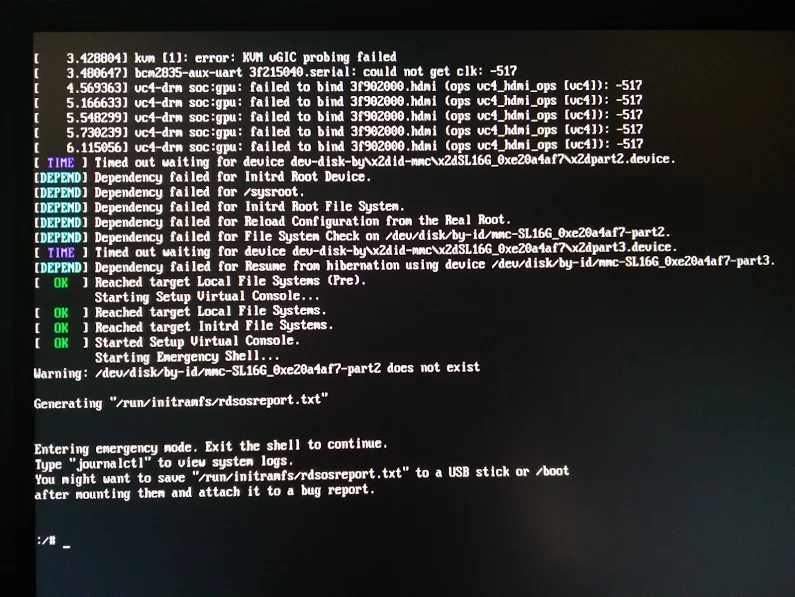
Reproducible steps

  1. download (or a more recent one) from http://download.opensuse.org/repositories/devel:/ARM:/Factory:/Contrib:/RaspberryPi3/images/ :
  2. Install them on a MicroSD card
  3. Put in Raspberry Pi 3 and boot
  4. Get the IP address of the machine, then SSH into it (ssh root@ip-address, password linux)
  5. Follow the steps from [WayBackopenSUSE on Raspberry Pi 3: From Zero to Functional System in a Few Easy Steps – SUSE Blog | SUSE Communities to get WiFi working:
    1. Edit /etc/dracut.conf.d/raspberrypi_modules.conf and remove the sdhci-iproc from the first and # on the last line:From :
      add_drivers+=" sdhci-iproc bcm2835-sdhost bcm2835_dma mmc_block dwc2 "
      # Workaround for Wifi
      #omit_drivers+=" sdhci-iproc"

      To :

      add_drivers+=" bcm2835-sdhost bcm2835_dma mmc_block dwc2 "
      # Workaround for Wifi
      omit_drivers+=" sdhci-iproc"
    2. Run these commands:
      mkinitrd -f
      reboot
    3. Check in Yast if wlan0 exists in System -> Network Settings, then assign an SSIS plus credentials to it
      1. Verify the list contains BCM43430 WLAN card
      2. Select it
      3. Click the Edit button
      4. Put the check mark next to Dynamic Address then select DHCP and the kind of DHCP (in my caseboth version 4 and 6)
      5. Click the Next button
      6. Keep Operating Mode as Managed
      7. Click the Scan Network button
      8. Select Network Name (ESSID) from the list
      9. Select Authentication Mode from the list
      10. Put the check mark for Key Input Type as Passphrase
      11. Enter the Encryption Key
      12. Click the Next button
      13. Click the OK button
      14. Quit Yast
      15. Wait a few moments, then very with ip a that wlan0 got an IP address
  6. Update the system:
    zypper refresh
    zypper dist-upgrade
  7. Reboot
  8. Wait for the error to occur on the HDMI screen (USB keyboard does not work there, so I cannot copy logs)

Gist log until 7. is below.

IRC chat transcript opensuse-factory

10:40am<wiertIs there anyone of the dev team here with a RPi3 that can see if my steps at https://wiert.me/2017/08/17/a-start-job-is-running-for-dev-disk-by-google-photos-jeroen-wiert-pluimers-google/ reproduce?
10:40amwiertTL;DR: Tumbleweed on Rpi3; enable WiFi according to site and forum instructions; zypper dist-upgrade; boot failure.
10:41amwiertwithout enabling WiFi everything is fine.
10:41amwiertspare RPi3s get in next week, so I’ll configure this one for my brother without WiFi for now.
10:43amfvogtHm, that guide can’t actually work that way (unless something changed significantly)
10:43amwiertit worked in the sense that it got WiFi working. it failed in the sense that you cannot upgrade any more (:
10:43amfvogtThe omit_drivers line removed the driver for the sd card controller, so it’s no surprise that it doesn’t boot anymore. It needs a different device tree
10:44amfvogtI guess you upgraded the kernel + DT? You must not do that
10:44amwiertfunny as after the mkinitrd, a reboot went fine.
10:44amwiertit’s only that after a zypper dup it fails.
10:44ammnowak__DimStar, I wan’t $$ only on Windows, I should not have to re-define $prompt_sign. I guess I need to move the second $prompt_sign to the if-clause below
10:45amfvogtwiert: Ah, so it ships with a WiFi enabled DT + Kernel with the TW image
10:45amfvogtIf you zypper dup then, it’ll switch to the DT + Kernel from plain TW, breaking everything
10:46amwiertWhat’s DT?
10:46amwiertdriver-tree?
10:46amfvogtClose, device-tree
10:46amwiert(that gist has all the steps I performed)
10:46amfvogtIt contains the assignment of memory and other HW resources to each other and drivers
10:47amfvogtwiert: “dtb-broadcom  obs://build.opensuse.org/devel:ARM -> openSUSE”
10:47amfvogtThat’s most likely the issue
10:48amfvogtYou can recover from that by downloading the right .dtb file and putting it on the sd card manually
10:48amfvogtAlternatively, the u-boot embedded one should still work, so you can delete the DT on the SD and it should boot again (with some missing peripherals though)
10:51amwiertI’ve already put a fresh disk image on it and I’m in the midst of configuring it for my brother (he’s mentally retarded and I’m putting it behind his TV so he can view his agenda electronically to see if that gives him more stability in organising his life; I need to be at his place in 2 hours)
11:27amwiert@fvogt: I will add this part of the IRC chat to that blog post and try to get your suggestions done when the spare RPI3s get in.

–jeroen

Read the rest of this entry »

Posted in *nix, Development, Hardware Development, Linux, openSuSE, Power User, Raspberry Pi, SuSE Linux, Tumbleweed | Leave a Comment »

SSD TRIM check tool | CyberShadow’s blog

Posted by jpluimers on 2017/08/17

SSD TRIM check tool | CyberShadow’s blog [WayBack] has source code on github:

trimcheck – SSD TRIM check tool for Windows

Source: CyberShadow/trimcheck: SSD TRIM check tool for Windows

It’s written in D using rdmd as compiler.

–jeroen

via via.


Posted in D, Development, Hardware, Power User, Software Development, SSD, Trim, Windows | 1 Comment »

Great diagram on composing a LINQ query – via Mastering C# – CodeProject

Posted by jpluimers on 2017/08/17

One of the best to graphs diagrams of LINQ I know is in Mastering C# – Lecture Notes Part 2 of 4 – CodeProject [WayBack]

The LINQ explanation in that article [WayBack] is top notch as well. Thanks Florian Rappl [WayBack]!

–jeroen

Posted in .NET, C#, C# 2.0, C# 3.0, C# 4.0, C# 5.0, C# 6 (Roslyn), Development, Software Development | Leave a Comment »

Closed: HDD Guardian – Home

Posted by jpluimers on 2017/08/16

Too bad: it was fun while it lasted.

Mid april 2017 [WayBackHDD Guardian – Home closed down, so the latest commit removed all the [WayBackHDD Guardian – Source Code.

HDD Guardian provides a Windows front-end for smartctl, a utility which monitors your hard drive(s) and SSD(s) for health status, taking advantage of S.M.AR.T.

The WayBack machine and Archive.is have archived some links though:

Anyone interested in getting it before codeplex itself shuts down:

git svn clone https://hddguardian.svn.codeplex.com/svn

Edit 20210909:

Note that a while ago, the salvaged source code got pushed to GitHub: [Wayback/Archive.is] native-api/hddguardian: A GUI app to watch and manage HDDs’ S.M.A.R.T., based on smartmontools. Salvaged from https://hddguardian.codeplex.com

–jeroen

Posted in .NET, Development, Power User, Software Development, VB.NET, Windows | Leave a Comment »

What is the right way to convert into UNIX timestamp from the date and time in C/C++? – Stack Overflow

Posted by jpluimers on 2017/08/16

Thanks R.. for answering this:

POSIX has a formula for exactly what you want:

http://pubs.opengroup.org/onlinepubs/9699919799/basedefs/V1_chap04.html#tag_04_15 [WayBack]

tm_sec + tm_min*60 + tm_hour*3600 + tm_yday*86400 +
    (tm_year-70)*31536000 + ((tm_year-69)/4)*86400 -
    ((tm_year-1)/100)*86400 + ((tm_year+299)/400)*86400

This works whenever you have a broken-down time in GMT, even if the underlying system’s mktime, etc. functions do not use the same format time_t as “Unix timestamps”.

If your original time is in local time, you can use mktime and gmtime to convert it to GMT using the system’s notion of timezone rules. If you want to apply your own timezone offset rules, just do that manually before using the above formula.

Source: What is the right way to convert into UNIX timestamp from the date and time in C/C++? – Stack Overflow [WayBack]

For testing and more examples: Epoch Converter – Unix Timestamp Converter [WayBack]

Hopefully this will help me getting better implementations for these:

–jeroen

Posted in Algorithms, C, C++, Development, Software Development | Leave a Comment »

Why doesn’t RevertToSelf undo the most recent SetThreadToken? | The Old New Thing

Posted by jpluimers on 2017/08/16

Oops: I fell in this trap as well: When you call Set­Thread­Token, [WayBack] it replaces the token. When you call Revert­To­Self [WayBack], the token is cleared and the thread no longer has a token. Maybe Revert­To­Self should have been named Clear­Thread­Token, since that would emphasize that the function erases any existing thread token, leaving the thread to inherit the identity of its host process.

Source: Why doesn’t RevertToSelf undo the most recent SetThreadToken? | The Old New Thing [WayBack]

–jeroen

Posted in Development, Software Development, The Old New Thing, Windows Development | Leave a Comment »

Some links on Belise/Elise licensing server (yes, AppWave is dead or at least: should be)

Posted by jpluimers on 2017/08/15

Some links on the Embarcadero License Center server (formerly known as Belise and Elise) from my contributions to these G+ threads:

When for instance your workstations cannot communicate to the external license servers or you want to run concurrent Delphi/C++-Builder/RAD-Studio instances on your local network, you need to run the Elise licensing server on your network, which requires you to have a server with Java running somewhere.

URL Title
http://docwiki.embarcadero.com/ELC/en/Obtaining_License_Files [WayBackObtaining License Files – ELC
http://docwiki.embarcadero.com/ELC/en/Installing_the_Embarcadero_License_Center [WayBackInstalling the Embarcadero License Center – ELC
http://support.codegear.com/article/43557 [WayBackDelphi, C++Builder, RAD Studio XE5 Update 2 install for network licenses
http://license.embarcadero.com/lservers/elise.jsp [WayBackEmbarcadero License Center Setup
http://support.codegear.com/article/36588 [WayBackEmbarcadero License Server overview
http://support.codegear.com/license [WayBackLicense Server
https://docs.bmc.com/docs/display/Configipedia/Borland+License+Server [WayBackBorland License Server – Configipedia – BMC Documentation
http://borland.public.jbuilder.enterprise.narkive.com/dk5UBkGc/borland-license-server-instalation [WayBackBorland License Server Instalation

Despite some of the documentation, it runs on more recent Windows versions too.

Not sure about the money: it’s just that a few clients of mine use it as it makes it easier to manage licenses when you switch contractors or not having various team members only use Delphi part of the time.

Read the rest of this entry »

Posted in Delphi, Development, Software Development | 1 Comment »

Inline code highlighting in reStructuredText – Stack Overflow

Posted by jpluimers on 2017/08/15

To inline code inside reStructuredText embed it with back-ticks and pre-pend the first back-tick with :code:

This is how some text with :code:`a = b + c` embedded will look like.

This is how some text with a = b + c embedded will look like.

Source: Inline code highlighting in reStructuredText – Stack Overflow [WayBack]

The above is in addition to the a = b + c that renders to default code as described for instance by reST – reStructuredText — Sphinx/Rest Memo v1.0-14-ga2798e1 documentation [WayBack]

–jeroen

Posted in Development, Lightweight markup language, reStructuredText, Software Development | Leave a Comment »

Mikrotik UDP port 5678 usage is for MikroTik Neighbor Discovery Protocol (MNDP)

Posted by jpluimers on 2017/08/14

Just in case you see UDP port 5678 in the firewall log of your MikroTik device: it’s usage of the MikroTik Neighbor Discovery Protocol (MNDP) [WayBack] protocol.

You can either block Neighbour Discovery [WayBack] in the firewall or turn it off on the MikroTik Services [WayBack] or inspect any of these protocols:

Proto/Port Description
20/tcp FTP data connection
21/tcp FTP control connection
22/tcp Secure Shell (SSH) remote Login protocol
23/tcp Telnet protocol
53/tcp
53/udp
DNS
67/udp Bootstrap protocol or DHCP Server
68/udp Bootstrap protocol or DHCP Client
80/tcp World Wide Web HTTP
123/udp Network Time Protocol ( NTP)
161/udp Simple Network Management Protocol (SNMP)
179/tcp Border Gateway Protocol ( BGP)
443/tcp Secure Socket Layer (SSL) encrypted HTTP
500/udp Internet Key Exchange (IKE) protocol
520/udp
521/udp
RIP routing protocol
646/tcp LDP transport session
646/udp LDP hello protocol
1080/tcp SOCKS proxy protocol
1698/udp 1699/udp RSVP TE Tunnels
1701/udp Layer 2 Tunnel Protocol ( L2TP)
1723/tcp Point-To-Point Tunneling Protocol ( PPTP)
1900/udp
2828/tcp
Universal Plug and Play ( uPnP)
1966/udp MME originator message traffic
1966/tcp MME gateway protocol
2000/tcp Bandwidth test server
5246,5247/udp CAPsMan
5678/udp Mikrotik Neighbor Discovery Protocol
6343/tcp Default OpenFlow port
8080/tcp HTTP Web Proxy
8291/tcp Winbox
8728/tcp API
8729/tcp API-SSL
20561/udp MAC winbox
/1 ICMP
/2 Multicast | IGMP
/4 IPIP encapsulation
/41 IPv6 (encapsulation)
/46 RSVP TE tunnels
/47 General Routing Encapsulation (GRE) – used for PPTP and EoIP tunnels
/50 Encapsulating Security Payload for IPv4 (ESP)
/51 Authentication Header for IPv4 (AH)
/89 OSPF routing protocol
/103 Multicast | PIM
/112 VRRP

–jeroen

Posted in Internet, MikroTik, Power User, routers | Leave a Comment »

Play to Chromecast from VLC 3.0 on Mac OS X (OS X, macOS, or whatever other names apple comes up with)

Posted by jpluimers on 2017/08/14

On my Mac OS X machine, I got this to work with the 20170731 nightly of VLC 3.0.

[WayBackHow to stream from VLC to Your Chromecast (3.0 Updated Version) – VLC Media Player only explains the steps for Windows and Android, probably because they were the first platforms supported by VLC to render on Chromecast: [WayBackHow to Stream Videos from VLC to Chromecast (Including on Windows, Mac & Android) / [WayBackHow to Stream From VLC to Your Chromecast

To make it easier for end-users, on other platforms the menu entries are different.

  • Windows: Menu Video -> Render
  • Mac: Menu Playback -> Renderer (not Render as shown in some posts)
  • Linux: No UI yet.

I found this via [WayBackLatest VLC 3 Nightly Streams to Chromecast Perfectly! : Chromecast and [WayBackHow do I stream to Chromecast using VLC? – Unix & Linux Stack Exchange

On Linux, there is the command-line for now (which works on OS X and Windows as well), or if you insist: use MKChromecast as described in [WayBackHow To Cast Video from Ubuntu to a Chromecast – OMG! Ubuntu!. [WayBack]Mkchromecast This is a program to cast your macOS X, or Linux audio to your Google Cast or Sonos devices with sources at https://github.com/muammar/mkchromecast

On Windows and Mac OS X, after choosing the Render, the steps are the same:

  1. Choose Render discovery on
  2. Choose a Chromecast device
  3. Accept the security certificate for it

Download: [WayBackhttps://nightlies.videolan.org/build/macosx-intel/vlc-3.0.0-20170731-0451/vlc-3.0.0-20170731-0451-git.dmg via [WayBackhttps://nightlies.videolan.org/build/macosx-intel/vlc-3.0.0-20170731-0451/

I didn’t need [WayBack] https://nightlies.videolan.org/build/macosx-intel/vlc-3.0.0-20170731-0451/vlc-contrib-x86_64-apple-darwin15-20170731.tar.bz2 

–jeroen

Posted in Chromecast, Google, Media, Media Streaming, Power User, Video | Leave a Comment »