The Wiert Corner – irregular stream of stuff

Jeroen W. Pluimers on .NET, C#, Delphi, databases, and personal interests

  • My badges

  • Twitter Updates

  • My Flickr Stream

  • Pages

  • All categories

  • Enter your email address to subscribe to this blog and receive notifications of new posts by email.

    Join 1,860 other subscribers

Archive for November, 2018

EPOX EP-8RDA3i motherboard with code FF before POST starts

Posted by jpluimers on 2018/11/19

From a long time ago: EVGA motherboard are very similar to EPOX ones (they

Once I had an FF motherboard code before even the POST started on an EP-8RDA3i motherboard.

Basically taking everything out, clearing the CMOS and putting everything back in solved the problem:

The capacitors were still OK.

–jeroen

Read the rest of this entry »

Posted in Hardware, Power User | Leave a Comment »

Refurbish the battery on an HP P410 BBWC | Opensource Blog

Posted by jpluimers on 2018/11/19

TL;DR: BBWC are using NiMh batteries that you can replace with bigger ones.

Source: [WayBackRefurbish the battery on an HP P410 BBWC | Opensource Blog

Via: [WayBack] Very useful hack if you are running old HP Xeon servers and want to use the original disk controllers and spinny rust. – Alan Cox – Google+

–jeroen

Read the rest of this entry »

Posted in Hardware, Power User, RAID | Leave a Comment »

nmap for Windows: ncat as a TCP client to servers

Posted by jpluimers on 2018/11/16

Downloads are from a bit cryptic page [WayBack] Download the Free Nmap Security Scanner for Linux/Mac/Windows via [WayBack] Windows | Nmap Network Scanning.

An alternative is to go to [WayBack] nmap.org/dist, then search for the bottom most files having .exe or .zip extensions.

It is much more modern than netcat (see some links on that below) and has elaborate documentation:

As a comparison some netcat links:

–jeroen

Posted in *nix, nmap, Power User | Leave a Comment »

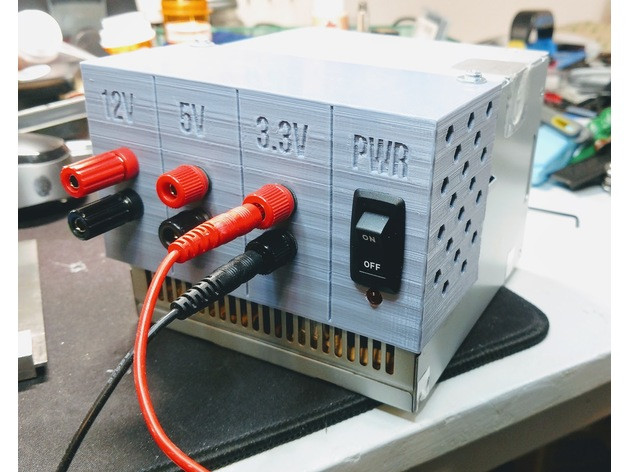
Convert/adapt an old ATX Power Supply into a Bench Power Supply with (or without) 3D Printed Parts

Posted by jpluimers on 2018/11/16

An interesting idea, although I would slightly modify it so I can -12V and -5V as well and maybe other voltage combinations too:

They are based on these underlying links:

Note that some of the newer power supplies with 24-pin molex connectors do not give you -5V any more.

A few notes:

  • depending on the age, ATX supplies can get you these voltages: -12V, -5V, 0V, +3.3V, +5V, +12V
    • -12V and -5V have very limited currents
    • newer power supplies often do not have -5V (especially the ones having 24-pin connectors)
    • newer power supplies have limited +5V power, but higher +12V power
    • older power supplies have limited +12V power, but higher +5V power
  • always take pictures of all connectors and the wire colours connected to them before starting (especially before cutting any wires)
    • this allows you to find back:
      • non-standard wire colours
      • configurations not covered here
  • to get stable 12V, you need a 5V load of about 5W:
    • between RED (+5V) andBLACK (GND),
    • for instance with pin 3 and pin 4,
    • or over one of the molex/floppy connectors: pins RED-BLACK
    • as load,
      • use at least a 10V/10W resistor or 12v/10W halogen lamp
      • ensure they are cooled well
  • to get stable 12V, you need a 12V load of about 10W
    • between YELLOW (+12V) andBLACK (GND),
    • for instance with pin 10 and pin 17,
    • or over one of the molex/floppy connectors: pins YELLOW-BLACK
    • as load,
      • use at least a 20V/20W resistor or 12v/20W halogen lamp
      • ensure they are cooled well
  • if your power supply has a BROWN (+3.3VS),
    • then ensure it is connected to ORANGE (+3.3V)
      • as brown is the SENSING wire to check 3.3V is OK.
  • to turn the power supply on,
    • short GREEN (PWR_ON, pin 14) and BLACK (GND, pin 15)
  • to know when the power is on:
    • connect a LED via a resistor between GREY (PWR_OK, pin 8) and BLACK (GND, pin 7)
  • to know when there is mains power:
    • connect a LED via a resistor between PURPLE (+5VSB, pin 9: stand by) and BLACK (GND, pin 7 or pin17)
  • Wikipedia: ATX Power supply describes
    • PWR_OK (often called Power Good)
    • +5VSB (stand by)
  • read the specs of your power supply to understand how much current it can deliver on which lines
  • some more current information

Example for loads: https://www.youtube.com/watch?v=gKgziA46wFY; more on why you need them and how to choose:

With a few more modifications you can [WayBack] Convert a Computer Power Supply to a Variable Bench Top Lab Power Supply.

I will probably go for this solution as it is easier to swap power supplies.

–jeroen

Via: [WayBack] Nice recycling of an old ATX power supply with a 3D printed part and a few accessories and cables… – Jean-Luc Aufranc – Google+


Read the rest of this entry »

Posted in Development, Hardware Development | 3 Comments »

Timestamp Generator / Converter – Timestampgenerator.com

Posted by jpluimers on 2018/11/16

I wish Google Search would return this when asking for “current time in ISO 8601”: [WayBackTimestamp Generator / Converter – Timestampgenerator.com

Type Value
Timestamp 1497872708
Server time 2017-06-19T11:52:55+00:00
ISO 8601 2017-06-19T11:45:08+00:00
RFC 2822 Mon, 19 Jun 2017 11:45:08 +0000
Day of the Week Monday
+1 Hour 1497876308
+1 Day 1497959108
+1 Week 1498477508
+1 Month 1500464708
+1 Year 1529408708

–jeroen

Posted in ISO 8601, LifeHacker, Power User | Leave a Comment »

Solution for Delphi – post-build event with multiple if/copy combinations only execute if first file does not exist – Stack Overflow

Posted by jpluimers on 2018/11/15

My solution in [WayBack] delphi – post-build event with multiple if/copy combinations only execute if first file does not exist – Stack Overflow is an addendum to my 2014 post Delphi prebuild/prelink/postbuild events.

Here we go:

Read the rest of this entry »

Posted in Conference Topics, Conferences, Delphi, Development, Event, Software Development, The Old New Thing, Windows Development | Leave a Comment »

dig: getting the list of root servers

Posted by jpluimers on 2018/11/15

For many dig queries, it helps to get the current list of root DNS servers.

Though the list is pretty static, occasionally it changes. While writing there were 13 of them and the most recent history report was in “RSSAC023: History of the Root Server System” at [WayBackwww.icann.org/en/system/files/files/rssac-023-04nov16-en.pdf.

So below are the steps to get an accurate list based on

First find out what the root servers are:

$  dig +noall +answer . ns | sort
.           106156  IN  NS  a.root-servers.net.
.           106156  IN  NS  b.root-servers.net.
.           106156  IN  NS  c.root-servers.net.
.           106156  IN  NS  d.root-servers.net.
.           106156  IN  NS  e.root-servers.net.
.           106156  IN  NS  f.root-servers.net.
.           106156  IN  NS  g.root-servers.net.
.           106156  IN  NS  h.root-servers.net.
.           106156  IN  NS  i.root-servers.net.
.           106156  IN  NS  j.root-servers.net.
.           106156  IN  NS  k.root-servers.net.
.           106156  IN  NS  l.root-servers.net.
.           106156  IN  NS  m.root-servers.net.

You should shorten this to $ dig +noall +answer . ns but that will not give you the TTL (how long the information will be cached before your DNS server refreshes it).

Now query at least 3 of these to get the actual list of root servers (I list only one statement, the rest is similar):

$ dig +noall +answer . ns @j.root-servers.net. | sort
.           518400  IN  NS  a.root-servers.net.
.           518400  IN  NS  b.root-servers.net.
.           518400  IN  NS  c.root-servers.net.
.           518400  IN  NS  d.root-servers.net.
.           518400  IN  NS  e.root-servers.net.
.           518400  IN  NS  f.root-servers.net.
.           518400  IN  NS  g.root-servers.net.
.           518400  IN  NS  h.root-servers.net.
.           518400  IN  NS  i.root-servers.net.
.           518400  IN  NS  j.root-servers.net.
.           518400  IN  NS  k.root-servers.net.
.           518400  IN  NS  l.root-servers.net.
.           518400  IN  NS  m.root-servers.net.

Compare the lists. If they are equal, then you’re done.

If not, then the internet is in trouble (:

When you want the A and AAAA records with IP addresses in addition to the NS records with names, then add +additional to your query:

dig +noall +answer +additional @j.root-servers.net. | sort
.           518400  IN  NS  a.root-servers.net.
.           518400  IN  NS  b.root-servers.net.
.           518400  IN  NS  c.root-servers.net.
.           518400  IN  NS  d.root-servers.net.
.           518400  IN  NS  e.root-servers.net.
.           518400  IN  NS  f.root-servers.net.
.           518400  IN  NS  g.root-servers.net.
.           518400  IN  NS  h.root-servers.net.
.           518400  IN  NS  i.root-servers.net.
.           518400  IN  NS  j.root-servers.net.
.           518400  IN  NS  k.root-servers.net.
.           518400  IN  NS  l.root-servers.net.
.           518400  IN  NS  m.root-servers.net.
a.root-servers.net. 518400  IN  A   198.41.0.4
a.root-servers.net. 518400  IN  AAAA    2001:503:ba3e::2:30
b.root-servers.net. 518400  IN  A   192.228.79.201
b.root-servers.net. 518400  IN  AAAA    2001:500:200::b
c.root-servers.net. 518400  IN  A   192.33.4.12
d.root-servers.net. 518400  IN  A   199.7.91.13
e.root-servers.net. 518400  IN  A   192.203.230.10
f.root-servers.net. 518400  IN  A   192.5.5.241
g.root-servers.net. 518400  IN  A   192.112.36.4
h.root-servers.net. 518400  IN  A   198.97.190.53
i.root-servers.net. 518400  IN  A   192.36.148.17
j.root-servers.net. 518400  IN  A   192.58.128.30
k.root-servers.net. 518400  IN  A   193.0.14.129
l.root-servers.net. 518400  IN  A   199.7.83.42
m.root-servers.net. 518400  IN  A   202.12.27.33

–jeroen

Posted in DNS, Internet, Power User | 1 Comment »

Find the TTL for a domain and subdomain by getting to the authoritative nameserver first

Posted by jpluimers on 2018/11/15

Lets find the authoritative name server and TTL (time to live) for the example.org domain and www.example.org subdomain.

Notes:

1a: get parents of name servers

First start with a root server (dig: getting the list of root servers) to get parents of the name servers for example.org (don’t you love indirection!):

$ dig +norecurse +noall +authority @f.root-servers.net. example.org.
org.            172800  IN  NS  a0.org.afilias-nst.info.
org.            172800  IN  NS  a2.org.afilias-nst.info.
org.            172800  IN  NS  b0.org.afilias-nst.org.
org.            172800  IN  NS  b2.org.afilias-nst.org.
org.            172800  IN  NS  c0.org.afilias-nst.info.
org.            172800  IN  NS  d0.org.afilias-nst.org.

You can repeat this query for 2 more root servers to ensure they are in sync.

1b: get authoritative name servers from the parents

Now repeat with at least 3 of these to ensure they give matching results for the name servers for example.org:

$ dig +norecurse +noall +authority @b0.org.afilias-nst.info. example.org.
example.org.        86400   IN  NS  b.iana-servers.net.
example.org.        86400   IN  NS  a.iana-servers.net.
$ dig +norecurse +noall +authority @c0.org.afilias-nst.info. example.org.
example.org.        86400   IN  NS  a.iana-servers.net.
example.org.        86400   IN  NS  b.iana-servers.net.
$ dig +norecurse +noall +authority @a0.org.afilias-nst.info. example.org.
example.org.        86400   IN  NS  a.iana-servers.net.
example.org.        86400   IN  NS  b.iana-servers.net.

2a: getting the domain name servers from a public name server

A query to a public DNS server will also return a name server list, but then you would need to know that name server first. In addition, you can not ask for +authority; you have to ask for +answer NS in stead:

$ dig +norecurse +noall +answer NS @8.8.8.8 example.org.
example.org.        55312   IN  NS  a.iana-servers.net.
example.org.        55312   IN  NS  b.iana-servers.net.

The name servers on the list are not guaranteed to be authoritative, as this query returns an empty result:

$ dig +norecurse +noall +authority @8.8.8.8 example.org.

2b. ensuring the name servers are authoritative name servers

From the name servers returned, you can now check if the servers themselves return the same name servers. If so, then you are sure they are authoritative:

$ dig +norecurse +noall +authority @a.iana-servers.net. example.org.
example.org.        86400   IN  NS  a.iana-servers.net.
example.org.        86400   IN  NS  b.iana-servers.net.
$ dig +norecurse +noall +authority @b.iana-servers.net. example.org.
example.org.        86400   IN  NS  b.iana-servers.net.
example.org.        86400   IN  NS  a.iana-servers.net.

3: get the actual TTL

With the authoritative name servers, you can get the actual TTL:

$ dig +norecurse +noall +answer SOA @a.iana-servers.net. example.org.
example.org.        3600    IN  SOA sns.dns.icann.org. noc.dns.icann.org. 2017042729 7200 3600 1209600 3600
$ dig +norecurse +noall +multiline +answer SOA @a.iana-servers.net. example.org.
example.org.        3600 IN SOA sns.dns.icann.org. noc.dns.icann.org. (
                2017042729 ; serial
                7200       ; refresh (2 hours)
                3600       ; retry (1 hour)
                1209600    ; expire (2 weeks)
                3600       ; minimum (1 hour)
                )

I got the +multiline trick from [WayBackHOWTO: Using dig(1) to Find DNS Time to Live (TTL) Values – A-Team Systems.

4: get the count down TTL from a local name server

You can repeat the above process with a non-authoritative name server a few times to see the TTL decrease:

$ dig +norecurse +noall +answer SOA example.org.
example.org.        322 IN  SOA sns.dns.icann.org. noc.dns.icann.org. 2017042729 7200 3600 1209600 3600
$ dig +norecurse +noall +answer SOA example.org.
example.org.        321 IN  SOA sns.dns.icann.org. noc.dns.icann.org. 2017042729 7200 3600 1209600 3600

This is for instance what is returned by [WayBackexample.org DNS information – who.is example.org DNS information. DNS records such SOA, TTL, MX, TXT and more.

Public DNS servers having multiple servers per IP can even run disperse TTL numbers, for instance Google DNS at 8.8.8.8 does this:

$ dig +norecurse +noall +answer SOA @8.8.8.8 example.org.
example.org.        13  IN  SOA sns.dns.icann.org. noc.dns.icann.org. 2017042729 7200 3600 1209600 3600
$ dig +norecurse +noall +answer SOA @8.8.8.8 example.org.
example.org.        1388    IN  SOA sns.dns.icann.org. noc.dns.icann.org. 2017042729 7200 3600 1209600 3600
$ dig +norecurse +noall +answer SOA @8.8.8.8 example.org.
example.org.        10  IN  SOA sns.dns.icann.org. noc.dns.icann.org. 2017042729 7200 3600 1209600 3600

Note that +nssearch does not work for me

Using +nssearch as per [WayBackHow to find what Authoritative Name Server provided the answer using dig? – Server Fault fails for me:

$ dig +nssearch example.org
SOA sns.dns.icann.org. noc.dns.icann.org. 2017042729 7200 3600 1209600 3600 from server 199.43.135.53 in 83 ms.
SOA sns.dns.icann.org. noc.dns.icann.org. 2017042729 7200 3600 1209600 3600 from server 199.43.133.53 in 144 ms.
;; connection timed out; no servers could be reached

This reveals this in the bold values:

  • The authoritative nameserver sns.dns.icann.org is not publicly accessible.
  • TTL 7200 (7200 seconds is 2 hours).

Future research

Authoritative answers might not be present in dig queries on some platforms. I need to dig deeper into [WayBackterminal – Dig not returning authority section? – Ask Different to see why.

Glue records are always tricky to get right: [WayBackHow to check domain NS glue records using dig « Admins eHow

–jeroen

Posted in *nix, *nix-tools, bash, Development, dig, DNS, Internet, Power User, Scripting, Software Development | Leave a Comment »

Setting the sound volume through NirCmd – Windows command line tool

Posted by jpluimers on 2018/11/14

I needed this during logon on Windows machines to set the sound volume: [WayBackNirCmd – Windows command line tool set-soundvolume-25-percent.bat:

:: requires https://www.nirsoft.net/utils/nircmd.html
:: 100% = 65535
nircmd setsysvolume 16000

Works on all Windows versions (7-10) I tested so far.

Via

There are way sexier ways to do this, but they were all too convoluted for the time I had to get this to work.

For the future:

–jeroen

Posted in Batch-Files, Development, Power User, Scripting, Software Development, Windows | Leave a Comment »

How to automatically choose a label color to contrast with background | TrendCT

Posted by jpluimers on 2018/11/14

Choosing label colours other than black or white is like making a dynamic mouse cursor that inverts the colours underneath it: it fails horribly in the low contrast regions, and looks very strange on pink-noise backgrounds.

This approach is uses black and white depending on the perceived brightness:

[WayBack] How to automatically choose a label color to contrast with background | TrendCT:

What would data viz be without labels? Just viz, that’s what. This guide aimed at web designers discusses how to choose a label text color with enough contrast.

Via: [WayBack] For all those people incapable of choosing the right color combinations. – Thomas Mueller (dummzeuch) – Google+

–jeroen

Posted in Algorithms, Color (software development), Development, Software Development, Usability, User Experience (ux) | Leave a Comment »