The Wiert Corner – irregular stream of stuff

Jeroen W. Pluimers on .NET, C#, Delphi, databases, and personal interests

  • My badges

  • Twitter Updates

  • My Flickr Stream

  • Pages

  • All categories

  • Enter your email address to subscribe to this blog and receive notifications of new posts by email.

    Join 1,860 other subscribers

Archive for April, 2019

No, Visual Studio Community 2017 is not a 30 day trial – via Stack Overflow

Posted by jpluimers on 2019/04/30

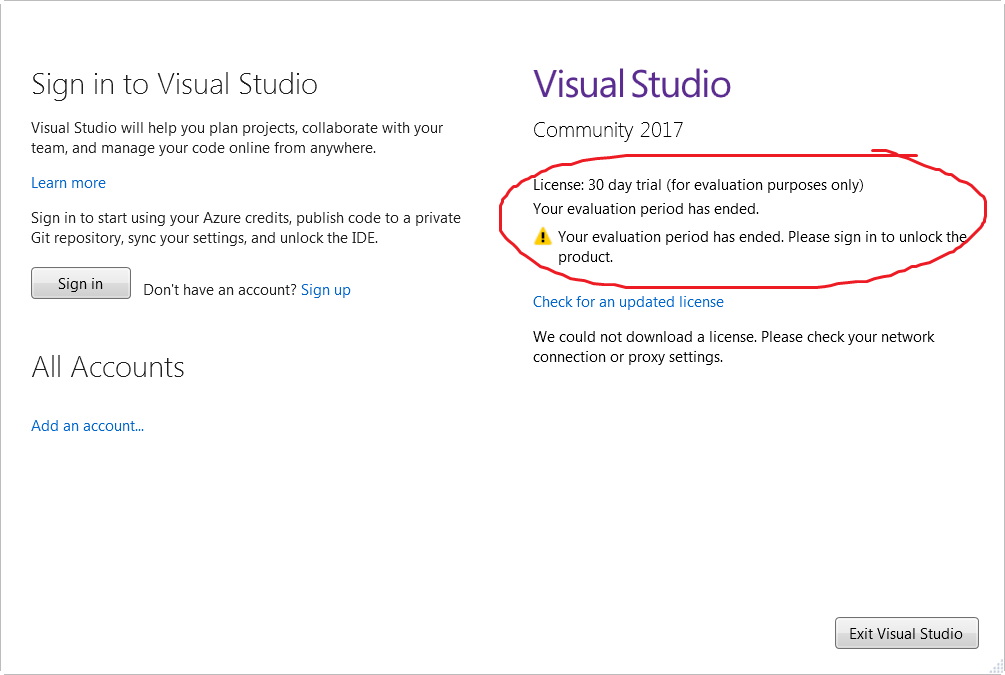
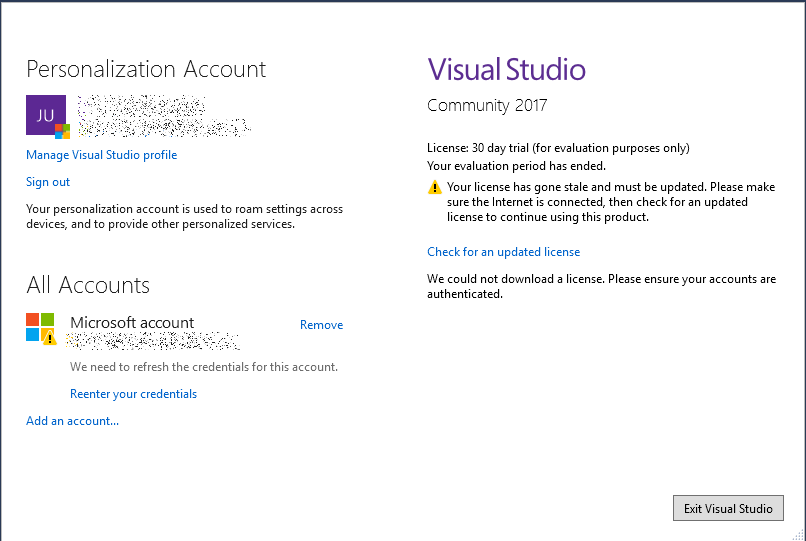
Visual Studio Community 2017 needs a license renewal every ~30 days with a Microsoft account: [WayBack] Visual Studio Community 2017 is a 30 day trial? – Stack Overflow.

This means it is not a trial, but it does not a Microsoft account, and communicate with it every ~30 days which you can get at [WayBack] Microsoft account | Sign In or Create Your Account Today.

Messages you can get:

  • “We could not download a license. Please check your network connection or proxy settings” – meaning: sign in with a Microsoft account by clicking “Add an account…”
  • “We could not download a license, Please ensure your accounts are authenticated.” – meaning you have to click “Reenter your credentials”

–jeroen

Posted in .NET, Development, Software Development, Visual Studio 2017, Visual Studio and tools | Leave a Comment »

bash – aliasing cd to pushd – is it a good idea? – Unix & Linux Stack Exchange

Posted by jpluimers on 2019/04/30

On my research list: [WayBackbash – aliasing cd to pushd – is it a good idea? – Unix & Linux Stack Exchange

It has a nice discussion on complements to pushd/popd/cd/dirs including a very nice set of navd scripts that eases the navigation of the directory stack.

I found it because the ESXi busybox does not have pushd and popd and a cd won’t work from inside a shell script: [WayBacklinux – Why doesn’t “cd” work in a bash shell script? – Stack Overflow

It also made me find out that the ESXi busybox does support cd - to go to the previous directory. More info on that cd syntax is at [WayBack] bash – Difference between “cd -” and “cd ~-” – Unix & Linux Stack Exchange

–jeroen

Posted in *nix, bash, Development, ESXi5, ESXi5.1, ESXi5.5, ESXi6, ESXi6.5, Power User, Scripting, Software Development, Virtualization, VMware, VMware ESXi | Leave a Comment »

compiling – Where do executables look for shared objects at runtime? – Unix & Linux Stack Exchange

Posted by jpluimers on 2019/04/30

Thanks Gilles for answering [WayBackcompiling – Where do executables look for shared objects at runtime? – Unix & Linux Stack Exchange.

Abstract:

In a nutshell, when it’s looking for a dynamic library (.so file) the linker tries:

  • directories listed in the LD_LIBRARY_PATH environment variable (DYLD_LIBRARY_PATH on OSX);
  • directories listed in the executable’s rpath;
  • directories on the system search path, which (on Linux at least) consists of the entries in /etc/ld.so.conf plus /lib and /usr/lib.

–jeroen

Posted in Development, Software Development | Leave a Comment »

osx lion – osx change printer ip address without adding new printer – Super User

Posted by jpluimers on 2019/04/29

From [WayBack] osx lion – osx change printer ip address without adding new printer – Super User:

Q

Is there a way to change a printer’s IP address in OSX (Lion) without having to add a new printer? I did find Printer IP Remedy, but was curious if there was an ‘official’ method.

A

You can do this in the CUPS web interface with the following steps:

  1. Open Terminal.app and run cupsctl WebInterface=yes. This enables the CUPS web interface
  2. Open http://127.0.0.1:631/printers in your web browser
  3. Click on the printer you want to change. From the “Administration” drop down, select “Modify Printer”.
  4. Log in with your local admin account
  5. Select the new printer IP either from “Discovered Network Printers” or add it manually with “Other Network Printers”. Make sure that you keep the same connection protocol as it says in “Current Connection” (for me, this was LPD).

Once you’re done with this, Mac OS X will directly print to the new IP address. There is no need to reboot or so. If you want to disable the CUPS web interface again, run cupsctl WebInterface=no.

The CUPS solution works splendid in MacOS as well, so there was no need for [Archive.is] Printer IP Remedy 1.3 free download for Mac | MacUpdate.

Without the CUPS web interface enabled, the web-interface at http://127.0.0.1:631/printers looks like this:

Web Interface is Disabled

The web interface is currently disabled. Run “cupsctl WebInterface=yes” to enable it.

After enabling it like the CUPS web interface wit cupsctl WebInterface=yes, you can see I have the same printer configured multiple times with different communication protocols and output languages:

Printers

Search in Printers:

Showing 6 of 6 printers.

Queue Name Description Location Make and Model Status
OKI_MC342_36855D OKI-MC342-PSO-36855D Office MC342-AirPrint Idle
OKI_MC342_36855D_PCL OKI-MC342-36855D PCL 1060NP-Office Generic PCL Laser Printer Idle
OKI_MC342_IPP OKI-MC342-IPP Office Generic PostScript Printer Idle
OKI_MC342_LPR OKI-MC342-LPR Office Generic PostScript Printer Idle

The first two printers were mapped by DNS, but the last two were mapped by IP address.

Changing the IP address was simple:

  1. Click on each link
  2. Select “Modify printer”
  3. Authenticate (only needed for the first printer change)
  4. For IPP: note the current address (like ipp://192.168.71.52/), then
    1. Choose “Internet Printing Protocol (ipp) “
    2. Click “Continue”
    3. Enter the correct ipp://…./ address (help is at http://127.0.0.1:631/help/network.html or http://127.0.0.1:631/help/network.html?PRINTABLE=YES)
    4. Click “Continue”
    5. Check the modifications (optionally change Description/Location)
    6. Click “Continue”
    7. Keep the driver
    8. Click “Modify printer”
  5. For LPD, note the current address (like lpd://192.168.71.52/), then follow the IPP steps, but choose “LPD/LPR Host or Printer” and enter a valid lpd address.

This is also the place where you can change “Default options”, like paper size (which – for all but the first – somehow defaulted to US Letter 11 inch, while it is actually filled with A4 paper).

At the end, disable the web interface: cupsctl WebInterface=no.

Related:

–jeroen

Read the rest of this entry »

Posted in *nix, *nix-tools, Apple, iMac, Mac, MacBook, MacBook Retina, MacBook-Air, MacBook-Pro, MacMini, macOS 10.12 Sierra, macOS 10.13 High Sierra, Power User | Leave a Comment »

LSI 9260-8i: all disks are “Unconfigured bad”

Posted by jpluimers on 2019/04/29

This is the second time in about 6 years that somehow after an ESXi reboot all of the drives on an LSI 9260-8i controller got into the state “Unconfigured bad”.

The trick to solve this is to:

  1. go into the WebBIOS of the LSI card
  2. mark all drives as “Unconfigured good”
  3. rescan for devices
  4. import the existing configuration
  5. reboot

More in depth steps with images:

–jeroen

Posted in LSI/3ware, Power User, RAID | Leave a Comment »

lamw/ghettoVCB: ghettoVCB

Posted by jpluimers on 2019/04/29

I found out that I had some very old draft notes below, but since then the source has moved to github: lamw/ghettoVCB: ghettoVCB.

Since I find VIB easier to use than the Offline Bundle (for differences see [WayBackVIB vs. Offline Bundle and [WayBack] VMware Front Experience: ESXi Community Packaging Tools) these are the VIB steps to get it installed:

  1. Download https://github.com/lamw/ghettoVCB/raw/master/vghetto-ghettoVCB.vib
  2. Put it in the /tmp directory on your ESXi box (using for instance FileZilla, WinSCP, SCP or other tools)
  3. Install it using esxcli software vib install -v /tmp/vghetto-ghettoVCB.vib -f

Then use it to make backups or restores as described at:

Note that contrary to the documentation, the config file has moved to /etc/ghettovcb/ghettoVCB.conf.

Because of Keeping your root visorfs clean: point the path to your own binaries stored on a vmfs volume I’m using a copy of that stored in my local-bin directory (which is backed-up by rsync to another disk) and a small ghettoVcb.sh bootstrap script referencing that config-file, so the backup command for one command now is this:

ghettoVcb.sh -m diaspore.opensuse-Tumbleweed-x64

or this for all VMs (about 2 hours from NVME SSD to HDD; will probably make this a 2 stage thing):

ghettoVcb.sh -a

VMs are backed-up under the directory specified in VM_BACKUP_VOLUME(below that’s ./) in a schema like this:

./diaspore.opensuse-Tumbleweed-x64
./diaspore.opensuse-Tumbleweed-x64/diaspore.opensuse-Tumbleweed-x64-2017-09-24_16-07-08
./diaspore.opensuse-Tumbleweed-x64/diaspore.opensuse-Tumbleweed-x64-2017-09-24_16-07-08/diaspore.opensuse-Tumbleweed-x64.vmx
./diaspore.opensuse-Tumbleweed-x64/diaspore.opensuse-Tumbleweed-x64-2017-09-24_16-07-08/diaspore.opensuse-Tumbleweed-x64-flat.vmdk
./diaspore.opensuse-Tumbleweed-x64/diaspore.opensuse-Tumbleweed-x64-2017-09-24_16-07-08/diaspore.opensuse-Tumbleweed-x64.vmdk
./diaspore.opensuse-Tumbleweed-x64/diaspore.opensuse-Tumbleweed-x64-2017-09-24_16-07-08/STATUS.ok

In the future, I might move to an NFS based back-up based on these links:

–jeroen

Very old notes:


–jeroen

Posted in ESXi4, ESXi5, ESXi5.1, ESXi5.5, ESXi6, ESXi6.5, Power User, Virtualization, VMware, VMware ESXi | Leave a Comment »

50 jaar na eerste maanlanding: ‘Het was magisch’ – Omroep West

Posted by jpluimers on 2019/04/29

[WayBack] 50 jaar na eerste maanlanding: ‘Het was magisch’ – Omroep West

Het is zo’n moment in de geschiedenis, waarvan iedereen nog precies weet waar hij of zij was: de landing van de eerste mens op de maan. Dit jaar is het het precies vijftig jaar geleden dat de wereld aan de buis gekluisterd zat om die eerste stappen live te zien. Space Expo in Noordwijk staat daarom het hele jaar in het teken van die eerste maanlanding, ook tijdens de voorjaarsvakantie.

Gratis toegang voor wie 50 wordt

Ze verwacht dat er over tien jaar misschien wel weer een missie naar de maan zal zijn. Om de eerste maanlanding te vieren, mag iedereen die dit jaar 50 wordt het hele jaar gratis naar binnen bij Space Expo.

Leuk verjaarsevenement (:

Via: [Archive.is] Omroep West on Twitter: “Iedereen dit jaar 50 wordt, mag het hele jaar gratis naar binnen bij @Spaceexpo https://t.co/7xQ6SO45Em”

–jeroen

Posted in History | Leave a Comment »

Commodore 1965 logo design by late Chris Yaneff from Canada

Posted by jpluimers on 2019/04/29

The original logo of Commodore International – Wikipedia, via a few sources including:

Jack Tramiel eventually left Commodore International, bought the Atari parts and moved on.

Commodore International died on my birthday at April 29, 1994.

I think the logo is still a wonderful design.

More historic information on the logo and Chris – he was a great designer:

Read the rest of this entry »

Posted in Uncategorized | Leave a Comment »

BBC Radio 2 – Ken Bruce, Mark Knopfler performs live, Mark Knopfler performs live in the Radio 2 Piano Room

Posted by jpluimers on 2019/04/29

Missed this during the hectic last years, but bumped into it by accident: [WayBack] BBC Radio 2 – Ken Bruce, Mark Knopfler performs live, Mark Knopfler performs live in the Radio 2 Piano Room.

Tracks performed: Romeo & Juliet, Good On You Son and The Boxer

as part of [WayBack] BBC Radio 2 – Ken Bruce, Mark Knopfler performs live

Mark Knopfler, the singer-songwriter, guitarist, producer and the lead singer of Dire Straits performs live in the Radio 2 Piano Room. Mark is about to release his 9th solo studio album ‘Down The Road Wherever’ which features 14 new songs written by Mark. The album has been inspired by a wide range of subjects, including his early days in Deptford with Dire Straits, a stray football fan lost in a strange town, the compulsion of a musician hitching home through the snow, and a man out of time in his local greasy spoon. In addition to producing his own records Mark has also produced albums for Bob Dylan and Randy Newman. The multi Grammy award winning artist has also composed film scores, been inducted into the Rock and Roll Hall of Fame and is considered one of the greatest guitarists of all time.

I also missed the “new” 2018 studio album Down the Road Wherever – Wikipedia:

Via [WayBack] Mark Knopfler Performs ‘Romeo & Juliet’ For BBC:

Guitarist Mark Knopfler led a stripped-down rendition of Dire Straits classic “Romeo And Juliet” for the BBC. Video of the stirring performance is now available.

–jeroen

Read the rest of this entry »

Posted in About, LifeHacker, Music, Personal, Power User | Leave a Comment »

Mint 17/SANE will not recognize Fujitsu ScanSnap ix500 scanner : linuxmint

Posted by jpluimers on 2019/04/26

For my link archive:

Posted in Fujitsu ScanSnap, Hardware, ix100, ix500, Power User, Scanners | Leave a Comment »