


On my list of things to check later: FMBC a Delphi implementation of MVVM? [WayBack] from old school to new frontier: Pattern, naming and MVVM from a Delphi point of view.
via: [WayBack] #FBMC the new MVVM 2.5? – Frank Lauter – Google+
–jeroen
Posted by jpluimers on 2019/12/31
On my list of things to check later: FMBC a Delphi implementation of MVVM? [WayBack] from old school to new frontier: Pattern, naming and MVVM from a Delphi point of view.
via: [WayBack] #FBMC the new MVVM 2.5? – Frank Lauter – Google+
–jeroen

Posted in Delphi, Development, Software Development | Leave a Comment »
Posted by jpluimers on 2019/12/31
 Sometimes a picture or video is better than a thousand words.
I wish that back when I learned about the mathematics of the Diffie–Hellman key exchange – Wikipedia
I had seen the picture on the right from File:Diffie-Hellman Key Exchange-modified.png – Wikipedia (via DHKE General overview) which inspired the Computerphile and Art-Of-The-Problem videos below doing the same dynamically with colorised liquids and paint.
Art-Of-The-Problem has a similar video on RSA as well which is also below.
Usually Diffie-Hellman is combined with RSA to prevent man-in-the-middle and allow for perfect forward secrecy. That’s what the final computerphile video is about.
Excellent!
Finally, Computerphile also posted a video with the mathematics. If you’re into that: nice work too!
Via:
–jeroen

Posted in Development, Encryption, Power User, Security, Software Development | Leave a Comment »
Posted by jpluimers on 2019/12/31
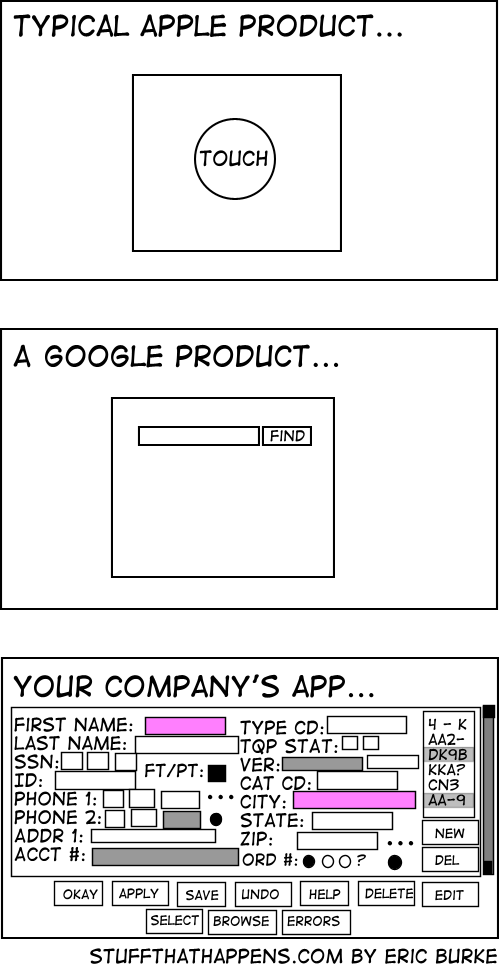 [WayBack] Simplicity • Stuff that Happens: What can we learn about usability…
With a comment from Uwe:
It is really disappointing that most customers are looking for solutions that don’t fall into the categories: “search” and “switch on/off”.Developer: “So which of the fields do you actually need in this screen?”
Customer. “All of them!”
Developer: “Well, that will make the screen pretty cluttered information”.
Customer: “And please allow to add more easily whenever we need them.”
Developer: “That would be hard to achieve unless you exchange all your monitors to bigger ones.”
Customer: “OK, then. Can you make it work on my Apple Watch?”[WayBack]
I very much can relate to this: somehow a lot of business driven applications have cramped user interfaces that are very hard to use because the overwhelming number of UI controls and features per screen.
This holds even for web applications.
Let’s hope this will slowly change for the better over time.
Via:
–jeroen

Posted in Development, Software Development, Usability, User Experience (ux) | Leave a Comment »
Posted by jpluimers on 2019/12/31
A while back there were a few G+ threads sprouted by David Heffernan on decoding big files into line-ending splitted strings:
Code comparison:
Python:
with open(filename, 'r', encoding='utf-16-le') as f:
  for line in f:
    pass
Delphi:
for Line in TLineReader.FromFile(filename, TEncoding.Unicode) do
  ;
This spurred some nice observations and unfounded statements on which encodings should be used, so I posted a bit of history that is included below.
Some tips and observations from the links:
Though TLineReader is not part of the RTL, I think it is from [WayBack] For-in Enumeration – ADUG.
It doesn’t help that on the Windows Console, various encodings are used:
Good reading here is [WayBack] c++ – What unicode encoding (UTF-8, UTF-16, other) does Windows use for its Unicode data types? – Stack Overflow
+A. Bouchez I’m with +David Heffernan here:
At its release in 1993, Windows NT was very early in supporting Unicode. Development of Windows NT started in 1990 where they opted for UCS-2 having 2 bytes per character and had a non-required annex on UTF-1.
UTF-1 – that later evolved into UTF-8 – did not even exist at that time. Even UCS-2 was still young: it got designed in 1989. UTF-8 was outlined late 1992 and became a standard in 1993
Some references:
–jeroen
Posted in Delphi, Development, Encoding, PowerShell, PowerShell, Python, Scripting, Software Development, The Old New Thing, Unicode, UTF-16, UTF-8, Windows Development | Leave a Comment »
Posted by jpluimers on 2019/12/30
Boy, I totally missed this was possible: [WayBack] How to text from your computer with Android Messages – The Verge
Texting from the web gives you a lot more flexibility in how and where you can continue conversations. Here’s how to set it up and get started.
…
- Make sure you’ve got the latest version of Android Messages installed on your phone.
- Go to messages.android.com on the computer or other device you want to text from. You’ll see a big QR code on the right side of this page.
- Open up Android Messages on your smartphone. Tap the icon with three vertical dots at the top and to the far right. You should see a “Messages for web” option inside this menu. If you don’t, just give it some time. Google is rolling out the feature gradually to everyone over the next week.
- Tap “Scan QR code” and point your phone’s camera at the QR code on your other device. In less than a second, your phone will vibrate and the two will be linked up. You should notice your conversations show up in the left column of the browser window. Google says that “conversation threads, contacts, and other settings will be encrypted and cached on your browser.”
Note: this doesn’t mean your actual text conversations are encrypted. They’re not.
–jeroen
Posted in Android Devices, Chrome, Google, LifeHacker, Power User | Leave a Comment »
Posted by jpluimers on 2019/12/30
Hopefully there is a 2.0 by now that either has prescription glasses, or wraps around them.
[WayBack] IRL Glasses – Glasses that Block Screens by Ivan Cash — Kickstarter
Via
–jeroen
Posted in LifeHacker, Power User | Leave a Comment »
Posted by jpluimers on 2019/12/30
My Dock kept moving to another monitor every now and then.
This actually seems to be a feature but got me a while to find out what it does at [WayBack] Dock keeps moving between monitors | Official Apple Support Communities:
If you move the mouse to another window and pull it down to very bottom of the screen and hold it there, the dock moves over. To move it back, move the mouse pointer to the screen you want it on and hold the pointer at the very bottom of the screen.
This bites you when an application has features (like tools) at the very bottom of a window.
–jeroen
Posted in Apple, iMac, Mac, Mac OS X / OS X / MacOS, MacBook, MacBook Retina, MacBook-Air, MacBook-Pro, MacMini, macOS 10.12 Sierra, OS X 10.10 Yosemite, OS X 10.11 El Capitan, OS X 10.9 Mavericks, Power User | Leave a Comment »
Posted by jpluimers on 2019/12/27
On my list of things to try:
Tim Berners-Lee, inventor of the World Wide Web, launches Inrupt, a start-up that will take the Solid open source platform and “Solid movement” to the next level with the backing of Glasswing Ventures. A look at the what and why.
For now, I have two WebIds and need to figure out how to link them (:
Hopefully the video below will help with that.
–jeroen
Posted in GDPR/DS-GVO/AVG, LifeHacker, Power User, Privacy, Security | Leave a Comment »
Posted by jpluimers on 2019/12/27
Geeft uw Bosch vaatwasser de foutmelding E22? Dit betekent dat het zeefje vervuild of verstopt is.
Bron: [WayBack] Bosch vaatwasser storing E22
Meer uitegebreid op [WayBack] Bosch vaatwasser storingen e15, e22, e24, e25, e27 of geen water/start niet:
Bosch vaatwasser storing e22: even schoonmaken
Om ervoor te zorgen dat uw vaatwasmachine altijd hoogwaardig blijft presteren zijn de foutmeldingen vanuit de fabriek vrij scherp afgesteld. Een voorbeeld hiervan is de melding van Bosch vaatwasser storing e22. Dit is een kleine storing, maar wel één die het programma onderbreekt. Deze storing betekent namelijk niets meer dan dat het tijd voor u is geworden om even wat schoonmaakwerkzaamheden te verrichten. Het vuil in uw machine moet namelijk ook afgevoerd worden en dat laat zo nu en dan zijn sporen na. Het schoonmaken is gelukkig niet heel moeilijk en kan snel gedaan worden.
Concentreer u op het zeefje
Wanneer u moet schoonmaken kunt u de oorzaak gemakkelijk vinden. Storing e22 heeft betrekking op het kleine zeefje in uw machine. Deze is vervuild geraakt en de gaatjes zijn daardoor verstopt. U kunt dit zelf schoonmaken. Zet de vaatwasser even uit voor u dit doet. U kunt het zeefje gemakkelijk los halen en even afspoelen en borstelen. Vervolgens moet het op precies dezelfde manier terug worden geplaatst. Als u daarna de machine weer aanzet zal hij zijn programma alsnog kunnen draaien. Is dit niet het geval, dan is het verstandig om een monteur te bellen.
–jeroen
Posted in LifeHacker, Power User | Leave a Comment »
Posted by jpluimers on 2019/12/27
Blast from the past:
–jeroen
Posted in MS-DOS, Power User, Windows | Leave a Comment »
 The Wiert Corner - irregular stream of stuff
