The Wiert Corner – irregular stream of stuff

Jeroen W. Pluimers on .NET, C#, Delphi, databases, and personal interests

  • My badges

  • Twitter Updates

  • My Flickr Stream

  • Pages

  • All categories

  • Enter your email address to subscribe to this blog and receive notifications of new posts by email.

    Join 1,860 other subscribers

Archive for March, 2021

delphi – Invalid floating point operation calling Trunc() – Stack Overflow

Posted by jpluimers on 2021/03/18

I bumped into [WayBack] delphi – Invalid floating point operation calling Trunc() – Stack Overflow, while searching for what might have tests like these fail:

TValueRecordTests.Int64_Through_Value_Container_via_Currency_Intermediate_Is_Identity_Operation(9223372036854775807) = 9223372036854775807
EInvalidOp with message 'Invalid floating point operation'

In the end, it reproduced with a much more simple test case class of which the first three fail (EInvalidOp with message 'Invalid floating point operation'), but the last three succeed.

Lesson learned:

  • High(Int64) stored in Currency or Double, will not Trunc back to their original value.
  • Low(Int64) stored in Currency will not Trunc back to their original value.
  • Testing boundary conditions is nice, but be sure what your boundary conditions are in the first place.

Read the rest of this entry »

Posted in Conference Topics, Conferences, Delphi, Development, Event, Software Development | Leave a Comment »

Threaded Inserts in 3D Prints – How strong are they? – YouTube

Posted by jpluimers on 2021/03/17

They are much stronger than plastic threads, no matter how you create the plastic threads.

To make them even stronger, add shell thickness to the thread locations, either globally or by using modifier meshes. Modifier meshes work way better in Cura than in Slic3r.

–jeroen

Read the rest of this entry »

Posted in 3D printing, Development, Hardware Development | Leave a Comment »

(mostly ASCII) List of emoticons – Wikipedia

Posted by jpluimers on 2021/03/17

Most searches for “ASCII emoticons” get you Unicode ones:

Luckily most are ASCII in List of emoticons – Wikipedia.

There are also shortcodes, which do not visually represent an emoji, but usually get translated to the image or Unicode character.

A few lists on them:

–jeroen

Posted in ASCII, Development, Encoding, LifeHacker, Power User, Software Development, Unicode | Leave a Comment »

A DUnit Folder Iterator Extension – The Art of Delphi Programming

Posted by jpluimers on 2021/03/17

Reminder to self: experiment with [WayBack] A DUnit Folder Iterator Extension – The Art of Delphi Programming.

This could be extended to virtual folders, allowing many integration tests to be run depending on some configuration hierarchy defined in a folder structure.

–jeroen

Posted in Conference Topics, Conferences, Delphi, Development, DUnit, Event, Software Development, Unit Testing | Leave a Comment »

Running SuperMicro IPMIView on MacOS

Posted by jpluimers on 2021/03/16

I wrote about SuperMicro mainboards and IPMIView recently, but that ran only on Windows and Linux. Since I focus my desktop mainly on MacOS, and never on Linux, I did not want to use the Windows IPMView (though it did work most of the time).

Not having a MacOS version sounded odd, as there was an iOS version:

[WayBack] ‎Supermicro IPMIView on the App Store “This app is only available on the App Store for iOS devices.”

A quick search made me find a few links:

The last one looked most promising, so I forked it.

Following the steps already made me write down a few notes for changes in the README.md file.

But then I bumped into a strange error when wanting to use the KVM Console from IPMIView, as it threw the same error all the time:

".jre/Contents/Home/bin/java": error=2, No such file or directory

I made a quick note in [WayBack] KVM Console cannot start due to java not found · Issue #1 · jpluimers/IPMIView.app · GitHub:

When starting a KVM Console, you get this error: ".jre/Contents/Home/bin/java": error=2, No such file or directory

Try to fix this.

Later I dug a bit deeper, and managed to fix it in the script steps of the README.md:

git clone https://github.com/TheCase/IPMIView.app
pushd IPMIView.app/
mkdir -p Resources/IPMIView
pushd Resources/IPMIView/
tar -zxvf ~/Downloads/IPMIView*.tar.gz --strip=1
pushd jre/
mkdir -p Contents/Home/bin
pushd Contents/Home/bin
ln -s `which java` java
popd
popd
popd
popd
rsync -avlo IPMIView.app/ ~/Applications/IPMIView.app/

Of course I ran into another problem on one of my SuperMicro machines: the KVM Console would consistently crash. Luckily that was solved by a IPMI Firmware Upgrade:

[WayBack] java – Supermicro IPMIView KVM Console does not work at all – Server Fault

The problem was the firmware for the IPMI on these boards was too old (not the same as the BIOS – updating the BIOS will not help in this case). Digging around SuperMicro’s site (never did get a reply from them), I found the Firmware Revision of 3.20 & was able to install it. On the IPMI device tab, under “Device Information”, you should see: Firmware Revision 3.20 IPMI Revision: 2.0 I can now see the KVM Console in both the IPMIView software

–jeroen

Posted in Hardware, IPMI, Mainboards, Power User, SuperMicro, X10SRH-CF, X9SRi-3F | Leave a Comment »

Undocumented Plastic “cm status –hiddenchanged” to show hidden changes like the Plastic SCM GUI does by default

Posted by jpluimers on 2021/03/16

[WayBack] Undo changes to a hidden changes item from CLI – General – Plastic SCM Community.

Maybe I should start an undocumented Plastic SCM series just like I did for Delphi. (:

As soon as you have entries in your hidden_changes.conf, then entries matching will show up in your Plastic SCM GUI, but not included in the cm status --all command.

Luckily there is an the --hiddenchanged switch (maybe to keep naming inconsistent with the hidden_changes.conf file) which is only documented in cm changed --help, not on-line).

So my new cm-show-status.bat file contains this line:

cm status --all --hiddenchanged %*

Maybe more switches can be deducted from [WayBack] Plastic SCM version control · The Plastic SCM API: GET PENDING CHANGES IN WORKSPACE:

GET PENDING CHANGES IN WORKSPACE

GET /api/v1/wkspaces/:wkname/changes

Parameters

Name Type Description
types string A comma-separated list detailing the desired change types to display in the response. Available types: addedcheckoutchangedcopiedreplaceddeletedlocaldeletedmovedlocalmovedprivateignoredhiddenchangedcontrolledchangedall

Read the rest of this entry »

Posted in Development, Encoding, PlasticSCM, Power User, Software Development, Source Code Management | Leave a Comment »

Delphi use of FS segment: structured exception handling

Posted by jpluimers on 2021/03/16

A while ago, I had to trace through a lot of code in the CPU pane to track down some memory allocation related issues.

I wondered what the use of the FS segment was about, so via [Archive.is] delphi what is fs segment used for – Google Search, I found that it is related to Win32 Structured Exception handling and therefore not limited to Delphi, through these links:

A few disassembly parts to show how the Delphi Win32 compiler uses this for try finally blocks and try except blocks is below. Note that often, there are implicit try finally blocks when having managed method parameters or local variables.

–jeroen

Read the rest of this entry »

Posted in Delphi, Development, Software Development, Undocumented Delphi, Windows Development | Leave a Comment »

Windows 10 Home: allow a certain user to have a non-expiring password

Posted by jpluimers on 2021/03/15

Sometimes it makes sense to have a user never expire the password.

On a non-home editions of Windows, this is easy: just run lusrmgr.msc, then in the UI change the property for the user.

On home editions of Windows, you cannot do this in a GUI: those bits are either disabled or completely unavailable.

I did this on a demo VM system on an elevated command-prompt:

C:\>wmic UserAccount where Name='developer' set PasswordExpires=False
Updating property(s) of '\\DEMO-VM\ROOT\CIMV2:Win32_UserAccount.Domain="DEMO-VM",Name="developer"'
Property(s) update successful.

To show the current state (before I changed it):

C:\>wmic UserAccount where Name='developer'
AccountType  Caption           Description  Disabled  Domain      FullName  InstallDate  LocalAccount  Lockout  Name       PasswordChangeable  PasswordExpires  PasswordRequired  SID                                            SIDType  Status 
512          DEMO-VM\developer              FALSE     DEMO-VM                            TRUE          FALSE    developer  TRUE                TRUE             TRUE              S-1-5-21-2478057260-1439466941-978077079-1002  1        OK     

Via: [WayBack] Cocosenor: 4 ways to disable or enable Windows 10 password expiration notification

–jeroen

Posted in Power User, Windows, Windows 10 | Leave a Comment »

MacOS “mds_stores” high CPU usage

Posted by jpluimers on 2021/03/15

I notices a high CPU usage, so searched for [Wayback] “mds_stores” – Google Search.

There I quickly found out this is the Spotlight indexer using a lot of CPU.

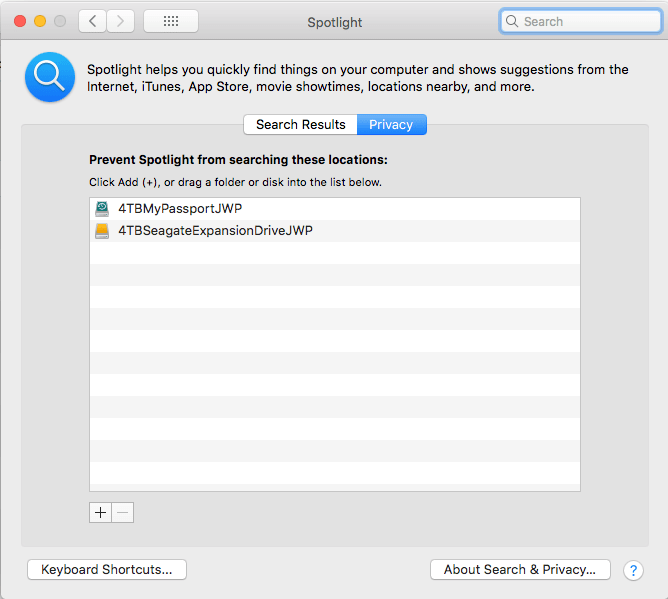
From that, it was easy to track down: I had added a second 4TB backup disk, but forgot to add it to the Spotlight indexing exclusion list, where you get by following these steps:

  1. Open “Preferences”
  2. Search for “Spotlight”
  3. Click on the “Privacy” button
  4. Click on the “+” button to add a new folder
  5. Browse to the top of the list inside your computer to find the volumes to exclude

Now it is on it:

Related: [WayBack] [FIXED] mds_stores Process Consuming High CPU Usage – MacMetric

–jeroen

Posted in Apple, Mac OS X / OS X / MacOS, Power User, SpotLight | Leave a Comment »

Windows Users like “Window Manager\DWM-3” are virtual users

Posted by jpluimers on 2021/03/15

Having seen logon failures from user Window Manager\DWM-3 while on a public WiFi network, I did a quick search on [WayBack] “Window Manager\DWM-3” – Google Search.

It appeared somebody trying a dictionary attack on the RDP port of my Windows VM which was on the host Bridged Network (see [Archive.is] Help – VMware Fusion 6 Documentation Center).

This is a virtual user that is part of a series of users that the Desktop Window Manager started using from Windows 8 and up.

The first user always exist, DWM-2 and up are created for new dwm.exe processes (by winlogon.exe) when users start logging on through RDP connections to a Windows machine:

  1. Window Manager\DWM-1
  2. Window Manager\DWM-2
  3. Window Manager\DWM-3
  4. Window Manager\DWM-4

In addition to logging on as a new user, as of Windows 8, these also are created when shutting down and starting up (which Windows fools you by actually doing a kind of hibernate): [Wayback] windows 8 – What is winlogon.exe -SpecialSession? – Super User

Related:

–jeroen

Posted in Power User, Windows, Windows 10, Windows 8, Windows 8.1 | Leave a Comment »