The Wiert Corner – irregular stream of stuff

Jeroen W. Pluimers on .NET, C#, Delphi, databases, and personal interests

  • My badges

  • Twitter Updates

  • My Flickr Stream

  • Pages

  • All categories

  • Enter your email address to subscribe to this blog and receive notifications of new posts by email.

    Join 1,861 other subscribers

Archive for June, 2021

Delphi: .dproj TargetedPlatforms bit flags in main PropertyGroup, and Platform values in other elements/attributes

Posted by jpluimers on 2021/06/09

For cleanup of .dproj files, I want to know the bit flags that TargetPlatforms can have.

TL;DR: .dproj content management in Delphi is a mess

For future reference empiric values for the flags that build the TargetedPlatforms (not to be confused with PlatformTargets) element content in the main PropertyGroup of a .dproj file in a table.

This might help creating an XSD for a .dproj file (Source: Reminder to self: make a start for an XSD that validates Delphi dproj files).

Absent cells means I have no idea if the values are relevant or what they could be.

Input for those is more than welcome.

Bit# TargetedPlatforms bit flag value Platform and $(Platform)value Meaning (dropdown value of “Select Platform” dialog)
0 1 Win32 32-bit Windows
1 2 Win64 64-bit Windows
2 4
3 8
4 16
5 32
6 64
7 128
8 256
9 512
10 1024 iOSDevice64 iOS Device 64-bit
11 2048
12 4096

($Platform) values still to cover:

  • Android
  • Linux64
  • OSX32
  • iOSDevice32
  • iOSSimulator

There is only one place for TargetedPlatforms in the .dproj file: at the XPath /Project/PropertyGroup/TargetedPlatforms.

For getting the XPath, I used Notepad++ as described in my earlier blog post Getting the path of an XML node in your code editor.

It has the combined flags, so:

  • 3 means Win32 and Win64 are enabled
  • 1025 means Win32 and iOSDevice64 are enabled

The Platform value (and thus $(Platform) value) is the one used in for example these elements or attributes:

  • /Project/PropertyGroup/Platform as currently selected platform
  • /Project/PropertyGroup/@Condition as selectivity expression, for instance
    •  <PropertyGroup Condition="('$(Platform)'=='Win64' and '$(Cfg_1)'=='true') or '$(Cfg_1_Win64)'!=''">
    • <PropertyGroup Condition="('$(Platform)'=='Win64' and '$(Base)'=='true') or '$(Base_Win64)'!=''">
  • /Project/ProjectExtensions/BorlandProject/Platforms/Platform (all having for the value property with the Platform value) having a content of either True or False.
    • This allows a .dproj file to contain information for platforms that are not visible yet.

The actual values of Platform also play a role in these places:

  • /Project/PropertyGroup/Base_Win64 containing the base settings for the Win64 platform so they can be derived for the Debug or Release builds.
  • /Project/PropertyGroup/@Condition for instance <PropertyGroup Condition="'$(Base_Win64)'!=''">
  • /Project/ProjectExtensions/BorlandProject/Deployment/DeployFile/Platform/@Name for instance <Platform Name="iOSSimulator">

Even worse: there are unneeded  nodes present for bits in TargetPlatforms and /Project/ProjectExtensions/BorlandProject/Platforms/Platform being absent or having a content False for /Project/ProjectExtensions/BorlandProject/Platforms/Platform/@value other than the enabled bits in TargetPlatforms, for instance:

  • nodes matched by /Project/ProjectExtensions/BorlandProject/Deployment/DeployFile/Platform
  • nodes matched by /Project/ProjectExtensions/BorlandProject/Deployment/ProjectRoot/@Platform
  • nodes matched by /Project/ProjectExtensions/BorlandProject/Deployment/DeployClass/Platform/@Name (and the parent DeployClass subtrees)
  • nodes matched by /Project/ProjectExtensions/BorlandProject/Platforms/Platform@value

Some examples of superfluous nodes when TargetPlarforms has a value of 1 (corresponding to Platform having a value of Win32:

<ProjectRoot Platform="Android" Name="$(PROJECTNAME)"/>
<ProjectRoot Platform="Linux64" Name="$(PROJECTNAME)"/>
<ProjectRoot Platform="OSX32" Name="$(PROJECTNAME).app"/>
<ProjectRoot Platform="Win32" Name="$(PROJECTNAME)"/>
<ProjectRoot Platform="Win64" Name="$(PROJECTNAME)"/>
<ProjectRoot Platform="iOSDevice32" Name="$(PROJECTNAME).app"/>
<ProjectRoot Platform="iOSDevice64" Name="$(PROJECTNAME).app"/>
<ProjectRoot Platform="iOSSimulator" Name="$(PROJECTNAME).app"/>

Also, non relevant platforms are included in this node:

<Platforms>
    <Platform value="Win32">True</Platform>
    <Platform value="Win64">False</Platform>
</Platforms>

The Deployment section is even worse; see for instance [WayBack] delphi – How manage or clean deploy section in dproj files? – Stack Overflow.

–jeroen

Posted in Conference Topics, Conferences, Delphi, Development, Event, Software Development | 1 Comment »

Chaz Firestone su Twitter: “All the balls are the same color — and that color is *brown*!… “

Posted by jpluimers on 2021/06/08

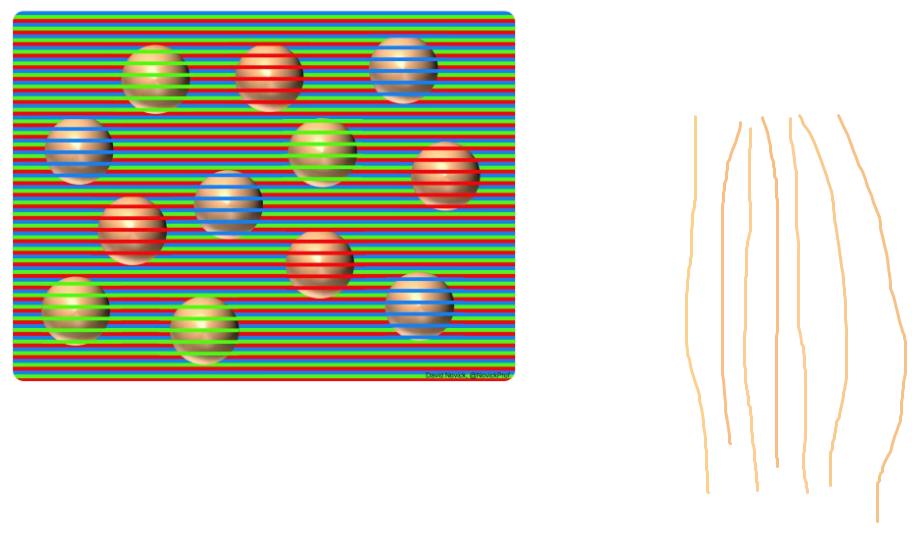
With User Experience, perception plays a big role. It helps to understand how colors work: a difficult topic with amazing results like: “All the balls are the same color — and that color is brown!”

All pictures below are from the [WayBack] Chaz Firestone on Twitter: “All the balls are the same color — and that color is brown!… “ thread.

Original by [WayBack] David Novick (@NovickProf) | Twitter: Professor of Engineering Education and Leadership, the University of Texas at El Paso. Tweets cover innovation & entrepreneurship, improv, and color illusions. El Paso, TX.

[Archive.is] David Novick on Twitter: “A three-color confetti illusion with spheres, which appear to be yellowish, reddish, and purpleish but in fact have exactly the same light-brown base color (RGB 255,188,144). Shrinking the image increases the effect. Original png file is at .… “

A PNG of the original is at engineering.utep.edu/novick/colors and his dropbox, and is even more stunning than the Twitter dithered versions below.

Colors from the color picker tool by [WayBack] #therightwaye (@therightwaye) | Twitter:

Grey backgrounds by [WayBack] Joffan (@Joffan7) | Twitter:

The cool thing is that this is being used in product packaging to make the fruits and vegetables look more orange.

Carrots by [WayBack] Hanon Ondricek on Twitter: “Oh right! And baby carrot bags have orange stripes… #itrustnothingnow… “:

Oranges and grapefruits by [WayBack] Alexei Kojenov (@kojenov) | Twitter:

–jeroen

Read the rest of this entry »

Posted in Color (software development), Development, Software Development, User Experience (ux) | Leave a Comment »

Toegankelijkheid is een recht, geen optie. Voor zowel overheid, als private bedrijven en instellingen dus een plicht in redelijkheid daarvoor te zorgen.

Posted by jpluimers on 2021/06/08

Uit een thread die een stuk onbenul aan de kaak stelde, kwam iets moois:

[WayBack] Max Verslakken 🌈 on Twitter: “‘Ik, een lopende persoon, bepaal wel effe voor mensen met een handicap wat er toegankelijk moet worden.’ Nieuwsflits: toegankelijkheid is een recht..…”:

Om precies te zijn: met de ratificatie van het #VNverdrag Handicap heeft Nederland als staat/overheid de plicht om toegankelijkheid te vergroten (zie vooral artikelen 4 en 9 van dit verdrag, wetten.overheid.nl/BWBV0004045/20…). Daarbij speelt ‘redelijk’ wel een rol, zie o.a. artikel 2. 1/2
2/2 Zo’n plicht was er nog niet voor private organisaties (zoals pretparken), maar die is er nu wel met Besluit Toegankelijkheid (zoek.officielebekendmakingen.nl/stb-2017-256.h…). Het is de plicht om ‘iets’ te doen voor algemene toegankelijkheid, waarbij ‘redelijk’ en ‘geleidelijk’ wel een rol spelen.
Tot slot: in het Besluit Toegankelijkheid staan enkele voorbeelden, zie de toelichting bij artikel 6. Wat ‘redelijk’ is, hangt af van o.a. de omvang van de organisatie, zie artikel 7. Zo mag je van bijv. een grote supermarkt veel meer verwachten/eisen dan van een kleine bakkerij.
Nog 1 P.S. 😉. Geert schrijft “alle attracties in een pretpark voor iedereen toegankelijk lukt niet”. Op korte termijn lukt dat idd niet, maar op langere tijd is veel mogelijk. Dat houdt die ‘geleidelijkheid’ in: niet alles hoeft meteen, maar er moet wel steeds vooruitgang zijn.

–jeroen Read the rest of this entry »

Posted in accessibility (a11y), Development, Software Development | Leave a Comment »

Delphi: some notes on HModule while tracking down an access violation in TRegGroups.UnregisterModuleClasses

Posted by jpluimers on 2021/06/08

Too bad the whole mechanism involving TRegGroups.UnregisterModuleClasses is not documented anywhere

It is the underlying storage to support TClassFinder, which was introduced in Delphi 6, documented on-line in Delphi 2007, documented slightly in Delphi 2009, and since Delphi 2010 only one line of documentation was added (including the unchanged “instatiated”):

  • Delphi 2007: [WayBack] TClassFinder Class

    This is class Classes.TClassFinder.

  • Delphi 2009:[WayBack] TClassFinder Class

    The TClassFinder allows the list of registered persistent classes to be retrieved. Objects instatiated from persistent classes are those that can be stored (serialised) beyond the operation of the current application.

  • Delphi 2010:[WayBack] Classes.TClassFinder – RAD Studio VCL Reference

    TClassFinder allows registered persistent classes to be retrieved.

    The TClassFinder allows the list of registered persistent classes to be retrieved. Objects instatiated from persistent classes are those that can be stored (serialised) beyond the operation of the current application.

Back to TRegGroups.UnregisterModuleClasses: it takes a HMODULE parameter and ultimately gets called through the (since Delphi 2007) on-line documented [WayBack] Classes.UnRegisterModuleClasses Function

procedure UnRegisterModuleClasses(Module: HMODULE);

Call UnRegisterModuleClasses to unregister all object classes that were registered by the module with the handle specified by the Module parameter. When a class is unregistered, it can’t be loaded or saved by the component streaming system.

After unregistering a class, its name can be reused to register another object class.

To get more context about the access violation, I used both the stack trace and a debugging watch for GetModuleName(Module) (using the [WayBack] SysUtils.GetModuleName Function).

In order to see which classes were registered by what module, I set a breakpoint at in TRegGroup.AddClass (which can be called through various code paths):

procedure TRegGroup.AddClass(AClass: TPersistentClass);
begin
  FGroupClasses.Add(AClass);
end;

HModule

That gave me the class, but I also needed the HModule for a class, so I did a windows get module of currently executing code – Google Search, giving me these links, all C/C++ related:

Here you already see some confusion: there is HINSTANCE and HMODULE. That’s a historic thing, as described by Raymond Chen in [WayBack] What is the difference between HINSTANCE and HMODULE? | The Old New Thing:

They mean the same thing today, but at one time they were quite different.
It all comes from 16-bit Windows.
In those days, a “module” represented a file on disk that had been loaded into memory, and the module “handle” was a handle to a data structure that described the parts of the file, where they come from, and where they had been loaded into memory (if at all). On the other hand an “instance” represented a “set of variables”.
One analogy that might (or might not) make sense is that a “module” is like the code for a C++ class – it describes how to construct an object, it implements the methods, it describes how the objects of the class behave. On the other hand, an “instance” is like a C++ object that belongs to that class – it describes the state of a particular instance of that object.
In C# terms, a “module” is like a “type” and an instance is like an “object”. (Except that modules don’t have things like “static members”, but it was a weak analogy anyway.)

GetModuleName

Searching for delphi “__ImageBase” – Google Search then got me [WayBack] c++ – Get DLL path at runtime – Stack Overflow with a nice Delphi related answer by [WayBack] Ian Boyd:

For Delphi users:

SysUtils.GetModuleName(hInstance);              //Works; hInstance is a special global variable
SysUtils.GetModuleName(0);                      //Fails; returns the name of the host exe process
SysUtils.GetModuleName(GetModuleFilename(nil)); //Fails; returns the name of the host exe process

In case your Delphi doesn’t have SysUtils.GetModuleName, it is declared as:

...

This reassured my use of [WayBack] SysUtils.GetModuleName code was OK:

function GetModuleName(Module: HMODULE): string; 
var
  ModName: array[0..MAX_PATH] of Char; 
begin
  SetString(Result, ModName, GetModuleFileName(Module, ModName, Length(ModName))); 
end;

HInstance in Delphi

The example from Ian Boyd also brought back memories from long ago about the [WayBack] HInstance Variable – Delphi in a Nutshell [Book]:

Read the rest of this entry »

Posted in Conference Topics, Conferences, Delphi, Development, Event, History, Software Development | Leave a Comment »

CloudKey ESXi Appliance – Google Search

Posted by jpluimers on 2021/06/07

Via [Archive.is] CloudKey ESXi Appliance – Google Search:

–jeroen

Posted in *nix, Cloud Key, ESXi6, ESXi6.5, ESXi6.7, Internet, Network-and-equipment, Power User, Unifi-Ubiquiti, Virtualization, VMware, VMware ESXi | Leave a Comment »

Random, Quick Brown Fox and Lorem Ipsum – How to Add Filler Text in Microsoft Word Documents

Posted by jpluimers on 2021/06/07

Choices:

  • =lorem(...): Ramdom Lorem Ipsum text paragraphs.
    • The sentences are roughly between 0.25 and 1.0 document widths in length.
  • =rand(...): Random English help text like paragraphs.
    • The sentences are roughly between 0.5 and 1.5 document width in length.
  • =rand.old(...): “The quick brown fox jumps over the lazy dog.” paragraphs (up until Word 2003, this was what rand(...) returned).
    • The sentences are always the same length.

(...) parameters:

  • (x,y): x paragraphs of y sentences of text
  • (y): y paragraphs of 3 sentences of text (lorem more towards 1, rand more towards 3)
  • (): depends on the function:
    • =lorem(): 5 paragraphs of 3 sentences of text
    • =rand(): 5 paragraphs of 3 sentences of text
    • =rand.old(): 3 paragraphs of 3 sentences of text

Note:

  • There is no way to specify x paragraphs of random number lines of text.
  • They need to have “Replace text as you type” enabled (see menu option “File” -> “Options” -> “Proofing” -> “Autocorrect Options”)
  • Word 2003 and lower only have =rand(...)

Based on:

Related: [WayBack] 10 awesome Lorem Ipsum alternatives – Justinmind via [WayBack] rand () in word – Microsoft Tech Community – 325554

For a random document demo, I usually do this:

  1. =lorem(100,1) to get 100 paragraphs of 1 line of text
  2. About every 10 paragraphs, I mark a paragraph with a relevant Heading style
  3. Inside the remaining text, I combine some paragraphs to get longer ones

–jeroen

Posted in Office, Office 2003, Office 2007, Office 2010, Office 2013, Office 2016, Power User, Word | Leave a Comment »

Contact for when WayBack internet archival fails to grab content

Posted by jpluimers on 2021/06/07

For my link archive, some tweets. [WayBack] Mark Graham is the person to contact in case archiving a link in the WayBack machine fails.

These are the steps for my link archival:

  1. check if it saves and renders with the WayBack machine, if so, copy the saved URL and the original URL
  2. check if it saves and renders with archive.is, if so, copy the saved URL and the original URL
  3. if neither saved, then use the original URL and link text, but note it was unsavable; otherwise prepend the original URL and link text with [WayBack] or [Archive.is] containing the saved URL

Reporting history gist: https://gist.github.com/jpluimers/6115b3cd6dab568ebd1c10ebddfaf140

–jeroen

Read the rest of this entry »

Posted in Internet, InternetArchive, Power User, WayBack machine | Leave a Comment »

Reminder to self: get less dependent on the various clouds

Posted by jpluimers on 2021/06/04

For my link archive: [WayBack] Grote Google-storing trof Gmail, YouTube en diensten van derden – IT Pro – Nieuws – Tweakers.

It has some interesting tips for IoT video doorbell products that are less depending on single-choice clouds:

Er bestaan er minimaal eentje; smart deurbel met camera en evt speaker, eigen intern netwerk, compatible met SIP (en video), zelf verantwoordelijk voor opnamen, etc. Enige nadeel is dan wel de prijs, het is een Duits kwaliteitsproduct, dus reken rond de 350 euro voor het absolute basismodel. Doorbird heet het; oa te koop bij Robbshop en CoolBlue of direct bij de fabiraknt’s website.


Je moet je huis flink geautomatiseerd hebben wil je echt nut van die api willen hebben.

als je alles zelf in de hand wil hebben doe je dat ook. Je zorgt er zelf voor dat je webinterface via een externe URL bereikbaar is en dan is het enkel je eigen hardware en internetverbindingen die als SPOF dienen en je kan dan ook makkelijker van solution-provider wisselen zonder vast te zitten.


wellicht is dit een oplossing voor jou?

https://www.instructables…oorbell-for-Less-Than-40/


–jeroen

Posted in Cloud Apps, Internet, IoT Internet of Things, Network-and-equipment, Power User | Leave a Comment »

Persevereren / Niet-zichtbare gevolgen / Gevolgen | Hersenletsel-uitleg.nl

Posted by jpluimers on 2021/06/04

Voor mijn link archief:

Persevereren is afgeleid van het woord persevere en beteken letterlijk het herhalen of doorgaan met een handeling, een woord, een beweging maar zelfs ook het voortzetten van een emotie.

[WayBack] Persevereren / Niet-zichtbare gevolgen / Gevolgen | Hersenletsel-uitleg.nl

–jeroen

Posted in About, LifeHacker, Personal, Power User | Leave a Comment »

VMware ESXi: VMware Tools Installed but not running

Posted by jpluimers on 2021/06/04

Sometimes you get this situation on a Windows VM, usually after a reboot but not logging on:

Networking No network information
VMware Tools Installed but not running

“Windows” “VMware Tools” “Installed but not running” – Google Search mostly gives results about the VMware tools installation ISO being malformed, the registry not being correct, or having Linux as guest:

In practice though, there is a really good change that your default power settings allow Windows to go to sleep after some time of activity. The Windows VM then really sleeps, including services and network adapters. Then VMware ESXi thinks the machine has no VMware tools running:

I have noticed this on ESXi 6.5 and 6.7 with both Windows 7 and Windows 10. It is broader though, as others have seen this in ESXi 5.x as well: [WayBack] VMware Communities : All Content – VMware ESXi 5.

Verifying sleep is enabled

This little trick shows you the various possible sleep states:

C:\>powercfg /availablesleepstates
The following sleep states are available on this system: Standby ( S1 )
The following sleep states are not available on this system:
Standby (S2)
        The system firmware does not support this standby state.
Standby (S3)
        The system firmware does not support this standby state.
Hibernate
        Hibernation has not been enabled.
Hybrid Sleep

Disabling sleep

If you search for “sleep” in the [WayBack] Powercfg command-line options | Microsoft Docs, you have a hard time finding these:

/change or /X

Modifies a setting value in the current power scheme.

Syntax:

/change  setting  value

Arguments:

setting
Specifies one of the following options:

  • monitor-timeout-ac
  • monitor-timeout-dc
  • disk-timeout-ac
  • disk-timeout-dc
  • standby-timeout-ac
  • standby-timeout-dc
  • hibernate-timeout-ac
  • hibernate-timeout-dc
value
Specifies the new value, in minutes.

Examples:

powercfg /change monitor-timeout-ac 5

in order to disable sleep, you hav disable the standby timeouts (suffix -ac means “Plugged in” and -d means “On battery”) by setting their values to 0 (zero) minutes as UAC elevated Administrator:

powercfg /change standby-timeout-ac 0
powercfg /change standby-timeout-dc 0

This is far less than in WayBack – FutureMark forums – windows 7 – how do i disable SLEEP mode via command line ? (via [WayBack] Disable Sleep mode using powercfg – it.megocollector.com), but this is really all you need, as it correctly disables sleeping:

Later I found that [WayBack] windows 7 – How to disable sleep mode via CMD? – Super User also shows this shorter solution.

Note you need to run those on as UAC elevated user, which you can check for using the net session trick in [WayBack] windows – Batch script: how to check for admin rights – Stack Overflow.

–jeroen

Posted in Conference Topics, Conferences, ESXi6.5, ESXi6.7, Event, Power User, Virtualization, VMware, VMware ESXi | Leave a Comment »