


For my link archive:
–jeroen
Posted by jpluimers on 2022/04/20
For my link archive:
–jeroen

Posted in ESXi6, ESXi6.5, ESXi6.7, Power User, Virtualization, VMware, VMware ESXi | Leave a Comment »
Posted by jpluimers on 2022/04/19
- [Archive.is] Ethan Mollick on Twitter: “The Internet is rotting. This chart shows the percentage of links from all New York Times articles that still work. Over 25% of the links embedded in articles just seven years ago & 60% of older links, are now broken. And tweets & posts are more ephemeral! … “
- [Wayback] What the ephemerality of the Web means for your hyperlinks – Columbia Journalism Review
Hyperlinks are a powerful tool for journalists and their readers. Diving deep into the context of an article is just a click away. But hyperlinks are a double-edged sword; for all of the internet’s boundlessness, what’s found on the Web can also be modified, moved, or entirely vanished. The fragility of the Web poses an […]
It’s all about Link_rot, which is the main reason I have been posting [Wayback] (and when these do not archive, [Archive.is]) archival links in my blog posts since about 2015.
Sometimes I find time to add these to older posts as well, but given there are 7000+ blog posts published, I won’t be able to do that for all past blog posts.
—jeroen

Posted in Internet, link rot, Power User, WWW - the World Wide Web of information | Leave a Comment »
Posted by jpluimers on 2022/04/18
Now that Google Hangouts on a PC keeps nagging that it will be replaced with Google Chat, and the main use case for my mentally retarded brother is video calls from behind his PC, I am going to investigate if Google Duo is any better (he loses mobile phones, which means no WhatsApp; Google Meet is to difficult for his mental abilities).
Some links to get me started:
Related:
duo.google.com en dan onder de drie pijltjes in Chrome verschijnt een “Install Google Duo” – de website wordt dan soort van als app geinstallerd”–jeroen
Posted in Google, GoogleDuo, GoogleHangouts, Power User | Leave a Comment »
Posted by jpluimers on 2022/04/15
The 2022 Russian invasion of Ukraine causes a chain reaction on the world food supplies.
Paul van Ruiten of Bureau OM made the below insightful diagram showing that is going on.
It is not complicated as it is an easy to follow chain of cause and effect where in all the parts, Ukraine needs at least three to four of these:
Currently there is already a world-wide increase in food prices and shortages of some foods. This will worsen when in this spring the situation in Ukraine fails to improve (read: Russia gets kicked out).
Large image below the signature from [Wayback/Archive] FPvodTdWQAgmt9k (4096×3100) which you can also download as [Wayback] PDF.
Sources:

Posted in Awareness | Leave a Comment »
Posted by jpluimers on 2022/04/14
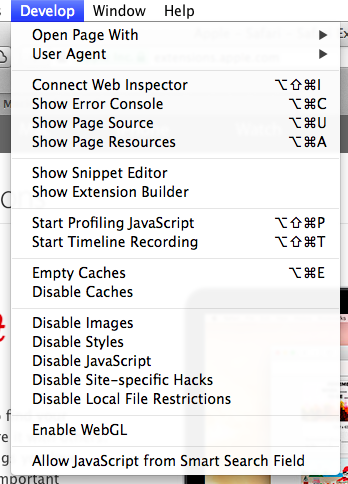
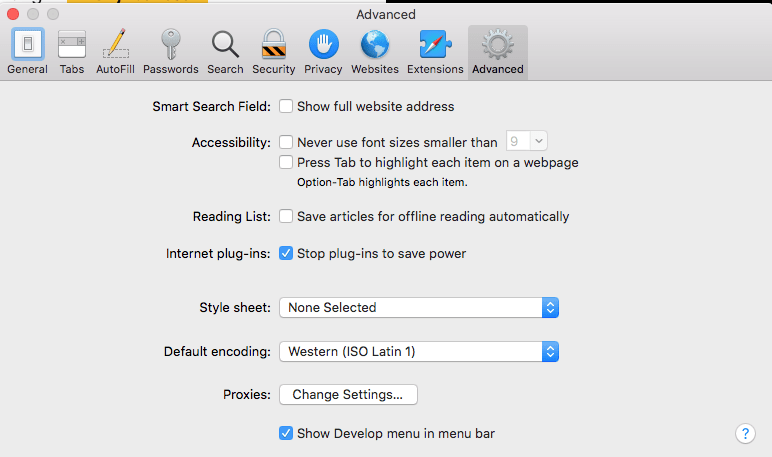
[Wayback] How to view the html page source of a website in Safari – Macintosh How To
You can enable the extra menu in Safari by selecting ‘Preferences’ under Safari in the OS X menu bar and then under the ‘Advanced’ pane select the checkbox that says ‘Show Develop menu in menu bar.’
…
This is the option you need:
a
MacOS – Safari – Show Develop menu in menu bar
–jeroen

Posted in Apple, Development, Mac OS X / OS X / MacOS, Power User, Safari, Software Development, Web Browsers, Web Development | Leave a Comment »
Posted by jpluimers on 2022/04/13
I say to people: only use shell interactively, don’t write scripts. Never. Not one.
But Kris, they ask, why so radical?
Because of this:
is the literal English Google Translation of the German text
Ich sage den Leuten: benutzt Shell nur interaktiv, schreibt keine Scripte. Nie. Nicht eines.
Aber Kris, fragen sie, wieso so Radikal?
Deswegen:
then links to [Wayback/Archive] Jan Schaumann on Twitter: “TIL zgrep(1) is a shell script. BSD basically does “zcat | grep”, but GNU does “gzip -dc | sed”. How did I learn that? The fun way! CVE-2022-1271, arbitrary-file-write and code execution vulnerability in GNU zgrep / gzip. …”:

Posted in *nix, *nix-tools, Apple, ash/dash, ash/dash development, bash, bash, BSD, Development, Mac, Mac OS X / OS X / MacOS, Power User, Scripting, Software Development | Leave a Comment »
Posted by jpluimers on 2022/04/13
Guessing the [Wayback] Run ESXi from a USB Flash Drive: A How-To-Guide by just the abstract does not show the value enough:
A USB flash drive can be used not only for installation media – you can also run ESXi from USB flash drives or SD flash cards and boot from these devices.
In fact, the article shows way more, including:
This is very important, because every now and then, these USB and SD devices fail (see for instance [Wayback] Solved: Remount boot filesystem on a running system. – VMware Technology Network VMTN), so knowing what to do then is key and helps handling errors like this one:
Lost connectivity to the device mpx.vmhba32:C0:T0:L0 backing the boot filesystem /vmfs/devices/disks/mpx.vmhba32:C0:T0:L0. As a result, host configuration changes will not be saved to persistent storage.
A every useful article for my link archive!
Related: ESXi: storing an ISO 8601 time-stamped backup tarball locally
Posted in ESXi5, ESXi5.1, ESXi5.5, ESXi6, ESXi6.5, ESXi6.7, ESXi7, Power User, Virtualization, VMware, VMware ESXi | Leave a Comment »
Posted by jpluimers on 2022/04/12
The below links helped me clean the Google Drive of a friend that grew way too large because TomTom HOME decided to put 100 gigabyte of data in the Documents folder instead of the local AppData folder (yup, this is a follow-up of Windows applications: storing your data in the correct place (Roaming, Local, LocalLow, not Documents)).
The trick with extensions to exclude is you have to add exclusions before syncing. Which is a kind of catch-22 or chicken and egg problem.
In case of the friend I helped we made a backup of the TomTom HOME data, then applied the exclusions and restored the data.
For TomTom HOME in order not to fill your Google Drive, but still allow backing up your Documents folder, these are extensions you might want to exclude (roughly in descending order of space) where you have to mind not storing any of these extensions in other subfolders of your Documents folder.:
.zip.cab.toc.tmp.meta.sat.tlv.ttd.dat.vif.chk.bin.rex.lde.gpr.dbl.so.ov2
The problem with this? Google Backup and Sync does not allow that many exclusion extensions.
–jeroen
Posted in Google, GoogleBackupAndSync, GoogleDrive, Power User, Windows, Windows 10 | Leave a Comment »
Posted by jpluimers on 2022/04/12
An interesting set of scripts from [Wayback/Archive.is] No Joke IT: Graceful shutdown of an ESXi 5.1 host and guest VMs (free edition) using the shell/command line/scripting (UPS friendly).
If all ESXi virtual machines support running of VMware Tools, then the solution is a plain /sbin/shutdown.sh && /sbin/poweroff (see [Wayback/Archive.is] No Joke IT: Shut down ESXi 5.1 guest VMs and the host (free edition) via SSH – the easy way!).
Code is in the repository at [Wayback/Archive.is] sixdimensionalarray/esxidown: A shell script to shutdown VMware ESXi host servers, with these two main files:
#!/bin/sh
# Runs a shell command asynchronously.

if [ "$1" != "" ]; then
    nohup sh $1 > /dev/null 2>&1 &
fi
# exit maintenance mode immediately before server has a chance to shutdown/power off
# NOTE: it is possible for this to fail, leaving the server in maintenance mode on reboot!
echo "Exiting maintenance mode..."
if [ $TEST -eq 0 ]; then
    esxcli system maintenanceMode set -e false -t 0
fi
Note: the No Joke IT web-site has vanished, so only the [Wayback] and [Archive.is] links of it still work. The github code was still there at the time of writing.
Via: [Wayback] Solved: Read only Files – VMware Technology Network VMTN
Related: Some notes on replacing parts of a text file with template text using sed on a Busybox system.
–jeroen
Posted in *nix, *nix-tools, ash/dash, ash/dash development, Development, ESXi5, ESXi5.1, ESXi5.5, ESXi6, ESXi6.5, ESXi6.7, Power User, Scripting, Software Development, Virtualization, VMware, VMware ESXi | Leave a Comment »
Posted by jpluimers on 2022/04/11
For my link archive:
You need to set
default_destination_recipient_limit = 2instead of 1. Because if set to 1 then the limit will only apply to the same recipient, not domain.
… [Wayback] User Maxxer:
Given that my problem is not related to the domain, I basically need to change the process limit.
the line to be changed is this, right?
smtp unix - - y - 5 smtp… [Wayback] User Ingvar J:
Yes, this looks like the correct statement
…
…
_destination_concurrency_limitneeds to be > 1.Value 1 will cause the destination to be full email, value >1 will cause the destination match the email domain. However the
destination_rate_relaywhen set will always send one at a time.…
try
smtp_destination_recipient_limit = 2
smtp_destination_concurrency_limit = 2
smtp_destination_rate_delay = 1s
…
The crux seems to be a combination of these parameters to do outgoing rate-limiting, for instance with these values:
default_destination_concurrency_limit = 30
default_destination_rate_delay = 5s
Here default_destination_concurrency_limit needs to be larger than one (so mails are grouped by domain) in order for the default_destination_rate_delay to have any effect at all.
You can even extend this to named transports as per [Wayback] Postfix Users – Create Custom Mail Queue answered by [Wayback] Ralf Hildebrandt
> Can I create custom mail queue in
/var/spool/postfixto hold the mails for
> specific destination and schedule to deliver one by one for period of time,
> let’s say 2 mins.That’s not needed. Create a custom transport for the destination.
Then use
<nameofcustomtransport>_destination_rate_delay= 120s
In the below bullets from the Postfix documentation, emphasis is mine.
Postfix Configuration Parameters: main.cf
default_destination_concurrency_limit
default_destination_concurrency_limit(default:20)The default maximal number of parallel deliveries to the same destination. This is the default limit for delivery via the lmtp(8), pipe(8), smtp(8) and virtual(8) delivery agents. With per-destination recipient limit > 1, a destination is a domain, otherwise it is a recipient.
Use transport_destination_concurrency_limit to specify a transport-specific override, where transport is the
master.cfname of the message delivery transport.
Postfix Configuration Parameters: default_destination_rate_delay
default_destination_rate_delay(default:0s)The default amount of delay that is inserted between individual message deliveries to the same destination and over the same message delivery transport. Specify a non-zero value to rate-limit those message deliveries to at most one per $default_destination_rate_delay.
The resulting behavior depends on the value of the corresponding per-destination recipient limit.
- With a corresponding per-destination recipient limit > 1, the rate delay specifies the time between deliveries to the same domain. Different domains are delivered in parallel, subject to the process limits specified in
master.cf.- With a corresponding per-destination recipient limit equal to 1, the rate delay specifies the time between deliveries to the same recipient. Different recipients are delivered in parallel, subject to the process limits specified in
master.cf.To enable the delay, specify a non-zero time value (an integral value plus an optional one-letter suffix that specifies the time unit).
Time units: s (seconds), m (minutes), h (hours), d (days), w (weeks). The default time unit is s (seconds).
NOTE: the delay is enforced by the queue manager. The delay timer state does not survive “
postfix reload” or “postfix stop“.Use
transport_destination_rate_delayto specify a transport-specific override, where transport is themaster.cfname of the message delivery transport.NOTE: with a non-zero
_destination_rate_delay, specify atransport_destination_concurrency_failed_cohort_limitof 10 or more to prevent Postfix from deferring all mail for the same destination after only one connection or handshake error.This feature is available in Postfix 2.5 and later.
default_process_limit
default_process_limit(default:100)The default maximal number of Postfix child processes that provide a given service. This limit can be overruled for specific services in the master.cf file.
master.cf (where Process limit is the 7th parameter on a configuration line)…
       Process limit (default: $default_process_limit)
              The maximum number of processes that may  execute  this  service
              simultaneously. Specify 0 for no process count limit.

              NOTE:  Some  Postfix  services  must  be  configured  as  a sin-
              gle-process service (for example,  qmgr(8))  and  some  services
              must   be   configured  with  no  process  limit  (for  example,
              cleanup(8)).  These limits must not be changed.
…
–jeroen
Posted in *nix, *nix-tools, postfix, Power User | Leave a Comment »

 The Wiert Corner - irregular stream of stuff