


A twitter post blasted me away by showing the results of Tesseract (software) – Wikipedia doing perfect OCR on an image from a twitter post:
Author Archive
Tesseract (software): amazing command-line OCR tool
Posted by jpluimers on 2022/05/13

Posted in C++, Color (software development), Development, OCR, Power User, Software Development, Tesseract | Leave a Comment »
Filezilla SFTP: figuring out the cause of “Connection timed out after 20 seconds of inactivity” part 2: about ((non-)?(interactive|login) ?){2} bash shells
Posted by jpluimers on 2022/05/12
Last year, I wrote about Filezilla: figuring out the cause of “Connection timed out after 20 seconds of inactivity” about sftp connection problems.
The solution there was to exclude part of bashrc with an if [Wayback] statement so bash would skip it during sftp, but not during ssh login:
[WayBack] linux – Use .bashrc without breaking sftp – Server Fault
- From answer 1 (thanks [WayBack] Mike):
Try doing this instead
if [ "$SSH_TTY" ] then source .bashc_real fi- From Answer 2 (thanks [WayBack] Insyte):
A good trick for testing the cleanliness of your login environment is to
sshin with a command, which simulates the same wayscp/sftpconnect. For example:ssh myhost /bin/truewill show you exactly whatscp/sftpsees when they connect.
That caused some scripts not to be run when switching user, for instance by doing sudo su -.
The reason for that was that I forgot to put enough research in part of Answer 2, so I quote a few bits more of it (highlights and code markup mine):
… it’s worth pointing out that you can accomplish this carefully selecting which startup files to put the verbose stuff in. From the
bashman page:When
bashis invoked as an interactive login shell, or as a non-interactive shell with the--loginoption, it first reads and executes commands from the file/etc/profile, if that file exists. After reading that file, it looks for~/.bash_profile,~/.bash_login, and~/.profile, in that order, and reads and executes commands from the first one that exists and is readable. The--noprofileoption may be used when the shell is started to inhibit this behavior.When an interactive shell that is not a login shell is started,
bashreads and executes commands from~/.bashrc, if that file exists. This may be inhibited by using the--norcoption. The--rcfilefile option will force bash to read and execute commands from file instead of~/.bashrc.The
sftp/scptools start an interactive non-login shell, so.bashrcwill be sourced.
For further reading, there is the underlying bash manual as a PDF file [Wayback] and html document tree [Wayback]. Note it is large (the PDF is 190 pages).
I find the easiest way to navigate around bash documentation through these links:
- [Wayback] Top (Bash Reference Manual) (especially read the Bash Features section there)
- [Wayback] Indexes (Bash Reference Manual) (there are five of them, centered around various core topics)
Types of shell invocations: to login or to non-login and to interactive or to non-interactive
Basically, from the above answer there are [Archive.is] 4 types of shells (confirmed by these parts of the bash documentation: [Wayback] Section 6.1: Invoking-Bash and [Wayback] Section 6.2: Bash-Startup-Files):
- interactive login
- interactive non-login
- non-interactive login
- non-interactive non-login
And there are various means the shells can start (ssh, local console, …). The "$SSH_TTY" trick only checks interactive login via ssh, but fails to detect others.
So I did some digging for the correct information to log, which including the above are:
- [Wayback] Section 4.3.1: The-Set-Builtin
-hLocate and remember (hash) commands as they are looked up for execution. This option is enabled by default.-mJob control is enabled (see Job Control). All processes run in a separate process group. When a background job completes, the shell prints a line containing its exit status.-BThe shell will perform brace expansion (see Brace Expansion). This option is on by default.-HEnable ‘!’ style history substitution (see History Interaction). This option is on by default for interactive shells.
Note that in addition to this, there is the non-settable option
i: The current shell is interactive (see the-iin section 6.1 below). - [Wayback] Section 4.3.2: The-Shopt-Builtin
login_shellThe shell sets this option if it is started as a login shell (see Invoking Bash). The value may not be changed.
- [Wayback] Section 6.1: Invoking-Bash
There are several single-character options that may be supplied at invocation which are not available with the
setbuiltin.-iForce the shell to run interactively. Interactive shells are described in Interactive Shells.
…
A login shell is one whose first character of argument zero is ‘-’, or one invoked with the –login option.
- [Wayback] Section 6.2: Bash-Startup-Files explains about these shell invocation types:
- interactive login shell
- interactive non-login shell
- non-interactive shell
- [Wayback] Section 6.3.1: Is-this-Shell-Interactive
To determine within a startup script whether or not Bash is running interactively, test the value of the ‘-’ special parameter. It contains
iwhen the shell is interactive. For example:case "$-" in *i*) echo This shell is interactive ;; *) echo This shell is not interactive ;; esac
Alternatively, startup scripts may examine the variable
PS1; it is unset in non-interactive shells, and set in interactive shells. Thus:if [ -z "$PS1" ]; then echo This shell is not interactive else echo This shell is interactive fi
From theory to practice
After reading the above documentation links, I put the below code in the global .bashrc (which of course caused trouble with sftp, so I commented it out later):
echo "Option flags: '$-'"
echo "PS1: '$PS1'"
echo "shopt login_shell: '$(shopt login_shell)'"
echo "Parameter zero: '$0'"
[ "$SSH_TTY" ] ; echo "[ \"\$SSH_TTY\" ] outcome: $?"
And the output after these commands:
-
ssh user@hostOption flags: 'himBH' PS1: '\u@\h:\w> ' shopt login_shell: 'login_shell on' Parameter zero: '-bash' [ "$SSH_TTY" ] outcome: 0Verdict:
interactive,login -
ssh user@hostfollowed by
sudo su -Option flags: 'himBH' PS1: '\[\]\h:\w #\[\] ' shopt login_shell: 'login_shell on' Parameter zero: '-bash' [ "$SSH_TTY" ] outcome: 1Verdict:
interactive,login -
ssh user@hostfollowed by
bashOption flags: 'himBH' PS1: '\u@\h:\w> ' shopt login_shell: 'login_shell off' Parameter zero: 'bash' [ "$SSH_TTY" ] outcome: 0Verdict:
interactive,non-login -
ssh user@hostfollowed by
sudo su -then by
bashOption flags: 'himBH' PS1: '\[\]\h:\w #\[\] ' shopt login_shell: 'login_shell off' Parameter zero: 'bash' [ "$SSH_TTY" ] outcome: 1Verdict:
interactive,non-login -
ssh user@host /bin/trueOption flags: 'hBc' PS1: '' shopt login_shell: 'login_shell off' Parameter zero: 'bash' [ "$SSH_TTY" ] outcome: 1Verdict:
non-interactive,non-login
The final one is what for instance sftp will see. It excludes the non-interactive mark in the shopt option flags.
Modifications to my .bashrc file
Since the [Wayback] test for "$SSH_TTY" is inconsistent with the login being interactive, I modified the .bashrc section
if [ "$SSH_TTY" ]
then
   source .bashc_real
fi
to become
if [[ $- =~ i ]]
then
   # only during interactive login shells
   source .bashc_real
fi
I know the [[...]] over test shorthand [...] is a bashism, see [Wayback] if statement – Is double square brackets [[ ]] preferable over single square brackets [ ] in Bash? – Stack Overflow for why I like it.
More relevant documentation
I based the above changes not only on the mentioned StackOverflow post, but also doing some more Googling revealing these useful documentation and question/answer links:
- [Wayback] Section 3.2.5.2: Conditional Constructs;
[[ expression ]]
[[…]][[ expression ]]Return a status of
0or1depending on the evaluation of the conditional expression expression. Expressions are composed of the primaries described below in Bash Conditional Expressions. Word splitting and filename expansion are not performed on the words between the[[and]]; tilde expansion, parameter and variable expansion, arithmetic expansion, command substitution, process substitution, and quote removal are performed. Conditional operators such as ‘-f’ must be unquoted to be recognized as primaries.…
An additional binary operator, ‘
=~’, is available, with the same precedence as ‘==’ and ‘!=’. When it is used, the string to the right of the operator is considered a POSIX extended regular expression and matched accordingly (using the POSIXregcompandregexecinterfaces usually described inregex(3)). The return value is0if the string matches the pattern, and1otherwise. If the regular expression is syntactically incorrect, the conditional expression’s return value is2. - [Wayback] Section 4.1: Bourne Shell Builtins;
testor[...](Bash Reference Manual)
test expr
Evaluate a conditional expression expr and return a status of
0(true) or1(false). Each operator and operand must be a separate argument. Expressions are composed of the primaries described below in Bash Conditional Expressions.testdoes not accept any options, nor does it accept and ignore an argument of--as signifying the end of options.When the
[form is used, the last argument to the command must be a]. - [Wayback] bash – What are the special dollar sign shell variables? – Stack Overflow (thanks [Wayback] kojiro!):
$1,$2,$3, … are the positional parameters."$@"is an array-like construct of all positional parameters,{$1, $2, $3 ...}."$*"is the IFS expansion of all positional parameters,$1 $2 $3 ....$#is the number of positional parameters.$-current options set for the shell.$$pid of the current shell (not subshell).$_most recent parameter (or the abs path of the command to start the current shell immediately after startup).$IFSis the (input) field separator.$?is the most recent foreground pipeline exit status.$!is the PID of the most recent background command.$0is the name of the shell or shell script.
Most of the above can be found under Special Parameters in the Bash Reference Manual. There are all the environment variables set by the shell.
For a comprehensive index, please see the Reference Manual Variable Index.
- [Wayback] bash – Differentiate Interactive login and non-interactive non-login shell – Ask Ubuntu (thanks [Wayback] terdon)
Briefly (see here for more details), with examples:
- interactive login shell: You log into a remote computer via, for example
ssh. Alternatively, you drop to a tty on your local machine (Ctrl+Alt+F1) and log in there. - interactive non-login shell: Open a new terminal.
- non-interactive non-login shell: Run a script. All scripts run in their own subshell and this shell is not interactive. It only opens to execute the script and closes immediately once the script is finished.
- non-interactive login shell: This is extremely rare, and you’re unlikey to encounter it. One way of launching one is
echo command | ssh server. Whensshis launched without a command (sosshinstead ofssh commandwhich will runcommandon the remote shell) it starts a login shell. If thestdinof thesshis not a tty, it starts a non-interactive shell. This is whyecho command | ssh serverwill launch a non-interactive login shell. You can also start one withbash -l -c command.
If you want to play around with this, you can test for the various types of shell as follows:
- Is this shell interactive?Check the contents of the
$-variable. For interactive shells, it will includei:## Normal shell, just running a command in a terminal: interacive $ echo $- himBHs ## Non interactive shell $ bash -c 'echo $-' hBc - Is this a login shell?There is no portable way of checking this but, for bash, you can check if the
login_shelloption is set:## Normal shell, just running a command in a terminal: interacive $ shopt login_shell login_shell off ## Login shell; $ ssh localhost $ shopt login_shell login_shell on
Putting all this together, here’s one of each possible type of shell:
## Interactive, non-login shell. Regular terminal $ echo $-; shopt login_shell himBHs login_shell off ## Interactive login shell $ bash -l $ echo $-; shopt login_shell himBHs login_shell on ## Non-interactive, non-login shell $ bash -c 'echo $-; shopt login_shell' hBc login_shell off ## Non-interactive login shell $ echo 'echo $-; shopt login_shell' | ssh localhost Pseudo-terminal will not be allocated because stdin is not a terminal. hBs login_shell on - interactive login shell: You log into a remote computer via, for example
- [Wayback] Difference between Login Shell and Non-Login Shell? – Unix & Linux Stack Exchange
A login shell is the first process that executes under your user ID when you log in for an interactive session. The login process tells the shell to behave as a login shell with a convention: passing argument 0, which is normally the name of the shell executable, with a
-character prepended (e.g.-bashwhereas it would normally bebash. Login shells typically read a file that does things like setting environment variables:/etc/profileand~/.profilefor the traditional Bourne shell,~/.bash_profileadditionally for bash†,/etc/zprofileand~/.zprofilefor zsh†,/etc/csh.loginand~/.loginfor csh, etc.When you log in on a text console, or through SSH, or with
su -, you get an interactive login shell. When you log in in graphical mode (on an X display manager), you don’t get a login shell, instead you get a session manager or a window manager.It’s rare to run a non-interactive login shell, but some X settings do that when you log in with a display manager, so as to arrange to read the profile files. Other settings (this depends on the distribution and on the display manager) read
/etc/profileand~/.profileexplicitly, or don’t read them. Another way to get a non-interactive login shell is to log in remotely with a command passed through standard input which is not a terminal, e.g.ssh example.com <my-script-which-is-stored-locally(as opposed tossh example.com my-script-which-is-on-the-remote-machine, which runs a non-interactive, non-login shell).When you start a shell in a terminal in an existing session (screen, X terminal, Emacs terminal buffer, a shell inside another, etc.), you get an interactive, non-login shell. That shell might read a shell configuration file (
~/.bashrcfor bash invoked asbash,/etc/zshrcand~/.zshrcfor zsh,/etc/csh.cshrcand~/.cshrcfor csh, the file indicated by theENVvariable for POSIX/XSI-compliant shells such as dash, ksh, and bash when invoked assh,$ENVif set and~/.mkshrcfor mksh, etc.).When a shell runs a script or a command passed on its command line, it’s a non-interactive, non-login shell. Such shells run all the time: it’s very common that when a program calls another program, it really runs a tiny script in a shell to invoke that other program. Some shells read a startup file in this case (bash runs the file indicated by the
BASH_ENVvariable, zsh runs/etc/zshenvand~/.zshenv), but this is risky: the shell can be invoked in all sorts of contexts, and there’s hardly anything you can do that might not break something.† I’m simplifying a little, see the manual for the gory details.
If you want to avoid the [[...]] bashishm, then read [Wayback] Bashism: How to make bash scripts work in dash – Greg’s Wiki.
–jeroen
Share this:

Posted in *nix, *nix-tools, ash/dash, bash, bash, Communications Development, Conference Topics, Conferences, Development, Event, Internet protocol suite, Power User, Scripting, SFTP, Software Development, SSH, TCP | Leave a Comment »
Zypper: list info on all patterns, so you can find out which pattern provides a package
Posted by jpluimers on 2022/05/11
I wanted to know which pattern provides [WayBack] etckeeper which is in the [WayBack] openSUSE Software package etckeeper.
It seems no built-in search query can do that, so I built one my own.
Since the result takes quite a while to produce, the output is a pattern.txt that you can manually search.
This is the command:
zypper search -t pattern | grep "|" | tail -n +2 | perl -pe 's/^.*? \| //' | perl -pe 's/ *\| .*$//' | xargs -I {} sh -c "zypper info -t pattern {}" > patterns.txt
The content is like this (the 2017 date shows I wrote this a long time ago):
Share this:
Posted in *nix, *nix-tools, bash, bash, Development, etckeeper, Linux, Perl, Power User, Scripting, sed, Software Development | Leave a Comment »
Jeff Geerling on Twitter: “I plug computers into my computers…” is indeed a PCIe KVM board based on a Raspberry Pi Compute Module 4
Posted by jpluimers on 2022/05/10
Last month, I wrote
Hopefully the picture below is the board of a PCIe KVM board based on a Raspberry Pi Compute Module 4 supporting Power over Ethernet (PoE). At least it seems to looking at the thread started by…
The thread was by Jeff Geerling on Twitter: “I plug computers into my computers…”.
Jeff followed up on this much sooner than I expected with [Wayback/Archive] Jeff Geerling on Twitter: “Hey look! That computer inside a computer thing is real now! It’s the PCIe version of the Blicube KVM: …”
Share this:

Posted in Compute Module, Development, Ethernet, Hardware, Hardware Development, KVM keyboard/video/mouse, Network-and-equipment, PiKVM / Pi-KVM, PoE - Power over Ethernet, Power User, Raspberry Pi, Wake-on-LAN (WoL) | Leave a Comment »
2fa.directory: public list of sites with two factor auth support which includes SMS, email, phone calls, hardware, and software.
Posted by jpluimers on 2022/05/09
List of sites with two factor auth support which includes SMS, email, phone calls, hardware, and software.
[Wayback/Archive.is] twofactorauth at 2fa.directory with GitHub sources at [Wayback/Archive.is] 2factorauth/twofactorauth: List of sites with two factor auth support which includes SMS, email, phone calls, hardware, and software..
Via: [Archive.is] Jilles🏳️🌈 on Twitter: “Ik gebruik custom e-mail accounts + 1Password/keepass en MFA; Yubikey, Authy, Authenticator. Geef geen eerlijk antwoord op googlebare security questions. En nog steeds ligt alles op straat. Tip: https://t2fa.directory … “
–jeroen
Share this:
Posted in 2FA/MFA, Authentication, Authy, Power User, Security | Leave a Comment »
Looks like I might participate in the TRIASSIC-study to help compare TAMIS versus ESD for resection of non-pedunculated rectal lesions
Posted by jpluimers on 2022/05/06
As a follow up of Some links on removing colon tissue with Endoscopic Full Thickness Resection (EFTR), it looks like I might participate in the TRIASSIC-study to help compare TAMIS versus ESD for resection of non-pedunculated rectal lesions.
The reason I document is my earlier Tweet: [Wayback/Archive] Jeroen Wiert Pluimers on Twitter: “Meh result of the colonoscopy: – 2 polyps of ~1cm size removed – 1 polyp of ~2.5cm could not be removed now: it is in an odd place (grows over the LAR-resection seam) and needs team-discussion on what to do in a future procedure (hopefully colonoscopy, maybe larpscopy) 1/”
So I archived most links from searching for EDS and TAMIS (further below) plus the whole content of the [Wayback/Archive] TRIASSIC-study:
A multicentre, randomised controlled trial comparing TRansanal minimal InvAsive Surgery (TAMIS) and endoscopic Submucosal dIsseCtion (ESD) for resection of non-pedunculated rectal lesions.
Links (English and Dutch)
Share this:

Posted in About, Cancer, Health, LifeHacker, Personal, Power User, Rectum cancer | Leave a Comment »
Setting up a GitLab project so it is served over https as a gitlab.io and a custom subdomain
Posted by jpluimers on 2022/05/05
Last week, I posted about Setting up a GitHub project so it is served over https as a custom github.io subdomain.
Today it’s the equivalent, but on GitLab.
Why GitLab? Two major reasons: unlike GitHub:
- it’s open source
- provides way more granular control over permissions
- allows a hierarchy of repositories on which you can specify that permission control
Already 2. and 3. combined are a huge advantage, though we will see that 3. also makes some of the subcases (hosting as user.gitlab.io from account gitlab.com/user where user is your username) is harder than the similar user.github.io, github.com/user combo.
So here we go, starting with a similar set of links:
- [Wayback] GitLab Pages | GitLab
- Links outside the Table of Contents:
- [Wayback] Static vs Dynamic Websites – What’s the difference? | GitLab
- [Wayback] All About Modern Static Site Generators | GitLab
- [Wayback] SSGs Part 3: Build any SSG site with GitLab Pages | GitLab
- [Wayback] Posting to your GitLab Pages blog from iOS | GitLab
- [Wayback] GitLab CI: Run jobs sequentially, in parallel or build a custom pipeline | GitLab
- [Wayback] How to use GitLab CI to deploy to multiple environments | GitLab
- [Wayback] Building a new GitLab Docs site with Nanoc, GitLab CI, and GitLab Pages | GitLab
- [Wayback] Publish code coverage report with GitLab Pages | GitLab
- [Wayback] Tutorial: Create a GitLab Pages website from scratch | GitLab
- [Wayback] Create a Pages website by using a CI/CD template | GitLab
- [Wayback] Create a Pages website from a forked sample | GitLab
- Links outside the Table of Contents:
- [Wayback] Create a Pages website from a template | GitLab
- [Wayback] GitLab Pages domain names, URLs, and base URLs | GitLab
- [Wayback] Custom domains and SSL/TLS certificates | GitLab
- [Wayback] DNS records overview | GitLab
- [Wayback] SSL/TLS certificates | GitLab
- [Wayback] GitLab Pages integration with Let’s Encrypt | GitLab
- [Wayback] GitLab Pages access control | GitLab
- [Wayback] Create redirects for GitLab Pages | GitLab
- [Wayback] Exploring GitLab Pages | GitLab
- Links outside the Table of Contents:
- [Wayback/Archive] Keyword reference for the `
.gitlab-ci.yml` file | GitLab
- Links outside the Table of Contents:
- Golang source code: [Wayback/Archive.is] GitLab.org / gitlab-pages · GitLab
- [Wayback] Hosting on GitLab.com with GitLab Pages | GitLab
The goal is to have
- page projects as or under
wiert.gitlab.io(likewiert.gitlab.io/wiert) - a
gitlabstatus.wiert.meplain html (or maybe markdown) page project that eventually will show some status information (kind of like status.gitlab.com, but for different things).
The beauty of GitLab is that it supports hierarchies of repositories through groups and subgroups, so I already had these subgroups hoping they would cover both the first and second kind of page projects:
Steps I did
Since there are quite a few links above, here are the steps I took from my gitlab.com/wiert account and gitlab.com/wiert.me group.
Steps for wiert.gitlab.io/wiert
- For wiert.gitlab.io/wiert, try A (failed in part, and therefore interesting to understand why):
- Under leaf group gitlab.com/wiert.me/public/web/sites/gitlab.io, created a new GitLab repository
- Chose “Create from template”
- Chose the template “Pages/Plain HTML”
- Named the project “
wiert” (with slug “wiert“) so it would appear at gitlab.com/wiert.me/public/web/sites/gitlab.io/wiert - From the left sidebar, navigated to your project’s “CI/CD”, then “Pipelines”
- Now I got in a confusing situation as the page indicated “There are currently no pipelines.”, but an enabled blue “Run pipeline” button:
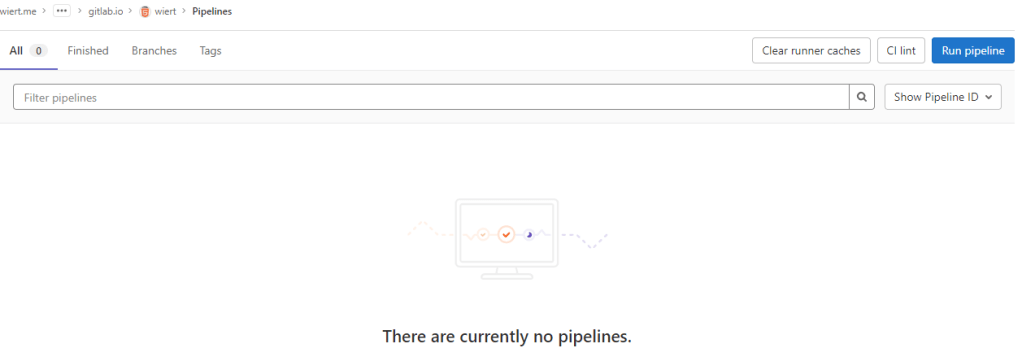
By default there is no CI/CD pipeline, but there is an enabled blue “Run pipeline” button: confusing.
- Clicked the “Run pipeline” button nonetheless, and that created [Wayback/Archive.is] a pipeline asking for parameters (that already had correct default values) and revealed a new blue “Run pipeline” button.
- Clicked that new “Run pipeline button” which created [Wayback/Archive.is] a job and deployed the page.
- From the left sidebar, navigated to “Settings”, then “Pages” to get the links to the pages site: http://wiert.me.gitlab.io/public/web/sites/gitlab.io/wiert/ and https://wiert.me.gitlab.io/public/web/sites/gitlab.io/wiert/

Warning: When using Pages under the general domain of a GitLab instance (gitlab.io), you cannot use HTTPS with sub-subdomains.
The sites do work (see the [Archive.is http version] and [Archive.is https version]), but the HTTPS fails because
wiert.me.gitlab.iodoes not match the SANs (Subject Alternative Names) in the certificate:*.gitlab.io, gitlab.io
- For wiert.gitlab.io/wiert, try B (failed, and therefore interesting to understand why):
- In my my groups gitlab.com/dashboard/groups, added a new group
wiert - Added subgroups until the leaf
gitlab.com/wiert/public/web/sites/gitlab.iowhich as URL is gitlab.com/wier1/public/web/sites/gitlab.io because user accountwiertalready occupies gitlab.com/wiert. - Under leaf group gitlab.com/wier1/public/web/sites/gitlab.io, created a new GitLab repository
- Chose “Create from template”
- Chose the template “Pages/Plain HTML”
- Named the project “
wiert” (with slug “wiert“) so it would appear at gitlab.com/wiert.me/public/web/sites/gitlab.io/wiert - From the left sidebar, navigated to your project’s “CI/CD”, then “Pipelines”
- Again there was “There are currently no pipelines.”, but an enabled blue “Run pipeline” button, which I clicked
- That created [Wayback/Archive.is] a pipeline asking for parameters (that already had correct default values) and revealed a new blue “Run pipeline” button.
- Clicked that new “Run pipeline button” which created [Wayback/Archive.is] a job deployed the page.
- From the left sidebar, navigated to “Settings”, then “Pages” to get the links to the pages site: http://wier1.gitlab.io/public/web/sites/gitlab.io/wiert and https://wier1.gitlab.io/public/web/sites/gitlab.io/wiert.
Bummer: again not thewiert.gitlab.io/wiertI hoped for
The sites do work (see the [Archive.is http version] and [Archive.is https version]). The HTTP does not redirect to the HTTP version, as I did not tick the☐ Force HTTPS (requires valid certificates)
-
If a user
wiertexists and occupiesgitlab.com/wiert, then a group namedwiertcannot occupygitlab.com/wiert, and therefore a project namedwiertwithin that group won’t be deployed towiert.gitlab.io/wiert.
Maybe this can be shortened like “if there is a userwiert, then no group namedwiertcannot be used to contain a project namedwiertto host aswiert.gitlab.io/wiert“.
Let’s find out!
- In my my groups gitlab.com/dashboard/groups, added a new group
- For wiert.gitlab.io/wiert, try C (success, steps 1, 3, 4, 7 and 8 were the key ones):
- In my user gitlab.com/wiert, created a new GitLab repository
- Chose “Create from template”
- Chose the template “Pages/Plain HTML”
- Named the project “
wiert” (with slug “wiert“) so it would appear at gitlab.com/wiert - The odd but cool thing is that the actual project now ended up at gitlab.com/wiert/wiert:
- From the left sidebar, navigated to your project’s “CI/CD”, then “Pipelines”
- Again there was “There are currently no pipelines.”, but an enabled blue “Run pipeline” button, which I clicked
- That created [Wayback/Archive.is] a pipeline asking for parameters (that already had correct default values) and revealed a new blue “Run pipeline” button.
- Clicked that new “Run pipeline button” which created [Wayback/Archive.is] a job deployed the page.
- From the left sidebar, navigated to “Settings”, then “Pages” to get the links to the pages site: http://wiert.gitlab.io/wiert/ and https://wiert.gitlab.io/wiert/.
Success: finally thewiert.gitlab.io/wiertI hoped for: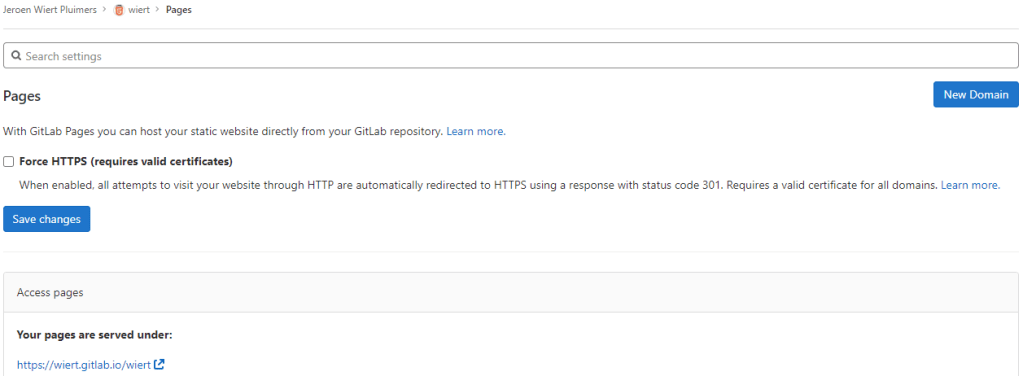
Success: published at https://wiert.gitlab.io/wiert/
The sites do work fine (see the [Archive.is http version] and [Archive.is https version]). The HTTP does not redirect to the HTTP version, as I did not tick the
☐ Force HTTPS (requires valid certificates)
Steps for wiert.gitlab.io
- For wiert.gitlab.io, try A (failed, and therefore interesting to understand why):
- Under leaf group gitlab.com/wiert.me/public/web/sites/gitlab.io, created a new GitLab repository
- Chose “Create from template”
- Chose the template “Pages/Plain HTML”
- Named the project “
wiert.gitlab.io” (with slug “wiert.gitlab.io“) so it would appear at gitlab.com/wiert.me/public/web/sites/gitlab.io/wiert.gitlab.io - From the left sidebar, navigated to your project’s “CI/CD”, then “Pipelines”
- Again there was “There are currently no pipelines.”, but an enabled blue “Run pipeline” button, which I clicked
- That created [Wayback/Archive.is] a pipeline asking for parameters (that already had correct default values) and revealed a new blue “Run pipeline” button.
- Clicked that new “Run pipeline button” which created [Wayback/Archive.is] a job deployed the page.
- From the left sidebar, navigated to “Settings”, then “Pages” to get the links to the pages site: http://wiert.me.gitlab.io/public/web/sites/gitlab.io/wiert.gitlab.io and https://wiert.me.gitlab.io/public/web/sites/gitlab.io/wiert.gitlab.io.
Failure: not thewiert.gitlab.ioI hoped for.The sites do work (see the [Archive.is http version] and [Archive.is https version]), but the HTTPS fails becausewiert.me.gitlab.iodoes not match the SANs (Subject Alternative Names) in the certificate:*.gitlab.io, gitlab.io. The HTTP does not redirect to the HTTP version, as I did not tick the☐ Force HTTPS (requires valid certificates)
- For wiert.gitlab.io, try B (failed, and therefore interesting to understand why):
- Under leaf group gitlab.com/wier1/public/web/sites/gitlab.io, created a new GitLab repository
- Chose “Create from template”
- Chose the template “Pages/Plain HTML”
- Named the project “
wiert.gitlab.io” (with slug “wiert.gitlab.io“) so it would appear at gitlab.com/wier1/public/web/sites/gitlab.io/wiert.gitlab.io - From the left sidebar, navigated to your project’s “CI/CD”, then “Pipelines”
- Again there was “There are currently no pipelines.”, but an enabled blue “Run pipeline” button, which I clicked
- That created [Wayback/Archive.is] a pipeline asking for parameters (that already had correct default values) and revealed a new blue “Run pipeline” button.
- Clicked that new “Run pipeline button” which created [Wayback/Archive.is] a job deployed the page.
- From the left sidebar, navigated to “Settings”, then “Pages” to get the links to the pages site: http://wier1.gitlab.io/public/web/sites/gitlab.io/wiert.gitlab.io and https://wier1.gitlab.io/public/web/sites/gitlab.io/wiert.
Bummer: again not thewiert.gitlab.ioI hoped for
The sites do work (see the [Archive.is http version] and [Archive.is https version]). The HTTP does not redirect to the HTTP version, as I did not tick the☐ Force HTTPS (requires valid certificates)
-
Try A and B were almost identical to wiert.gitlab.io/wiert try A and B, so let’s see if the solution C for that also works for us:
- For wiert.gitlab.io, try C (success, steps 1, 3, 4, 7 and 9 were the key ones)
- In my user gitlab.com/wiert, created a new GitLab repository
- Chose “Create from template”
- Chose the template “Pages/Plain HTML”
- Named the project “
wiert.gitlab.io” (with slug “wiert.gitlab.io“) so it would appear at gitlab.com/wiert/wiert.gitlab.io. - From the left sidebar, navigated to your project’s “CI/CD”, then “Pipelines”
- Again there was “There are currently no pipelines.”, but an enabled blue “Run pipeline” button, which I clicked
- That created [Wayback/Archive.is] a pipeline asking for parameters (that already had correct default values) and revealed a new blue “Run pipeline” button.
- Clicked that new “Run pipeline button” which created [Wayback/Archive.is] a job deployed the page.
- From the left sidebar, navigated to “Settings”, then “Pages” to get the links to the pages site: http://wiert.gitlab.io/ and https://wiert.gitlab.io/.
Success: finally thewiert.gitlab.ioI hoped for with working sites (see the [Archive.is http version] and [Archive.is https version]). - Note the HTTP does not redirect to the HTTP version, as I did not tick the
☐ Force HTTPS (requires valid certificates)
Steps for gitlabstatus.wiert.me
Having learned from the GitHub githubstatus.wiert.me procedure (where I had to wait a long time for the default *.wiert.me domain mapping timeout and the githubstatus.wiert.me DNS CNAME record to become effective), I started on the DNS CNAME record side which is documented at [Wayback] Custom domains and SSL/TLS certificates: Section 3. Set up DNS records for Pages: For subdomains | GitLab:
Subdomains (
subdomain.example.com) require:
- A DNS
CNAMErecord pointing your subdomain to the Pages server.- A DNS
TXTrecord to verify your domain’s ownership.
From DNS Record To subdomain.example.comCNAMEnamespace.gitlab.io_gitlab-pages-verification-code.subdomain.example.comTXTgitlab-pages-verification-code=00112233445566778899aabbccddeeffNote that, whether it’s a user or a project website, the
CNAMEshould point to your Pages domain (namespace.gitlab.io), without any/project-name.

The value for the TXT record is only known after you created the pages project, but the value for the CNAME record is known beforehand:
From DNS Record To gitlabstatus.wiert.meCNAMEnamespace.gitlab.io
So let’s see if I can do this in one try, with these steps:
- For gitlabstatus.wiert.me, try A (success, steps 1, 3, 4, 7 and 9 were the key ones)
- In my DNS settings of the wiert.me domain, created a
CNAMErecord fromgitlabstatus.wiert.metonamespace.gitlab.io:
gitlabstatus.wiert.me
CNAMErecord pointing to namespace.gitlab.io - Under leaf group gitlab.com/wiert.me/public/web/sites/wiert.me, created a new GitLab repository
- Chose “Create from template”
- Chose the template “Pages/Plain HTML”
- Named the project “
gitlabstatus.wiert.me” (with slug “gitlabstatus.wiert.me“) so it would appear at gitlab.com/wiert.me/public/web/sites/wiert.me/gitlabstatus.wiert.me - From the left sidebar, navigated to your project’s “CI/CD”, then “Pipelines”
- Again there was “There are currently no pipelines.”, but an enabled blue “Run pipeline” button, which I clicked
- That created [Wayback/Archive.is] a pipeline asking for parameters (that already had correct default values) and revealed a new blue “Run pipeline” button.
- Clicked that new “Run pipeline button” which created [Wayback/Archive.is] a job deployed the page.
- From the left sidebar, navigated to “Settings”, then “Pages” to get the links to the pages site: http://wiert.me.gitlab.io/public/web/sites/wiert.me/gitlabstatus.wiert.me and https://wiert.me.gitlab.io/public/web/sites/wiert.me/gitlabstatus.wiert.me.
Intermediate success: working sites (see the [Archive.is http version] and [Archive.is https version]).
- Now it is time to get the DNS
CNAMErecord fromgitlabstatus.wiert.metonamespace.gitlab.iointo operation by clicking the “New Domain” button:
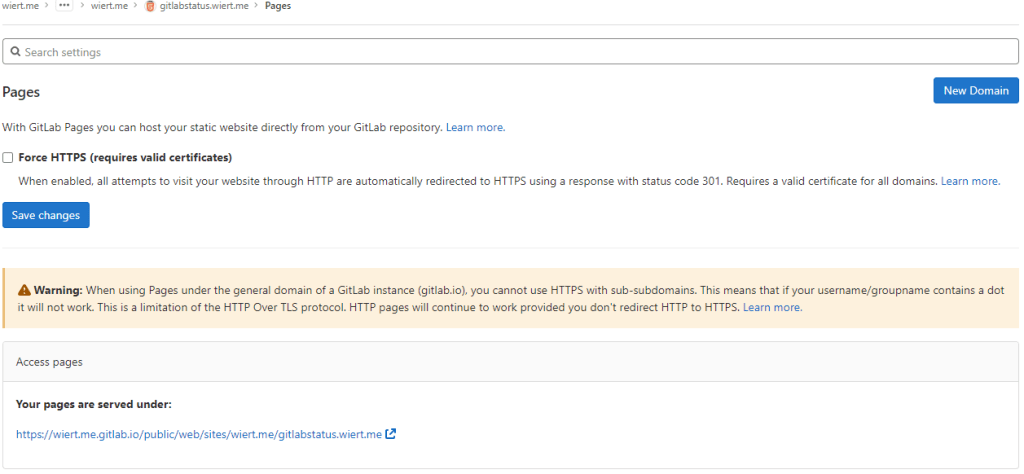
“New Domain” button in the “Pages” settings.
-
There I filled in the correct
gitlabstatus.wiert.medomain name, then pressed the “Create New Domain” button: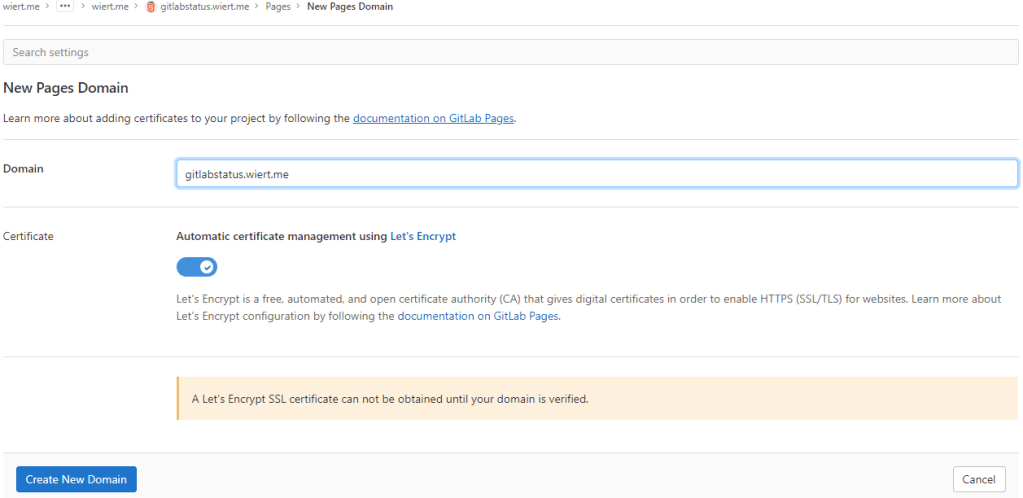
New domain becomes
gitlabstatus.wiert.me - Then a page appeared voiding the DNS
CNAMEwork I already did: the documentation is clearly wrong as these are the two DNS record entries to be made as shown by gitlab.com/wiert.me/public/web/sites/wiert.me/gitlabstatus.wiert.me/pages/domains/gitlabstatus.wiert.me:
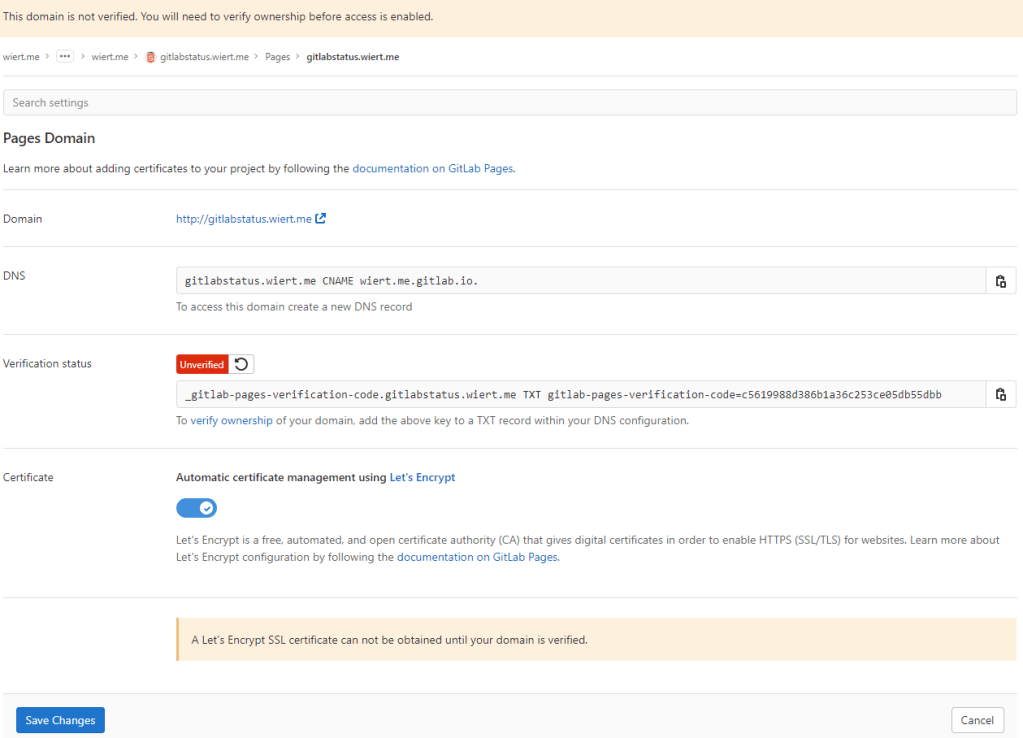
Correct instructions for the DNS records to get gitlabstatus.wiert.me working
Subdomains (
gitlabstatus.wiert.me) require:- A DNS
CNAMErecord pointing your subdomain to the Pages server. - A DNS
TXTrecord to verify your domain’s ownership.
From DNS Record To gitlabstatus.wiert.meCNAMEwiert.me.gitlab.io._gitlab-pages-verification-code.gitlabstatus.wiert.meTXTgitlab-pages-verification-code=c5619988d386b1a36c253ce05db55dbbBasically the whole
namespace.gitlab.iopart of the documentation is a placeholder for the actualnamespacethat belongs to the leaf group the pages project is in (in my casewiert.me).So this is the new DNS entry, for which I had to wait until the DNSTTLto time out and effectuate:
New DNS gitlabstatus.wiert.me
CNAMErecord pointing to wiert.me.gitlab.ioNote that this DNS administrative interface from WordPress.com does omit the final period of the
CNAMEdestination (officially this would bewiert.me.gitlab.io.) - A DNS
- After the
CNAMEDNS record, I also made the TXT DNS record:

New DNS TXT record for verification of gitlabstatus.wiert.me
Then I waited a little for the DNS
TXTrecord to be saved and try the verification of theTXTrecord. - Even then, verification took some time. I had to click the refresh button a few times before verification succeeded:

The DNS TXT record for gitlabstatus.wiert.me finally got verified
- Now I could press blue “Save Changes” button below and waited for the
CNAMErecord DNSTTLto expire so I could check the domain and – hopefully – the TLS certificate to be requested by Let’s Encrypt:
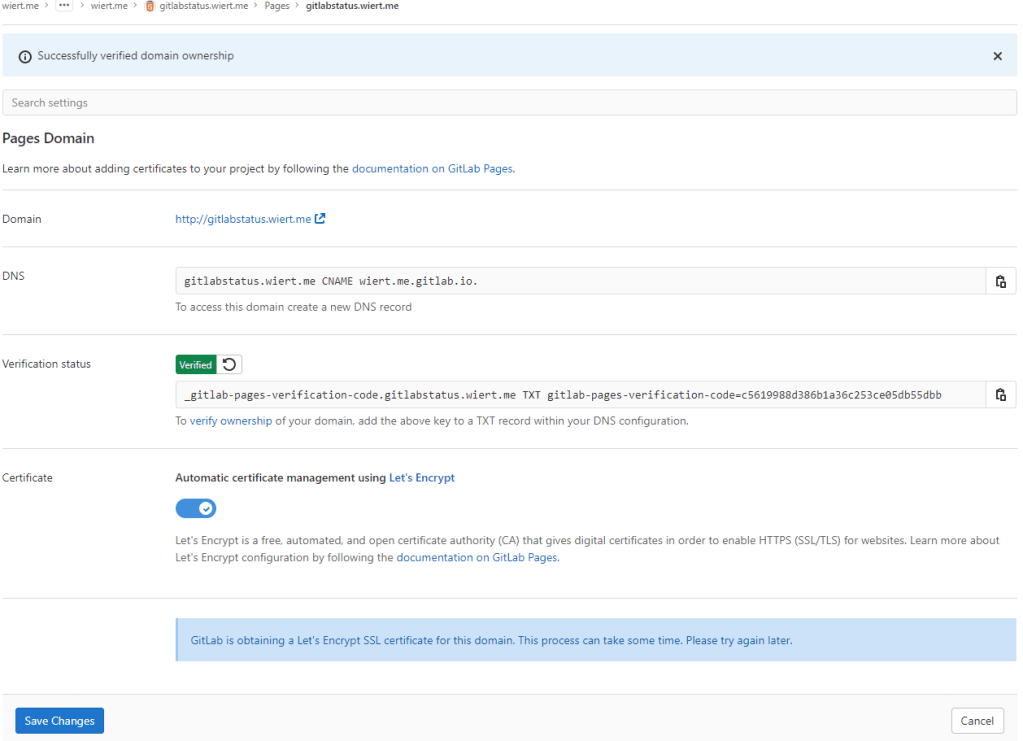
After the
gitlabstatus.wiertDNS TXT record got verified, I could save the domain information - After the old
CNAMErecord DNSTTLexpired and the newCNAMErecord came into effect, the domain became available as http://gitlabstatus.wiert.me/:
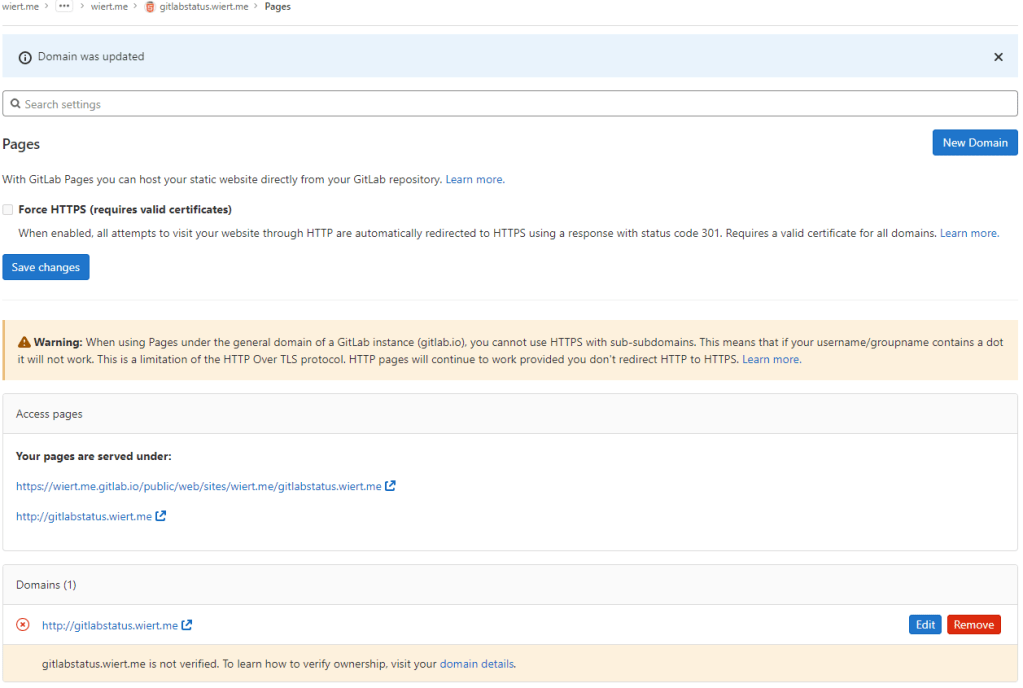
Waiting for
gitlabstatus.wiert.meto become active - After verification, the “Domains (1)” bit changed from this:

Domain
gitlabstatus.wiert.meinformation before verificationto this:

Domain
gitlabstatus.wiert.meinformation after verification - In the mean time, also the TLS certificate got issued by Let’s Encrypt, so the final sites now both worked: http://gitlabstatus.wiert.me/ and https://gitlabstatus.wiert.me/.
- Success: finally the
gitlabstatus.wiert.meI hoped for with working sites (see the [Archive.is http version] and [Archive.is https version] for thewiert.medomain, and [Archive.is http version] and [Archive.is https version] for thewiert.medomain). - Note the HTTP does not redirect to the HTTP version, as I did not tick the
☐ Force HTTPS (requires valid certificates)
- In my DNS settings of the wiert.me domain, created a
In retrospect, this could have been shorter when I had done the DNS part later, which is contrary to how to do this with GitHub.
Conclusion
The conclusion seems this:
Gitlab Page repositories to be published as or under
wiert.gitlab.ioneed to reside directly under userwiert. Having them reside under a different group likewiertorwiert.mewon’t work.
Or in more generic terms:
When creating pages as
user.gitlab.ioyou have to put your pages projects directly under your user accountgitlab.com/user.Putting them under groups or leaf groups fails, no matter if the (leaf) group is named
useror otherwise.
In addition, you can add custom domains to any Gitlab repository (even one that never stated out as a GitLab Pages repository). It will work as soon as the domain DNS mapping is setup through both a CNAME mapping record and TXT verification record.
The steps for this in your GitLab repository are:
- Ensure you have a valid
.gitlab-ci.ymlfile at the root of your repository; I used the [Wayback/Archive.is] one from [Wayback/Archive] GitLab Pages examples / plain-html · GitLab as my site is purely static - Ensure you have a valid
index.htmlfile in thepublicdirectory of your repository, similar to [Wayback/Archive] GitLab Pages examples / plain-html · GitLab - When both 1. and 2. are committed in your repository at GitLab, then it will automatically be deployed to a docker container on
gitlab.io, which allows the outside world to visit your GitHub Pages sie, and the Let’s Encrypt Certificate to be generated (and prevents this error: [Wayback/Archive] GitLab Pages integration with Let’s Encrypt | GitLab: “Something went wrong while obtaining the Let’s Encrypt certificate”). - Under “Settings” -> “Pages”, add a new domain name to the repository: now it automatically becomes a GitLab Pages repository.
- When adding the domain, the settings page will show both a DNS
CNAMErecord and DNSTXTrecord; ensure both are applied on your primary DNS name server and replicated to all authoritative DNS name servers. - Save the new page.
- Check if the page is available on the new domain you added.
- Optionally under “
Settings” -> “Pages” enable the “Force HTTPS (requires valid certificates)” option and save.
TLS information
Note: I saved the TLS information – including certificates here:
- [Wayback] certcheckerapp.com/home?hostname=wiert.me.gitlab.io&hideResult=false
- [Wayback] Wildcard GitLab certificate with serial number
5B0C885BD0E0A1A52AD5C29Dfor*.gitlab.io, gitlab.io. - [Wayback] Certificate chain
- [Wayback] Wildcard GitLab certificate with serial number
- [Wayback] certcheckerapp.com/home?hostname=wier1.gitlab.io&hideResult=false
- [Wayback] Wildcard GitLab certificate with serial number
5B0C885BD0E0A1A52AD5C29Dfor*.gitlab.io, gitlab.io. - [Wayback] Certificate chain
- [Wayback] Wildcard GitLab certificate with serial number
- [Wayback] certcheckerapp.com/home?hostname=wiert.gitlab.io&hideResult=false
- [Wayback/Archive.is] Wildcard GitLab certificate with serial number
5B0C885BD0E0A1A52AD5C29Dfor*.gitlab.io, gitlab.io. - [Wayback] Certificate chain
- [Wayback/Archive.is] Wildcard GitLab certificate with serial number
- [Wayback] certcheckerapp.com/home?hostname=gitlabstatus.wiert.me&hideResult=false
- [Wayback/Archive.is] Regular domain certificate with serial number
3380904328FD4633E6CF27FE9B7D5BE25AEforgitlabstatus.wiert.me. - [Wayback/Archive.is] Let’s Encrypt issuer certificate with serial number
912B084ACF0C18A753F6D62E25A75F5AforR3. - [Wayback/Archive.is] X1 root certificate with serial number
4001772137D4E942B8EE76AA3C640AB7forISRG Root X1. - [Wayback] Certificate chain
- [Wayback/Archive.is] Regular domain certificate with serial number
More about the Let’s Encrypt certificates at [Wayback] Chain of Trust – Let’s Encrypt:
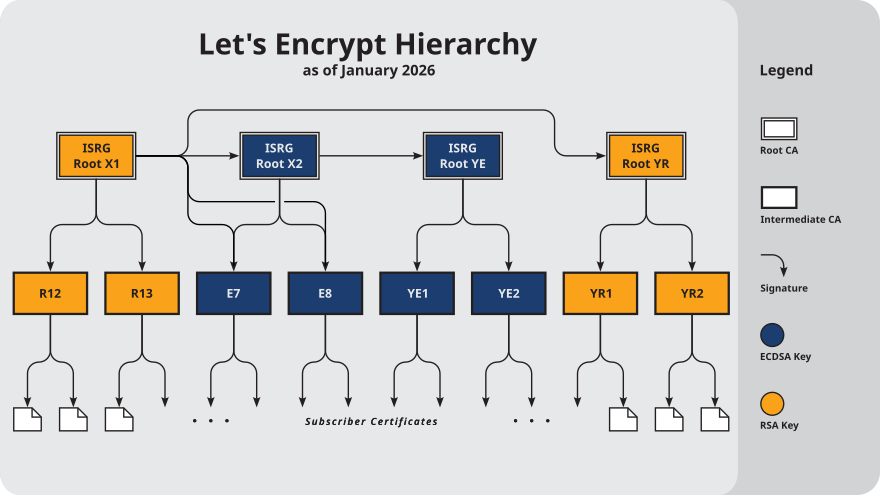
–jeroen
Share this:

Posted in Cloud, Communications Development, Development, DNS, Encryption, GitLab, Hosting, HTML, HTTPS/TLS security, Infrastructure, Internet, Internet protocol suite, Let's Encrypt (letsencrypt/certbot), Power User, Software Development, Source Code Management, TCP, TLS, Web Development | Leave a Comment »
NPoole/BeanCounter
Posted by jpluimers on 2022/05/04
[Wayback/Archive] NPoole/BeanCounter
A Simple, Affordable, Counter for Cut Tape and Partial Reels.
Soon it should become available on [Wayback/Archive] BeanCounter | Crowd Supply

Via [Wayback/Archive] 🌟Cyber City Circuits🌟 on Twitter: “Get hyped. “.
–jeroen
Share this:

Posted in Development, Hardware Development, LifeHacker, Power User, Soldering | Leave a Comment »
capitaltg/thea: Certificate Checker and https://certchecker.app site
Posted by jpluimers on 2022/05/03
[Wayback/Archive.is] capitaltg/thea: Certificate Checker
Certificate Checker provides an easy-to-use solution to check certificates, certificate chains, and TLS configurations. To run Certificate Checker for publicly-accessible web sites you can go to: https://certchecker.app and enter in there a URL to check.Users can easily run Certificate Checker in an internal network to validate or troubleshoot their TLS configuration. To run it on a local network you can run the Docker image as described below. You can also build the application and deploy it on an existing server.
It runs on [Wayback/Archive.is] Certificate Checker.
I used it to check various certificates and chains, including those for my GitHub Pages explained last week in Setting up a GitHub project so it is served over https as a custom subdomain.
–jeroen
Share this:
Posted in Communications Development, Development, Encryption, HTTPS/TLS security, Internet protocol suite, Let's Encrypt (letsencrypt/certbot), Power User, Security, Software Development, TCP, TLS, Web Development | Leave a Comment »
Remotely controlling most Harman Kardon systems
Posted by jpluimers on 2022/05/03
There is a Harman Kardon Remote app on [Wayback/Archive.is] Android and [Wayback/Archive.is] iOS.
It can control Harman Kardon AVR and BDS devices, and the communication appears to be simple XML over HTTP according to [Wayback/Archive.is] H/K AVR 151 Remote Control API – Adam Parsons.
It got reverse engineered into two libraries, both based on string concatenating XML HTTP requests:
- a PHP based library at [Wayback/Archive.is] KarimGeiger/HKAPI: API wrapper for Harman Kardon AVR with network capabilities and HK Remote support.
- a JavaScript library at [Wayback/Archive.is] andrei4002/homebridge-harman-kardon-avr: not working. wip
Note:
- the Harman Kardon Remote app only runs on my local IPv4 subnet (it won’t work routing from one IPv4 to another IPv4), hopefully the API works better
- the app does auto-detect (wich often fails) of on-line Harman Kardon AVR/BDS devices, I wonder how that is implemented
- there is this [Wayback] Harman Kardon AVR – Home Assistant plugin
- it works on some JBL devices too, as they are based on Harman Kardon internals: [Wayback] Harmon/Kardon AVR – Configuration – Home Assistant Community
I just tested it with a unit test and it work on my JBL AVR101 (same API as the Harman/Kardon)
- that the Harman Kardon remoting protocol is quite unstable (and even worse than the above Remote apps) that can only be solved by cold-rebooting your Harman Kardon device (observed this both on a BDS 277 and BDS 580), so be sure to have a remote controlled power outlet for that.
- You often have to cold-reboot these anyway because they stop listening to the IR-remote control as well or listen to HDMI commands (like ARC or CEC), so I already had such a switch in place.
- Same for Samsung TVs that over time will not wake up using CEC and require cold-rebooting
- various devices and firmware versions have different ideas of the
sleepcommand and eventually can perform a full shutdown, see the comments at [Wayback/Archive.is] Add list of known devices · KarimGeiger/HKAPI@6036d4f. - the Harkan Kardon Remote protocol is totally different from the Harman Kardon Controller protocol used by the Harman Kardon Controller apps on [Wayback/Archive.is] Android and [Wayback/Archive.is] iOS.
- For people interested: the Harman Kardon Controller protocol is for the Harman Kardon Omni speakers and use a JSON/REST API, with:
- documentation at [Wayback] REST API Specification (including PubNub JSON format) — Harman Developer 1.0 documentation.
- implementation in Groovy at [Wayback/Archive.is] tylerfreckmann/smartthings: harman smartthings integration
- via [Wayback] Suport for Harman Kardon Omni speakers – Feature Requests – Home Assistant Community
- For people interested: the Harman Kardon Controller protocol is for the Harman Kardon Omni speakers and use a JSON/REST API, with:
–jeroen
Share this:
Posted in Development, PHP, Scripting, Software Development | Leave a Comment »
 The Wiert Corner - irregular stream of stuff