


A few notes for managing the users that should be allowed to send mail via sendmail using TLS authentication.
Most of it is derived/summarised for [WayBack] SMTP AUTH in sendmail 8.10-8.13 and [WayBack] Creating Users for a Postfix-Based Mail Relay – Scott’s Weblog – The weblog of an IT pro specializing in cloud computing, virtualization, and networking, all with an open source view
- Verify your sendmail allows TLS:
# sendmail -d0.1 -bv | grep SASL

NETUNIX NEWDB NIS NISPLUS PIPELINING SASLv2 SCANF SOCKETMAP - The list of TLS authentication users differs from the ones in
/etc/passwd - The tools and files manage if the output is
SASLv2or older. ForSASLv2they are:/etc/sasldb2has the users/passwordssasldblistusers2lists the userssaslpasswd2manages users
For instance, this commands creates a new user for use with sendmail:
# saslpasswd2 -c -u example.org firstname.lastname

Password:

Again (for verification):
sasldblistusers2
firstname.lastname@example.org: userPassword
cat /etc/sasldb2
....................firstname.lastname@example.orguserPassword
For future reading:
not found in sasldb- [WayBack] SMTP AUTH in sendmail 8.10-8.13: SMTP AUTH in sendmail 8.10: authenticate senders to allow relaying etc
- [WayBack] sendmail – How to generate entries for different mechanisms with saslpasswd2? – Server Fault which includes steps to test with [WayBack] CRAM-MD5 authentication online generator – busylog.net
- [WayBack] Sendmail-SMTP-AUTH-TLS-Howto (follow these if you do not yet have a TLS certificate for your sendmail server; technically you do not need TLS in order to provide AUTH, but sending challenge/responses unencrypted is not smart; see [WayBack] help diagnosing smtp auth problem | The FreeBSD Forums)
- Testing SMTP from the console on Linux, BSD and Mac OS: swaks and smtp-cli Perl script clients
I thought I needed this so I could add an alias @pluimers.com to my gmail box, as I read only the accepted answer at [WayBack] Add new alias to Gmail without SMTP (forwarding-only address) – Web Applications Stack Exchange pointing to:
 [WayBack] External Addresses No Longer Use Gmail SMTP Servers
- [Archive.is] Add Send mail as: email – Google Product Forums
- [WayBack] Send emails from a different address or alias – Gmail Help If you own another email address, you can send mail as that address. For example: Yahoo, Outlook, or other non-Gmail address Your work, school, or business domain or alias, like @yourschool.edu
I should have read the second answer at [WayBack] Add new alias to Gmail without SMTP (forwarding-only address) – Web Applications Stack Exchange:
As of writing, however, you can simply use the Gmail SMTP server, as long as you use [WayBack] Google two-step authentication.
So just for completeness, the full steps:
- Gmail settings, Accounts and Import tab.
- Add another email address you own
- Type name and email address to be added.
- For SMTP Server, put
smtp.gmail.com- For Username, your full Gmail address including
@gmail.com- For password, provide an App Password generated in Google Accounts at https://security.google.com/settings/security/apppasswords
- Leave Secured connection using TLS selected as is.
- Add Account
–jeroen


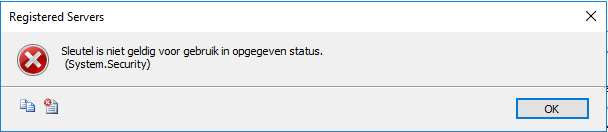 TITLE: Registered Servers
------------------------------
Sleutel is niet geldig voor gebruik in opgegeven status.
(System.Security)
------------------------------
BUTTONS:
OK
------------------------------
===================================
Sleutel is niet geldig voor gebruik in opgegeven status.
(System.Security)
------------------------------
Program Location:
at System.Security.Cryptography.ProtectedData.Unprotect(Byte[] encryptedData, Byte[] optionalEntropy, DataProtectionScope scope)
at Microsoft.SqlServer.Management.RegisteredServers.RegisteredServer.ProtectData(String input, Boolean encrypt)
at Microsoft.SqlServer.Management.RegisteredServers.RegisteredServer.get_SecureConnectionString()
at Microsoft.SqlServer.Management.RegisteredServers.RegisteredServer.get_ConnectionString()
at Microsoft.SqlServer.Management.RegisteredServers.RegisteredServer.get_ServerName()
at Microsoft.SqlServer.Management.RegisteredServers.RegisteredServerTree.AddRegisteredServerNode(RegisteredServer regSrv, TreeNodeCollection nodes)
TITLE: Registered Servers
------------------------------

Sleutel is niet geldig voor gebruik in opgegeven status.
 (System.Security)

------------------------------
BUTTONS:

OK
------------------------------
===================================

Sleutel is niet geldig voor gebruik in opgegeven status.
 (System.Security)

------------------------------
Program Location:

   at System.Security.Cryptography.ProtectedData.Unprotect(Byte[] encryptedData, Byte[] optionalEntropy, DataProtectionScope scope)
   at Microsoft.SqlServer.Management.RegisteredServers.RegisteredServer.ProtectData(String input, Boolean encrypt)
   at Microsoft.SqlServer.Management.RegisteredServers.RegisteredServer.get_SecureConnectionString()
   at Microsoft.SqlServer.Management.RegisteredServers.RegisteredServer.get_ConnectionString()
   at Microsoft.SqlServer.Management.RegisteredServers.RegisteredServer.get_ServerName()
   at Microsoft.SqlServer.Management.RegisteredServers.RegisteredServerTree.AddRegisteredServerNode(RegisteredServer regSrv, TreeNodeCollection nodes)
 TITLE: Export Registered Servers
------------------------------
The operation 'Export' failed. (Microsoft.SqlServer.Management.RegisteredServers)
For help, click: http://go.microsoft.com/fwlink?ProdName=Microsoft+SQL+Server&ProdVer=14.0.17254.0+((SSMS_Rel_17_4).180502-0908)&LinkId=20476
------------------------------
ADDITIONAL INFORMATION:
Serialization operation on RegisteredServer[@Name='servername'] has failed. (Microsoft.SqlServer.Management.Sdk.Sfc)
For help, click: http://go.microsoft.com/fwlink?ProdName=Microsoft+SQL+Server&ProdVer=14.0.17254.0+((SSMS_Rel_17_4).180502-0908)&LinkId=20476
------------------------------
Sleutel is niet geldig voor gebruik in opgegeven status.
(System.Security)
------------------------------
BUTTONS:
OK
------------------------------
===================================
The operation 'Export' failed. (Microsoft.SqlServer.Management.RegisteredServers)
------------------------------
For help, click: http://go.microsoft.com/fwlink?ProdName=Microsoft+SQL+Server&ProdVer=14.0.17254.0+((SSMS_Rel_17_4).180502-0908)&LinkId=20476
------------------------------
Program Location:
at Microsoft.SqlServer.Management.RegisteredServers.RegisteredServersStore.Export(SfcInstance obj, String file, CredentialPersistenceType cpt)
at Microsoft.SqlServer.Management.RegisteredServers.Utils.Export(Object obj, String filename, Boolean includeUserNames, ServerType serverType)
at Microsoft.SqlServer.Management.RegisteredServers.RegisteredServersContextMenuManager.ContextExport(Object sender, EventArgs e)
===================================
Serialization operation on RegisteredServer[@Name='SQLServerName'] has failed. (Microsoft.SqlServer.Management.Sdk.Sfc)
------------------------------
For help, click: http://go.microsoft.com/fwlink?ProdName=Microsoft+SQL+Server&ProdVer=14.0.17254.0+((SSMS_Rel_17_4).180502-0908)&LinkId=20476
------------------------------
Program Location:
at Microsoft.SqlServer.Management.Sdk.Sfc.SfcSerializer.Write(XmlWriter instanceWriter, Object instance, Dictionary`2 namespaces)
at Microsoft.SqlServer.Management.Sdk.Sfc.SfcSerializer.WriteAllInstances()
at Microsoft.SqlServer.Management.Sdk.Sfc.SfcSerializer.Write(XmlWriter xmlWriter)
at Microsoft.SqlServer.Management.RegisteredServers.RegisteredServersStore.Export(SfcInstance obj, String file, CredentialPersistenceType cpt)
===================================
Sleutel is niet geldig voor gebruik in opgegeven status.
(System.Security)
------------------------------
Program Location:
at System.Security.Cryptography.ProtectedData.Unprotect(Byte[] encryptedData, Byte[] optionalEntropy, DataProtectionScope scope)
at Microsoft.SqlServer.Management.RegisteredServers.RegisteredServer.ProtectData(String input, Boolean encrypt)
at Microsoft.SqlServer.Management.RegisteredServers.RegisteredServer.get_SecureConnectionString()
at Microsoft.SqlServer.Management.RegisteredServers.RegisteredServer.GetConnectionStringWithEncryptedPassword(CredentialPersistenceType cpt)
at Microsoft.SqlServer.Management.RegisteredServers.RegisteredServersStore.FilterProperty(SfcSerializer serializer, FilterPropertyEventArgs propertyArgs)
at Microsoft.SqlServer.Management.Sdk.Sfc.SfcSerializer.WriteInternal(XmlWriter instanceWriter, Object instance, Dictionary`2 namespaces)
at Microsoft.SqlServer.Management.Sdk.Sfc.SfcSerializer.Write(XmlWriter instanceWriter, Object instance, Dictionary`2 namespaces)
TITLE: Export Registered Servers
------------------------------

The operation 'Export' failed. (Microsoft.SqlServer.Management.RegisteredServers)

For help, click: http://go.microsoft.com/fwlink?ProdName=Microsoft+SQL+Server&ProdVer=14.0.17254.0+((SSMS_Rel_17_4).180502-0908)&LinkId=20476

------------------------------
ADDITIONAL INFORMATION:

Serialization operation on RegisteredServer[@Name='servername'] has failed. (Microsoft.SqlServer.Management.Sdk.Sfc)

For help, click: http://go.microsoft.com/fwlink?ProdName=Microsoft+SQL+Server&ProdVer=14.0.17254.0+((SSMS_Rel_17_4).180502-0908)&LinkId=20476

------------------------------

Sleutel is niet geldig voor gebruik in opgegeven status.
 (System.Security)

------------------------------
BUTTONS:

OK
------------------------------

===================================

The operation 'Export' failed. (Microsoft.SqlServer.Management.RegisteredServers)

------------------------------
For help, click: http://go.microsoft.com/fwlink?ProdName=Microsoft+SQL+Server&ProdVer=14.0.17254.0+((SSMS_Rel_17_4).180502-0908)&LinkId=20476

------------------------------
Program Location:

   at Microsoft.SqlServer.Management.RegisteredServers.RegisteredServersStore.Export(SfcInstance obj, String file, CredentialPersistenceType cpt)
   at Microsoft.SqlServer.Management.RegisteredServers.Utils.Export(Object obj, String filename, Boolean includeUserNames, ServerType serverType)
   at Microsoft.SqlServer.Management.RegisteredServers.RegisteredServersContextMenuManager.ContextExport(Object sender, EventArgs e)

===================================

Serialization operation on RegisteredServer[@Name='SQLServerName'] has failed. (Microsoft.SqlServer.Management.Sdk.Sfc)

------------------------------
For help, click: http://go.microsoft.com/fwlink?ProdName=Microsoft+SQL+Server&ProdVer=14.0.17254.0+((SSMS_Rel_17_4).180502-0908)&LinkId=20476

------------------------------
Program Location:

   at Microsoft.SqlServer.Management.Sdk.Sfc.SfcSerializer.Write(XmlWriter instanceWriter, Object instance, Dictionary`2 namespaces)
   at Microsoft.SqlServer.Management.Sdk.Sfc.SfcSerializer.WriteAllInstances()
   at Microsoft.SqlServer.Management.Sdk.Sfc.SfcSerializer.Write(XmlWriter xmlWriter)
   at Microsoft.SqlServer.Management.RegisteredServers.RegisteredServersStore.Export(SfcInstance obj, String file, CredentialPersistenceType cpt)

===================================

Sleutel is niet geldig voor gebruik in opgegeven status.
 (System.Security)

------------------------------
Program Location:

   at System.Security.Cryptography.ProtectedData.Unprotect(Byte[] encryptedData, Byte[] optionalEntropy, DataProtectionScope scope)
   at Microsoft.SqlServer.Management.RegisteredServers.RegisteredServer.ProtectData(String input, Boolean encrypt)
   at Microsoft.SqlServer.Management.RegisteredServers.RegisteredServer.get_SecureConnectionString()
   at Microsoft.SqlServer.Management.RegisteredServers.RegisteredServer.GetConnectionStringWithEncryptedPassword(CredentialPersistenceType cpt)
   at Microsoft.SqlServer.Management.RegisteredServers.RegisteredServersStore.FilterProperty(SfcSerializer serializer, FilterPropertyEventArgs propertyArgs)
   at Microsoft.SqlServer.Management.Sdk.Sfc.SfcSerializer.WriteInternal(XmlWriter instanceWriter, Object instance, Dictionary`2 namespaces)
   at Microsoft.SqlServer.Management.Sdk.Sfc.SfcSerializer.Write(XmlWriter instanceWriter, Object instance, Dictionary`2 namespaces)


 The Wiert Corner - irregular stream of stuff