


For my link archive: [WayBack] Encode/Decode Quoted Printable – Webatic.
It did a splendid job at decoding email files in MIME format Quoted-printable.
–jeroen
Posted by jpluimers on 2021/03/26
For my link archive: [WayBack] Encode/Decode Quoted Printable – Webatic.
It did a splendid job at decoding email files in MIME format Quoted-printable.
–jeroen

Posted in *nix, *nix-tools, Communications Development, Development, eMail, Encoding, Internet, Internet protocol suite, Power User, sendmail, SMTP, SocialMedia, Software Development | Leave a Comment »
Posted by jpluimers on 2021/02/25
For my link archive:
Topics covered in this section:
- Server-side certificate and private key configuration
- Server-side forward-secrecy configuration
- Server-side TLS activity logging
- Enabling TLS in the Postfix SMTP server
- Client certificate verification
- Supporting AUTH over TLS only
- Server-side TLS session cache
- Server access control
- Server-side cipher controls
- Miscellaneous server controls
In this post I will show how I setup a smtp server running Postfix with TLS encryption and with the correct cyphers. So that email between smtp servers where possible is using strong email encryption.
–jeroen
Posted in *nix, *nix-tools, Communications Development, Development, Internet protocol suite, postfix, Power User, SMTP | Leave a Comment »
Posted by jpluimers on 2020/12/17
Indy is great, but not well documented so: [WayBack] Indy10, TIdSMTP, how to get protocol log? I try to get log from SMTP communication, like this (copy from wiki): {code} S: 220 smtp.example.com ESMTP P… – Jacek Laskowski – Google+
Indy10,
TIdSMTP, how to get protocol log?I try to get log from SMTP communication, like this (copy from wiki):
{code}
S: 220 smtp.example.com ESMTP Postfix
C: HELO relay.example.com
S: 250 smtp.example.com, I am glad to meet you
C: MAIL FROM:<bob@example.com>
S: 250 Ok
C: RCPT TO:<alice@example.com>
S: 250 Ok
C: RCPT TO:<theboss@example.com>
S: 250 Ok
C: DATA
S: 354 End data with <CR><LF>.<CR><LF>
C: From: "Bob Example" <bob@example.com>
C: To: Alice Example <alice@example.com>
C: Cc: theboss@example.com
C: Date: Tue, 15 January 2008 16:02:43 -0500
C: Subject: Test message
{code}but without success :-(
I try use many events from
TIdSMTP, TIdLogEvent,TIdSSLIOHandlerSocketOpenSSLbut result is low level like bytes, status etc. not true SMTP log.How to do it?

Did you try using TIdLogFile like it is shown here? (It is the first hit in Google) For me it created readable logfiles. rajapet.com – How to log the TIDSmtp component
try
try
IdLogFile.Active := true;
fsmtp.IOHandler := TIdIOHandler.MakeDefaultIOHandler(fsmtp);
fsmtp.IOHandler.Intercept := IdLogFile;
fsmtp.IOHandler.OnStatus := fsmtp.OnStatus;
fSMTP.Connect;
fSMTP.Send(fMessage);
except
on e: exception do begin
MessageDlg(‘Error sending message: ‘ + e.Message, mtError, [mbOK], 0);
end;
end;
finally
if fSMTP.Connected then
fSMTP.Disconnect(true);
IdLogFile.Active := false;
end;
- [Archive.is] Internet Direct (Indy): TIdSMTP Class
- [Archive.is] Internet Direct (Indy): TIdLogFile Class
- [Archive.is] Internet Direct (Indy): TIdIOHandler Class
- [Archive.is] Internet Direct (Indy): TIdIOHandler.Intercept Property
- [WayBack] Ruminated Rumblings
- [WayBack] SMTP Mail and Indy (again) | Ruminated Rumblings
 +Rik van Kekem Thanks! I need to set
LogEvent.Active: = True! ;-)
Sending stuff still might be tough, so you might want to consider alternatives too: [WayBack] I need to add to the REST server the ability to send emails with attachments of different types. Which library is best to use? Indy or maybe ICS? Of cou… – Jacek Laskowski – Google+
I need to add to the REST server the ability to send emails with attachments of different types. Which library is best to use? Indy or maybe ICS? Of course with SSL/TLS support.
+Balázs Szakály, YES! Synapse. Let’s get people using it more. You can give it some criticism surely, but consider the pro’s:It is straight-forwardly-written so when you hit a wall you can read the code easily (compared to other solutions),
You can inherit, extend and extrapolate, re-use and tweak,
Very Delphi-ish (TMimeMessages = TStringList or some such, not at at devmachine atm)
Compact and free!
Quite stable too.
–jeroen
Posted in Communications Development, Delphi, Development, Indy, Internet protocol suite, SMTP, Software Development | Leave a Comment »
Posted by jpluimers on 2020/10/15
Postfix has documentation on primary MX and secondary MX, but not on tertiary MX.
If the primary MX is down, you have a series of secondary MX and tertiary MX that configured the same way, MX DNS priority for primary, the series of secondary MX and tertiary MX have increasing numbers, and the primary MX goes down, then senders can get “too many hops” as secondary and tertiary MX are looping.
I had a hard time finding a good and easy solution as these queries do not return many meaningful results:
Here are some links that helped getting this solved:
Short answer: this message means that mail is probably looping. If you see this after you turned on Postfix content filtering, then you have made a mistake that causes mail to be filtered repeatedly. This is cured by appropriate use of content_filter=, header_checks=, and body_checks=.
Long answer: the message has too many
Received:message headers. A received header is added whenever Postfix (or any MTA) receives a message. A large number ofReceived:message headers is an indication that mail is looping around.Side comment: email uses the opposite of the technique that is used to avoid IP forwarding loops. With IP, the sender sets a TTL (time to live) field in the IP header. The field is decremented by each router. When the TTL reaches zero the packet is discarded and an ICMP error message is returned to the sender.
In case you or anyone else was/is wondering about the
mydestination = localhostthing, the reason it has to be set to just localhost is because MIAB uses Postfix’s “virtual domain hosting” (http://www.postfix.org/VIRTUAL_README.html) support. Per the documentation formydestinationat http://www.postfix.org/postconf.5.html#mydestination:Do not specify the names of virtual domains – those domains are specified elsewhere. See VIRTUAL_README for more information.
(in the context of MIAB every domain is a virtual domain).
In my case a series of these:
Received: from mwgp.xs4all.nl (mwgp.xs4all.nl [80.101.239.92])
    by fiber24315337242.heldenvannu.net (Postfix) with ESMTP id 26395200FE
    for <jeroen@pluimers.com>; Fri, 29 Jun 2018 11:01:02 +0200 (CEST)
Received: from fiber24315337242.heldenvannu.net (unknown [37.153.243.246])
    by mwgp.xs4all.nl (Postfix) with ESMTP id 077A5E937
    for <jeroen@pluimers.com>; Fri, 29 Jun 2018 11:01:02 +0200 (CEST)
Specifying the transport will likely help me solve this problem:
This all came down to editing /etc/postfix/transport adding lines for each relayed domain like this one:
example.org smtp:[mx-a-record.example.org]
Lines like it direct to use the smtp transport and use a specific host (normally, the relay transport is being used).
After this:
# postmap /etc/postfix/transport

# rcpostfix reload
I choose not to configure [WayBack] Postfix Configuration Parameters: relay_recipient_maps, but might if I had an automated way of replicating lists of valid (and invalid) users.
Another option was confirmed at [WayBack] Software-update: Postfix 3.4.0 / 3.3.3 / 3.2.8 / 3.1.11 / 3.0.15 – Computer – Downloads – Tweakers by [WayBack] menocchio. Thanks!
Dat is volgens mij eenvoudig op te lossen met relay_transport of transport_maps. Zie ook: Postfix transport table format.
Daarmee dwing je de secondary servers de mail altijd af te willen leveren bij de primary server (en dus niet bij een andere secondary). En als de primary niet online is, dan wacht ie netjes tot dat wel het geval is :-)
Bijvoorbeeld:
relay_transport = smtp:[primarymx.domain.tld]
Likely relevant: [WayBack] The Book of Postfix
Maybe relevant in the future:
mydestination
relay_domains and relayhost
The second part of this document presents additional configurations for hosts in specific environments.
Found on my hunt for the above:
Create a file named
transportin /etc/postfix and add the following text,gmail.com smtp:smtp.yourisp.com:25
googlemail.com smtp:smtp.yourisp.com:25Remember to swap “smtp.yourisp.com” for the address of your ISP’s smtp relay server.
Now we need to compile this file using the postmap command,
postmap /etc/postfix/transport
Edit /etc/postfix/main.cf and add this line at the bottom,
transport_maps = hash:/etc/postfix/transport
Restart postfix and you should find all mail addressed to @gmail.com or @googlemail.com will be redirected to your smtp relay.
Optional list of relay hosts for SMTP destinations that can’t be found or that are unreachable. With Postfix 2.3 this parameter is renamed to smtp_fallback_relay.
Optional list of relay hosts for SMTP destinations that can’t be found or that are unreachable. With Postfix 2.2 and earlier this parameter is called fallback_relay.
Try not to make typo’s: [WayBack] postfix appears not finding MX records or host names from DNS
Interesting thought, but not sure how smart SPAM bots are now: [Archive.is] Spam relaying through secondary MX… – Google Groups
To archive this:
–jeroen
Posted in *nix, Communications Development, Development, DevOps, DNS, etckeeper, Infrastructure, Internet, Internet protocol suite, Linux, Power User, SMTP | Leave a Comment »
Posted by jpluimers on 2020/04/08
After a 2018 discussion with a “zorgkantoor” (Dutch for office that arranges for special long term health care needs, successor of AWBZ) about their very low (10 megabyte) SMTP message size limit – even though they expect scanned PDF documents.
Their web-care team posed this limit as normal, so I made a list of limits in their peer group, common world-wide and well-ranked Dutch internet providers.
My plan is to check the progression of these limits over time.
Note these are the bruto message sizes including encoded attachments. Since encoding in [WayBack] MIME Base64 – Wikipedia has a overhead of at least 37% (encoded size is at least 1.37 the original size), the unencoded maximum size is less than 73% of what is listed below.
References:
Posted in base64, Communications Development, Development, eMail, Encoding, Internet protocol suite, MIME, Power User, Python, Scripting, SMTP, SocialMedia, Software Development, TCP | Leave a Comment »
Posted by jpluimers on 2020/04/06
I found this in one of my logs a a while ago:
Error when executing EHLO command for domain mail.com on SMTP server mx00.mail.com.

(554, 'mail.com (mxgmxus007) Nemesis ESMTP Service not available\nNo SMTP service\nBad DNS PTR resource record.\nFor explanation visit http://postmaster.gmx.com/en/error-messages?ip=37.153.243.242&c=rdns')
It means that gmx.de / mail.com are among the strictest email handling providers I know. I don’t blame them: EHLO is at the start of an extended SMTP session.
At [WayBack] Error messages | GMX Postmaster it indicates:
5xy Bad DNS PTR resource record
Emails from your email server were rejected because the PTR Resource Record (PTR-RR) of your IP address does not follow our guidelines. Possible reasons for this can be:
–jeroen
Posted in Communications Development, Development, eMail, Internet protocol suite, Power User, SMTP, SocialMedia, TCP | Leave a Comment »
Posted by jpluimers on 2020/03/26
Often when you send large emails the only reply you get is a non-descriptive message like 552 5.3.4 Message size exceeds fixed limit from the SMTP server without an indication what the limit actually is.
Most SMTP servers however implement extensions in the EHLO greeting that returns a SIZE mail parameter. You can query it by hand using this:
telnet aspmx.l.google.com smtp
Trying 108.177.119.27...
Connected to aspmx.l.google.com.
Escape character is '^]'.
220 mx.google.com ESMTP 32si3005669edb.510 - gsmtp
EHLO example.org
250-mx.google.com at your service, [80.100.143.119]
250-SIZE 157286400
250-8BITMIME
250-STARTTLS
250-ENHANCEDSTATUSCODES
250-PIPELINING
250-CHUNKING
250 SMTPUTF8
QUIT
221 2.0.0 closing connection 32si3005669edb.510 - gsmtp
Connection closed by foreign host.
There you can see the maximum message size at the time of writing is 157286400 bytes which is about 150 megabytes.
There is a nice Python script showing how to obtain it at [WayBack] Getting Information from EHLO | Erle Robotics Python Networking Gitbook Free (note this one does send an email, so you might want to trim the example if you just want to see the size).
More background reading:
smtplib.SMTP.ehlo (also documents esmtp_features)smtplib.SMTP.has_extnThis turns out to be a tad more complex, because DNS functionality isn’t part of core Python, and the rdata part of DNS records ends with a dot, which might not be usable with the SMTP library.
References for me when trimming down:
pip install or pip install --user–jeroen
Posted in Communications Development, Conference Topics, Conferences, Development, Event, Internet protocol suite, Power User, SMTP | Leave a Comment »
Posted by jpluimers on 2019/02/01
Summary from [WayBack] Dear #lazyweb, can anyone point me to a modern email server setup (just email) with letsencrypt, some spam filter, multi domain preferably on RHEL/Cent… – Jan Wildeboer – Google+
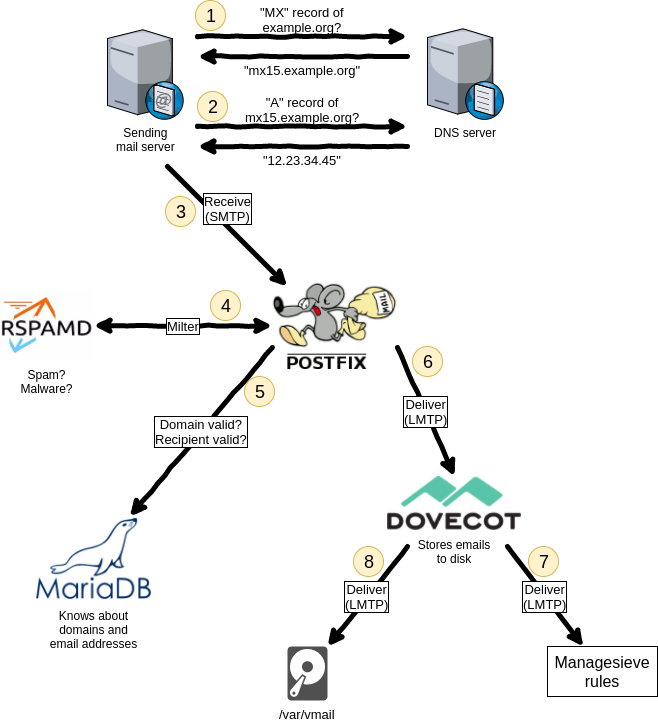 [WayBack] ISPmail tutorials – workaround.org (Postfix, Dovecot IMAP/POP3 and MySQL backend on a Debian server just)
Things to do:
–jeroen

Posted in *nix, *nix-tools, Communications Development, Development, Internet protocol suite, postfix, Power User, SMTP | Leave a Comment »
Posted by jpluimers on 2019/01/03
Testing SMTP using telnet is tedious as you have to remember the commands and responses in the SMTP protocol. It gets even harder when doing SMTP AUTH, as then you have to base encode a bunch of strings [WayBack] How to Test SMTP AUTH using Telnet [Wiki] | NDCHost
Luckily there is a Perl script swaks: [WayBack] Swaks – Swiss Army Knife for SMTP which does ESMTP and LMTP as well as TLS.
The funny thing is that the repository at jetmore/swaks: Swaks – Swiss Army Knife for SMTP only has the readme, but the not the script which you can get from [WayBack] swaks.pl.
Despite that, most Linux distributions have an installation package.
[WayBack] swaks for OpenSuse is in the [WayBack] network repository, so for Tumbleweed (actually: Factory) on Raspberry Pi you need to perform this:
zypper addrepo http://download.opensuse.org/repositories/network/openSUSE_Factory_ARM/network.repo

zypper refresh

zypper install swaks
On Mac OS X it is even easier: if you have the homebrew package manager installed, you just install the [WayBack] swaks formula using the [WayBack] swaks.rb script:
brew install swaks
Note there is also the smtp-cli Perl script which I mentioned before at Fake/Mock SMTP servers and services for use during development, which also does TLS, but few environments have ready built packages for them. If you still want to try it out:
For SMTP AUTH:
swaks -tls --to jeroen.wiert.me@pluimers.com --from jeroen.wiert.me@pluimers.com --server smtp.xs4all.nl --auth-user username
Which prompts for the password, then outputs like this:
=== Trying smtp.xs4all.nl:25...
=== Connected to smtp.xs4all.nl.
<- 220 smtp-cloud3.xs4all.net ESMTP ESMTP server ready -> EHLO rmbpro1tbjwp
<-  250-smtp-cloud3.xs4all.net hello [188.206.68.219], pleased to meet you
<-  250-HELP
<-  250-AUTH LOGIN PLAIN
<-  250-SIZE 157286400
<-  250-8BITMIME
<-  250-STARTTLS
<- 250 OK -> STARTTLS
<- 220 Ready to start TLS === TLS started with cipher TLSv1:DHE-RSA-AES256-SHA:256 === TLS no local certificate set === TLS peer DN="/OU=Domain Control Validated/OU=PositiveSSL Wildcard/CN=*.xs4all.nl" ~> EHLO rmbpro1tbjwp
<~  250-smtp-cloud3.xs4all.net hello [188.206.68.219], pleased to meet you
<~  250-HELP
<~  250-AUTH LOGIN PLAIN
<~  250-SIZE 157286400
<~  250-8BITMIME
<~ 250 OK ~> AUTH LOGIN
<~ 334 ############ ~> anA=
<~ 334 ############ ~> ############################
<~ 235 ... authentication succeeded ~> MAIL FROM:<jeroen.wiert.me@pluimers.com>
<~  250 <jeroen.wiert.me@pluimers.com> sender ok
 ~> RCPT TO:<jeroen.wiert.me@pluimers.com>
<~  250 <jeroen.wiert.me@pluimers.com> recipient ok
 ~> DATA
<~ 354 enter mail, end with "." on a line by itself ~> Date: Wed, 19 Jul 2017 09:09:57 +0200
 ~> To: jeroen.wiert.me@pluimers.com
 ~> From: jeroen.wiert.me@pluimers.com
 ~> Subject: test Wed, 19 Jul 2017 09:09:57 +0200
 ~> Message-Id: <20170719090957.052207@rmbpro1tbjwp>
 ~> X-Mailer: swaks v20170101.0 jetmore.org/john/code/swaks/
 ~>
 ~> This is a test mailing
 ~>
 ~> .
<~ 250 smtp-cloud3.xs4all.net accepted mail mXA71v00C4jr6ac01XA9Bo for delivery ~> QUIT
<~  221 smtp-cloud3.xs4all.net ESMTP closing connection
=== Connection closed with remote host.
–jeroen
Posted in *nix, *nix-tools, Communications Development, Development, Hardware Development, Internet protocol suite, Linux, openSuSE, Power User, Raspberry Pi, SMTP, SuSE Linux, Tumbleweed | Leave a Comment »
Posted by jpluimers on 2018/10/16
At [WayBack] Error when trying to signup using an email address with uppercase letters (#27898) · Issues · GitLab.org / GitLab Community Edition · GitLab, I commented this:
Both the
:email_confirmationfields should get the same case processing treatment.That treatment should consist of this:
- The part before the @ should be treated as case sensitive
- The part after the @ should be treated as case insensitive
This means that:
Foo@Example.OrgandFoo@example.orgare the sameFoo@example.organdfoo@example.orgare differentThe main reason is that there are email systems expecting case sensitivity in the part before the @ sign.
I think excluding those users from being able to use GitLab is a bad idea.
See especially the comments at the Stack Overflow answer to Are email addresses case sensitive?
Relevant RFC 5321: Simple Mail Transfer Protocol sections:
Important comments:
I work at a large company and there is another person with the same first and last name. I discovered today that his local-part differs from mine only in capitalization. This has been working properly, so I was surprised to see “no widely used mail systems distinguish different addresses based on case”. We use MS Exchange which I would call “widely used”. – Matthew James Briggs Nov 24 ’15 at 20:14
RFC 5321 2.4. General Syntax Principles and Transaction Model – SMTP implementations MUST take care to preserve the case of mailbox local-parts. In particular, for some hosts, the user “smith” is different from the user “Smith”. Mailbox domains follow normal DNS rules and are hence not case sensitive. – Adam111p Apr 27 ’16 at 10:02
Most important parts of the answer:
From RFC 5321, section-2.3.11:
The standard mailbox naming convention is defined to be “local-part@domaiN“; contemporary usage permits a much broader set of applications than simple “user names”. Consequently, and due to a long history of problems when intermediate hosts have attempted to optimize transport by modifying them, the local-part MUST be interpreted and assigned semantics only by the host specified in the domain part of the address.
So yes, the part before the “@” could be case-sensitive, since it is entirely under the control of the host system. In practice though, no widely used mail systems distinguish different addresses based on case.
The part after the @ sign however is the domain and according to RFC 1035, section 3.1,
“Name servers and resolvers must compare [domains] in a case-insensitive manner”
–jeroen
Posted in Communications Development, Development, Internet protocol suite, SMTP, Software Development | Leave a Comment »

 The Wiert Corner - irregular stream of stuff