


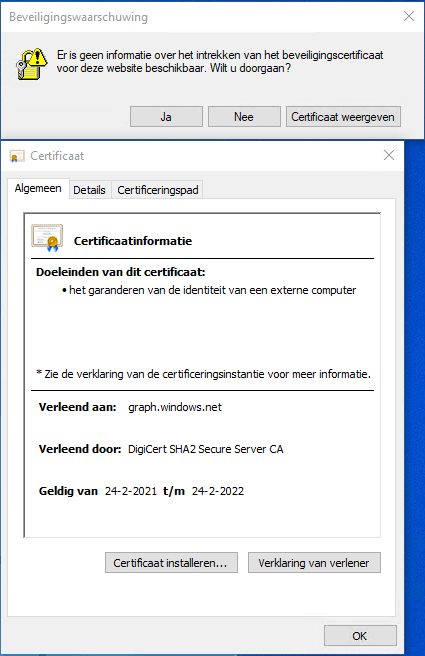
Got this on two Dutch Windows machines, not sure why yet:
Missing information on security certificate retraction
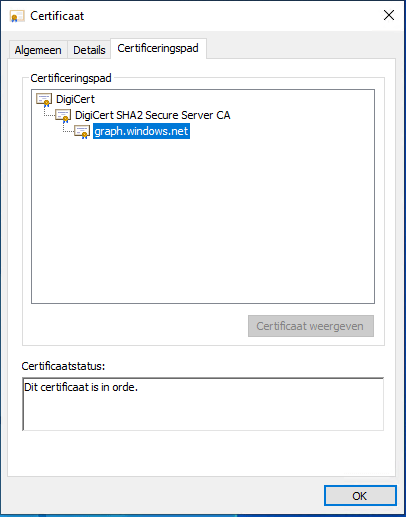
Certificate path is OK
–jeroen
Posted by jpluimers on 2022/02/28
Got this on two Dutch Windows machines, not sure why yet:
Missing information on security certificate retraction
Certificate path is OK
–jeroen

Posted in Communications Development, Development, Encryption, Internet protocol suite, Power User, Security, TCP, TLS | Leave a Comment »
Posted by jpluimers on 2022/02/24
IoT devices still often use the ‘Basic’ HTTP Authentication Scheme for authorisation, see [Wayback] RFC7617: The ‘Basic’ HTTP Authentication Scheme (RFC ) and [Wayback] RFC2617: HTTP Authentication: Basic and Digest Access Authentication (RFC ).
Often this authentication is used even over http instead of over https, for instance the Egardia/Woonveilig alarm devices I wrote about yesterday at Egardia/Woonveilig: some notes about logging on a local gateway to see more detailed information on the security system. This is contrary to guidance in:
   This scheme is not considered to be a secure method of user
   authentication unless used in conjunction with some external secure
   system such as TLS (Transport Layer Security, [RFC5246]), as the
   user-id and password are passed over the network as cleartext.
   "HTTP/1.0", includes the specification for a Basic Access
   Authentication scheme. This scheme is not considered to be a secure
   method of user authentication (unless used in conjunction with some
   external secure system such as SSL [5]), as the user name and
   password are passed over the network as cleartext.
Fiddling with those alarm devices, I wrote these two little bash functions (with a few notes) that work both on MacOS and in Linux:
# `base64 --decode` is platform neutral (as MacOS uses `-D` and Linux uses `-d`)
# `$1` is the encoded username:password
function decode_http_Basic_Authorization(){
  echo $1 | base64 --decode
  echo
}

# `base64` without parameters encodes
# `echo -n` does not output a new-line
# `$1` is the username; `$2` is the password
function encode_http_Basic_Authorization(){
  echo $1:$2 | base64
}
The first decodes the <credentials> from a Authorization: Basic <credentials> header into a username:password clean text followed by a newline.
The second one encodes a pair of username and password parameters into such a <credentials> string.
They are based on these initial posts that were not cross platform or explanatory:
–jeroen

Posted in *nix, *nix-tools, Apple, Authentication, bash, bash, Communications Development, Development, HTTP, Internet protocol suite, Linux, Mac OS X / OS X / MacOS, Power User, Scripting, Security, Software Development, TCP, Web Development | Leave a Comment »
Posted by jpluimers on 2022/01/20
For quite some time now, Chrome (think years) refuses to prompt for saving passwords whereas Firefox and Safari do prompt and save them, even for site types that it used to save passwords for in the past.
It has been annoying enough for too long now that I tried to do better than the Google searches I used back when I saw this happen first.
Below are some links based on new searches (starting with [Wayback] adding a password in chrome settings – Google Search); hopefully I can try them after I made a list of sites that Chrome does not show the password save prompt for.
Solutions I tried that failed (but maybe useful for others):
input field being marked with type="password", and if not add it.Solutions still to try:
Posted in Chrome, Chrome, Communications Development, Development, Encryption, ESXi6, ESXi6.5, ESXi6.7, Firefox, Fritz!, Fritz!Box, Fritz!WLAN, Google, https, HTTPS/TLS security, Internet, Internet protocol suite, Let's Encrypt (letsencrypt/certbot), Power User, routers, Safari, Security, TCP, TLS, Virtualization, VMware, VMware ESXi, Web Browsers, Web Development | Leave a Comment »
Posted by jpluimers on 2021/11/30
When trying to deliver mail, it is important to know which protocols and ports you can use.
On smtp, smtp-submission, smtps (ports 25, 587 and 465) and unofficial port 2525 (which Maingun maps to `smtp-submission): [Wayback] Which SMTP Port Should I Use? Learn Ports 25, 465, & 587 | Mailgun
Quote on why smtps port 465 is hardly used:
Port 465:
IANA has reassigned a new service to this port, and it should no longer be used for SMTP communications.
However, because it was once recognized by IANA as valid, there may be legacy systems that are only capable of using this connection method. Typically, you will use this port only if your application demands it. A quick Google search, and you’ll find many consumer Inbox Service Providers’ (ISPs) articles that suggest port 465 as the recommended setup. However, we do not recommend it, as it is not RFC compliant.
–jeroen
Posted in Communications Development, Development, Internet protocol suite, SMTP, Software Development, TLS, Web Development | Leave a Comment »
Posted by jpluimers on 2021/11/25
Cool: [Wayback/Archive.is] GitHub – TimeToogo/tunshell: Remote shell into ephemeral environments 🐚 🦀
Via: [Archive.is] Jan Schaumann on Twitter: “This looks neat: on-demand remote shell into ephemeral environments, e.g. CI/CD pipeline container. Both sides fetch a client, use rendezvous server to negotiate session info, then establish connection or fall back to proxy through rendezvous. “

Posted in Communications Development, Development, DevOps, HTTP, Infrastructure, Internet protocol suite, Power User, Software Development, TCP, WebSockets | Leave a Comment »
Posted by jpluimers on 2021/11/23
Cool tool for when you ever need random users to test a system [Wayback] Random User Generator | Home:
Random user generator is a FREE API for generating placeholder user information. Get profile photos, names, and more. It’s like Lorem Ipsum, for people.
This was used when extracting Parler data to substantiate evidence around the 20210106 USA Capitol riots.
You can even use a simple HTTP GET like [Wayback] randomuser.me/api and get a JSON result like this.
{"results":[{"gender":"female","name":{"title":"Miss","first":"Malou","last":"Mortensen"},"location":{"street":{"number":2669,"name":"Lyngbyvej"},"city":"Sundby","state":"Syddanmark","country":"Denmark","postcode":48047,"coordinates":{"latitude":"-35.1307","longitude":"113.7480"},"timezone":{"offset":"+1:00","description":"Brussels, Copenhagen, Madrid, Paris"}},"email":"malou.mortensen@example.com","login":{"uuid":"981747de-66fe-40b0-87ea-adfe403fe1be","username":"purpleostrich871","password":"sweets","salt":"x86aQbIB","md5":"55497ac53530b428f98b9d36267ceeef","sha1":"358b94ffabe7d827c34da15791e5d6717c594428","sha256":"6e357e887877e29b7e6d53073f648174382c53c24f83479e25fed9c82075ed32"},"dob":{"date":"1995-06-05T04:50:35.145Z","age":26},"registered":{"date":"2018-07-21T00:59:50.523Z","age":3},"phone":"02990797","cell":"94800012","id":{"name":"CPR","value":"050695-9954"},"picture":{"large":"https://randomuser.me/api/portraits/women/27.jpg","medium":"https://randomuser.me/api/portraits/med/women/27.jpg","thumbnail":"https://randomuser.me/api/portraits/thumb/women/27.jpg"},"nat":"DK"}],"info":{"seed":"8971869bb62b73d7","results":1,"page":1,"version":"1.3"}}
Via:
–jeroen
Posted in Communications Development, Development, HTTP, Internet protocol suite, JavaScript/ECMAScript, JSON, Python, REST, Scripting, Software Development, TCP | Leave a Comment »
Posted by jpluimers on 2021/10/29
If you enable File and Printer sharing on Windows, by default the firewall only enables it on private networks for the local subnet as remote address (for domain networks, it allows “Any”) as seen on the picture below.
When your network consists of multiple subnets, for instance when it is large, or multiple sites are connected via site-to-site VPN (often called LAN-to-LAN VPN) solutions, then these subnets cannot access each others files or printers.
Realising these default blocks, they are easy to resolve as explained in for instance [WayBack] Windows firewall blocking network shares through VPN server – Server Fault by [WayBack] Brian:
I realize this is almost three years late, but I just spent today fighting with the same problem. I did get it working, so I figured I’d share. Note that I’m using a Windows 7 PC as the file server; other versions might need slightly different configuration.
In the “Windows Firewall with Advance Security”, there are several “File and Printer Sharing” rules:
- File and Printer Sharing (NB-Datagram-In)
- File and Printer Sharing (NB-Name-In)
- File and Printer Sharing (NB-Session-In)
- File and Printer Sharing (SMB-In)
(There are additional rules, but I didn’t care about printer sharing. The same changes would apply if you want those.)
File and Printer Sharing appears to default to “Local subnet” only. You’ll need to add the subnet of your VPN clients.
Modify each of those rules as follows:
- Open the Properties dialog for the rule.
- Navigate to the Scope tab.
- In the Remote IP address section, the “These IP addresses” radio button should be selected.
- Click “Add…” next to the list of addresses. By default, only “Local subnet” is in the list.
- In the “This IP address or subnet:” field, enter the subnet assigned to your VPN clients (this is probably 192.168.1.0/24 in the OP, but if not, it’s the subnet assigned to the VPN adapter on the client side), then click OK.
- If you’re also using IPv6, add the VPN client IPv6 subnet as well.
That was enough for me to access file shares over the VPN.
(If you want to do it manually, you need to open TCP ports 139 and 445, and UDP ports 137 and 138, in the file server’s firewall.)
Hopefully I will find some time in the future to automate this using PowerShell, as netsh names are localised do hard to make universal.
These links might help me with that:
Posted in Communications Development, Development, Internet protocol suite, Power User, SMB, TCP, Windows | Leave a Comment »
Posted by jpluimers on 2021/10/20
[Archive.is] Filippo Valsorda on Twitter: “whoami.filippo.io , the SSH server that knows who you are, got some newly refreshed intel! Try it out! $ ssh whoami.filippo.io “
The server itself has some HTML with information too whoami.filippo.io redirecting to [WayBack] ssh whoami.filippo.io (source code is at [WayBack] GitHub – FiloSottile/whoami.filippo.io: A ssh server that knows who you are. $ ssh whoami.filippo.io).
It’s a cool open source server written in Golang, that gets all your public ssh keys (ssh automatically transmits those) and tries to map them back to a GitHub account.
In addition it shows you some potential vulnerabilities of your ssh client.
Note that in October 2020, it was temporarily down, but it will be up again: [Archive.is] Filippo Valsorda 💉💉 on Twitter: “Yeah I’m planning to but I can’t give you an ETA I’m afraid. A few weeks, maybe?… “
Some interesting comments in the thread:
https://GitLabWebsite/username.keys… “github-keygen: it builds SSH config that protects against this attack by using your GitHub SSH key only when connecting to GitHub.… “
This script will:
- Create a new SSH key dedicated only to your GitHub connections in ~/.ssh/id_<github-account>@github
- Create the SSH configuration optimized for GitHub and dedicated to GitHub (does not impact your other SSH configurations) in ~/.ssh/config.
- Install the GitHub SSH host authentication fingerprints in ~/.ssh/known_hosts_github
whoami.filippo.io is a neat trick, not a proof of concept of a vulnerability. However, all the folks who said “public keys are public duh” pass their cryptography 101 and fail their security 201 =)”
$ ssh whoami.filippo.io (code: …) “Related: [WayBack] Auditing GitHub users’ SSH key quality
[WayBack] GitHub – FiloSottile/whoami.filippo.io: A ssh server that knows who you are. $ ssh whoami.filippo.io: How do I stop passing public keys
How do I stop it?
If this behavior is problematic for you, you can tell ssh not to present your public keys to the server by default.
Add these lines at the end of your
~/.ssh/config(after other “Host” directives)Host * PubkeyAuthentication no IdentitiesOnly yesAnd then specify what keys should be used for each host
Host example.com
    PubkeyAuthentication yes
    IdentityFile ~/.ssh/id_rsa
    # IdentitiesOnly yes # Enable ssh-agent (PKCS11 etc.) keys
If you want you can use different keys so that they can’t be linked together
Host github.com
    PubkeyAuthentication yes
    IdentityFile ~/.ssh/github_id_rsa
–jeroen
Posted in *nix, *nix-tools, Communications Development, Development, Go (golang), Internet protocol suite, Power User, Software Development, SSH, ssh/sshd, TCP | Leave a Comment »
Posted by jpluimers on 2021/10/05
googlechrome: scheme to force Chrome as browser on it a while agoexample: scheme to an application)microsoft-edge: scheme even more than Windows 10 to force URIs to open in Edge, and some browsers are now working around thisVia:
- Implement
microsoft-edge:protocol handler, issue #1726697, , Masatoshi Kimura, Firefox project, Bugzilla, Mozilla- When Brave handles
microsoft-edge:protocol searches use user’s default search instead of Bing, issue #17684, , Brian Clifton, Brave browser project, Brave Software, GitHub- Allow Brave to Handle Searches from Windows Shell and Cortana, issue #13875, , Brave browser project, Brave Software, GitHub
microsoft_edge_protocol_util.cc, commit a80e1ea7b6, , Simon Hong, Brave Core project, Brave Software, GitHub- Mozilla has defeated Microsoft’s default browser protections in Windows, , Tom Warren, The Verge, Vox Media
- Microsoft is making it harder to switch default browsers in Windows 11, , Tom Warren, The Verge, Vox Media
- Opening links in Chrome for iOS, , Mobile Chrome, Documentation, Chrome Developers, Google
Posted in Awareness, Development, HTTP, Internet protocol suite, Software Development, TCP, TLS, URI, Web Development | Leave a Comment »
Posted by jpluimers on 2021/10/04
From a while back: [Archive.is] Jeroen Wiert Pluimers on Twitter: ‘Answering Yes to “You have an older version of PackageManagement known to cause issues with the PowerShell extension. Would you like to update PackageManagement (You will need to restart the PowerShell extension after)?” hung my Visual Studio Code.… ‘
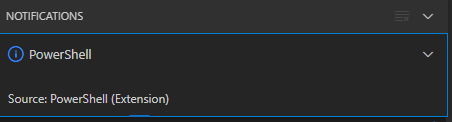
After clicking “Yes”, the the only thing visible was this notification that had an ever running “progress bar”:
Notifications – Powershell – Source: Powershell (Extension)
The first part of the solution was relatively simple: restart Visual Studio code, then the original notification showed, and after clicking “Yes”, the “Panel” (you can toggle it with Ctrl+J) showed the “Terminal” output (yes, I was working on [Wayback/Archive.is] PowerShell script for sending Wake-on-LAN magic packets to given machine hardware MAC address, more about that later):

Posted in .NET, Communications Development, Development, Encryption, HTTP, HTTPS/TLS security, Internet protocol suite, Power User, Security, Software Development, TCP, Visual Studio and tools, vscode Visual Studio Code, Windows, Windows 10 | Leave a Comment »

 The Wiert Corner - irregular stream of stuff