Archive for the ‘TCP’ Category
Posted by jpluimers on 2022/05/03
[Wayback/Archive.is] capitaltg/thea: Certificate Checker
Certificate Checker provides an easy-to-use solution to check certificates, certificate chains, and TLS configurations. To run Certificate Checker for publicly-accessible web sites you can go to:
https://certchecker.app and enter in there a URL to check.
Users can easily run Certificate Checker in an internal network to validate or troubleshoot their TLS configuration. To run it on a local network you can run the Docker image as described below. You can also build the application and deploy it on an existing server.
It runs on [Wayback/Archive.is] Certificate Checker.
I used it to check various certificates and chains, including those for my GitHub Pages explained last week in Setting up a GitHub project so it is served over https as a custom subdomain.
–jeroen
Posted in Communications Development, Development, Encryption, HTTPS/TLS security, Internet protocol suite, Let's Encrypt (letsencrypt/certbot), Power User, Security, Software Development, TCP, TLS, Web Development | Leave a Comment »
Posted by jpluimers on 2022/04/27
Some links that helped me getting this working:
Read the rest of this entry »
Posted in Cloud, Cloudflare, Communications Development, Development, Encryption, GitHub, HTML, HTTP, HTTPS/TLS security, Infrastructure, Internet protocol suite, Let's Encrypt (letsencrypt/certbot), Power User, Security, Software Development, Source Code Management, TCP, TLS, Web Development | Leave a Comment »
Posted by jpluimers on 2022/03/15
This is cool: [Wayback] Cryptosense Discovery:
Free tool that discovers security configuration errors in SSH and TLS servers and explains how to fix them. Supports STARTTLS and can also scan HTTPS, POP3, IMAP and SMTP servers.
It gives you a list of servers a target domain uses (for purposes like web, email, etc) that can have external encryption enabled, then allows you to test these.
The list by default has only servers within that target domain enabled, but you can optionally include other servers (for instance if a domain uses a third party for their SMTP handling).
Basically it is the web-counterpart of a tool like testssl.sh (which I have written about before).
Found while checking out how to test the MX security of a domain using [Wayback] testssl.sh as I forgot the syntax, which in retrospect is dead easy as per [Wayback] tls – How to use testssl.sh on an SMTP server? – Information Security Stack Exchange (thanks [Wayback] Z.T.!):
…
testssl.sh --mx <domain name>
works fine.
testssl.sh -t smtp <ip>:25
and
testssl.sh -t smtp <ip>:587
also work fine.
Note that not specifying the port assumes port 443, despite specifying protocol smtp. That doesn’t work.
…
Also, you might try discovery.cryptosense.com which does the same thing only better
That website is made by the cool people at [Wayback] Cryptosense.
Both are a lot easier than the alternatives described in [Wayback] Blog · How to test SMTP servers using the command-line · Halon MTA: using nslookup and dig for determining the affected hosts, using nc or telnet for testing basic connectivity, using [Wayback/Archive.is] openssl s_client to test TLS, and [Wayback/Archive.is] smtpping for measuring throughput.
In addition to the above tools mentioned in the blog, I’ve also used sendEmail (note case sensitivity), ehlo-size, and swaks.
This is what I tested:
- [Wayback] Cryptosense Discovery: clientondersteuningplus.nl
We found these machines for clientondersteuningplus.nl. Select those you would like to scan:
|
clientondersteuningplus.nl |
185.37.70.68 |
|
localhost.clientondersteuningplus.nl |
127.0.0.1 |
|
pop.clientondersteuningplus.nl |
5.157.84.75 |
These machines are also used by clientondersteuningplus.nl. They seem to be managed by a third party:
…
–jeroen
Posted in *nix, *nix-tools, Awk, bash, bash, Communications Development, Development, DNS, Encryption, grep, HTTPS/TLS security, Internet, Internet protocol suite, Power User, Scripting, Security, SMTP, Software Development, SSH, ssh/sshd, TCP, testssl.sh, TLS | Leave a Comment »
Posted by jpluimers on 2022/02/28
Got this on two Dutch Windows machines, not sure why yet:
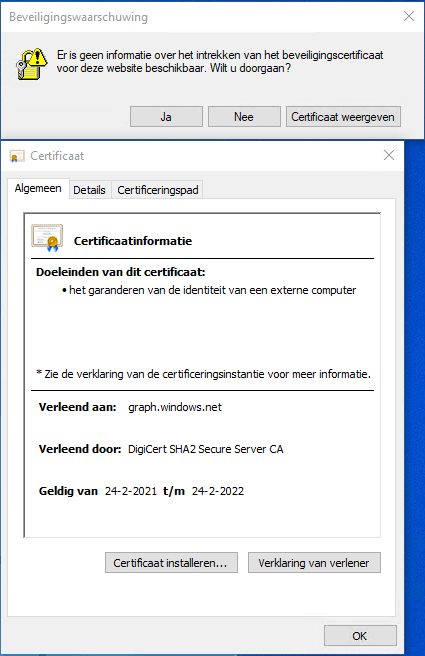
Missing information on security certificate retraction
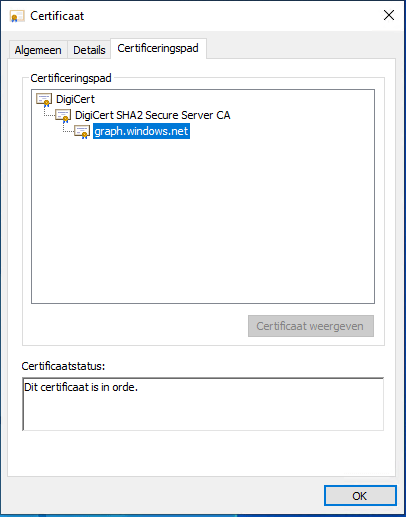
Certificate path is OK
–jeroen
Posted in Communications Development, Development, Encryption, Internet protocol suite, Power User, Security, TCP, TLS | Leave a Comment »
Posted by jpluimers on 2022/02/24
IoT devices still often use the ‘Basic’ HTTP Authentication Scheme for authorisation, see [Wayback] RFC7617: The ‘Basic’ HTTP Authentication Scheme (RFC ) and [Wayback] RFC2617: HTTP Authentication: Basic and Digest Access Authentication (RFC ).
Often this authentication is used even over http instead of over https, for instance the Egardia/Woonveilig alarm devices I wrote about yesterday at Egardia/Woonveilig: some notes about logging on a local gateway to see more detailed information on the security system. This is contrary to guidance in:
- RFC7617:
   This scheme is not considered to be a secure method of user
   authentication unless used in conjunction with some external secure
   system such as TLS (Transport Layer Security, [RFC5246]), as the
   user-id and password are passed over the network as cleartext.
- RFC2617:
   "HTTP/1.0", includes the specification for a Basic Access
   Authentication scheme. This scheme is not considered to be a secure
   method of user authentication (unless used in conjunction with some
   external secure system such as SSL [5]), as the user name and
   password are passed over the network as cleartext.
Fiddling with those alarm devices, I wrote these two little bash functions (with a few notes) that work both on MacOS and in Linux:
# `base64 --decode` is platform neutral (as MacOS uses `-D` and Linux uses `-d`)
# `$1` is the encoded username:password
function decode_http_Basic_Authorization(){
  echo $1 | base64 --decode
  echo
}

# `base64` without parameters encodes
# `echo -n` does not output a new-line
# `$1` is the username; `$2` is the password
function encode_http_Basic_Authorization(){
  echo $1:$2 | base64
}
The first decodes the <credentials> from a Authorization: Basic <credentials> header into a username:password clean text followed by a newline.
The second one encodes a pair of username and password parameters into such a <credentials> string.
They are based on these initial posts that were not cross platform or explanatory:
- [Wayback] Decode HTTP Basic Access Authentication – Stack Pointer
- [Wayback] Create Authorization Basic Header | MJ’s Web Log
–jeroen
Posted in *nix, *nix-tools, Apple, Authentication, bash, bash, Communications Development, Development, HTTP, Internet protocol suite, Linux, Mac OS X / OS X / MacOS, Power User, Scripting, Security, Software Development, TCP, Web Development | Leave a Comment »
Posted by jpluimers on 2022/01/20
For quite some time now, Chrome (think years) refuses to prompt for saving passwords whereas Firefox and Safari do prompt and save them, even for site types that it used to save passwords for in the past.
It has been annoying enough for too long now that I tried to do better than the Google searches I used back when I saw this happen first.
Below are some links based on new searches (starting with [Wayback] adding a password in chrome settings – Google Search); hopefully I can try them after I made a list of sites that Chrome does not show the password save prompt for.
Solutions I tried that failed (but maybe useful for others):
Solutions still to try:
Read the rest of this entry »
Posted in Chrome, Chrome, Communications Development, Development, Encryption, ESXi6, ESXi6.5, ESXi6.7, Firefox, Fritz!, Fritz!Box, Fritz!WLAN, Google, https, HTTPS/TLS security, Internet, Internet protocol suite, Let's Encrypt (letsencrypt/certbot), Power User, routers, Safari, Security, TCP, TLS, Virtualization, VMware, VMware ESXi, Web Browsers, Web Development | Leave a Comment »
Posted by jpluimers on 2021/11/30
When trying to deliver mail, it is important to know which protocols and ports you can use.
On smtp, smtp-submission, smtps (ports 25, 587 and 465) and unofficial port 2525 (which Maingun maps to `smtp-submission): [Wayback] Which SMTP Port Should I Use? Learn Ports 25, 465, & 587 | Mailgun
Quote on why smtps port 465 is hardly used:
Port 465:
IANA has reassigned a new service to this port, and it should no longer be used for SMTP communications.
However, because it was once recognized by IANA as valid, there may be legacy systems that are only capable of using this connection method. Typically, you will use this port only if your application demands it. A quick Google search, and you’ll find many consumer Inbox Service Providers’ (ISPs) articles that suggest port 465 as the recommended setup. However, we do not recommend it, as it is not RFC compliant.
–jeroen
Posted in Communications Development, Development, Internet protocol suite, SMTP, Software Development, TLS, Web Development | Leave a Comment »
Posted by jpluimers on 2021/11/23
Cool tool for when you ever need random users to test a system [Wayback] Random User Generator | Home:
Random user generator is a FREE API for generating placeholder user information. Get profile photos, names, and more. It’s like Lorem Ipsum, for people.
This was used when extracting Parler data to substantiate evidence around the 20210106 USA Capitol riots.
You can even use a simple HTTP GET like [Wayback] randomuser.me/api and get a JSON result like this.
{"results":[{"gender":"female","name":{"title":"Miss","first":"Malou","last":"Mortensen"},"location":{"street":{"number":2669,"name":"Lyngbyvej"},"city":"Sundby","state":"Syddanmark","country":"Denmark","postcode":48047,"coordinates":{"latitude":"-35.1307","longitude":"113.7480"},"timezone":{"offset":"+1:00","description":"Brussels, Copenhagen, Madrid, Paris"}},"email":"malou.mortensen@example.com","login":{"uuid":"981747de-66fe-40b0-87ea-adfe403fe1be","username":"purpleostrich871","password":"sweets","salt":"x86aQbIB","md5":"55497ac53530b428f98b9d36267ceeef","sha1":"358b94ffabe7d827c34da15791e5d6717c594428","sha256":"6e357e887877e29b7e6d53073f648174382c53c24f83479e25fed9c82075ed32"},"dob":{"date":"1995-06-05T04:50:35.145Z","age":26},"registered":{"date":"2018-07-21T00:59:50.523Z","age":3},"phone":"02990797","cell":"94800012","id":{"name":"CPR","value":"050695-9954"},"picture":{"large":"https://randomuser.me/api/portraits/women/27.jpg","medium":"https://randomuser.me/api/portraits/med/women/27.jpg","thumbnail":"https://randomuser.me/api/portraits/thumb/women/27.jpg"},"nat":"DK"}],"info":{"seed":"8971869bb62b73d7","results":1,"page":1,"version":"1.3"}}
Via:
–jeroen
Read the rest of this entry »
Posted in Communications Development, Development, HTTP, Internet protocol suite, JavaScript/ECMAScript, JSON, Python, REST, Scripting, Software Development, TCP | Leave a Comment »
Posted by jpluimers on 2021/10/29
If you enable File and Printer sharing on Windows, by default the firewall only enables it on private networks for the local subnet as remote address (for domain networks, it allows “Any”) as seen on the picture below.
When your network consists of multiple subnets, for instance when it is large, or multiple sites are connected via site-to-site VPN (often called LAN-to-LAN VPN) solutions, then these subnets cannot access each others files or printers.
Realising these default blocks, they are easy to resolve as explained in for instance [WayBack] Windows firewall blocking network shares through VPN server – Server Fault by [WayBack] Brian:
I realize this is almost three years late, but I just spent today fighting with the same problem. I did get it working, so I figured I’d share. Note that I’m using a Windows 7 PC as the file server; other versions might need slightly different configuration.
In the “Windows Firewall with Advance Security”, there are several “File and Printer Sharing” rules:
- File and Printer Sharing (NB-Datagram-In)
- File and Printer Sharing (NB-Name-In)
- File and Printer Sharing (NB-Session-In)
- File and Printer Sharing (SMB-In)
(There are additional rules, but I didn’t care about printer sharing. The same changes would apply if you want those.)
File and Printer Sharing appears to default to “Local subnet” only. You’ll need to add the subnet of your VPN clients.
Modify each of those rules as follows:
- Open the Properties dialog for the rule.
- Navigate to the Scope tab.
- In the Remote IP address section, the “These IP addresses” radio button should be selected.
- Click “Add…” next to the list of addresses. By default, only “Local subnet” is in the list.
- In the “This IP address or subnet:” field, enter the subnet assigned to your VPN clients (this is probably 192.168.1.0/24 in the OP, but if not, it’s the subnet assigned to the VPN adapter on the client side), then click OK.
- If you’re also using IPv6, add the VPN client IPv6 subnet as well.
That was enough for me to access file shares over the VPN.
(If you want to do it manually, you need to open TCP ports 139 and 445, and UDP ports 137 and 138, in the file server’s firewall.)
Hopefully I will find some time in the future to automate this using PowerShell, as netsh names are localised do hard to make universal.
These links might help me with that:
Read the rest of this entry »
Posted in Communications Development, Development, Internet protocol suite, Power User, SMB, TCP, Windows | Leave a Comment »


 The Wiert Corner - irregular stream of stuff