The Wiert Corner – irregular stream of stuff

Jeroen W. Pluimers on .NET, C#, Delphi, databases, and personal interests

  • My badges

  • Twitter Updates

  • My Flickr Stream

  • Pages

  • All categories

  • Enter your email address to subscribe to this blog and receive notifications of new posts by email.

    Join 1,862 other subscribers

Archive for the ‘Raspberry Pi’ Category

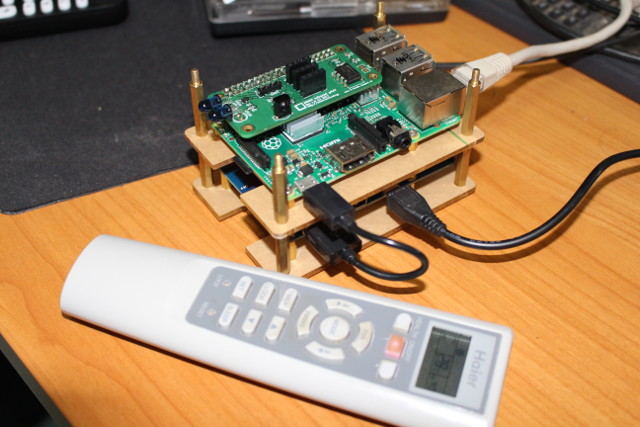
How to Control Your Air Conditioner with Raspberry Pi Board and ANAVI Infrared pHAT

Posted by jpluimers on 2018/06/04

Interesting howto: [WayBackHow to Control Your Air Conditioner with Raspberry Pi Board and ANAVI Infrared pHAT

via: [WayBack] Air conditioners’ remote control codes are a bit different from say your TV remote control, as they don’t just send one byte, but a bunch of bytes… – Jean-Luc Aufranc – Google+

–jeroen

Posted in *nix, Development, Hardware Development, Power User, Raspberry Pi | Leave a Comment »

Hmm, latest Tumbleweed on Raspberry Pi 3 has an odd thing booting: Ansi termi…

Posted by jpluimers on 2018/05/25

Reminder to self: since the [ArchiveARM Cortex A53 problems are fixed, check out if this is also fixed:

[WayBack] Hmm, latest Tumbleweed on Raspberry Pi 3 has an odd thing booting: Ansi terminal characters aren’t being processed any more. – Jeroen Wiert Pluimers – Google+

Related: Git repository with fixed binaries for Tumbleweed on Raspberry Pi 3 – Bug 1084419 – Glibc update to 2.27 causes segfault during name resolution

–jeroen

Related as a different Pi died after a sudden power down:

Posted in *nix, Development, Hardware Development, Linux, openSuSE, Power User, Raspberry Pi, SuSE Linux, Tumbleweed | Leave a Comment »

Some Raspberry Ideas via Tweakers.net

Posted by jpluimers on 2018/05/11

via: [WayBackRaspberry Pi Zero W met wifi en bluetooth kost 10 dollar – Computer – Nieuws – Tweakers

  • LibreELEC (media player OS for Kodi); if your PC is recent enough and supports CEC, you can even use the remote control of your TV to controle the KODI user interface
  • EmulationStation; play old NES/SNES/PS1/etc games on your TV
  • Pi Hole, alternative DNS server that blocks ads even on devices that do not support an ad blocker
  • Domoticz to support device and protocols like Klik-aan-klik-uit, Z-Wave, HVAC, thermostats, smart electricity meters, and make your home “smart”
  • Build Robotjes and control with your smartphone
  • Install Rasbian and replace simple desktop machine usage
  • Sick Beard
  • Sonarr
  • SABnzbd+
  • Couch Potato
  • Retropie
  • http://makezine.com/proje…ode-raspberry-pi-cluster/

–jeroen

Posted in *nix, Debian, Development, Hardware Development, Linux, Power User, Raspberry Pi, Raspbian | Leave a Comment »

Is a raspberry pi 1 good enough for a pihole server? : pihole

Posted by jpluimers on 2018/04/10

Many people use it that way. Which means I can put it on an old Raspberry Pi B+ revision 1.2 board (which Wikipedia indicates as the B 1+ in the Specifications table but as Raspberry Pi 1 Model B+ revision 1.2 in the schematics of connectors).

I might consider DietPi as distribution (which is Debian based) as it is even ligher.

See [WayBackhttps://www.reddit.com/r/pihole/comments/6h39zr/is_a_raspberry_pi_1_good_enough_for_a_pihole/#divw0i5

One more note: I need to check out which Debian base name (which indicates the version) works best as there seemed to be a dnsmasq issue (not archived because discourse hatesdislikes the WayBack machine and Archive.is):

Like Apple, Android and Delphi, they use name based versions of which I always forget the order of. Luckily the source of the below table gets updated over time [2017 Archive.is2018 Archive.is] Debian releases and names – Electric Toolbox Debian releases are named after characters from Toy Story and are frequently referred to with the name rather than the version.:

Version Code name Release date Toy Story character
1.1 Buzz 1996-06-17 Buzz Lightyear
1.2 Rex 1996-12-12 Rex (the T-Rex)
1.3 Bo 1997-06-05 Bo Peep
2.0 Hamm 1998-07-24 Hamm (the pig)
2.1 Slink 1999-03-09 Slinky Dog
2.2 Potato 2000-08-15 Mr Potato Head
3.0 Woody 2002-07-19 Woody the cowboy
3.1 Sarge 2005-06-06 Sarge from the Bucket O’ Soldiers
4.0 Etch 2007-04-08 Etch, the Etch-A-Sketch
5.0 Lenny 2009-02-14 Lenny, the binoculars
6.0 Squeeze 2011-02-06 Squeeze toy aliens
7 Wheezy 2013-05-04 Wheezy the penguin
8 Jessie 2015-04-26 Jessie the cowgirl
9 Stretch 2017-06-17 Rubber octopus from Toy Story 3
10 Buster not yet released Andy’s pet dog
11 Bullseye Not yet released Woody’s horse
Sid “unstable” The next door neighbour

Via: [WayBack] Software-update: Pi-hole 3.3.1 – IT Pro – Downloads – Tweakers

–jeroen

Posted in *nix, Debian, Development, Hardware Development, Linux, Power User, Raspberry Pi, Raspbian | 1 Comment »

Git repository with fixed binaries for Tumbleweed on Raspberry Pi 3 – Bug 1084419 – Glibc update to 2.27 causes segfault during name resolution

Posted by jpluimers on 2018/04/08

OSC downloads for [archive.is] https://bugzilla.opensuse.org/show_bug.cgi?id=1084812

The binaries provided by Stefan Brüns, together with installation instructions are now in a git repository at [WayBack] wiert.me/public/linux/opensuse/tumbleweed/aarch64 a.k.a. arm64/1084182-fix-osc-binaries · GitLab.

Follow the steps in Applying the fixes on a broken system to at least temporarily get your system to work (a new zypper dist-upgrade might fail, so be careful with that).

The cause was some ARM A53 errata handling:

–jeroen

Posted in *nix, *nix-tools, Development, DVCS - Distributed Version Control, git, Hardware Development, Linux, openSuSE, Power User, Raspberry Pi, Source Code Management, SuSE Linux, Tumbleweed | Leave a Comment »

Tumbleweed on Raspberry Pi 3 – Bug 1084419 – Glibc update to 2.27 causes segfault during name resolution

Posted by jpluimers on 2018/03/15

Need to watch these:

A few notes:

  • It is inside the glibc name resolution
  • IPv6 is OK, IPv4 fails.
  • ping/nslookup (which do not depend on glibc) are OK
  • there is an intermediate fix requiring direct osc downloads

A simple test case

Failing situation

$ curl --silent --show-error http://example.org > /dev/null
Segmentation fault (core dumped)

Succeeding situation

$ curl --silent --show-error http://example.org > /dev/null

Non related, but in hindsight my own stupid fault during a similar update: a post mortem

Most important bits of my external infrastructure - page 1

Most important bits of my external infrastructure – page 1

I thought I had forgot about the SuSEfirewall2 changes (On my research list: migrate from OpenSuSE SuSEfirewall2 to firewalld) so assumed that was the reason I broke one of my secondaries (which runs on a Raspberry Pi 2):

Mistakes like these are the reason to have secondaries in the first place https://infrastatus.wiert.me and do port-mortems.

Which is kind of odd, as the SuSEfirewall2 didn’t throw any warnings like at this similar one:

This one still works because it is on the firewall in front of the Raspberry Pi 2:

(Screenshots of the above URLs are below).

In fact it was another mistake: I had forgotten to make the DHCP lease static, which resulted in a wrong IP address to be assigned upon reboot, instantly making the firewall rules invalid:

I could have fixed this remotely when I had thought about this.

–jeroen

Read the rest of this entry »

Posted in *nix, Development, Hardware Development, Linux, openSuSE, Power User, Raspberry Pi, SuSE Linux, Tumbleweed | 3 Comments »

Using a Mac for prepping the SD-card for an ODROID-C1+

Posted by jpluimers on 2018/02/12

Some notes based on The woods and trees of OpenSuSE on single-board computers – image abbreviations – and getting it installed using OS X « The Wiert Corner – irregular stream of stuff.

I needed to get Ubuntu on an ODROID-C1+ (as it looks like nobody is maintaining a current OpenSuSE for it).

Installing the ODROID-C1+ image using OS X

Download image

Download either of these (note that “minimal” is different from “mate minimal”; see https://www.youtube.com/watch?v=jOYWx_YToh8) from de.eu.odroid.in/ubuntu_16.04lts:

Put image on SD card

I installed on a 8 gigabyte SD card that revealed itself as /dev/disk1 using this diskutil command (via osx – List all devices connected, lsblk for Mac OS X – Ask Different [WayBack])

diskutil list

So this wrote the image to SD card in a sudo su - prompt:

targetDevice="disk1"
unxz --keep ubuntu-16.04-minimal-odroid-c1-20160817.img.xz; \
diskutil umount "/dev/${targetDevice}s1"; \
dd bs=1m of="/dev/r${targetDevice}" if=ubuntu-16.04-minimal-odroid-c1-20160817.img; \
sync; \
diskutil list; \
diskutil eject "/dev/${targetDevice}"

Boot and first time steps on Odroid

Use the default user and password that [WayBackODROID Forum • View topic – Ubuntu Minimal User / Password mentions:

odroid login: root
Password: odroid

From there, create a new user and add it to the sudo group (I used visudo to check the correct group for sudoers) :

adduser jeroenp
addgroup jeroenp sudo

And then hook it up to the network and get the IP address:

ifconfig

Now you can ssh into the odroid with user jeroenp and the password assigned to it. You can also perform a sudo su - to get to root level.

ssh and configure a few things

First of all, install etckeeper as it’s a life saver:

apt-get install etckeeper

This will install some other packages, but that’s OK; it will end suggesting you to enter email address, name and perform an initial commit:

Initialized empty Git repository in /etc/.git/

*** Please tell me who you are.

Run

  git config --global user.email "you@example.com"
  git config --global user.name "Your Name"

to set your account's default identity.
Omit --global to set the identity only in this repository.

fatal: unable to auto-detect email address (got 'root@odroid.(none)')
etckeeper commit failed; run it by hand

Do that:

cd /etc
git config --global user.email "example@example.org"
git config --global user.name "Example User"
git commit -m "initial commit"

Now perform these steps:

  1. Change the root password
  2. Disable etckeeper daily autocommits
  3. Change the hostname
  4. Update/Upgrade/Distribution-upgrade
  5. Fix the cursor in console mode

Change root password:

# sudo su -
# passwd
Enter new UNIX password:
Retype new UNIX password:
passwd: password updated successfully

Disable etckeeper daily autocommits involves one line in /etc/etckeeper/etckeeper.conf:

-#AVOID_DAILY_AUTOCOMMITS=1
+AVOID_DAILY_AUTOCOMMITS=1

Change the hostname; assuming your new host name is newHostName.

  1. edit /etc/hosts and replace the old hostname with newHostName
  2. Perform these commands:
    hostnamectl set-hostname newHostName
    exec bash
    hostname -f

Both the command prompt and the hostname output should show newHostName.

Update/Upgrade:

apt-get update
apt-get upgrade

Fix the cursor in console mode:

Somehow the Odroid C1+ does not support a blinking hardware text cursor.


–jeroen

Posted in *nix, *nix-tools, Development, etckeeper, Hardware Development, Linux, Odroid, openSuSE, Power User, Raspberry Pi, SuSE Linux, Tumbleweed, Ubuntu | Leave a Comment »

Some links on multicast networking, Raspberry Pi and DVB USB adapters that help you build a TV server

Posted by jpluimers on 2017/12/26

A cool set of YouTube videos by CWNE88:

The USB device used here is this one:

Tuner is AVerMedia AVerTV Volar Green
There are 2 models, but the good one uses firmware dvb-usb-it9135-02.fw The other one uses dvb-usb-af9035-02.fw but that didn’t seem to work as well and got hot. They look the same on the outside though.
ID 07ca:3835 AVerMedia Technologies, Inc. AVerTV Volar Green HD (A835B)

–jeroen

Posted in Development, Hardware Development, Power User, Raspberry Pi | Leave a Comment »

MX Backup – Postfix Email Server | samhobbs.co.uk

Posted by jpluimers on 2017/11/09

Interesting as it has steps for both OpenSuSE and Debian each well suited for running on a Raspberry Pi.

[WayBackMX Backup – Postfix Email Server | samhobbs.co.uk

It seems postfix is a lot easier to configure than sendmail so I already like it.

First I need to read a bit more in Postfix greylisting.

I’ll need to catch up on Sam’s other parts with the postfix tag as well:

–jeroen

Posted in *nix, *nix-tools, Debian, Development, Hardware Development, Linux, openSuSE, Power User, Raspberry Pi, Raspbian, sendmail, SuSE Linux, Tumbleweed | Leave a Comment »

ModMyPi | Cluster HAT Kit Inc. 4 x Raspberry Pi Zero

Posted by jpluimers on 2017/10/30

Interesting stuff; I wonder if there is a case for it as well:

The Cluster HAT interfaces a (Controller) Raspberry Pi A+/B+/2/3 with 4 Raspberry Pi Zeros Configured to use USB Gadget mode, it is an ideal tool for teaching, testing or simulating small scale clusters.

This Kit Includes 1 x Cluster HAT V2, 4 x Raspberry Pi Zero’s, 4 x 16GB Micro SD Cards.

Please Note. A Raspberry Pi B+/2/3, with SD Card & Power Supply are also required for set up. These items are NOT Included in the Kit but can be purchased separately.

Source: [WayBackModMyPi | Cluster HAT Kit Inc. 4 x Raspberry Pi Zero

Via Matthijs ter Woord.

–jeroen

Posted in Development, Hardware Development, Hardware Interfacing, Raspberry Pi | 2 Comments »