The Wiert Corner – irregular stream of stuff

Jeroen W. Pluimers on .NET, C#, Delphi, databases, and personal interests

  • My badges

  • Twitter Updates

  • My Flickr Stream

  • Pages

  • All categories

  • Enter your email address to subscribe to this blog and receive notifications of new posts by email.

    Join 1,835 other subscribers

Archive for the ‘Raspberry Pi’ Category

Is a raspberry pi 1 good enough for a pihole server? : pihole

Posted by jpluimers on 2018/04/10

Many people use it that way. Which means I can put it on an old Raspberry Pi B+ revision 1.2 board (which Wikipedia indicates as the B 1+ in the Specifications table but as Raspberry Pi 1 Model B+ revision 1.2 in the schematics of connectors).

I might consider DietPi as distribution (which is Debian based) as it is even ligher.

See [WayBackhttps://www.reddit.com/r/pihole/comments/6h39zr/is_a_raspberry_pi_1_good_enough_for_a_pihole/#divw0i5

One more note: I need to check out which Debian base name (which indicates the version) works best as there seemed to be a dnsmasq issue (not archived because discourse hatesdislikes the WayBack machine and Archive.is):

Like Apple, Android and Delphi, they use name based versions of which I always forget the order of. Luckily the source of the below table gets updated over time [2017 Archive.is2018 Archive.is] Debian releases and names – Electric Toolbox Debian releases are named after characters from Toy Story and are frequently referred to with the name rather than the version.:

Version Code name Release date Toy Story character
1.1 Buzz 1996-06-17 Buzz Lightyear
1.2 Rex 1996-12-12 Rex (the T-Rex)
1.3 Bo 1997-06-05 Bo Peep
2.0 Hamm 1998-07-24 Hamm (the pig)
2.1 Slink 1999-03-09 Slinky Dog
2.2 Potato 2000-08-15 Mr Potato Head
3.0 Woody 2002-07-19 Woody the cowboy
3.1 Sarge 2005-06-06 Sarge from the Bucket O’ Soldiers
4.0 Etch 2007-04-08 Etch, the Etch-A-Sketch
5.0 Lenny 2009-02-14 Lenny, the binoculars
6.0 Squeeze 2011-02-06 Squeeze toy aliens
7 Wheezy 2013-05-04 Wheezy the penguin
8 Jessie 2015-04-26 Jessie the cowgirl
9 Stretch 2017-06-17 Rubber octopus from Toy Story 3
10 Buster not yet released Andy’s pet dog
11 Bullseye Not yet released Woody’s horse
Sid “unstable” The next door neighbour

Via: [WayBack] Software-update: Pi-hole 3.3.1 – IT Pro – Downloads – Tweakers

–jeroen

Posted in *nix, Debian, Development, Hardware Development, Linux, Power User, Raspberry Pi, Raspbian | 1 Comment »

Git repository with fixed binaries for Tumbleweed on Raspberry Pi 3 – Bug 1084419 – Glibc update to 2.27 causes segfault during name resolution

Posted by jpluimers on 2018/04/08

OSC downloads for [archive.is] https://bugzilla.opensuse.org/show_bug.cgi?id=1084812

The binaries provided by Stefan Brüns, together with installation instructions are now in a git repository at [WayBack] wiert.me/public/linux/opensuse/tumbleweed/aarch64 a.k.a. arm64/1084182-fix-osc-binaries · GitLab.

Follow the steps in Applying the fixes on a broken system to at least temporarily get your system to work (a new zypper dist-upgrade might fail, so be careful with that).

The cause was some ARM A53 errata handling:

–jeroen

Posted in *nix, *nix-tools, Development, DVCS - Distributed Version Control, git, Hardware Development, Linux, openSuSE, Power User, Raspberry Pi, Source Code Management, SuSE Linux, Tumbleweed | Leave a Comment »

Tumbleweed on Raspberry Pi 3 – Bug 1084419 – Glibc update to 2.27 causes segfault during name resolution

Posted by jpluimers on 2018/03/15

Need to watch these:

A few notes:

  • It is inside the glibc name resolution
  • IPv6 is OK, IPv4 fails.
  • ping/nslookup (which do not depend on glibc) are OK
  • there is an intermediate fix requiring direct osc downloads

A simple test case

Failing situation

$ curl --silent --show-error http://example.org > /dev/null
Segmentation fault (core dumped)

Succeeding situation

$ curl --silent --show-error http://example.org > /dev/null

Non related, but in hindsight my own stupid fault during a similar update: a post mortem

Most important bits of my external infrastructure - page 1

Most important bits of my external infrastructure – page 1

I thought I had forgot about the SuSEfirewall2 changes (On my research list: migrate from OpenSuSE SuSEfirewall2 to firewalld) so assumed that was the reason I broke one of my secondaries (which runs on a Raspberry Pi 2):

Mistakes like these are the reason to have secondaries in the first place https://infrastatus.wiert.me and do port-mortems.

Which is kind of odd, as the SuSEfirewall2 didn’t throw any warnings like at this similar one:

This one still works because it is on the firewall in front of the Raspberry Pi 2:

(Screenshots of the above URLs are below).

In fact it was another mistake: I had forgotten to make the DHCP lease static, which resulted in a wrong IP address to be assigned upon reboot, instantly making the firewall rules invalid:

I could have fixed this remotely when I had thought about this.

–jeroen

Read the rest of this entry »

Posted in *nix, Development, Hardware Development, Linux, openSuSE, Power User, Raspberry Pi, SuSE Linux, Tumbleweed | 3 Comments »

Using a Mac for prepping the SD-card for an ODROID-C1+

Posted by jpluimers on 2018/02/12

Some notes based on The woods and trees of OpenSuSE on single-board computers – image abbreviations – and getting it installed using OS X « The Wiert Corner – irregular stream of stuff.

I needed to get Ubuntu on an ODROID-C1+ (as it looks like nobody is maintaining a current OpenSuSE for it).

Installing the ODROID-C1+ image using OS X

Download image

Download either of these (note that “minimal” is different from “mate minimal”; see https://www.youtube.com/watch?v=jOYWx_YToh8) from de.eu.odroid.in/ubuntu_16.04lts:

Put image on SD card

I installed on a 8 gigabyte SD card that revealed itself as /dev/disk1 using this diskutil command (via osx – List all devices connected, lsblk for Mac OS X – Ask Different [WayBack])

diskutil list

So this wrote the image to SD card in a sudo su - prompt:

targetDevice="disk1"
unxz --keep ubuntu-16.04-minimal-odroid-c1-20160817.img.xz; \
diskutil umount "/dev/${targetDevice}s1"; \
dd bs=1m of="/dev/r${targetDevice}" if=ubuntu-16.04-minimal-odroid-c1-20160817.img; \
sync; \
diskutil list; \
diskutil eject "/dev/${targetDevice}"

Boot and first time steps on Odroid

Use the default user and password that [WayBackODROID Forum • View topic – Ubuntu Minimal User / Password mentions:

odroid login: root
Password: odroid

From there, create a new user and add it to the sudo group (I used visudo to check the correct group for sudoers) :

adduser jeroenp
addgroup jeroenp sudo

And then hook it up to the network and get the IP address:

ifconfig

Now you can ssh into the odroid with user jeroenp and the password assigned to it. You can also perform a sudo su - to get to root level.

ssh and configure a few things

First of all, install etckeeper as it’s a life saver:

apt-get install etckeeper

This will install some other packages, but that’s OK; it will end suggesting you to enter email address, name and perform an initial commit:

Initialized empty Git repository in /etc/.git/

*** Please tell me who you are.

Run

  git config --global user.email "you@example.com"
  git config --global user.name "Your Name"

to set your account's default identity.
Omit --global to set the identity only in this repository.

fatal: unable to auto-detect email address (got 'root@odroid.(none)')
etckeeper commit failed; run it by hand

Do that:

cd /etc
git config --global user.email "example@example.org"
git config --global user.name "Example User"
git commit -m "initial commit"

Now perform these steps:

  1. Change the root password
  2. Disable etckeeper daily autocommits
  3. Change the hostname
  4. Update/Upgrade/Distribution-upgrade
  5. Fix the cursor in console mode

Change root password:

# sudo su -
# passwd
Enter new UNIX password:
Retype new UNIX password:
passwd: password updated successfully

Disable etckeeper daily autocommits involves one line in /etc/etckeeper/etckeeper.conf:

-#AVOID_DAILY_AUTOCOMMITS=1
+AVOID_DAILY_AUTOCOMMITS=1

Change the hostname; assuming your new host name is newHostName.

  1. edit /etc/hosts and replace the old hostname with newHostName
  2. Perform these commands:
    hostnamectl set-hostname newHostName
    exec bash
    hostname -f

Both the command prompt and the hostname output should show newHostName.

Update/Upgrade:

apt-get update
apt-get upgrade

Fix the cursor in console mode:

Somehow the Odroid C1+ does not support a blinking hardware text cursor.


–jeroen

Posted in *nix, *nix-tools, Development, etckeeper, Hardware Development, Linux, Odroid, openSuSE, Power User, Raspberry Pi, SuSE Linux, Tumbleweed, Ubuntu | Leave a Comment »

Some links on multicast networking, Raspberry Pi and DVB USB adapters that help you build a TV server

Posted by jpluimers on 2017/12/26

A cool set of YouTube videos by CWNE88:

The USB device used here is this one:

Tuner is AVerMedia AVerTV Volar Green
There are 2 models, but the good one uses firmware dvb-usb-it9135-02.fw The other one uses dvb-usb-af9035-02.fw but that didn’t seem to work as well and got hot. They look the same on the outside though.
ID 07ca:3835 AVerMedia Technologies, Inc. AVerTV Volar Green HD (A835B)

–jeroen

Posted in Development, Hardware Development, Power User, Raspberry Pi | Leave a Comment »

MX Backup – Postfix Email Server | samhobbs.co.uk

Posted by jpluimers on 2017/11/09

Interesting as it has steps for both OpenSuSE and Debian each well suited for running on a Raspberry Pi.

[WayBackMX Backup – Postfix Email Server | samhobbs.co.uk

It seems postfix is a lot easier to configure than sendmail so I already like it.

First I need to read a bit more in Postfix greylisting.

I’ll need to catch up on Sam’s other parts with the postfix tag as well:

–jeroen

Posted in *nix, *nix-tools, Debian, Development, Hardware Development, Linux, openSuSE, Power User, Raspberry Pi, Raspbian, sendmail, SuSE Linux, Tumbleweed | Leave a Comment »

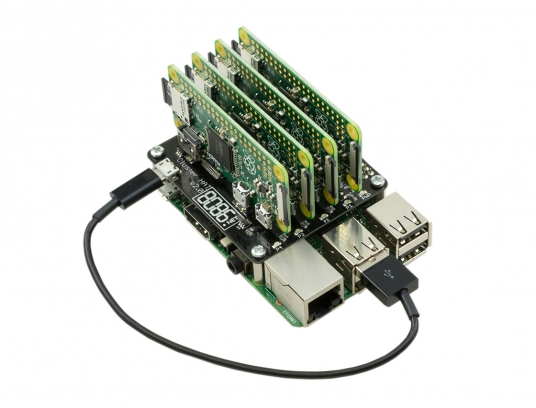
ModMyPi | Cluster HAT Kit Inc. 4 x Raspberry Pi Zero

Posted by jpluimers on 2017/10/30

Interesting stuff; I wonder if there is a case for it as well:

The Cluster HAT interfaces a (Controller) Raspberry Pi A+/B+/2/3 with 4 Raspberry Pi Zeros Configured to use USB Gadget mode, it is an ideal tool for teaching, testing or simulating small scale clusters.

This Kit Includes 1 x Cluster HAT V2, 4 x Raspberry Pi Zero’s, 4 x 16GB Micro SD Cards.

Please Note. A Raspberry Pi B+/2/3, with SD Card & Power Supply are also required for set up. These items are NOT Included in the Kit but can be purchased separately.

Source: [WayBackModMyPi | Cluster HAT Kit Inc. 4 x Raspberry Pi Zero

Via Matthijs ter Woord.

–jeroen

Posted in Development, Hardware Development, Hardware Interfacing, Raspberry Pi | 2 Comments »

UPS PIco HV3.0 documentation not on github: “03_0x38_W_UPS PIco HV3.0.pdf”

Posted by jpluimers on 2017/10/17

I ordered a UPS PIco HV3.0 A Stack 450 Plus and it arrived without any documentation on how to solder the parts together.

So I tried searching for them: https://www.google.com/search?q=UPS+PIco+HV3.0+A+Stack+450+Plus+installation+instructions which turned mostly github based URLs.

I learned there is a bit on github:

But despite code and documentation being there, no installation instructions on how to solder the stuff together.

Luckily, they responded quickly to my tweet So I got my “UPS PIco HV3.0 A Stack 450 Plus” @ModMyPi but no assembly instructions. Where do all the non-soldered parts go when using RPi3? and a quick respons thread revealing I needed 03_0x38_W_UPS PIco HV3.0.pdf which – TADAAAA – is on Google drive and on the forums at [WayBackUPS PIco Firmware Update & Troubleshooting : Technical Support

So despite github providing an excellent platform for discussion and storing documentation, something archaic like a forum is used to store data in a disorganised way.

Too bad, as the document itself is 100+ page of invaluable documentation.

So in case of future bit-rot, here are the links:

Read the rest of this entry »

Posted in Development, Hardware Development, Hardware Interfacing, Raspberry Pi | Leave a Comment »

Raspberry Pi brexit – changing your locale away from GB when you’ve a different keyboard

Posted by jpluimers on 2017/10/02

A while ago I wrote about -bash: warning: setlocale: LC_ALL: cannot change locale (en_US.UTF-8) on fresh Raspbian on Raspberry

I thought my locale issues were solved and they sort of were. Until I had to logon locally and managed to get one or more of these characters in my password:

  • ~ (tilde)
  • @ (at)
  • # (hash)
  • \ (backslash)
  • | (pipe)
  • " (double-quote)

Then logon would fail locally but work via ssh. Go figure!

Lot’s of people outside the UK using their Raspberry Pi with keyboard and monitor will now say: you’ve the default GB keyboard layout and your keyboard is not GB.

Bingo!

This is how US keys look when using a GB keyboard layout:

Read the rest of this entry »

Posted in *nix, Debian, Development, Hardware Development, Linux, Power User, Raspberry Pi, Raspbian | Leave a Comment »

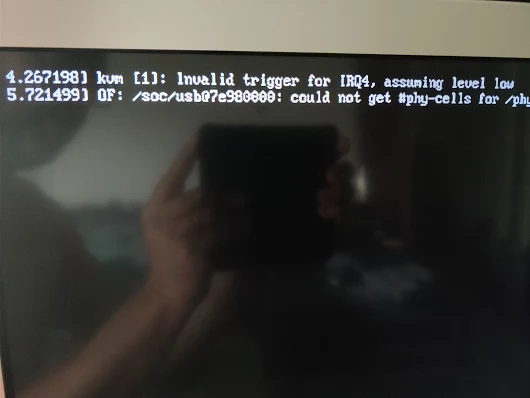
Oops: OF: /soc/usb at 7e980000: could not get #phy-cells for /phy

Posted by jpluimers on 2017/09/28


kvm [1]: Invalid trigger for IRQ4, assuming level low
OF: /soc/usb at 7e980000: could not get #phy-cells for /phy

Via [WayBack] Oops. – Jeroen Wiert Pluimers – Google+

This was after updating my Raspberry Pi 3 with Tumbleweed to 20170920.

Not sure what do do now. Some searches didn’t reveal much:

–jeroen

Posted in *nix, Development, Hardware Development, Linux, openSuSE, Power User, Raspberry Pi, SuSE Linux, Tumbleweed | Leave a Comment »