The Wiert Corner – irregular stream of stuff

Jeroen W. Pluimers on .NET, C#, Delphi, databases, and personal interests

  • My badges

  • Twitter Updates

  • My Flickr Stream

  • Pages

  • All categories

  • Enter your email address to subscribe to this blog and receive notifications of new posts by email.

    Join 1,854 other subscribers

Archive for the ‘Development’ Category

On my list of things to try: Amazon SES for outbound/inbound email handling

Posted by jpluimers on 2021/08/10

SES mail servers at the time of writing

*n*x:

# nslookup -type=TXT amazonses.com | grep "v=spf1"
amazonses.com   text = "v=spf1 ip4:199.255.192.0/22 ip4:199.127.232.0/22 ip4:54.240.0.0/18 ip4:69.169.224.0/20 ip4:76.223.180.0/23 ip4:76.223.188.0/24 ip4:76.223.189.0/24 ip4:76.223.190.0/24 -all"I

Windows

C:\>nslookup -type=TXT amazonses.com | find "v=spf1"
Non-authoritative answer:
        "v=spf1 ip4:199.255.192.0/22 ip4:199.127.232.0/22 ip4:54.240.0.0/18 ip4:69.169.224.0/20 ip4:76.223.180.0/23 ip4:76.223.188.0/24 ip4:76.223.189.0/24 ip4:76.223.190.0/24 -all"

These addresses use a compact CIDR notation to denote ranges of networks containing ranges of network IPv4 addresses.

CIRD processing to sendmail access file

(this is linux sendmail only)

Converting the nslookup outout to a CIDR based sendmail /etc/mail/access excerpt goes via a pipe sequence of multiple sed commands:

# nslookup -type=TXT amazonses.com | grep "v=spf1" | sed 's/\(^.*"v=spf1 ip4:\| -all"$\)//g' | sed 's/\ ip4:/\n/g' | xargs -I {} sh -c "prips {} | sed 's/$/\tRELAY/g'"
199.255.192.0   RELAY
199.255.192.1   RELAY
...
76.223.190.254  RELAY
76.223.190.255  RELAY

What happens here is this:

  1. Filter out only spf1 records using grep.
  2. Remove the head (.*v=spf1 ip4:) and tail ( -all") of the output, see [WayBack] use of alternation “|” in sed’s regex – Super User.
  3. Replaces all ip4: with newlines (so the output get split over multiple lines), see [WayBack] linux – splitting single line into multiple line in numbering format using awk – Stack Overflow.
  4. Convert the CIDR notation to individual IP addresses (as sendmail cannot handle CIDR),
    1. This uses a combination of xargs with the  sh trick to split the CIDR list into separate arguments, and prips (which prints the IP addresses for a CIDR); see:
    2. Alternatively, use
  5. Replaces all end-of-line anchor ($) with a tab followed by RELAY, see

You can append the output of this command to /etc/mail/access, then re-generate /etc/mail/access.db and restart sendmail; see for instance [WayBack] sendmail access.db by example | LinuxWebLog.com.

Without the xargs, the output would look like this:

# nslookup -type=TXT amazonses.com | grep "v=spf1" | sed 's/\(^.*"v=spf1 ip4:\| -all"$\)//g' | sed 's/\ ip4:/\n/g'
199.255.192.0/22
199.127.232.0/22
54.240.0.0/18
69.169.224.0/20
76.223.180.0/23
76.223.188.0/24
76.223.189.0/24
76.223.190.0/24

Via

–jeroen

Posted in *nix, *nix-tools, Amazon SES, Amazon.com/.de/.fr/.uk/..., Cloud, Communications Development, Development, Infrastructure, Internet protocol suite, Power User, sendmail, SMTP, Software Development | Leave a Comment »

Delphi 10.2 Tokyo and up compiler issue: incompatible with Delphi 1.10.1 Berlin behaviour on unit path resolution

Posted by jpluimers on 2021/08/10

There is a very tricky compiler and IDE issue in Delphi 10.2 and up that on the compiler site behaves differently from Delphi 1.10.1 Berlin, and on the IDE side stays the same from Delphi 2005 on.

The issue baffled me, as lot’s features were not added in the Delphi compiler because of backward compatibility reasons.

The problem is that the compiler now favours the unit search path over the paths specified in the .dpr. This breaks compatibility with earlier versions and the IDE: the IDE still thinks pathnames in the .dpr files are the ones to follow.

There are some permutations on this problem, of which a few ones below.

Nonexisting unit in the project, but existing on the search path

  • .dpr file in a directory X
  • a unit inside a different directory A specified the .dpr file, but not on disk, and directory A not in the unit search path
  • a disk version of the unit in yet another directory B where directory B is in the unit search path

This results in Delphi 1..10.1 Berlin to error on compiling the project (because the unit is not found), but 10.2 and up succeeding (because the unit is found).

Existing unit in the project, but directory not on the search a path

Another permutation is this one:

  • .dpr file in a directory X
  • a unit inside a different directory A specified the .dpr file, and on disk, and directory A not in the unit search path

Two same named units, one on search path, other in project but not on search path

Yet another permutation:

  • .dpr file in a directory X
  • a unit inside a different directory A specified the .dpr file, on disk, and directory A not in the unit search path
  • a disk version of the unit in yet another directory B where directory B is in the unit search path
  • unit A and unit B have different content

This works the same in all versions of Delphi: the unit file referenced in the .dpr is compiled.

Via: [WayBack] Jeroen Pluimers on Twitter: “Delphi 10.2 Tokyo and 10.3 Rio compilers break Delphi 1…10.1 Berlin behaviour. Still reproducing and researching the consequences. It for instance means stuff suddenly compiles when it should not, or breaks when it should not. Preliminary reproduction at “

[WayBack] wiert.me / public / delphi / DelphiConsoleProjectWithMissingProjectUnitThatIsOnTheSearchPath · GitLab

–jeroen

Read the rest of this entry »

Posted in Delphi, Development, Software Development | Leave a Comment »

autossh on Windows from a service: automatically starting a tunnel no matter anyone being logged on

Posted by jpluimers on 2021/08/09

There is an autossh binary for Windows available on GitHub: [WayBack] GitHub – jazzl0ver/autossh: Windows binary for autossh v1.4c.

Combined with NSSM (which for instance you can install through [WayBack] Chocolatey Software | NSSM – the Non-Sucking Service Manager) you can not only automatically build and maintain an SSH connection, but also ensure the autossh process is up and running as a service without the need for an active logon.

This allows for SSH based tunnels from and to your Windows system.

For this usage scenario, there is no need for these tools any more:

Future research:

One time steps

These are in part based on:

1. Download autoSSH

Download the most recent [WayBack] Releases · jazzl0ver/autossh · GitHub  (see below for updates).

I used the 1.4g version: [WayBack] autossh.exe, then put on my Windows PATH.

2. Install NSSM

Since it is on chocolatey ([WayBack] Chocolatey Software | NSSM – the Non-Sucking Service Manager 2.24.101.20180116), this will suffice:

choco install --yes nssm

3 .Prepare remote computer so it allows enough SSH retries

Check the value of MaxAuthTries in /etc/ssh/sshd_config.

# grep MaxAuthTries /etc/ssh/sshd_config MaxAuthTries 1

The value needs to be at least 3 or higher for ssh-copy-id to work properly.

When changing the value, be sure to restart the sshd daemon.

Without a low value of MaxAuthTries in /etc/ssh/sshd_config, ssh-copy-id will give an error ERROR: Received disconnect from myRemoteComputer port 2222:2: Too many authentication failures.

See also these link via [WayBack ]“INFO: attempting to log in with the new key(s), to filter out any that are already installed” “Too many authentication failures” – Google Search:

4. Temporarily allow the remote account to perform interctive logon

Temporarily change the user shell to /bin/bash to allow [WayBack] ssh-copy-id to work at all.

This is explained in more detail by [WayBack] shell – ssh dissable login, but allow copy-id – Server Fault.

5. Generate public and private key pairs

You need an ssh public and private key, then transfer this to your Windows client. You can for instance use these as a base:

For instance (where myLocalUser is the local user generate the key-pair for for, and myRemoteUser plus myRemoteComputer is the remote user and computer you want to autossh to):

  • ssh-keygen -t rsa -b 4096 -f %UserProfile%\.ssh\id_rsa_myLocalUser@%ComputerName%_autossh_myRemoteUser@myRemoteComputer
  • ssh-keygen -t ed25519 -f %UserProfile%\.ssh\id_ed25519_myLocalUser@%ComputerName%_autossh_myRemoteUser@myRemoteComputer

6. install git (for ssh-copy-id and bash)

Since git includes ssh-copy-id (which you need in the next step, it is at %Program Files%\Git\usr\bin\ssh-copy-id) and git is on chocolatey ([WayBack] Chocolatey Software | Git (Install) 2.23.0):

choco install --yes git.install --params "/GitAndUnixToolsOnPath /NoGitLfs /SChannel /NoAutoCrlf /WindowsTerminal"

7. Copy the public parts of the generated key pairs to the remote account on the remote machine

Use bash with ssh-copy-id to transfer the generated public keys to a remote system (replace 2222 with the SSH port number on the remote computer; often it is just 22):

pushd %UserProfile%\.ssh
bash -c "ssh-copy-id -i %UserProfile%\.ssh\id_rsa_myLocalUser@%ComputerName%_autossh_myRemoteUser@myRemoteComputer -p 2222 myRemoteUser@myRemoteComputer"
bash -c "ssh-copy-id -i %UserProfile%\.ssh\id_ed25519_myLocalUser_%ComputerName%_autossh_myRemoteUser@myRemoteComputer -p 2222 myRemoteUser@myRemoteComputer"
popd

This sounds overly complicated, but is the only way to incorporate the environment variables.

8. Test with ssh, then with autossh

These two ssh commands should succeed; choose the one for which you prefer the rsa or ed25519 algorithm.

  • ssh -i %UserProfile%\.ssh\id_rsa_myLocalUser@%ComputerName%_autossh_myRemoteUser@myRemoteComputer -p 2222 myRemoteUser@myRemoteComputer
  • ssh -i %UserProfile%\.ssh\id_ed25519_myLocalUser_%ComputerName%_autossh_myRemoteUser@myRemoteComputer -p 2222 myRemoteUser@myRemoteComputer

After this, try with autossh:

  • autossh -M 0 -o "ServerAliveInterval 30" -o "ServerAliveCountMax 3" -i %UserProfile%\.ssh\id_rsa_myLocalUser@%ComputerName%_autossh_myRemoteUser@myRemoteComputer -p 2222 myRemoteUser@myRemoteComputer
  • autossh -M 0 -o "ServerAliveInterval 30" -o "ServerAliveCountMax 3" -i %UserProfile%\.ssh\id_ed25519_myLocalUser_%ComputerName%_autossh_myRemoteUser@myRemoteComputer -p 2222 myRemoteUser@myRemoteComputer

This disables the autossh port monitoring (the -M 0 option, but uses a combination of interval/count-max from ssh itself to monitor the connection (the -o "ServerAliveInterval 30" -o "ServerAliveCountMax 3" options).

Note that there is no default monitoring port, as it can be any one: [WayBack] linux – What is the default monitoring port for autossh? – Super User

9. Install autossh as a service

a

Steps

  1. a
  2. b
  3. c
  4. d
  5. e

SSH logon

Depending on which algorithm you like most, use either of the below 2 (replace 2222 with the SSH port number on the remote computer; often it is just 22):

  • ssh -i %UserProfile%\.ssh\id_rsa_myLocalUser@%ComputerName%_autossh_myRemoteUser@myRemoteComputer -p 2222 myRemoteUser@myRemoteComputer
  • ssh -i %UserProfile%\.ssh\id_ed25519_myLocalUser_%ComputerName%_autossh_myRemoteUser@myRemoteComputer -p 2222 myRemoteUser@myRemoteComputer


C:\Users\jeroenp>ssh-keygen -t ed25519 -f %UserProfile%\.ssh\id_ed25519_myUser_%ComputerName%_autossh_revue
Generating public/private ed25519 key pair.
Enter passphrase (empty for no passphrase):
Enter same passphrase again:
Your identification has been saved in C:\Users\jeroenp\.ssh\id_ed25519_myUser_D10U003_autossh_revue.
Your public key has been saved in C:\Users\jeroenp\.ssh\id_ed25519_myUser_D10U003_autossh_revue.pub.
The key fingerprint is:
SHA256:6qjzXhQtZpTzU6aryHMYuwVs5b4a/2COKxFGFQj0Eg4 jeroenp@D10U003
The key's randomart image is:
+--[ED25519 256]--+
|E+ oo...         |
|o =  .o.  o      |
| + .  *o.+       |
|  +. = o+        |
| . .+ o So       |
|  ...+ ..        |
|   o.=B.         |
|  o *@oo         |
|  .*O*=..        |
+----[SHA256]-----+

C:\Users\jeroenp>ssh-keygen -t rsa -b 4096 -f %UserProfile%\.ssh\id_rsa_myUser_%ComputerName%_autossh_revue
Generating public/private rsa key pair.
Enter passphrase (empty for no passphrase):
Enter same passphrase again:
Your identification has been saved in C:\Users\jeroenp\.ssh\id_rsa_myUser_D10U003_autossh_revue.
Your public key has been saved in C:\Users\jeroenp\.ssh\id_rsa_myUser_D10U003_autossh_revue.pub.
The key fingerprint is:
SHA256:WaWRoAnr4OuXAnc+MekpbdnNto71SgdMykp7XqylQr8 jeroenp@D10U003
The key's randomart image is:
+---[RSA 4096]----+
|    .   .....    |
|     o o  .+     |
|  . . o . o      |
| . o . + o       |
|  . o.o S        |
|. .o*o . .       |
| o.*oO.o* .      |
| .o %ooO+o       |
|  .= oE++o.      |
+----[SHA256]-----+

NSSM

NSSM is really cool to run any application as a service: [WayBack] NSSM – the Non-Sucking Service Manager

nssm is a service helper which doesn’t suck. srvany and other service helper programs suck because they don’t handle failure of the application running as a service. If you use such a program you may see a service listed as started when in fact the application has died. nssm monitors the running service and will restart it if it dies. With nssm you know that if a service says it’s running, it really is. Alternatively, if your application is well-behaved you can configure nssm to absolve all responsibility for restarting it and let Windows take care of recovery actions.

nssm logs its progress to the system Event Log so you can get some idea of why an application isn’t behaving as it should.

nssm also features a graphical service installation and removal facility. Prior to version 2.19 it did suck. Now it’s quite a bit better.

After installing, everything is command-line based (I cut away some blank lines for readability):

C:\bin\bin>nssm --help
NSSM: The non-sucking service manager
Version 2.24-101-g897c7ad 64-bit, 2017-04-26
Usage: nssm [ ...]

To show service installation GUI:

        nssm install []

To install a service without confirmation:

        nssm install   [ ...]

To show service editing GUI:

        nssm edit 

To retrieve or edit service parameters directly:

        nssm dump 
        nssm get   []
        nssm set   [] 
        nssm reset   []

To show service removal GUI:

        nssm remove []

To remove a service without confirmation:

        nssm remove  confirm

To manage a service:

        nssm start 
        nssm stop 
        nssm restart 
        nssm status 
        nssm statuscode 
        nssm rotate 
        nssm processes 

Windows binary autossh version

If it is behind on [WayBack] autossh (see version history at [WayBack] autossh/CHANGES.txt), then just ask for a new version; usually it gets built and released quickly: [WayBack] Any plans for 1.4g? · Issue #3 · jazzl0ver/autossh · GitHub

[WayBack] Releases · jazzl0ver/autossh · GitHub  at the time of writing:

–jeroen

Posted in *nix, *nix-tools, Communications Development, Development, Internet protocol suite, Power User, SSH, TCP | Leave a Comment »

How to turn on automatic logon in Windows

Posted by jpluimers on 2021/08/09

[WayBack] How to turn on automatic logon in Windows

Describes how to turn on the automatic logon feature in Windows by editing the registry.

Most archivals of the above post fail with a 404-error after briefly flashing the content, but this particular one usually succeeds displaying.

It is slightly different from the one referenced in my blog post automatic logon in Windows 2003, and because of the archival issues, I have quoted most of it below.

A few observations, at least in Windows 10 and 8.1:

  • Major Windows 10 upgrades will disable the autologon: after each major upgrade, you have to re-apply the registry patches.
  • If the user has a blank password, you can remove the DefaultPassword value.
    • Empty passwords allow local logon (no network logon or remote desktop logon), no network access and no RunAs, which can actually help improve security. More on that in a later blog post
  • For a local machine logon, you do not need the DefaultDomainName value either (despite many posts insisting you need them), but you can technically set it to the computer name using reg add "HKEY_LOCAL_MACHINE\Software\Microsoft\Windows NT\CurrentVersion\Winlogon" /v DefaultDomainName /t REG_SZ /d %ComputerName% /f
  • If another user logs on and off, the values keep preserved, so after a reboot, the correct user automatically logs on
  • you need a full reboot cycle for this to take effect
  • The AutoLogon tool does not allow blank passwords

I wrote a batch file enable-autologon-for-user-parameter.bat that makes it easier:

if [%1] == [] goto :help

:enable
  reg add "HKEY_LOCAL_MACHINE\SOFTWARE\Microsoft\Windows NT\CurrentVersion\Winlogon" /v AutoAdminLogon /t REG_SZ /d 1 /f
:setUserName
  reg add "HKEY_LOCAL_MACHINE\SOFTWARE\Microsoft\Windows NT\CurrentVersion\Winlogon" /v DefaultUserName /t REG_SZ /d %1 /f
:removePasswordIfItExists
  reg delete "HKEY_LOCAL_MACHINE\SOFTWARE\Microsoft\Windows NT\CurrentVersion\Winlogon" /v DefaultPassword /f
if [%2] == [] goto :eof
:setPassword
  reg add "HKEY_LOCAL_MACHINE\SOFTWARE\Microsoft\Windows NT\CurrentVersion\Winlogon" /v DefaultPassword /t REG_SZ /d %2 /f  
  goto :eof

:help
  echo Syntax:
  echo   %0 username password

The article quote:

Read the rest of this entry »

Posted in Batch-Files, Development, Microsoft Surface on Windows 7, Power User, Scripting, Software Development, Windows, Windows 10, Windows 7, Windows 8, Windows 8.1, Windows 9, Windows Server 2003, Windows Server 2003 R2, Windows Server 2008, Windows Server 2008 R2, Windows Server 2012, Windows Server 2012 R2, Windows Server 2016, Windows Vista, Windows XP | Leave a Comment »

Be aware of vendor lock-in, especially when serving CMS content in an inclusive way

Posted by jpluimers on 2021/08/05

The below thread was a response to me indicating that serving content mainly in Microsoft Word documents on a site aiming at visually impaired makes it needlessly hard for those visually impaired to consume the content.

The really odd thing was absolute no reaction whatsoever (not even a Twitter like) after explaining how to get rid of the vendor lock-in.

References:

Site and Word document example:

Thread: [WayBack] Thread by @jpluimers: “@JoostKon @marcvisio Het Kentico CMS zou dit ook met Markdown moeten kunnen doen. Is veel universeler dan Microsoft Word, en bovendien gebas […]”

Het Kentico CMS zou dit ook met Markdown moeten kunnen doen. Is veel universeler dan Microsoft Word, en bovendien gebaseerd op puur text (wat dan vanzelf wordt gerenderd naar HTML of andere output).

github.com/Kentico/custom…

1/…

De soorten opmaak uit het Word document kennisportaal.visio.org/CMSPages/GetFi… zitten allemaal in Markdown.

2/…

Google gaat dan vrijwel zeker jullie site beter indexeren, dus dan werkt iets als zoeken op “Notenschrift, tabs of songtekst met akkoorden” site:visio.org meteen goed.

google.com/search?q=“Notenschrift%2C+tabs+of+songtekst+met+akkoorden”

3/…

Die term komt namelijk voor in het Word document, maar wordt nu niet op de site teruggevonden.

Om het toch te vinden, moet je nu delen van het Microsoft Word document in het HTML gedeelte van de site kopiëren en – wanneer het Word document wijzigt – synchroon houden

4/…

Het gebruik van Word zorgt dus dat een deel van je processen te ingewikkeld zijn: ze zijn namelijk afhankelijk van je technologie keus, en niet van je organisatorische wensen.

Ik denk dat je met gebruik van een open standaard als Markdown het uiteindelijk simpeler wordt.

5/…

Introductie van Markdown lost meteen een deel van je vendor lock-in probleem op zodat je meer flexibel bent in toekomstige technologie keuzes.

en.wikipedia.org/wiki/Vendor_lo…

6/6

  1. [WayBack] Marc Stovers on Twitter: “Handig overzicht van Android apps om #bladmuziek of #akkoorden te lezen voor wie #slechtziend is en behoefte heeft aan bijvoorbeeld vergroten van de noten. Bij de app keuze is rekening gehouden met mogelijkheden voor #toegankelijkheid. … @konvisio…”
  2. [WayBack] Jeroen Pluimers on Twitter: “Waarom moet je dat overzicht downloaden in plaats van meteen online in de je android embedded browser te kunnen zien?… “
  3. [WayBack] Marc Stovers no Twitter: “@JoostKon jij een idee of en hoe dit zou kunnen met kennisportaal docs?… ” .
  4. [WayBack] KonVisioJoost on Twitter: “@jpluimers Hallo Jeroen, onze schrijvers werken momenteel in Word. Om deze Word documenten direct te kunnen tonen dienen we deze om te zetten naar HTML of op een andere wijze te tonen (Onze CMS is qua mogelijkheden beperkt). Mocht je mogelijkheden weten dan horen we die graag.…”

–jeroen

Read the rest of this entry »

Posted in Development, Software Development | Leave a Comment »

Two might lead to a pattern

Posted by jpluimers on 2021/08/05

There is a known saying phrased using cardinal, adverbial or ordinal numbers, and several naming for the first:

  • One is change, two is coincidence, three is a pattern
  • Once Is Chance, Twice is Coincidence, Third Time Is A Pattern
  • One is an anomaly, two is a coincidence, three is a pattern
  • First time is an incident, second a coincidence, third a pattern

Sometimes the second can lead to a pattern.

Read the rest of this entry »

Posted in Algorithms, Development, LifeHacker, Power User, Software Development | Leave a Comment »

DUnit with FastMM: Detecting memory leaks in individual tests.

Posted by jpluimers on 2021/08/05

Steps:

  1. Add the conditional define FASTMM to your project
  2. Ensure you have $(BDS)\source\DUnit\src  in your search path in your project (as otherwise Delphi will pick the pre-built TestFramework.dcu file which was compiled without the FASTMM conditional define)
  3. Inside a test method, or the SetUp method of a class, set FailsOnMemoryLeak to True
  4. If the SetUp method of the class allocates memory, ensure the TearDown de-allocates it. Otherwise you will have leaks:
    • DUnit will check memory differences from the start of the SetUp until the end of the TearDown
    • DUnit will not take into account what is freed in the destructor or by automatic finalization after the destructor!
  5. Re-build your application (otherwise the DUnit TestFramework unit will not take into account the FASTMM conditional define)

Depending in your test framework, FailsOnMemoryLeak might be by default be False or True:

  • TestInsight by default has FailsIfMemoryLeaked set to True for the root test suite (which is then applied to FailsOnMemoryLeak of any test method).
    procedure RunRegisteredTests(const baseUrl: string);
    var
      suite: ITestSuite;
      result: TTestResult;
      listener: ITestListener;
    begin
      suite := RegisteredTests;
      if not Assigned(suite) then Exit;
      result := TTestResult.Create;
      result.FailsIfNoChecksExecuted := True;
      result.FailsIfMemoryLeaked := True;
      listener := TTestInsightListener.Create(baseUrl, suite.CountEnabledTestCases);
      result.AddListener(listener);
      try
        suite.Run(result);
      finally
        result.Free;
      end;
    end;
  • Console DUnit runners (Text, or XML) by default have FailsIfMemoryLeaked set to False.
  • GUI DUnit runner has FailsIfMemoryLeaked depending on the options:

DUnit source differences

Note that recent Delphi versions (I think XE and up) ship with almost the same sources as https://sourceforge.net/code-snapshots/svn/d/du/dunit/svn/dunit-svn-r44-trunk.zip, with these Embarcadero changes:

  • all SVN timestamps are based on time zone -0400 instead of +0000:
    • $Date: 2008-04-24 07:59:47 -0400 (Thu, 24 Apr 2008) $
    • $Date: 2008-04-24 11:59:47 +0000 (Thu, 24 Apr 2008) $
  • Embarcadero removed:
    • all comment lines having TODO in them
    • all files of types .dof, .cfg, and.wmz
    • the files NGUITestRunner.nfm and NGUITestRunner.pas
    • the file /etc/usermap
    • the directory trees /private and /projects
  • Embarcadero changed
    • file /src/versioninfo.res from 9.3.0 to 9.2.1 (which is odd, as all files are from 9.3.0)
    • unit TextTestRunner to support:
      • CLR (used last in Delphi 2007)
      • FailureCount
      • ErrorCount
      • IndentLevel
      • PrefixChars
      • conditional defines ADDITIONAL_INFO, BASIC_INFO
      • output of UnitName
    • unit TestExtensions to support:
      • CLR (used last in Delphi 2007)
      • conditional defines ANDROID_FIXME and LINUX
      • compiler directive LEGACYIFEND
    • GUITestRunner.dfm to have ResultsView: TListView property Height value 45 instead of 39
    • the below methods to use ReturnAddress in stead of CallerAddr:
      • TGUITestCase.FindControl
      • TGUITestCase.Click
      • TGUITestCase.EnterKeyInto
      • TGUITestCase.EnterTextInto
      • TGUITestCase.Show
      • TGUITestCase.CheckTabTo overloads
      • TGUITestCase.CheckFocused overloads
      • TGUITestCase.CheckEnabled overloads
      • TGUITestCase.SetFocus overloads
      • TGUITestCase.CheckVisible overloads
    • method TGUITestRunner.RunTest
      • from
        class procedure TGUITestRunner.RunTest(test: ITest);
        begin
          with TGUITestRunner.Create(nil) do
          begin
           try
            suite := test;
            ShowModal;
           finally
            Free;
           end;
          end;
        end;
      • to
        class procedure TGUITestRunner.RunTest(test: ITest);
        var
          GUI :TGUITestRunner;
        begin
          Application.CreateForm(TGUITestRunner, GUI);
          with GUI do
          begin
           try
            suite := test;
            ShowModal;
           finally
            Free;
           end;
          end;
        end;
    • unit GUITestRunner:
      • from
        procedure RunTest(test: ITest);
        begin
          with TGUITestRunner.Create(nil) do
          begin
            try
              Suite := test;
              ShowModal;
            finally
              Free;
            end;
          end;
        end;
      • to
        procedure RunTest(test: ITest);
        var
          GUI :TGUITestRunner;
        begin
          Application.CreateForm(TGUITestRunner, GUI);
          with GUI do
          begin
            try
              Suite := test;
              if Suite <> nil then
                ShowModal;
            finally
              Free;
            end;
          end;
        end;
      • method TGUITestRunner.SetUp not to set SubItems[0] := ''; when there is no test suite.
      • method TGUITestRunner.FormCreate to use FormatSettings.TimeSeparator instead of TimeSeparator.
  • unit TestFramework to support:
    • HPPEMIT
    • LEGACYIFEND
    • CLR and _USE_SYSDEBUG_
    • AUTOREFCOUNT
    • NEXTGEN
    • ANDROID
    • the RunCountAttribute and RunCount support
    • a CheckEquals overload for uint64
    • a CheckNotEquals overload for TCharArray
    • CheckCircularRef
    • CompareFloatRelative
    • NotSameErrorMessage with WideString arguments instead of string
    • a TestDataDir function
    • ReturnAddress for older compilers
  • a new unit DUnitTestRunner
  • a new Makefile file
  • a new UnitTests.log file

–jeroen

Posted in Conference Topics, Conferences, Delphi, Development, DUnit, Event, FastMM, Software Development, TestInsight | 1 Comment »

Unicode superscript and subscript alphabetic letters

Posted by jpluimers on 2021/08/04

Not all letters have superscript or subscript counterparts. The counterparts are from different ranges, so might not look nice when next to each other.

I think 20th using Unicode lowercase superscript looks ugly 20ᵗʰ. With uppercase superscript it is somewhat OK: 20ᵀᴴ.

The list is from [WayBack] javascript – How to find the unicode of the subscript alphabet? – Stack Overflow:

Take a look at the wikipedia article Unicode subscripts and superscripts. It looks like these are spread out across different ranges, and not all characters are available.

Consolidated for cut-and-pasting purposes, the Unicode standard defines complete sub- and super-scripts for numbers and common mathematical symbols ( ⁰ ¹ ² ³ ⁴ ⁵ ⁶ ⁷ ⁸ ⁹ ⁺ ⁻ ⁼ ⁽ ⁾ ₀ ₁ ₂ ₃ ₄ ₅ ₆ ₇ ₈ ₉ ₊ ₋ ₌ ₍ ₎ ), a full superscript Latin lowercase alphabet except q ( ᵃ ᵇ ᶜ ᵈ ᵉ ᶠ ᵍ ʰ ⁱ ʲ ᵏ ˡ ᵐ ⁿ ᵒ ᵖ ʳ ˢ ᵗ ᵘ ᵛ ʷ ˣ ʸ ᶻ ), a limited uppercase Latin alphabet ( ᴬ ᴮ ᴰ ᴱ ᴳ ᴴ ᴵ ᴶ ᴷ ᴸ ᴹ ᴺ ᴼ ᴾ ᴿ ᵀ ᵁ ⱽ ᵂ ), a few subscripted lowercase letters ( ₐ ₑ ₕ ᵢ ⱼ ₖ ₗ ₘ ₙ ₒ ₚ ᵣ ₛ ₜ ᵤ ᵥ ₓ ), and some Greek letters ( ᵅ ᵝ ᵞ ᵟ ᵋ ᶿ ᶥ ᶲ ᵠ ᵡ ᵦ ᵧ ᵨ ᵩ ᵪ ). Note that since these glyphs come from different ranges, they may not be of the same size and position, depending on the typeface.

After a nice chat with my nephew EWD, I did some research and found the above via

–jeroen

Posted in Development, Encoding, internatiolanization (i18n) and localization (l10), Power User, Software Development, Unicode | Leave a Comment »

Naming of naming styles should reflect their casing · Issue #35243 · dotnet/roslyn · GitHub

Posted by jpluimers on 2021/08/04

If this is still open, please vote for it: [WayBack] Naming of naming styles should reflect their casing · Issue #35243 · dotnet/roslyn · GitHub

Having the drop down of naming styles reflect the actual output in one way or the other will make it way easier to select the correct one.

Besides that, a few new naming styles are suggested in this issue, like snake_case which is great for translating APIs that are already in that form.

Via:

–jeroen

Posted in .NET, C#, C# 6 (Roslyn), C# 7, C# 8, Development, Software Development | Leave a Comment »

TestInsight: when you think the math does not add up…

Posted by jpluimers on 2021/08/04

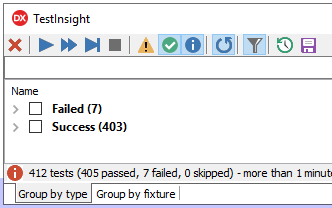
You’d think the math does not add up:

But it does: both “Success” and “Warnings” are counted as “passed”.


TL;DR: ensure the yellow “Warning” triangle is enabled

–jeroen

Posted in Delphi, Development, Software Development, TestInsight | Leave a Comment »