The Wiert Corner – irregular stream of stuff

Jeroen W. Pluimers on .NET, C#, Delphi, databases, and personal interests

  • My badges

  • Twitter Updates

  • My Flickr Stream

  • Pages

  • All categories

  • Enter your email address to subscribe to this blog and receive notifications of new posts by email.

    Join 1,839 other subscribers

Archive for the ‘Development’ Category

Cool 10-thousand piece domino bricks based computer that can add numbers

Posted by jpluimers on 2018/07/04

Very cool video based on these logic gates made from domino bricks:

The 4-bit calculator worked.

The 5-bit was set-up failed in part. That conclusion is at around 19:00.

A post mortem is at around 20:00: the machine was setup sizing it too small so the timing was too tight and didn’t work out.

–jeroen

Read the rest of this entry »

Posted in Development, Hardware Development, History | Leave a Comment »

Delphi – Viewing an array in the Watch Windows starting from a non-zero index

Posted by jpluimers on 2018/07/04

via [WayBack] Is it possible to range an arrays in Watches view to specific index range? Sometimes I work with arrays that contain 100Ks lines, and Watches limit the view to index 131071… – Mike Torrettinni – Google+

Reminder to check how well this works:

Given FInts: array of integer;

you can declare `TIntArray = array of integer;`

(I’m sure it exists somewhere already but couldn’t find it at the moment) and then watch, for example

TIntArray(@FInts[150000])

–jeroen

PS: Uwe Raabe commented on G+:

Uwe Raabe+1

You can add a watch variable like arr[4711] and set the repeat count to a sensible value. Unfortunately this will give you a single line display which is not expandable.
https://quality.embarcadero.com/browse/RSP-19468
“Allow expanding watch variable with repeat count > 1”

Posted in Delphi, Development, Software Development | 1 Comment »

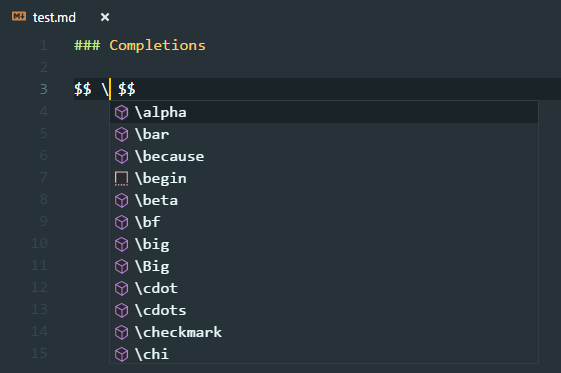
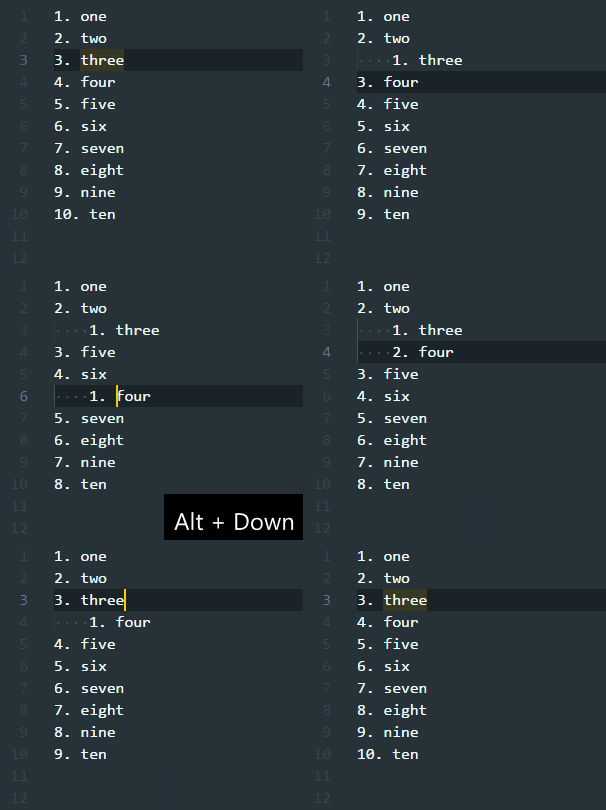
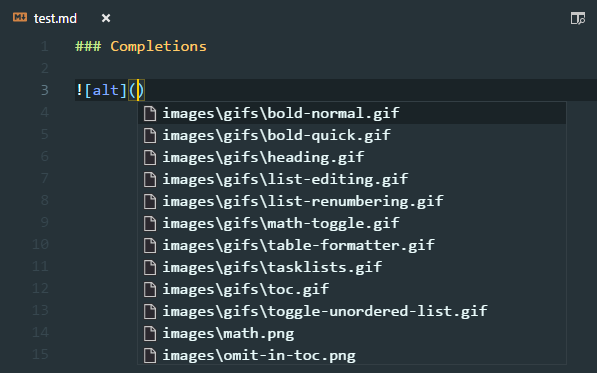
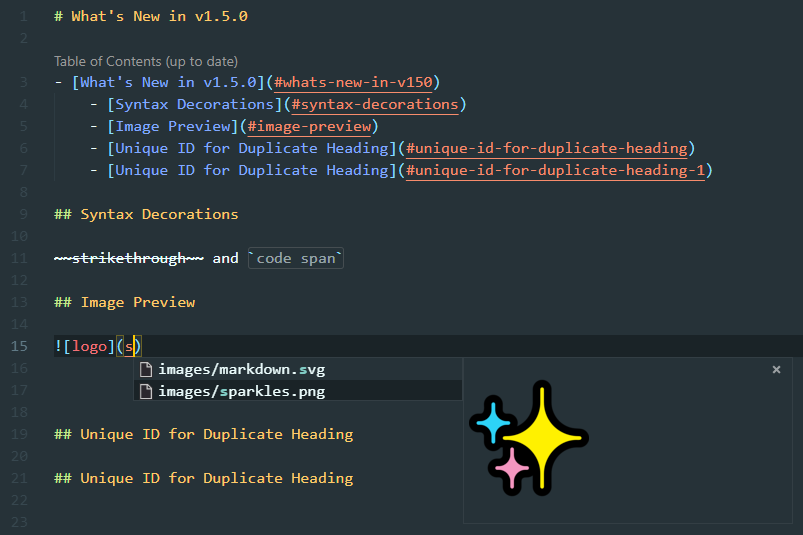
Two reasons I love Visual Studio Code over Atom.io: built-in markdown support and vscode-markdown; just watch the CHANGELOG.md at master · neilsustc/vscode-markdown · GitHub

Posted by jpluimers on 2018/07/03

Boy, I love this so much: [WayBack] vscode-markdown/CHANGELOG.md at master · neilsustc/vscode-markdown · GitHub

Just a few of the screen videos:

  • Formula support
  • Table of Contents (ToC) support including leaving out individual headings:
  • On the fly list renumbering:
  • Image reference completion including image preview:

–jeroen

Posted in Development, Lightweight markup language, MarkDown, Software Development | Leave a Comment »

Delphi – ModelMaker Code Explorer history lists in the registry

Posted by jpluimers on 2018/07/03

ModelMaker Code Explorer does not allow you to edit the “most recently used” items in that you can use in various places, but luckily these history lists are all in the registry as keys under this base key:

HKEY_CURRENT_USER\Software\ModelMaker\MideX\#.0\Histories

There # is the major version number of ModelMaker Code Explorer (internally named MideX).

Under the base key, you can find these keys:

  • ExternalSpac  not figured out yet
  • InterfaceSupport not figured out yet
  • Object PascalParameters list limited to 60 individual parameters (“Modifier Name: Type = Default”)
  • Parameters list limited to 60 parameter lists in the “Edit Method” wizard.
  • PascalTypeNames list limited to 60 variable types
  • PascalVarLookup list limited to 60 variables (each of form “Variable: Type”) used in the “Add Explaining Variable” wizard.
  • PropArray array indexes used in the property editor
  • PropDefaultSpec default values of properties in the property editor
  • PropWriteParam write parameters in the property editor
  • RenameLocal not figured out yet
  • ResStrExternalFile not figured out yet
  • Surrounds not figured out yet
  • UsedUnits list limited to 30 entries of the uses list editor

If you made a typo anywhere, then just edit or delete these entries.

–jeroen

Posted in Delphi, Development, ModelMaker Code Explorer, Software Development | Leave a Comment »

Delphi – directives are not conditionals

Posted by jpluimers on 2018/07/03

Directives are commands to the compiler such as {$D+} or {$WARN xxxx OFF}. Compiler defined conditionals are not “directives”, rather they’re used for conditional directives {$IF Defined(xxxx)} or {$IFDEF xxxx}, where xxxx can be NEXTGEN – Allen Bauer

It’s important to describe features right so everyone understands what you mean.

And note that you should end all your IFDEF with IFEND to stay compatible with the broadest set of Delphi versions possible.

–jeroen

Source: [WayBackdelphi – What is the use of NEXTGEN compiler conditional? – Stack Overflow

PS: Note the comment below by Remy Lebeau:

Note, in Delphi XE3 and later, you might also need to use {$LEGACYIFEND ON}  (http://docwiki.embarcadero.com/RADStudio/en/Legacy_IFEND_(Delphi)) in order to use {$IFEND} correctly, particularly if you have nested {$IF} and {$IF(N)DEF} blocks in your code.

A quick search for “LEGACYIFEND” “Delphi” “XE3” revealed this directive was indeed introduced in Delphi XE3, but not documented until XE4:

Brian Long documents how to get around the limitation that Remy commented about:

{$ifdef CONDITIONALEXPRESSIONS}
  {$if CompilerVersion >= 24.0}
    {$LEGACYIFEND ON}
  {$ifend}
{$endif}

It is in fact at the top of [WayBack] indy/IdCompilerDefines.inc at master · graemeg/indy · GitHub, which reminds me that there is now a git mirror of Indy at GitHub:

[WayBack] GitHub – graemeg/indy: Indy (Internet Direct) framework. This is an unofficial mirror repository which gets synced every 15 minutes. It contains the full history from the official Indy 10 SVN repository.

–jeroen

Posted in Delphi, Development, Software Development | 2 Comments »

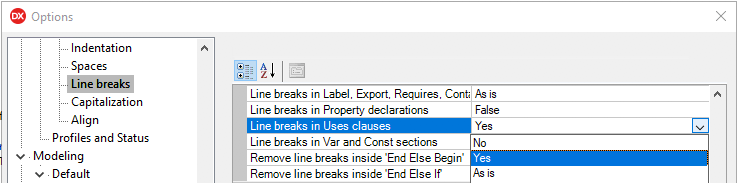
Delphi: formatting uses lists to each unit is on a separate line

Posted by jpluimers on 2018/06/29

Delphi formatter setting, so I can manually arrange uses lists:

–jeroen

Uwe Raabe commented on G+:

Also available in MMX Code Explorer in the settings dialog: Pascal -Sorting – Format unit uses clauses – “Each unit on a new line”.
If you prefer the standard setting and spare the other for special purpose, there is “Format Uses – Alternate” in the context menu. Perhaps give it a decent shortcut for quick access.

Bernd Ott in the same thread:

Important because scm. Less merge trouble. Only the last semicolon in last row is always stupid.

https://plus.google.com/+JeroenPluimers/posts/RfrCkDAd95G

Posted in Conference Topics, Conferences, Delphi, Development, Event, Software Development | 4 Comments »

VM disk sizes

Posted by jpluimers on 2018/06/29

I forgot to schedule the post below. It is still relevant if you create a machine with lots of Delphi versions on it.

Read the rest of this entry »

Posted in .NET, .NET 2.0, .NET 3.0, .NET 3.5, Database Development, Delphi, Delphi 2007, Delphi XE, Delphi XE2, Delphi XE3, Delphi XE4, Delphi XE5, Development, Firebird, InterBase, Power User, Software Development, Windows, Windows 8 | 2 Comments »

Delphi still doesn’t raise overflow exception on Int64 multiplication…

Posted by jpluimers on 2018/06/28

Thanks to Stefan Glienke for pointing me at the below patch for [WayBack] Why doesn’t raise overflow exception on multiplication example or how to detect in this case?{$RANGECHECKS ON} {$OVERFLOWCHECKS ON}varvalue: Int64;… – Rafael Dipold – Google+.

It’s basically an issue in __llmulo that has been documented but not solved since “forever”:

some people “some while ago” reported this and even posted a solution: [WayBackhttp://qc.embarcadero.com/wc/qcmain.aspx?d=34049

And there it is again: [WayBackhttp://qc.embarcadero.com/wc/qcmain.aspx?d=119146

And most recently: https://quality.embarcadero.com/browse/RSP-16617

FWIW here is a runtime patch that corrects this (using the version posted in QC#119146): https://pastebin.com/jzLgYeqm

The bug tracking of the Delphi team is so bad, that some of the reports actually mark this issue “As Designed” like in [WayBackhttp://qc.embarcadero.com/wc/qcmain.aspx?d=118287

The below patch requires rights to call [WayBackWriteProcessMemory as documented in [WayBackHow to Read and Write Other Process Memory.

–jeroen

Patch at [WayBack] https://pastebin.com/jzLgYeqm

Read the rest of this entry »

Posted in Delphi, Development, QC, Software Development | 3 Comments »

Some notes on what errors you get when using a gds32.dll not matching your Firebird or InterBase

Posted by jpluimers on 2018/06/28

These were some of the errors and error fragments I got when I had the wrong gds32.dll or wrong Database engine:

  • file C:\PROGRAMDATA\EMBARCADERO\INTERBASE\GDS_DB\EXAMPLES\DATABASE\EMPLOYEE.GDB is not a valid database
  • I/O error during "CreateFile (open)" operation for file "C:\PROGRAMDATA\EMBARCADERO\INTERBASE\GDS_DB\EXAMPLES\DATABASE\EMPLOYEE.GDB"
  • connection rejected by remote interface

Since I used IBX, they were all inside EInterbaseError  exception instances.

The bad thing: with IBX you cannot specify your gds32.dll: you have to ensure the right version/architecture is loaded by your executable.

–jeroen

via: Source: Delphi, IBX and the Turkish I problem

Posted in Database Development, Development, Firebird, InterBase | Leave a Comment »

Database Identifiers | Microsoft Docs

Posted by jpluimers on 2018/06/27

As I needed to know which other characters besides $ are allowed in MSSQL identifiers: [WayBackDatabase Identifiers | Microsoft Docs

The 2017 specs:

There are two classes of identifiers:

Regular identifiers
Comply with the rules for the format of identifiers. Regular identifiers are not delimited when they are used in Transact-SQL statements.

SELECT *  
FROM TableX  
WHERE KeyCol = 124  

Delimited identifiers
Are enclosed in double quotation marks (“) or brackets ([ ]). Identifiers that comply with the rules for the format of identifiers might not be delimited. For example:

SELECT *  
FROM [TableX]         --Delimiter is optional.  
WHERE [KeyCol] = 124  --Delimiter is optional.  

Identifiers that do not comply with all the rules for identifiers must be delimited in a Transact-SQL statement. For example:

SELECT *  
FROM [My Table]      --Identifier contains a space and uses a reserved keyword.  
WHERE [order] = 10   --Identifier is a reserved keyword.  

Both regular and delimited identifiers must contain from 1 through 128 characters. For local temporary tables, the identifier can have a maximum of 116 characters.

Rules for Regular Identifiers

The names of variables, functions, and stored procedures must comply with the following rules for Transact-SQL identifiers.

  1. The first character must be one of the following:
    • A letter as defined by the Unicode Standard 3.2. The Unicode definition of letters includes Latin characters from a through z, from A through Z, and also letter characters from other languages.
    • The underscore (_), at sign (@), or number sign (#).Certain symbols at the beginning of an identifier have special meaning in SQL Server. A regular identifier that starts with the at sign always denotes a local variable or parameter and cannot be used as the name of any other type of object. An identifier that starts with a number sign denotes a temporary table or procedure. An identifier that starts with double number signs (##) denotes a global temporary object. Although the number sign or double number sign characters can be used to begin the names of other types of objects, we do not recommend this practice.

      Some Transact-SQL functions have names that start with double at signs (@@). To avoid confusion with these functions, you should not use names that start with @@.

  2. Subsequent characters can include the following:
    • Letters as defined in the Unicode Standard 3.2.
    • Decimal numbers from either Basic Latin or other national scripts.
    • The at sign, dollar sign ($), number sign, or underscore.
  3. The identifier must not be a Transact-SQL reserved word. SQL Server reserves both the uppercase and lowercase versions of reserved words. When identifiers are used in Transact-SQL statements, the identifiers that do not comply with these rules must be delimited by double quotation marks or brackets. The words that are reserved depend on the database compatibility level. This level can be set by using the ALTER DATABASE statement.
  4. Embedded spaces or special characters are not allowed.
  5. Supplementary characters are not allowed.When identifiers are used in Transact-SQL statements, the identifiers that do not comply with these rules must be delimited by double quotation marks or brackets.

Note

Some rules for the format of regular identifiers depend on the database compatibility level. This level can be set by using ALTER DATABASE.

Related: [WayBack] ALTER DATABASE Compatibility Level (Transact-SQL) | Microsoft Docs

–jeroen

Posted in Database Development, Development, SQL Server | Leave a Comment »