Archive for the ‘C# 2.0’ Category
Posted by jpluimers on 2012/08/23
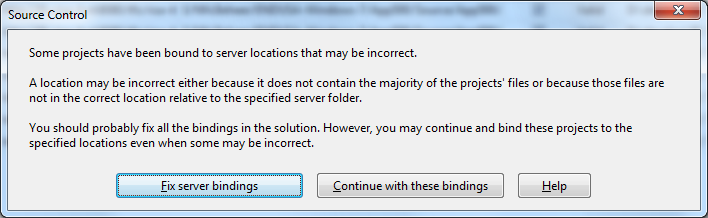
 A while ago, I inherited a bunch of C# and VB.NET projects. One of them always generated the below error when including it in Team Foundation System (yes, the original projects were salvaged from Visual Source Shredder version 6.0c):
[Source Control]

Some projects have been bound to server locations that may be incorrect.

A location may be incorrect either because it does not contain the majority of the projects' files or because those files are not in the correct location relative to the specified server folder.

You should probably fix all the bindings in the solution. However, you may continue and bind these projects to the specified locations even when some may be incorrect.

[Fix server bindings] [Continue with these bindings] [Help]
First I tried the Help button: it links to a Help page on MSDN explaining the error can be cause with some statistics on projects not being in the source control system. Since all projects were, there, I looked for more information.
I tried finding a “Fix Server Bindings” or a 2010 “Some projects have been bound to server locations that may be incorrect” link that fitted my use case (getting projects from VSS into TFS), but the solutions I tried eventually all led to the same issue.
Fixing the server bindings would always fail: the solution (which itself is also a project) would get the status Invalid.

The next steps were these:
- add an empty solution in the same directory as the original one,
- add that solution to TFS
- add the projects from the original solution to this solution one by one
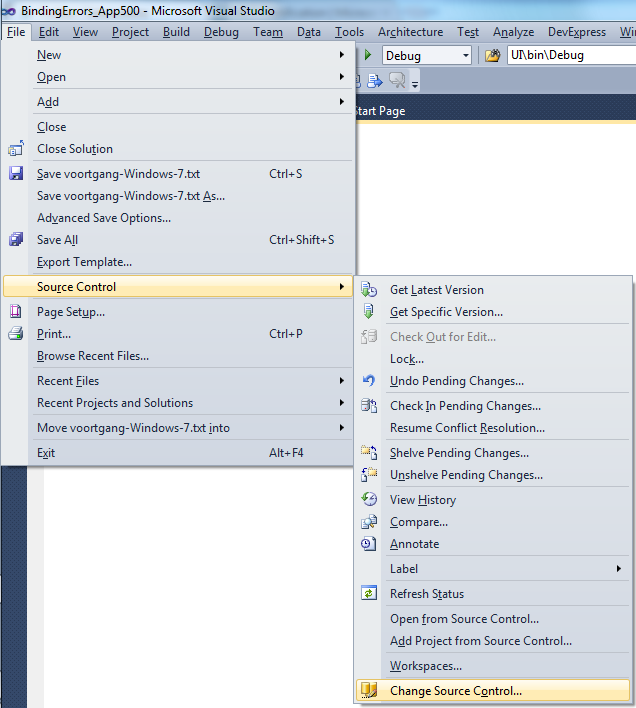
- check after each addition of the bindings were still OK using the “File”, “Source Control”, “Change Source Control” sequence on the right.
(note that you don’t always see “Change Source Control”, if you don’t select the solution in the Solution Explorer before going to the File menu).
- text compare both .SLN solution files
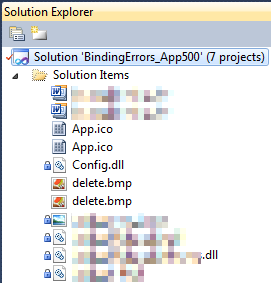
- observe that “Solution Items” actually is a project just like the others:
Project("{2150E333-8FDC-42A3-9474-1A3956D46DE8}") = "Solution Items", "Solution Items", "{8D9964D4-6129-4B8F-9238-F9161A02B968}"

ProjectSection(SolutionItems) = preProject

...

Framework\Config.dll = Framework\Config.dll

...

EndProjectSection

EndProject
- add the existing solution item from the original solution to this solution one by one, check
- check after each addition of the bindings were still OK using the “File”, “Source Control”, “Change Source Control” sequence on the right.
(note that you don’t always see “Change Source Control”, if you don’t select the solution in the Solution Explorer before going to the File menu).
- copy the non-existing solution items to the solution one by one using the text compare tool (yes, a lot of the projects are dirty and contain references to files that are not in the version control system)
save after every copy, then reload the project in Visual Studio
- check after each addition of the bindings were still OK using the “File”, “Source Control”, “Change Source Control” sequence on the right.
(note that you don’t always see “Change Source Control”, if you don’t select the solution in the Solution Explorer before going to the File menu).
- after a few files, suddenly the “Invalid” appeared, so the issue has to do with missing files.
Reading the Help more carefully, with in the back of my mind keeping “Solution Items” all as projects, I finally got the cause:
When some percentage of Solution Items cannot be found locally, and are not in the version control system, Visual Studio marks the solution binding to the version control system as “Invalid”.
 The temporary solution is to ignore the error, until I have found all the missing files (they are scattered around some network shares), or made sure they are not needed at all.
There are many of those (you recognize them from the missing padlock icon in the Solution Explorer).
Version control rot is just like link rot, that’s why one of the high priority action items is to introduce for build automation at this client, then deploy those as clean builds into the Develop and Test stages of the DTAP, then verify if the solutions still work).
–jeroen
Posted in .NET, C#, C# 1.0, C# 2.0, C# 3.0, C# 4.0, C# 5.0, Development, Internet, link rot, Power User, Software Development, Source Code Management, TFS (Team Foundation System), VB.NET, Visual Studio 2010, Visual Studio and tools, WWW - the World Wide Web of information | Leave a Comment »
Posted by jpluimers on 2012/08/16
If anyone knows a better solution than string search/replace, please let me know:
I’m required to write a tool that can handle the below XML fragment that is not well formed as it contains XML declarations in the middle of the stream.
The company already has these kinds files in use for a long time, so there is no option to change the format.
There is no source code available that does the parsing, and the platform of choice for new tooling is .NET 4 or newer preferably with C#.
This is how the fragments look like: Read the rest of this entry »
Posted in .NET, .NET 2.0, .NET 3.0, .NET 3.5, .NET 4.0, C#, C# 2.0, C# 3.0, C# 4.0, Development, Software Development, XML, XML/XSD | Leave a Comment »
Posted by jpluimers on 2012/08/15
A few weeks ago, Bill Karwin did a must watch webinar on the prevention SQL Injection titled “SQL Injection Myths and Fallacies“.
Bill Karwin (twitter, new blog, old blog, Amazon) is famous for much work in the SQL database community, including InterBase/Firebird, mySQL, Oracle and many more.
He also:
Anyway, his webinar is awesome. Be sure to get the slides, watch the replay, and read the questions follow up.
Watching it you’ll get a better understanding of defending against SQL injection.
A few very valuable points he made: Read the rest of this entry »
Posted in .NET, .NET 3.5, .NET 4.5, .NET ORM, ASP.NET, Batch-Files, C#, C# 1.0, C# 2.0, C# 3.0, C# 4.0, C# 5.0, C++, Cloud Development, COBOL, CommandLine, Database Development, Delphi, Delphi for PHP, Delphi x64, Delphi XE2, Development, EF Entity Framework, F#, Firebird, FireMonkey, History, InterBase, iSeries, Java, JavaScript/ECMAScript, Jet OLE DB, LINQ, LLBLGen, MEF, Microsoft Surface, Mobile Development, PHP, PowerShell, Prism, Scripting, SharePoint, SilverLight, Software Development, SQL, SQL Server, SQL Server 2000, SQL Server 2005, SQL Server 2008, SQL Server 2008 R2, SQL Server 2012, SQL Server 7, VB.NET, VBS, Visual Studio 11, Visual Studio 2002, Visual Studio 2003, Visual Studio 2005, Visual Studio 2008, Visual Studio 2010, Visual Studio and tools, Web Development, Windows Azure, WinForms, WPF, XAML, xCode/Mac/iPad/iPhone/iOS/cocoa | 1 Comment »
Posted by jpluimers on 2012/08/09
A while ago, I needed a way to defer settings to environment variables in a .NET application written in C#.
The easiest way to do this is to keep the same syntax as for expanding environment variables in batch files: use the %ENVIRONMENTVARIABLE% syntax (not the delayed expansion !ENVIRNMENTVARIABLE! syntax).
The reason is that there is a Windows API function ExpandEnvironmentStrings that handles all the expansion magic.
Don’t P/Invoke that function yourself, as there is already a very nice Environment.ExpandEnvironmentVariables wrapper since the .NET framework 1.1 that handles all the gory details for you (like marshalling the strings, making sure that lpDst contains enough space for the expansion).
–jeroen
Posted in .NET, C#, C# 1.0, C# 2.0, C# 3.0, C# 4.0, C# 5.0, Development, Software Development | Leave a Comment »
Posted by jpluimers on 2012/08/08
CodeRush has a nice refactoring to extract a C# string into a resource.
There is a small glitch that when you press undo after that, and there was no string file in your project, then the empty resource file is not always saved.
Upon building your project, you will get an error like this:
---------------------------

Microsoft Visual Studio

---------------------------

The item 'Resources.resx' does not exist in the project directory. It may have been moved, renamed or deleted.

---------------------------

OK

---------------------------
The Resources.resx file is not visible in your Solution Explorer, so you cannot delete it there.
You have to manually edit your .csproj file and remove the Resources.resx reference there.
I’ve had this happen only a couple of times, and cannot yet reproduce this. Until I can reproduce, this is a workaround to remedy the effects.
–jeroen
Posted in .NET, C#, C# 1.0, C# 2.0, C# 3.0, C# 4.0, C# 5.0, Development, Software Development | Leave a Comment »
Posted by jpluimers on 2012/07/24
Please don’t do your code like this:
        internal bool blnMDACResult = true;

        internal bool CheckMDACisOK(string eenMDAC, string strAdoDllPath)
        {
            FileVersionInfo AdoVersionInfo;

            try
            {
                AdoVersionInfo = FileVersionInfo.GetVersionInfo(strAdoDllPath);
                AdoDllVersion = new Version(AdoVersionInfo.ProductMajorPart, AdoVersionInfo.ProductMinorPart, AdoVersionInfo.ProductBuildPart, AdoVersionInfo.ProductPrivatePart);

                switch (eenMDAC)
                {
                    case "2.6":
                    case "2,6":
                        // MDAC 2.6 - 2.60.6526.0
                        Version MinimumVersion = new Version(2, 60, 6526, 0);
                        blnMDACResult = AdoDllVersion.CompareTo(MinimumVersion) >= 0;
                        break;

                    case "2.7":
                    case "2,7":
                        // MDAC 2.7 - 2.70.7713.0
                        Version MinimumVersion = new Version(2, 70, 7713, 0);
                        blnMDACResult = AdoDllVersion.CompareTo(MinimumVersion) >= 0;
                        break;

                    case "2.8":
                    case "2,8":
                        // MDAC 2.8 - 2.80.1022.0
                        Version MinimumVersion = new Version(2, 80, 1022, 0);
                        blnMDACResult = AdoDllVersion.CompareTo(MinimumVersion) >= 0;
                        break;

                    default:
                        // 2.9 and up
                        string numberDecimalSeparator = Thread.CurrentThread.CurrentCulture.NumberFormat.NumberDecimalSeparator;
                        double dMinVersion = ConvertAppl.ToDouble(eenMDAC.Replace(".", numberDecimalSeparator));
                        double dVersion = ConvertAppl.ToDouble(AdoDllVersion.Major + ".".Replace(".", numberDecimalSeparator) + AdoDllVersion.Minor);
                        if (dVersion > dMinVersion)
                            blnMDACResult = true;
                        else
                            blnMDACResult = false;
                        break;
                }
            }
            catch
            {
                // Something went wrong, let's assume the version is ok. (trial on error)
                blnMDACResult = true;
                return blnMDACResult;
            }

            return blnMDACResult;

        }
–jeroen
Posted in .NET, C#, C# 1.0, C# 2.0, C# 3.0, C# 4.0, C# 5.0, Development, Software Development | Leave a Comment »
Posted by jpluimers on 2012/07/12
Didn’t need it until now, as now I wrote my first unit test on an internal class, with the unit test in a separate assembly.
Visual Studio 2010 suggested adding the InternalsVisibleTo Attribute to the assembly containing the internal class specifying that the unit test assembly would have access to it.
For me that felt up-side-down, but thinking again it is logical, but still doesn’t feel well.
This is what it does:
The InternalVisibleToAttribute was added in .Net 2.0 and most people seem to be using it in order expose internal methods to external unit test classes. However, there is nothing to prevent you from using it in non-testing situations., although I have not seen a good reason other then unit testing to use it.
–jeroen
via: C# InternalVisibleTo Attribute | Salvo(z).
Posted in .NET, C#, C# 2.0, C# 3.0, C# 4.0, Development, Prism, Software Development, VB.NET | Leave a Comment »
Posted by jpluimers on 2012/07/05
Recently I was asked to investigate a performance problem with a certain .NET application.
The first error I got when getting the app to build in Visual Studio 2010, and then run it was like this:
System.ComponentModel.InvalidAsynchronousStateException was caught
  Message=An error occurred invoking the method.  The destination thread no longer exists.
  Source=System.Windows.Forms
  StackTrace:
       at System.Windows.Forms.Control.WaitForWaitHandle(WaitHandle waitHandle)
       at System.Windows.Forms.Control.MarshaledInvoke(Control caller, Delegate method, Object[] args, Boolean synchronous)
       at System.Windows.Forms.Control.Invoke(Delegate method, Object[] args)
       at UI.Splash.SetStatus(String status) in C:\...\Splash.cs:line 395
       at UI.Menu.Main() in C:\...\Menu.cs:line 4275
  InnerException:
Someone built their own splash logic with multi-threading.
Funny that today, this got answered on StackOverflow by [WayBack] mgie: [WayBack] multithreading – TMonitor synchronization / Application.ProcessMessages – Stack Overflow.
Though that is a Delphi link (and points to the nice libraries [Archive.is] AsynCalls and [WayBack] OmniThreadLibrary), the most important link it contains is to [WayBack] Borland Newsgroup Archive :: borland.public.delphi.internet.winsock :: Re: Disconnect TIdHttp in thread.
That sounds like a Delphi link too, but the subtitle “‘Ways to get into avoidable trouble with threads, V1.2′” hints the essence: it is a post that describes in an environment-agnostic way how to avoid multi-threading problems.
Recommended reading!
Anyway: Building multi-threaded code is hard. Even harder fleshing out all the corner cases and potential error conditions.
No matter what kind of programming environment: If you have not done lots of multi-threaded programming, then please don’t do it yourself: go ask someone that does know how to do it. Or better, try to avoid it.
I try to let libraries to the handling of multi-threading for me, if I use multi-threading at all, as others are far better at this than I am.
–jeroen
Posted in .NET, C#, C# 1.0, C# 2.0, C# 3.0, C# 4.0, C# 5.0, Conference Topics, Conferences, Delphi, Development, Event, Java, Software Development, VB.NET, VBS, Visual Studio 2010, Visual Studio and tools, WinForms | 6 Comments »
Posted by jpluimers on 2012/06/28
Earlier this week, I already wrote about different idioms in different IDEs.
Here is another one, again a feature I don’t use often: getting a fresh GUID in the IDE. Read the rest of this entry »
Posted in .NET, C#, C# 1.0, C# 2.0, C# 3.0, C# 4.0, C# 5.0, Delphi, Development, Software Development, Visual Studio and tools | 7 Comments »
Posted by jpluimers on 2012/06/27
Recently I had to do a quick removal of duplicate lines in bunch of text files.
A quick search revealed that back in 2009, John Skeet came to the rescue with a couple of examples (:
--jeroen
via: C# Remove Duplicate Lines From Text File? – Stack Overflow.
Posted in .NET, C#, C# 1.0, C# 2.0, C# 3.0, C# 4.0, C# 5.0, Development, Jon Skeet, Software Development | 1 Comment »


 A while ago, I inherited a bunch of C# and VB.NET projects. One of them always generated the below error when including it in Team Foundation System (yes, the original projects were salvaged from Visual Source Shredder version 6.0c):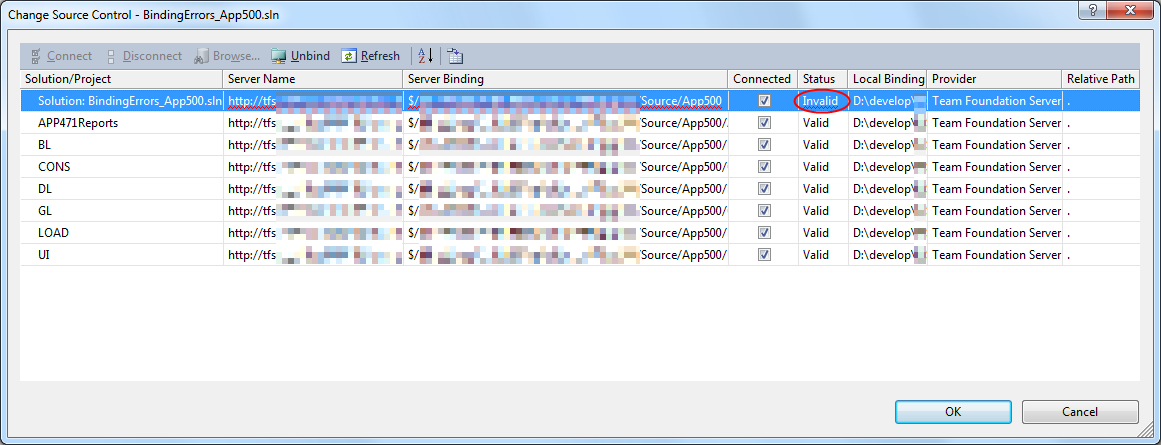
 The temporary solution is to ignore the error, until I have found all the missing files (they are scattered around some network shares), or made sure they are not needed at all.

 The Wiert Corner - irregular stream of stuff