The Wiert Corner – irregular stream of stuff

Jeroen W. Pluimers on .NET, C#, Delphi, databases, and personal interests

  • My badges

  • Twitter Updates

  • My Flickr Stream

  • Pages

  • All categories

  • Enter your email address to subscribe to this blog and receive notifications of new posts by email.

    Join 1,861 other subscribers

Archive for the ‘.NET’ Category

.NET/C# small program that shows you your proxy settings, demonstrates LINQ to Registry, and String.Contains

Posted by jpluimers on 2013/03/05

I’ve been working at a client where they have hardened most of their systems in a not so programmer friendly way. One of the things you cannot to is start RegEdit, not even for viewing. Since I need Fiddler2 to poke through their Internet Proxy in order to get access to an external TFS server, and their machines often reboot due to maintenance cycles, sometimes my proxy settings are dead. This tiny app shows you how to get display your proxy settings, demonstrating:

Enjoy! (Note, you could have done this with PowerShell in a very easy way too, as it access the Registry just like it was a file system).

When using Fiddler, it shows output like this:

AutoConfigProxy=wininet.dll
ProxyEnable=1
MigrateProxy=1
ProxyHttp1.1=1
ProxyOverride=<-loopback>
ProxyServer=http=127.0.0.1:8888;https=127.0.0.1:8888;

LINQ to Registry

One of the drawbacks of Registry work is that you need to dispose of your keys. That is handled inside ReadOnlyAccessToRegistryKey.Run which also handles your Code Access Security. This means that the lambda expression (could just as well have been an anonymous method) can just concentrate on the LINQ stuffreturning an enumeration of anonymous types. You need the ‘let’ portion if you also want to perform ‘where’ on the values.

using System;
using System.Collections.Generic;
using System.Linq;
using BeSharp.Win32;
using Microsoft.Win32;

namespace LinqToRegistryShowProxySettings
{
    class Program
    {
        static void Main(string[] args)
        {
            try
            {
                run();
            }
            catch (Exception ex)
            {
                Console.WriteLine(ex);
                throw;
            }
        }

        static void run()
        {
            const string internetSettingsKey = @"Software\Microsoft\Windows\CurrentVersion\Internet Settings";

            ReadOnlyAccessToRegistryKey.Run(Registry.CurrentUser, internetSettingsKey,
                registryKey =>
                {
                    var keyValues = from name
                                 in registryKey.GetValueNames()
                                    //let keyValue = new { key = name, value = registryKey.GetValue(name).ToString() } // only if you need the Value in the Where, as it created for all occurences
                                    where
                                    name.Contains("proxy", StringComparison.OrdinalIgnoreCase) ||
                                    name.Contains("autoConfig", StringComparison.OrdinalIgnoreCase)
                                    select new { key = name, value = registryKey.GetValue(name).ToString() };

                    foreach (var keyValue in keyValues)
                    {
                        Console.WriteLine("{0}={1}", keyValue.key, keyValue.value);
                    }
                }
            );

        }
    }
}

ReadOnlyAccessToRegistryKey

This manages the Code Access Security since you will access the registry readonly. It also disposes the RegistryKey instance. The Code Access Security access and revert must be in the same method, so you cannot create a class that does the Assert in the constructor, and the dispose in the Disposer.

using System;
using Microsoft.Win32;
using System.Security.Permissions;
using System.Security;

namespace BeSharp.Win32
{
    public class ReadOnlyAccessToRegistryKey
    {
        public static void Run(RegistryKey hiveRegistryKey, string subKeyName, Action action)
        {
            string fullKeyName = hiveRegistryKey.Combine(subKeyName);
            RegistryPermission readRegistryPermission = new RegistryPermission(RegistryPermissionAccess.Read, fullKeyName);
            readRegistryPermission.Assert();
            try
            {
                using (RegistryKey registryKey = hiveRegistryKey.OpenSubKey(subKeyName))
                {
                    action(registryKey);
                }
            }
            finally
            {
                CodeAccessPermission.RevertAssert();
            }
        }
    }
}

Extensions for the Registry:

  • easy way to get the full names for HKLM, HKCU, etc.
  • Combine key names (and insert \ between them)
  • implements a Contains method for strings (thanks to StackOverflow); should be in a separate class, will do that in the library.
using System;
using Microsoft.Win32;

namespace BeSharp.Win32
{
    public static class RegistryExtensions
    {
        // Hives: http://en.wikipedia.org/wiki/Windows_Registry
        public readonly static string HKCC = Registry.CurrentConfig.Name;
        public readonly static string HKCR = Registry.ClassesRoot.Name;
        public readonly static string HKCU = Registry.CurrentUser.Name;
#if Obsolete
        [Obsolete]
        public readonly static string HKDD = Registry.DynData.Name;
#endif
        public readonly static string HKLM = Registry.LocalMachine.Name;
        public readonly static string HKPD = Registry.PerformanceData.Name;
        public readonly static string HKU = Registry.Users.Name;

        public static string Combine(this string keyName, string subKeyName)
        {
            string result = string.Format(@"{0}\{1}", keyName, subKeyName);
            return result;
        }

        public static string Combine(this RegistryKey registryKey, string subKeyName)
        {
            string result = registryKey.Name.Combine(subKeyName);
            return result;
        }

        public static string Combine(this RegistryKey registryKey, RegistryKey subRegistryKey)
        {
            return registryKey.Combine(subRegistryKey.Name);
        }

        //http://stackoverflow.com/questions/444798/case-insensitive-containsstring/444818#444818

        public static bool Contains(this string value, string substring, StringComparison stringComparison = StringComparison.CurrentCulture)
        {
            int index = value.IndexOf(substring, stringComparison);
            bool result = (index >= 0);
            return result;
        }
    }
}

–jeroen

Posted in .NET, .NET 4.0, .NET 4.5, C#, C# 4.0, C# 5.0, Development, PowerShell, Scripting, Software Development, Visual Studio 11, Visual Studio 2010, Visual Studio and tools | 2 Comments »

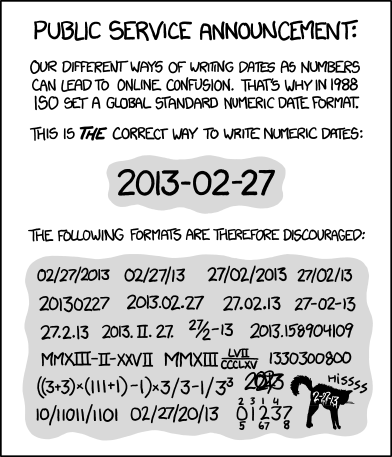
Please write dates and times so that everyone understands them, not just you. xkcd: ISO 8601

Posted by jpluimers on 2013/02/28

ISO 8601 was published on 06 05 88 and most recently amended on 12 01 04

ISO 8601 was published on 06 05 88 and most recently amended on 12 01 04

Boy, am I glad with the xkcd: ISO 8601 post and image on the right.

One reason:

Please write dates and times so that everyone understands them, not just you.

The alt-text of the comic is hilarious (ISO 8601 was published on 06 05 88 and most recently amended on 12 01 04) showing the confusion of using 2 digit years not knowing which field means which (I thin XKCD author Randall Munroe and Mathematics of the ISO calendar got some of the dates, see PDF search dates below).

I found out in the mid 1980s that people I was communicating with internationally (back then the internet was forming and you already had BITNET Relay chat and email) were using different date formats than I did.

Ever since that, I’ve used the YYYY-MM-DD format of writing dates, encouraging others to use as well and as soon as I found out that was a standard, started to evangelize ISO 8601 (there is an ISO 8601 category on my blog), which – at the time of writing this – had had revisions in 1998 (on 1998-06-15), 2000 (on 2000-12-15) and 2004 (on 2004-12-01).

A lot later I found out that back in 1971, this date format was a recommendation, and in 1976 already a standard. Not nearly as old as Esperanto though (:

Speaking about languages:

At the end of last century, after Delphi 5 added year 2000 support (which made the 16-bit Delphi 1 disappear from the box as the effort to prove the product including all libraries was year 2000 proof), Delphi went cross platform.

The Delphi team working on both Kylix 1 and Delphi 6, the also added a DateUtils unit which provides a lot of cuntionality, including support for weak numbers. The first test version always assumed week 1 was the one with januari first in it. As ISO 8601 also indicates how the first week of a year should be determined, a couple of people (Jeroen W. Pluimers, Glenn Crouch, Rune Moberg and  Ray Lischner) provided code that fixed this and a few other things in the unit. We even got mentioned by Cary Jensen!

That code is now also part of the RemObjects ShineOn library. That DateUtils unit is now on GitHub.
A Delphi XE version of the code (and a Delphi 2007 one) are now at NickDemoCode (Thanks Nick Hodges!).

Delphi is not the only environment having ISO 8601 support. XML has, .NET has, etc: it is now wide spread.
So follow your tools, and start using it yourself as well (:

Too bad the ISO 8601 standard text is not available publicly:

I remember the Y2K preparation era where the ISO-8601 standard was freely available at http://www.iso.ch/markete/8601.pdf, soon after the Year 2000, the PDF got locked behind a payment engine.
ISO suffers from heavy link rot too, for instance the ISO 3166 country codes used to be at http://www.iso.org/iso/prods-services/iso3166ma, but are now at http://www.iso.org/iso/home/standards/country_codes.htm. What about HTTP 303 or 302 redirect here guys?

Luckily people keep cached copies:

  1. “ISO 8601” “First edition” “1988-06-15” filetype:pdf
  2. “ISO 8601” “Second edition” “2000-12-15” filetype:pdf
  3. “ISO 8601” “Third edition” “2004-12-01” filetype:pdf

–jeroen

via: xkcd: ISO 8601.

Posted in .NET, Delphi, Delphi 2005, Delphi 2006, Delphi 2007, Delphi 2009, Delphi 2010, Delphi 6, Delphi 7, Delphi 8, Delphi x64, Delphi XE, Delphi XE2, Delphi XE3, Development, ISO 8601, Power User, Prism, Software Development | Tagged: , , , , , , , , , , , , , | 10 Comments »

Command line tool to manage Windows 7 Libraries, with source code – The Old New Thing – Site Home – MSDN Blogs

Posted by jpluimers on 2013/02/28

Interesting: Command line tool to manage Windows 7 Libraries, with source code – The Old New Thing – Site Home – MSDN Blogs.

Especially as next to some documentation, it points to these two:

–jeroen

Posted in .NET, .NET 2.0, .NET 3.0, .NET 3.5, .NET 4.0, .NET 4.5, Batch-Files, C#, C# 2.0, C# 3.0, C# 4.0, C# 5.0, Development, Scripting, Software Development | Leave a Comment »

Free Chapters 1-4 Professional Android Programming with Mono for Android and .NET/C# | Wrox P2P

Posted by jpluimers on 2013/02/27

Cool: free starter is a PDF with chapters 1-4.

–jeroen

via: Free Xamarin Studio and Free Chapters 1-4 Professional Android Programming with Mono for Android and .NET/C# | Wrox P2P.

Posted in .NET, Android, C#, Development, Mobile Development, Mono for Android, Software Development | Tagged: , , , , , | Leave a Comment »

A few more interesting links on Delphi, C# and CLR history (trip down memory lane; Peter Sollich)

Posted by jpluimers on 2013/02/27

The continuation of the trip down memory lane

Few people know the name Peter Sollich, as he always chose not to be a public figure (for instance, he is absent on the Outstanding Technical Achievement video).

Peter has been very important for both the Delphi and the .NET worlds: he was the original author of the 32-bit product that became the Delphi x86 compiler.

A few interesting links came up when using his name in some Google searches.

–jeroen

Posted in .NET, .NET 1.x, .NET 2.0, .NET 3.0, .NET 3.5, .NET 4.0, .NET 4.5, .NET CF, C++, C++ Builder, Delphi 1, Delphi 3, Delphi 4, Delphi 5, Delphi 6, Development, Software Development | 2 Comments »

Behind the Code with Anders Hejlsberg (via: Cape Cod Gunny Does Delphi: Priceless)

Posted by jpluimers on 2013/02/26

I remember having heard this interview on audio a long while ago, but couldn’t find it back. Now I stumbled across Cape Cod Gunny writing about this great video where Anders Hejlsberg is interviews by Research Channel for an hour. To quote Cape Cod Gunny:

I just watched this interview with Anders Hejlsberg for the first time. This is truly an amazing interview. It’s rather long, about 1 hour, but it is so worth it. I’m not giving anything away… you’ll have to just watch and enjoy.

I am giving a few things away: trip down memory lane, putting big parts of software development history into perspective,

Since Anders has been so versatile, influential and still humble, this is a must watch for anyone in the software field. To quote Research Channel:

This episode features industry luminary, Anders Hejlsberg. Before coming to Microsoft in 1996 he was well noted for his work as the principal engineer of Turbo Pascal and the chief architect of the Delphi product line. At Microsoft, he was the architect for the Visual J++ development system and the Windows Foundation Classes (WFC). Promoted to Distinguished Engineer in 2000, Anders is the chief designer of the C# programming language and a key participant in the development of Microsoft’s .NET Framework. In this show, Anders is joined by a surprise guest. This episode of ‘Behind the Code’ is hosted by Barbara Fox – former senior security architect of cryptography and digital rights management for Microsoft.

Thanks Gunny for pointing me at this!

–jeroen

via: Cape Cod Gunny Does Delphi: Priceless: Behind the Code with Anders Hejlsberg.

(PS: how a video published in the C# 3 era can be so current <g>).

And if you feel for more, here, hereherehere and here are some more, are a few lists of videos where Anders speaks.
From a historic perspective, I like these most:

Posted in .NET, .NET 1.x, .NET 2.0, .NET 3.0, .NET 3.5, .NET 4.0, .NET 4.5, C#, C# 1.0, C# 2.0, C# 3.0, C# 4.0, C# 5.0, Delphi, Delphi 1, Delphi 3, Delphi 4, Delphi 5, Delphi 6, Development, Software Development | 4 Comments »

Xamarin vs Titanium vs FireMonkey: should cross-platform tools abstract the GUI? « Tim Anderson’s ITWriting

Posted by jpluimers on 2013/02/21

Great post and must read for any X-platform developer: Xamarin vs Titanium vs FireMonkey: should cross-platform tools abstract the GUI? « Tim Anderson’s ITWriting.

–jeroen

Posted in .NET, Delphi, Development, FireMonkey, Mono for Android, MonoTouch, Prism, Software Development | 2 Comments »

Vista and up: CardGames.dll (was: Delphi – back in 1996 – CARDS.DLL component wrapper in Delphi 1 and 2!)

Posted by jpluimers on 2013/02/19

About 3 years ago, I wrote a small article about the Cards.dll that I encapsulated even longer ago.

I just did some looking around to see on which versions of Windows Cards.dll was still available, as Card.dll has been there since the Windows 16-bit era.

Conclusion: this C# example shows was available on Windows XP, but it seems not available on Windows Vista and up.

The successor is CardGames.dll, which is far bigger than Cards.dll, only has resources (but way more than Cards.dll), and no code.

I’ll probably use XN Resource Editor 3.1 for some investigation later on to see how to get some demos running on more modern versions of Windows (:

–jeroen

via:

Posted in .NET, C#, C# 1.0, C# 2.0, C# 3.0, C# 4.0, C# 5.0, Delphi, Development, Software Development | 4 Comments »

Skype and the new Team Explorer – Brian Harry’s blog – Site Home – MSDN Blogs

Posted by jpluimers on 2013/02/18

Interesting, especially since Microsoft is moving Live Messenger users to Skype shortly: Skype and the new Team Explorer – Brian Harry’s blog – Site Home – MSDN Blogs.

–jeroen

Posted in .NET, Development, Power User, SocialMedia, Software Development, Visual Studio 11, Visual Studio 2008, Visual Studio 2010, Visual Studio and tools, Windows | Leave a Comment »

A couple of notes on NMQ_MQ_LIB

Posted by jpluimers on 2013/02/13

A couple of notes on NMQ_MQ_LIB and the WebSphere MQ aka MQSeries client libraries:

  • NMQ_MQ_LIB specifies the MQ DLL to use
  • Depending in your interface, the NMQ_MQ_LIB can be an environment variable, application setting, or hardcoded DLL name
  • MQSeries 5.x and WebShpere MQ 6.x require you to specify the bitness in the MQIC DLL name (they don’t accept mqic.dll, but require mqic32.dll) when you access it from the C or Delphi interface.
    MQM DLL does not require bitness: it is mqm.dll in all versions.
  • From client applications, use mqic.dll or mqic32.dll.

And a few links:

I needed this to get some apps talking to MQ on AS/400 aka iSeries aka System i working correctly by getting the DLLs right.

–jeroen

Posted in .NET, AS/400 / iSeries / System i, Delphi, Development, MQ Message Queueing/Queuing, Software Development, WebSphere MQ | Leave a Comment »