Archive for the ‘Software Development’ Category
Posted by jpluimers on 2022/02/02
Interesting project at [Wayback] Open Source Insights
Open Source Insights is an experimental project by Google.
Hopefully by now it is supporting more than just npm/golang/maven and by the time it sunsets, other projects take over.
The introduction was some 9 months ago: [Wayback] Introducing the Open Source Insights Project | Google Open Source Blog
Via:
–jeroen
Posted in Development, Go (golang), JavaScript/ECMAScript, Node.js, Power User, Scripting, Security, Software Development | Leave a Comment »
Posted by jpluimers on 2022/02/02
TL;DR:
- Windows has
CON: which is an equivalent for /dev/tty
- Windows has no equivalent for
/dev/stdout (the standard output stream)
- There is a C#
PipeServer.cs proof-of-concept that allows to simulate /dev/stdout through a temporary named pipe
- Windows pipe names start with
\\.\pipe\ for names on the local machine
- The above for
/dev/stdout on Windows also holds for /dev/stdin (the standard input stream)
All via [Wayback] pipe – Windows how to redirect file parameter to stdout? (Windows equivalent of /dev/stdout) – Super User.
Read the rest of this entry »
Posted in .NET, C#, Development, Software Development, Windows Development | Leave a Comment »
Posted by jpluimers on 2022/02/01
[Wayback] Jeroen Wiert Pluimers on Twitter: “”Too special” password character password woos at @HORNBACH_NL : [ Het wachtwoord moet minstens acht tekens lang zijn, en minstens een getal en een letter (a-zA-Z) bevatten. De volgende speciale tekens zijn toegestaan: !”#$%&'()*+,.:;?@_|} ] 1/”
I wonder what kind of parser they use, as these printable special ASCII characters are forbidden:
- \-/[\]^`{~
- space (0x20)
- tab (0x9)
- line feed (0xa)
- carriage return (0xb
- vertical tab (0xb)
- form feed (0xc)
Seems no JSON or SQL to me: there I would expect other limitations.
What would break if you use them in other fields or pass them in an HTML POST-request?
I mean: these passwords should be salted and hashed immediately when the HTML-POST request is received, so certainly they would not be stored somewhere or passed many layers into code, right?
Oh, in order to activate an account there, you need to accept some 40+ A4 sized pages of legal stuff. Brave Dutch judge that will put these all in favour of Hornbach.
–jeroen
Read the rest of this entry »
Posted in Development, LifeHacker, Power User, Security, Software Development, Web Development | Leave a Comment »
Posted by jpluimers on 2022/02/01
Sometimes it is easier to have current and public CA signed TLS certificates for internal servers than to setup and maintain an internal CA and register it on all affected browsers (including mobile phones).
One of my reasons to investigate this is that Chrome refuses to save credentials on servers that have no verifiable TLS certificate, see my post Some links on Chrome not prompting to save passwords (when Firefox and Safari do) about a week ago.
Below are some links for my link archive that hopefully will allow me to do this with Let’s Encrypt (msot via [Wayback/Archive] letsencrypt for internal servers – Google Search):
Read the rest of this entry »
Posted in Cloud, Cloudflare, Development, Encryption, ESXi6, ESXi6.5, ESXi6.7, ESXi7, Fritz!, Fritz!Box, Fritz!WLAN, Infrastructure, Internet, Let's Encrypt (letsencrypt/certbot), Power User, Security, Software Development, Virtualization, VMware, VMware ESXi, Web Development | Leave a Comment »
Posted by jpluimers on 2022/01/31
Small cd-to-file.bat tip:
pushd %~dp1
–jeroen
Posted in Batch-Files, Power User, Scripting, Software Development, Windows | Leave a Comment »
Posted by jpluimers on 2022/01/27
First the script that display messages for all virtual machines, vim-cmd-display-messages-for-all-VMs.sh:
#!/bin/sh
vmids=`vim-cmd vmsvc/getallvms | sed -n -E -e "s/^([[:digit:]]+)\s+((\S.+\S)?)\s+(\[\S+\])\s+(.+\.vmx)\s+(\S+)\s+(vmx-[[:digit:]]+)\s*?((\S.+)?)$/\1/p"`
for vmid in ${vmids} ; do
    powerState=`vim-cmd vmsvc/power.getstate ${vmid} | sed '1d'`
    name=`vim-cmd vmsvc/get.config ${vmid} | sed -n -E -e '/\(vim.vm.ConfigInfo\) \{/,/files = \(vim.vm.FileInfo\) \{/ s/^ +name = "(.*)",.*?/\1/p'`
    vmPathName=`vim-cmd vmsvc/get.config ${vmid} | sed -n -E -e '/files = \(vim.vm.FileInfo\) \{/,/tools = \(vim.vm.ToolsConfigInfo\) \{/ s/^ +vmPathName = "(.*)",.*?/\1/p'`
    echo "Messages for VM with id ${vmid} which has power state ${powerState} (name = ${name}; vmPathName = ${vmPathName})."
    vim-cmd vmsvc/message ${vmid}
done
exit 0
It is very similar to vim-cmd-reload-all-VM-vmx-configurations.sh from Source: ESXi: reloading all virtual machines from their (potentially) vmx files.
Messages I know either equal “No message” or are about “This virtual machine may have been moved or copied.“
If there is no available message, then you always get the stock message No message., so this is something you can use as a check in scripts.
Read the rest of this entry »
Posted in *nix, *nix-tools, ArchiveTeamWarrior, ash/dash, ash/dash development, Development, ESXi6, ESXi6.5, ESXi6.7, ESXi7, Power User, Scripting, Software Development, Virtualization, VMware, VMware ESXi | Leave a Comment »
Posted by jpluimers on 2022/01/26
I’ve been agile all my (not just programming) life, and only figured out this century that there is a vocabulary for that, containing the words agile, extreme programming, feature-driven and many more.
Now with the passing of the years, I also realise I have been trying to do “slow and smooth” all my life, and that with age (and less adrenaline) this becomes easier and easier.
I think “slow and smooth” goes well with “agile”, specially when you keep the focus on “doing things right” (and trying to do them right the first time, and keeping it right in incremental steps).
It often reminds me of the Dutch phrase “heeft u haast, gaat dan zitten” which often is attributed to be part of the many Chinese proverbs. It roughly translates to “when in a hurry, take a seat”, and suggests to take a step back and think when under pressure. Maybe this English version of a Chinese proverb comes close: “When you are in a hurry, the horse holds back”.
For is it is intriguing that mainly Chinese, but in a broader sense Asian, proverbs play such an important role, whereas Western proverbs get less and less important. Informal knowledge seems to diminish in Western culture, which I think is a pity.
Maybe all these vocabulary things that started to make sense way after my puberty also have to do with being diagnosed autistic at 50. That too started a lot of puzzle-pieces to suddenly make sense.
Below the links that inspired me to make this blog post in the first place:
–jeroen
Read the rest of this entry »
Posted in Agile, Conference Topics, Conferences, Development, Event, LifeHacker, Power User, Software Development | Leave a Comment »
Posted by jpluimers on 2022/01/26
When working with converging algorithms, sometimes floating code can become very slow. That is: orders of magnitude slower than you would expect.
A very interesting answer to [Wayback] c++ – Why does changing 0.1f to 0 slow down performance by 10x? – Stack Overflow.
I’ve only quoted a few bits, read the full question and answer for more background information.
Welcome to the world of denormalized floating-point! They can wreak havoc on performance!!!
Denormal (or subnormal) numbers are kind of a hack to get some extra values very close to zero out of the floating point representation. Operations on denormalized floating-point can be tens to hundreds of times slower than on normalized floating-point. This is because many processors can’t handle them directly and must trap and resolve them using microcode.
If you print out the numbers after 10,000 iterations, you will see that they have converged to different values depending on whether 0 or 0.1 is used.
Basically, the convergence uses some values closer to zero than a normal floating point representation dan store, so a trick is used called “denormal numbers or denormalized numbers (now often called subnormal numbers)” as described in Denormal number – Wikipedia:
…
In a normal floating-point value, there are no leading zeros in the significand; rather, leading zeros are removed by adjusting the exponent (for example, the number 0.0123 would be written as 1.23 × 10⁻²). Denormal numbers are numbers where this representation would result in an exponent that is below the smallest representable exponent (the exponent usually having a limited range). Such numbers are represented using leading zeros in the significand.
…
Since a denormal number is a boundary case, many processors do not optimise for this.
–jeroen
Posted in .NET, Algorithms, ARM, Assembly Language, C, C#, C++, Delphi, Development, Software Development, x64, x86 | Leave a Comment »
Posted by jpluimers on 2022/01/25
In Determining the ESXi installation type (2014558) | VMware KB, I also showed how to backup the configuration and download it.
Sometimes you want an ISO 8601 time-stamped local tarball just in case you want to revert to it at a later stage.
First a small recap on how to get the tarball, download location and temporary location in the first place (it will be automatically deleted from the temporary location):
# vim-cmd hostsvc/firmware/sync_config
# vim-cmd hostsvc/firmware/backup_config
Bundle can be downloaded at : http://*/downloads/52aa233b-5db4-2298-5e1b-f510b2cd149f/configBundle-ESXi-X10SRH-CF.tgz
# find /scratch/downloads/ -name *.tgz
/scratch/downloads/52aa233b-5db4-2298-5e1b-f510b2cd149f/configBundle-ESXi-X10SRH-CF.tgz
Goal is to get the download filename and save it to a different folder and embed the ISO 8601 timestamp in the filename.
Like many scripts, sed and regular expressions come to the rescue once more, just like in ESXi ash/dash/busybox shell getting current timestamp in UTC ISO8601 format without colons or dashes (which we will need anyway because of the ISO 8601 time stamp, and a bit of fiddling at regex101.com/r/NyrzKF
# SCRATCH_CONFIG_BUNDLE_NAME=$(vim-cmd hostsvc/firmware/backup_config | sed -n -E -e "s/^(Bundle can be downloaded at : http://*)(/downloads/[[:xdigit:]]{8}-[[:xdigit:]]{4}-[[:xdigit:]]{4}-[[:xdigit:]]{4}-[[:xdigit:]]{12}/configBundle-.+?)(.tgz)$//scratch23/p")
# echo "SCRATCH_CONFIG_BUNDLE_NAME: '${SCRATCH_CONFIG_BUNDLE_NAME}'"
SCRATCH_CONFIG_BUNDLE_NAME: '/scratch/downloads/5271677d-97db-30dc-673d-b99e61bed251/configBundle-ESXi-X10SRH-CF.tgz'
# date --utc -I'seconds' --reference "${SCRATCH_CONFIG_BUNDLE_NAME}"
2021-05-09T17:44:42UTC
Note:
Not few people have bumped into this, the only other I could find through [Wayback] “vim.fault.TooManyWrites” “syncConfiguration” – Google Search is [Archive.is] mal wieder purple Screen – VMware-Forum.
Figuring out the various parts of the SCRATCH_CONFIG_BUNDLE_NAME: '/scratch/downloads/5271677d-97db-30dc-673d-b99e61bed251/configBundle-ESXi-X10SRH-CF.tgz' is like at regex101.com/r/J4yU72, regex101.com/r/uID9xs and regex101.com/r/o8a4Am:
CONFIG_BUNDLE_DIRECTORY_NAME=$(echo "${SCRATCH_CONFIG_BUNDLE_NAME}" | sed -n -E -e "s/(\/scratch\/downloads\/[[:xdigit:]]{8}-[[:xdigit:]]{4}-[[:xdigit:]]{4}-[[:xdigit:]]{4}-[[:xdigit:]]{12}\/)(configBundle-.+?)(.tgz)$/\1/p")
CONFIG_BUNDLE_FILE_NAME=$(     echo "${SCRATCH_CONFIG_BUNDLE_NAME}" | sed -n -E -e "s/(\/scratch\/downloads\/[[:xdigit:]]{8}-[[:xdigit:]]{4}-[[:xdigit:]]{4}-[[:xdigit:]]{4}-[[:xdigit:]]{12}\/)(configBundle-.+?)(.tgz)$/\2/p")
CONFIG_BUNDLE_DOT_EXTENSION=$( echo "${SCRATCH_CONFIG_BUNDLE_NAME}" | sed -n -E -e "s/(\/scratch\/downloads\/[[:xdigit:]]{8}-[[:xdigit:]]{4}-[[:xdigit:]]{4}-[[:xdigit:]]{4}-[[:xdigit:]]{12}\/)(configBundle-.+?)(.tgz)$/\3/p")
echo "CONFIG_BUNDLE_DIRECTORY_NAME: '${CONFIG_BUNDLE_DIRECTORY_NAME}'"
echo "CONFIG_BUNDLE_FILE_NAME:      '${CONFIG_BUNDLE_FILE_NAME}'"
echo "CONFIG_BUNDLE_DOT_EXTENSION:  '${CONFIG_BUNDLE_DOT_EXTENSION}'"
Output is like this:
SCRATCH_CONFIG_BUNDLE_NAME:   '/scratch/downloads/528f9f5a-0123-f022-2b4d-a5c2e595c51a/configBundle-ESXi-X10SRH-CF.tgz'
CONFIG_BUNDLE_DIRECTORY_NAME: '/scratch/downloads/528f9f5a-0123-f022-2b4d-a5c2e595c51a/'
CONFIG_BUNDLE_FILE_NAME:      'configBundle-ESXi-X10SRH-CF'
CONFIG_BUNDLE_DOT_EXTENSION:  '.tgz'
Full backup-config-to-ESXi_configuration_backup-directory.sh script:
Read the rest of this entry »
Posted in *nix, *nix-tools, ash/dash, ash/dash development, cron/crontab, Development, ESXi6, ESXi6.5, ESXi6.7, ESXi7, Power User, Scripting, Software Development, Virtualization, VMware, VMware ESXi | Leave a Comment »
Posted by jpluimers on 2022/01/25
In Get Formatted Value of Cell in Excel – Stack Overflow, I focused on the =TEXT function, then indicated I would look into Excel format strings later.
Below are just a few links and a very short description as hopefully later I will have more time to dig into this.
The basic format is this (where all bits other than Format1 are optional):
[Locale]Format1;Format2;Format3;Format4
For now this is for my link archive:
- [Wayback] Excel number format strings (e.g. “@”, “$-409]d-mmm-yy;@”) – Complete reference availability? – Stack Overflow has two answers of which the second one is deleted, but very useful:
- Here’s a list of the Number Format Codes for Excel.
- Second option for link: Ecma-376 4th Edition Part 1, Section 18.8.31
- If you are looking for the international number codes try at http://office.microsoft.com/en-gb/excel-help/creating-international-number-formats-HA001034635.aspx
- The
HA001034635 link has disappeared, which is a pity as it explains the localisation; luckily two forms of the URL have been saved where [Locale] is constructed like this example (all Locale digits are hexadecimal):
[$-24050412]m/d/yy
In the preceding example:
24 is the numeral shape component (Korean 1).
05 is the calendar type component (Korean (Tangun era)).
0412 is the locale and language designation component (Korean).
- [Wayback] Archive.is: Creating international number formats – Excel … HA001034635.aspx
- [Wayback] Archive.is: Creating international number formats – Excel – Office.com … HA001034635.aspx?redir=0
- More
[Locale] information is explained in [Wayback] What does the 130000 in Excel locale code [$-130000] mean? – Stack Overflow by [Wayback] User IrwinAllen13 – Stack Overflow and has more calendar formats than the above Microsoft links.
- [Wayback] Number format codes – Excel for Mac has the base and sort of explains what the
@ is for: the content of the cell.
First the base:
When you create custom number formats, you can specify up to four sections of format code. These sections of code define the formats for
- positive numbers,
- negative numbers,
- zero values, and
- text,
in that order. The sections of code must be separated by semicolons (;).
The following example shows the four types of format code sections.

 Format for positive numbers
 Format for negative numbers
 Format for zeros
 Format for text
Then on on specifying less than 4 sections:
- If you specify only one section of format code, the code in that section is used for all numbers.
- If you specify two sections of format code, the first section of code is used for positive numbers and zeros, and the second section of code is used for negative numbers.
- When you skip code sections in your number format, you must include a semicolon for each of the missing sections of code.
- You can use the ampersand (&) text operator to join, or concatenate, two values.
Then on the @ sign (which is under “Text and spacing”):
To create a number format that includes text that is typed in a cell, insert an “at” sign (@) in the text section of the number format code section at the point where you want the typed text to be displayed in the cell.
…
For example, to include text before the text that’s typed in the cell, enter “gross receipts for “@ in the text section of the number format code.
Finally it explains how to colorise the formatting or hide particular values under “Decimal places, spaces, colors, and conditions”:
The color code must be the first item in the code section.
[Black] [Blue] [Cyan] [Green] [Magenta] [Red] [White] [Yellow]
…
Hiding various values:
| To hide |
Use this code |
| Zero values |
0;–0;;@ |
| All values |
;;; (three semicolons) |
- [Wayback] ECMA-376 – Ecma International where Ecma-376 4th Edition Part 1, Section 18.8.31 is supposed to have format strings (will dig into this later)
Office Open XML file formats – This Standard defines Office Open XML’s vocabularies and document representation and packaging
- [Wayback] ECMA-376, Part 1
- Not sure where Part 2 is
- [Wayback] ECMA-376, Part 3
- [Wayback] ECMA-376, Part 4
- Not sure where Part 5 is
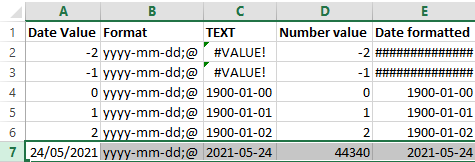
Below a few screenshots while experimenting.
The first one shows the formulas, the second one the content. The Date value cells shows the values when entered as shown; the Date formatted cells are all formatted with yyyy-mm-dd;@ formatting.
I still need to figure out why using a =TEXT function shows #VALUE! whereas using cell formatting just a bunch of ############### (15 times a #, not sure if that is always the same number).

–jeroen
Posted in Development, Excel, Office, Office Development, Power User, Software Development | Leave a Comment »


 The Wiert Corner - irregular stream of stuff