The Wiert Corner – irregular stream of stuff

Jeroen W. Pluimers on .NET, C#, Delphi, databases, and personal interests

  • My badges

  • Twitter Updates

  • My Flickr Stream

  • Pages

  • All categories

  • Enter your email address to subscribe to this blog and receive notifications of new posts by email.

    Join 1,854 other subscribers

Archive for the ‘Software Development’ Category

RFC2606: Reserved Top Level DNS Names (RFC); draft-ellermann-idnabis-test-tlds-04: Reserved Top Level DNS Names (Internet-Draft, 2008)

Posted by jpluimers on 2022/01/20

Note

Though there are .example.edu and .example.info, though used in documentation and  registered by IANA, have a status is different from the official Reserved Top Level DNS Names:

This is not exactly the same situation as for say ".example.org", where IANA is the registrant *and* registrar.

Wikipedia links:

Read the rest of this entry »

Posted in Development, DNS, Documentation Development, Internet, Power User, Software Development, Testing | Leave a Comment »

Some links on Chrome not prompting to save passwords (when Firefox and Safari do)

Posted by jpluimers on 2022/01/20

For quite some time now, Chrome (think years) refuses to prompt for saving passwords whereas Firefox and Safari do prompt and save them, even for site types that it used to save passwords for in the past.

It has been annoying enough for too long now that I tried to do better than the Google searches I used back when I saw this happen first.

Below are some links based on new searches (starting with [Wayback] adding a password in chrome settings – Google Search); hopefully I can try them after I made a list of sites that Chrome does not show the password save prompt for.

Solutions I tried that failed (but maybe useful for others):

Solutions still to try:

Read the rest of this entry »

Posted in Chrome, Chrome, Communications Development, Development, Encryption, ESXi6, ESXi6.5, ESXi6.7, Firefox, Fritz!, Fritz!Box, Fritz!WLAN, Google, https, HTTPS/TLS security, Internet, Internet protocol suite, Let's Encrypt (letsencrypt/certbot), Power User, routers, Safari, Security, TCP, TLS, Virtualization, VMware, VMware ESXi, Web Browsers, Web Development | Leave a Comment »

The Seven Step Process to Creating an Amazing Demo | by Chris Bensen

Posted by jpluimers on 2022/01/20

On the reading list: [Wayback/Archive.is] The Seven Step Process to Creating an Amazing Demo | by Chris Bensen | Oracle Developers | May, 2021 | Medium

So you have some crazy idea and want to build a demo. This seven step process should help you turn that idea into something amazing

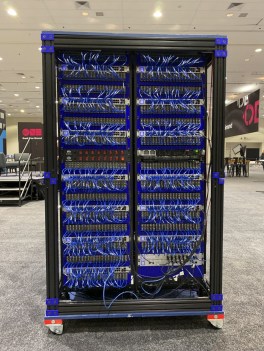
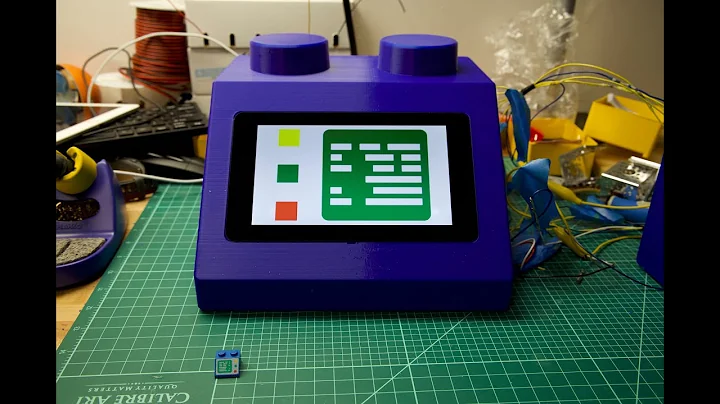
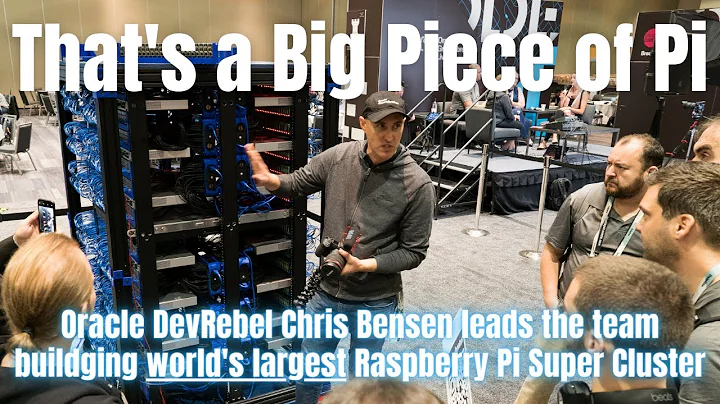
Chris created the World’s Largest 3D Printed Brick Computer and was the driving force behind the Raspberry Pi Mini Super Computer [Wayback].

World’s Largest 3D Printed Brick Computer

World’s Largest 3D Printed Brick Computer

Raspberry Pi Mini Super Computer

Raspberry Pi Mini Super Computer

–jeroen

Read the rest of this entry »

Posted in Development, Geeky, Hardware Development, Raspberry Pi, Software Development | Leave a Comment »

Some uptime monitoring tools that are still free and understand more than http/https

Posted by jpluimers on 2022/01/19

Since uptimerobot has slowly moving free features, part of my family uses it to monitor uptime of their personal stuff, and I don’t want to pay for the free monitoring I do on Embarcadero infrastructure (I know that they have been phasing out older useful sites for ages, but even their main sites were down for 2 days about a year ago).

Yes, I know the competitiveness of [Wayback] Website monitoring – Wikipedia, and I’m glad Uptimerobot has been there for a relatively long time, but alas: for personal use…

The list of of the pricing pages of each site, containing a one line summary blurb if it was available:

Via [Wayback] 16 Best Online Services to Monitor Sites Uptime

–jeroen

Posted in *nix, Delphi, Development, Monitoring, Power User, Software Development | Leave a Comment »

ESXi: getting and setting the host name, domain and fqdn

Posted by jpluimers on 2022/01/19

A few links and notes:

  1. [Wayback] Changing the hostname of an ESX or ESXi host (1010821)

    Run these commands to change the hostname in ESXi 5.x, ESXi 6.x,ESXi 7.x, using the command line:

    • esxcli system hostname set –host=hostname
    • esxcli system hostname set –fqdn=fqdn
  2. [Wayback] ESX Host appears as localhost.localdomain in VMware Infrastructure/vSphere client (2009720)

    Cause

    The name resolution parameters were not properly configured during the installation of the ESX host.
  3. [Wayback] Domain repoint for embedded vCenter Server fails with error: “domain_consolidator Failed to set machine id” (71020)

    This issue is caused by a mismatch between the FQDN that was configured as the PNID during the vCenter Server deployment and the hostname that is currently configured.

I had a mismatch happen because of the second entry: a host configured in a different domain than it was deployed to.

Here are the commands to list and change the hosts name, domain and fqdn:

Read the rest of this entry »

Posted in *nix, *nix-tools, ash/dash, ash/dash development, Development, ESXi6, ESXi6.5, ESXi6.7, ESXi7, Power User, Scripting, Software Development, Virtualization, VMware, VMware ESXi | Leave a Comment »

Get Formatted Value of Cell in Excel – Stack Overflow

Posted by jpluimers on 2022/01/18

It’s odd, but facing a potentially lot shorter life expectancy, I need to prepare to become more expendable in personal life.

This means that I need to document or/and automate a lot of duties.

In this case, it is administrative work as custodian for my brother that is based on scripts, Excel sheets and manual steps.

In order to lessen these steps, I wanted to get the formatted value of certain Excel WorkSheet cells so I could concatenate them in other places.

It appears that neither the CONCATENATE function (nor the more recently introduced CONCAT function) nor  & concatenation operator just take the unformatted value of the cell and put that in as text.

Note that the TEXTJOIN function is basically a CONCATENATE function with an extra delimiter parameter, so it does not format text.

One format I needed was YYYY-MM-DD, basically the ISO-8601 date format.

The Excel format string for this is yyyy-mm-dd;@, and the corresponding formula to apply it on cell L5 is =TEXT(J5, "yyyy-mm-dd;@")

Based on [Wayback] Get Formatted Value of Cell in Excel – Stack Overflow:

Use the TEXT() function:
TEXT(value, format_text)
So if the value is 23.5 and you pass =TEXT(A1, "$0.00") it will return $23.50
Source: http://office.microsoft.com/en-us/excel-help/text-function-HP010062580.aspx

At a later stage, I will look into the actual format strings.

References:

–jeroen

Posted in Development, Excel, Office, Power User, Software Development | Leave a Comment »

Need to revisit osquery: SQL powered operating system instrumentation, monitoring, and analytics supports more platforms and also aggregates to central log locations

Posted by jpluimers on 2022/01/18

Almost two years ago, GitHub – facebook/osquery: SQL powered operating system instrumentation, monitoring, and analytics published from the automatic blog queue.

It was in the midst of my rectum cancer treatment, so I was glad the blog queue back then was still about 18 months deep.

This meant I looked into osquery in 2018, which I remember because I needed it on MacOS as I did not want to remember the syntax for MacOS specific commands on getting system information. It also coincides with how much my repository fork was behind: [Wayback: jpluimers/osquery commits/Archive: jpluimers/osquery commits].

Fast forward to now, the breath of systems I’m involved with has widened, so I was glad to see that Kristian Köhntopp mentioned it:

So time to try it again (:

The links he mentioned:

  • [Wayback/Archive] Welcome to osquery – osquery

    osquery is an operating system instrumentation framework for Windows, OS X (macOS), Linux, and FreeBSD. The tools make low-level operating system analytics and monitoring both performant and intuitive.

  • [Wayback/Archive] Welcome to osquery – osquery: High Level Features
    The high-performance and low-footprint distributed host monitoring daemon, osqueryd, allows you to schedule queries to be executed across your entire infrastructure. The daemon takes care of aggregating the query results over time and generates logs which indicate state changes in your infrastructure. You can use this to maintain insight into the security, performance, configuration, and state of your entire infrastructure. osqueryd‘s logging can integrate into your internal log aggregation pipeline, regardless of your technology stack, via a robust plugin architecture.
    The interactive query console, osqueryi, gives you a SQL interface to try out new queries and explore your operating system. With the power of a complete SQL language and dozens of useful tables built-in, osqueryi is an invaluable tool when performing incident response, diagnosing a systems operations problem, troubleshooting a performance issue, etc.
  • [Wayback/Archive] osqueryd (daemon) – osquery
  • [Wayback/Archive] osqueryi (shell) – osquery
  • [Wayback/Archive] Aggregating Logs – osquery
  • [Wayback/Archive] AWS Logging – osquery

Main site: [Wayback/Archive] osquery | Easily ask questions about your Linux, Windows, and macOS infrastructure

Repository: [Wayback/Archive] osquery/osquery: SQL powered operating system instrumentation, monitoring, and analytics.

–jeroen

Posted in *nix, *nix-tools, Apple, Development, DevOps, Facebook, Infrastructure, Mac, Mac OS X / OS X / MacOS, Power User, SocialMedia, Software Development, Windows | Leave a Comment »

ESXi: persistent files you can edit to apply settings during boot

Posted by jpluimers on 2022/01/18

Since ESXi boots from RAM, most files in /etc are not persisted after modification.

The files that are persisted, are only persisted once every hour by auto-backup.sh, so better run auto-backup.sh by hand if you want to reboot after changing them.

The auto-backup.sh script is ran every hour at 1 minute past the hour as per below crontab.

Default ESXi crontab in /var/spool/cron/crontabs/root:

#min hour day mon dow command
1    1    *   *   *   /sbin/tmpwatch.py
1    *    *   *   *   /sbin/auto-backup.sh
0    *    *   *   *   /usr/lib/vmware/vmksummary/log-heartbeat.py
*/5  *    *   *   *   /bin/hostd-probe.sh ++group=host/vim/vmvisor/hostd-probe/stats/sh
00   1    *   *   *   localcli storage core device purge

Schedules deciphered via [Wayback] Crontab.guru – The cron schedule expression editor:

  • [Wayback] Every day at 01:01: “This module removes stale temporary files”
    1    1    *   *   *   /sbin/tmpwatch.py
  • [Wayback] Every hour at *:01: saves backup to /bootbank/state.tgz.
    1    *    *   *   *   /sbin/auto-backup.sh
  • [Wayback] Every hour at *:00 logs heartbeat messages to /var/log/vmksummary.log like 2021-02-23T19:00:02Z heartbeat: up 577d2h37m16s, 9 VMs; [[2802426 vmx 4194304kB] [6176344 vmx 4194304kB] [68997 vmx 8388608kB]] [[2802426 vmx 0%max] [6176344 vmx 0%max] [68997 vmx 0%max]]
    0    *    *   *   *   /usr/lib/vmware/vmksummary/log-heartbeat.py
  • [Wayback] Every 5th minute logs to /var/log/hostd-probe.log.
    */5  *    *   *   *   /bin/hostd-probe.sh ++group=host/vim/vmvisor/hostd-probe/stats/sh
  • [Wayback] Every day at 01:00: Removes storage devices which have not been seen in some time interval.
    00   1    *   *   *   localcli storage core device purge

Note that localcli commands are the same as esxcli; for esxcli, a running hostd is required; localcli can run without hostd. See:

–jeroen

Posted in *nix, *nix-tools, ash/dash, ash/dash development, Development, ESXi6, ESXi6.5, ESXi6.7, ESXi7, Power User, Scripting, Software Development, Virtualization, VMware | Leave a Comment »

ESXi ash/dash/busybox shell getting current timestamp in UTC ISO8601 format without colons or dashes

Posted by jpluimers on 2022/01/17

On VMware ESXi, with the  Busybox ash/dash shell, I wanted to get the current UTC timestamp in ISO 8601 format without dashes (-) or especially colons (:) and plus-signs (+) you have to back-slash escape colons or double quote parameters, which is often can be a pain).

This is why we can’t have good things: Getting the UTC 8610 timestamp was far less easy than I hoped for.

First of all, Busybox only allows for a precision of seconds, not milliseconds, and the specification format needs better documentation as per [Wayback] embedded linux – How to get ISO8601 seconds format from “date” in busybox? – Stack Overflow:

Read the rest of this entry »

Posted in *nix, *nix-tools, ash/dash, ash/dash development, Development, ESXi6, ESXi6.5, ESXi6.7, ESXi7, Power User, Scripting, sed, sed script, Software Development, Virtualization, VMware, VMware ESXi | Leave a Comment »

On learning vi/vim

Posted by jpluimers on 2022/01/13

I saved below thread (if you cannot read German: try Google Translate on it [Archive.is]).

The part that – translated – strikes me most is this:

A mini-challenge where I want to spent 15 minutes per day on: when I need some functionality, instead of hacking around, research how it really is supposed to be done and internalise that way.

This totally aligns with me “learn new things every day” mantra.

Also some interesting vi/vim resources and approaches are mentioned:

If you are better at reading tables or lists for commands, I can recommend [Wayback] Basic vi Commands (Computer Science Department, Colorado State University).

One of the hardest things for me to remember somehow is the search/replace syntax, though it is very similar to that of sed. Useful examples of most permutations are at [Wayback] Vi For Smarties – Lesson Eight under “Advanced Search and Replace”:

  1. Use :s/foo/bar/ to replace the first occurrence of the word foo on the current line with the word bar.
  2. Use :s/foo/bar/g to replace all occurrences of the word foo on the current line with the word bar.
  3. Use :%s/foo/bar/g to replace all occurrences of the word foo in the current file with the word bar. Leaving off the g at the end only replaces the first occurrence of foo on each line of the current file.
  4. Use :%s/foo//g to delete all occurrences of the word foo in the current file. Leaving off the percent sign (%), of course, only does this for the current line.
  5. Use :%s/foo/bar/gc to have Vi query you before each attempt to replace the word foo with the word bar.

It is part of a series of tutorials starting at [Wayback] Vi For Smarties – Lesson One, and after the last lesson directs to the in-depth – as prose written – tutorial series [Archive.is] Wayback: The Vi/Ex Editor (which, despite marked by “[ Editor’s Note: . This tutorial series is a “work in progress” and will evolve over time. We’ll announce each new addition and expand this table of contents.]” got ditched shortly after January 2006)

https://web.archive.org/web/20160108053134/http://www.networkcomputin…

.

Note that like sed, you can use a different search/replace character than /: [Wayback] vim – / in vi Search and replace? – Stack Overflow

  • Escape the / with \ like this: \/.
  • Use different search character than /, for instance ., or #.

Back to the twitter thread

[Archive.is] Das königliche Wir on Twitter: “Ich lerne jetzt vi(m). Klingt beknackt, oder? Aber ich hab überlegt: ich möchte effizienter werden, meinen Kram stressfreier bewältigen. Und ich finde, es bietet sich an da an Baustellen anzusetzen, die täglich relevant sind. Und vi(m) nutze ich in der Tat täglich. 1/”

Ich lerne jetzt vi(m).

Klingt beknackt, oder? Aber ich hab überlegt: ich möchte effizienter werden, meinen Kram stressfreier bewältigen. Und ich finde, es bietet sich an da an Baustellen anzusetzen, die täglich relevant sind. Und vi(m) nutze ich in der Tat täglich.

Aber auch wenn ich ihn nutze und über den »Hilfe, wie komm ich aus dem Editor wieder raus?!«-Witz nur sehr müde die Augen rolle gehe ich davon aus, dass ich nicht mal einen Bruchteil der Möglichkeiten ausschöpfe, die er bietet (1. Release 1976, älter als ich!). Das ist spannend.

Das ist jetzt meine Mini-Challenge, auf die ich jeden Tag eine Viertelstunde verwenden will: wenn ich eine Funktion brauche mich nicht mehr drum herum zu hacken, sondern recherchieren wie es richtig geht und das dann gefälligst auch verinnerlichen. Mal sehen, ob das so klappt

In dem Zuge will ich auch wieder verstärkt (neo)mutt in Verbindung mit vim nutzen – das wäre ein wunderbares tägliches Training 😎 Mails schreiben muss man irgendwie immer.

neomutt bietet leider auch einen Eimer voll Funktionen, die ich noch nicht ordentlich nutze. Gnah.

An euren Replies erkenne ich, dass das mit dem »sich die Kürzel merken« echt heikel zu sein scheint 🤔 Wie handhabt ihr das im Alltag? Einfach ein paar Basics wie :u und CTRL+r und gut ist? Ich bin neugierig. Oder nutzt ihr alle nano? (Ich glaub, dann muss ich entfolgen) 😂

Nur als kleinen Zwischenstand: nach dem Lesen eurer Antworten schließe ich, dass ich mich mit meinem Kenntnisstand nicht verstecken muss 😂 Da hat mir der virtuelle Schulterblick schon weiter geholfen.

vi(m), weil ich Admin bin und dieses Tool auf jedem System und ohne X-Geraffels üblicherweise vorfinde (wenn auch bei neueren Installationen dieser absurde „visual mode“ der Default ist 😳). Auch unter (Open)Solaris, IRIX, was weiß ich.

Antworten:

Patrick Ben Koetter (@patrickbkoetter)

Ich habe diverse Plugins ausprobiert und lande immer wieder bei “normal“, weil ich einfach nicht die Disziplin aufbringe das Zeug richtig zu üben.

Marcel Weinberg (@winem_)

Denke so geht es vielen, die eben teilweise auch schon viele Jahre in der IT sind. Ist dir vimtutor bekannt? Den regelmäßig durchzutanzen hilft auch etwas, auch wenn man einiges immer mal vergisst oder einfach nicht nutzt.

Kristian Köhntopp (@isotopp)

vi movement Kommandos haben System. Erkenne und lerne das System. hjkl + prefix+hjkl, Marken, prefix+jump to mark und so weiter.

Und bleibe von den verblödeten Plugins weg. Die braucht kein Mensch und machen vim nur langsam im Start und kompliziert.

Boris (@k3rvyn)

Was mich so richtig weiter gebracht hat, war dieser Talk:
https://www.youtube.com/watch?v=5r6yzFEXajQ

winfreak (@winfreak)

Ich bilde mir kleine Merkphrasen für movements…
Aus „ciw“ wird „change inner word“, z.B.
Das kann ich mir deutlich besser merken.

–jeroen

Read the rest of this entry »

Posted in *nix, *nix-tools, Development, Power User, Scripting, Software Development, vi/vim | Leave a Comment »