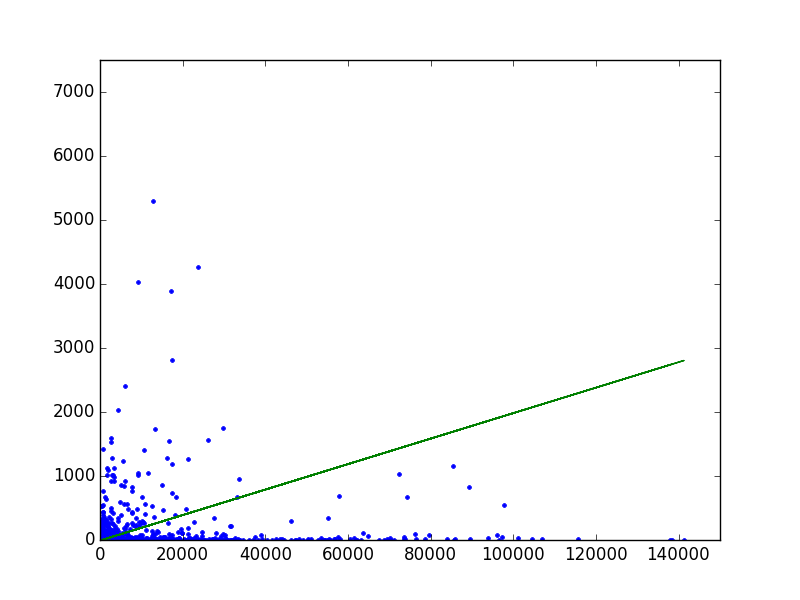
First example is to eliminate outliers in the below graph.
He also has a really cool (German) Playlist on data analysis with Python called Datenanalyse in Python and has a great site with examples at franz.media.
It’s free until the end of Friday, Dec 1, 2017. Afterwards it goes back to its normal $50 price. (Though you can use this link https://www.udemy.com/automate/?couponCode=FOR_LIKE_10_BUCKS to buy it for $10. And it’s an open secret that if you browse Udemy in privacy mode, they’ll show you the discount price to lure in a “new” customer. But course creators get a much larger cut when people use their referral codes.)
The course follows the book of the same name, which is available for free, in full, at [WayBack] https://automatetheboringstuff.com under a Creative Commons license. (Which I encourage you to use to share your own creative works.)
This is a very useful Atom.io package, but it has one big issue: when you close a preview window then re-opening it, the settings are restored to the default -frst -thtml --webtex ones.
As I’m an Atom.io n00b, I need to dig into this another time.
A network graph with more than a thousand programming languages connected by influence relations. Highly influential languages like Lisp, Smalltalk, C, Java, Pascal, C++, Haskel or Python are shown as larger circles as compared to languages with little influence on others like PHP or Argh!. / The influence relation data was retrieved from Freebase in 2013. This design available on posters and other products. An awesome gift for programmers who are into digital art. • Also buy this artwork on wall prints, apparel, kids clothes, and more.
Maybe for my LoT (LAN of Things): having multiple (even many) local LANs some each with their section of LoT equipment nicely separated and partially being able to talk to some of the other LANs or part of the outside world.
Some links that might help me getting this set up:
I hope I’m not alone on this but I find the cURL documentation hard to follow and short on examples.
My goal was to mimic some HTTP XML posting traffic a server gets from IoT devices. Google Chrome Postman (or Postman REST Client) reproduction is very easy and will send.
TL;DR
ensure you have an empty --header "Content-Type:" header: this ensures that cURL doesn’t add one and does not mess on how the content is being transferred.
use the --data or --data-binary command with an @ to post a file as body.
if you want --write-out then be sure you have a recent cURL version.
This file contains hidden or bidirectional Unicode text that may be interpreted or compiled differently than what appears below. To review, open the file in an editor that reveals hidden Unicode characters. Learn more about bidirectional Unicode characters
This will hang the connection: somehow cURL will never notify the upload is done and the HTTP server keeps waiting. When you put --verbose or --trace-ascii - on the command-line you will see something like this before hanging: * upload completely sent off: 245 out of 245 bytes.
This will automatically add a Content-Length: 245 header and complete the transfer. But it will also add a Content-Type: application/x-www-form-urlencoded header causing the content not being posted as a body.
This will automatically ad a Content-Length: xxx header (way longer than 245) because it converts the request into a Content-Type: multipart/form-data; boundary=------------------------e1c0d47bac806954 one (the hex at the end differs) which is totally unlike what Postman does.
It is also unlike to what the HTTP server accepts.
It turns out that --data-ascii is exactly the same as --data and that --data-binary just skips some new-line conversion when compared to --data or --data-ascii. Contrary to the --data-raw documentation that suggest it is equivalent to --data-binary it seems --data-raw behaves exactly like --data and --data-ascii. Odd.
So these are all stuck with the Content-Type: application/x-www-form-urlencoded and I thought I was running out of options.
It posts exactly the same content as the IoT devices and Postman do.
Phew!
I tried to combine this with the --write-out (a.k.a. -w) option, but for older versions of cURL (I could reproduce with 7.34) that forces cURL back in to Content-Type: application/x-www-form-urlencoded mode so watch your cURL version!
Later I will put more research in chuncked transfer. Links that might help me:




 The Wiert Corner - irregular stream of stuff