The Wiert Corner – irregular stream of stuff

Jeroen W. Pluimers on .NET, C#, Delphi, databases, and personal interests

  • My badges

  • Twitter Updates

  • My Flickr Stream

  • Pages

  • All categories

  • Enter your email address to subscribe to this blog and receive notifications of new posts by email.

    Join 1,854 other subscribers

Archive for the ‘Scripting’ Category

URLs for Mikrotik scripts to block IP addresses after repetitive login failures

Posted by jpluimers on 2017/06/13

For my research list:

–jeroen

Posted in Development, Internet, MikroTik, Power User, RouterOS, routers, Scripting, Software Development | Leave a Comment »

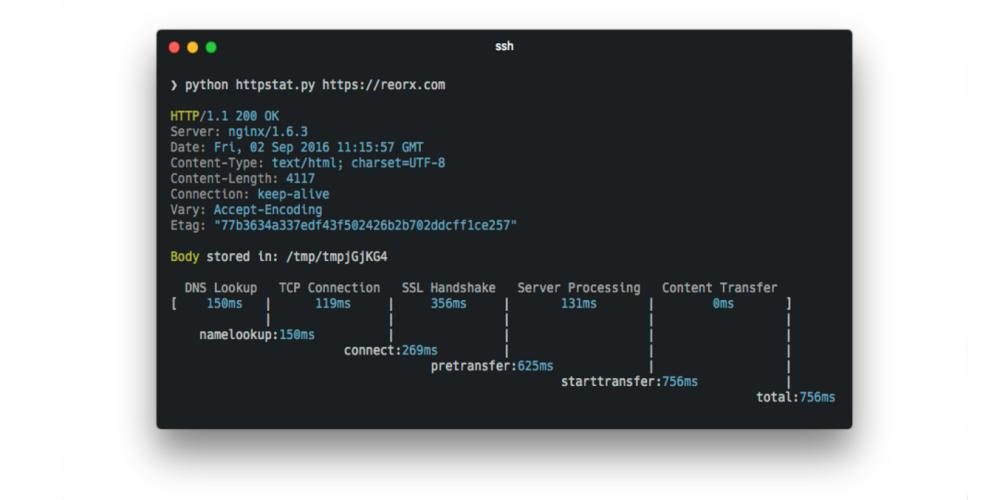
curl Statistics Made Simple: httpstat

Posted by jpluimers on 2017/06/08

curl Statistics Made Simple: httpstat is a single file Python script that has no dependency and is compatible with Python 3.

Source: curl Statistics Made Simple: httpstat [WayBack]

via: Using curl to get the HTTP header, and httpstat script to add connection stats (timings) to it. – Jean-Luc Aufranc – Google+ [WayBack]

Source: Using curl to get the HTTP header, and httpstat script to add connection stats…

Posted in *nix, cURL, Development, Power User, Python, Scripting, Software Development | Leave a Comment »

Mikrotik scripting language: a list of questions I had linking to the forum messages having answers

Posted by jpluimers on 2017/06/08

The RouterOS scripting language you can use on Mikrotik device immediately shows it’s origin: the console.

  • It is a statement oriented language where statement separators can be both semicolons and new-lines.
  • You can use the \ at the end-of the line as line-continuation character effectively spreading statements over multiple lines.

As promised some links to questions I asked:

Some questions by others that were also extremely useful:

And a few observations:

  • Functions do not need to be global. The RouterOS Scripting Manual paragraph on functions shows an example with :global that works just as fine with :local
    :local myFunc do={:put "hello from function"} 
    $myFunc
     
    # output: 
    # hello from function
  • a

–jeroen

Posted in Development, Internet, MikroTik, Power User, RouterOS, routers, Scripting, Software Development | 1 Comment »

APC 7xxx models, DHCP Option 43 and Mikrotik DHCP servers

Posted by jpluimers on 2017/06/07

When switching my DHCP to a Mikrotik CCR1009, both the AP7920 and AP7921 failed to get IP addresses. The APC7921 would look bounce between waiting and offered states like this:

The cause is the need of DHCP Option 43 (Vendor Class Identifier) specified in RFC2132 – based on [WayBack] RFC 2131 – Dynamic Host Configuration Protocol and [WayBackRFC 1533 – DHCP Options and BOOTP Vendor Extensions – which I found first via these links:

Read the rest of this entry »

Posted in Development, Internet, MikroTik, Power User, RouterOS, routers, Scripting, Software Development | 3 Comments »

Makefile Assignments are Turing-Complete « null program

Posted by jpluimers on 2017/06/01

The picture tricked me into thinking it was a Makefile for Tic-Tac-Toe, but it is in fact a 174 kilobyte makefile for Conways’ game of life which proofs that make macros are Turing complete.

Source: Makefile Assignments are Turing-Complete « null program

via: Abusing POSIX make to implement Conway’s game of life to demonstrate that make macros are Turing complete, even if there are no if and loop macros. – Kristian Köhntopp – Google+

While running on my Mac, the recursivity will make it fail on lack of resources though.

If seen both these:

sleep: Resource temporarily unavailable

and

make[119]: /bin/sh: Resource temporarily unavailable
make[119]: *** wait: No child processes. Stop.
make[119]: *** Waiting for unfinished jobs....
make[119]: *** wait: No child processes. Stop.


–jeroen

Posted in Development, Makefile, Scripting, Software Development | Leave a Comment »

Easily print GitHub markdown as beautiful PDFs that – in Chrome – immediately download

Posted by jpluimers on 2017/04/26

Printing Markdown with GitPrint

Simply view any Markdown file on GitHub, then in your URL bar replace the github.com part of the URL with gitprint.com — your markdown file will be rendered to a beautiful, printable PDF.

Try an example https://gitprint.com/jquery/jquery/blob/master/README.md

Every once in a while I feel like I’ve been living under a stone for years. Today is such a day as gitprint has been around since 2014 and I only noticed it until now.

It’s cool as it prints any github page (including Markdown, RestructuredText, etc) as a PDF file.

Notes:

Read the rest of this entry »

Posted in Bookmarklet, Development, DVCS - Distributed Version Control, git, GitHub, jQuery, Software Development, Source Code Management, Web Browsers | Leave a Comment »

use vmrun – via How do I find the IP address of a virtual machine using VMware Fusion? – Super User

Posted by jpluimers on 2017/04/20

Note this works only when the VMs have VMware Tools installed (more on that below):

VMWare provides, not surprisingly, a built in tool for this, vmrun. It’s under /Applications/VMware Fusion.app/Contents/Library/vmrun although it has moved around in other Fusion releases a bit.

🍺 vmrun list Total running VMs: 1 .docker/machine/machines/myvm.vmx
🍺 vmrun getGuestIPAddress ~/.docker/machine/machines/myvm.vmx 172.16.213.128

via: How do I find the IP address of a virtual machine using VMware Fusion? – Super User [WayBack]

vmrun [WayBack] is barely documented and most of is in PDF of which this is the most recent I could find: www.vmware.com/pdf/vix180_vmrun_command.pdf [WayBack]

Based on the above path, I added this to my ~/.bash_profile file:

alias vmrun='/Applications/VMware\ Fusion.app/Contents/Library/vmrun'
alias vmrun-list-running-VMs='vmrun list | grep vmx'
vmrun-list-ipv4-of-running-VMs()
{
  vmrun-list-running-VMs | while read line ; do echo $line && vmrun getGuestIPAddress $line; done
}

Now I can do this:

$ vmrun-list-ipv4-of-running-VMs
/Users/jeroenp/VM/W81Entx64DelphiRegression.vmwarevm/W81Entx64.vmx
172.16.172.135
/Users/jeroenp/VM/diaspore-opensuse-Tumbleweed-x64.vmwarevm/diaspore-opensuse-Tumbleweed-x64.vmx
Error: The VMware Tools are not running in the virtual machine: /Users/jeroenp/VM/diaspore-opensuse-Tumbleweed-x64.vmwarevm/diaspore-opensuse-Tumbleweed-x64.vmx
$ vmrun-list-ipv4-of-running-VMs
/Users/jeroenp/VM/diaspore.opensuse-Tumbleweed-x64/diaspore.opensuse-Tumbleweed-x64.vmx
Error: Unable to get the IP address
/Users/jeroenp/VM/W81Entx64DelphiRegression.vmwarevm/W81Entx64.vmx
172.16.172.135
$ vmrun-list-ipv4-of-running-VMs
/Users/jeroenp/VM/diaspore.opensuse-Tumbleweed-x64/diaspore.opensuse-Tumbleweed-x64.vmx
Error: Unable to get the IP address
/Users/jeroenp/VM/W81Entx64DelphiRegression.vmwarevm/W81Entx64.vmx
172.16.172.135
$ vmrun-list-ipv4-of-running-VMs
/Users/jeroenp/VM/diaspore.opensuse-Tumbleweed-x64/diaspore.opensuse-Tumbleweed-x64.vmx
172.16.172.134
/Users/jeroenp/VM/W81Entx64DelphiRegression.vmwarevm/W81Entx64.vmx
172.16.172.135
$ vmrun-list-ipv4-of-running-VMs
/Users/jeroenp/VM/diaspore.opensuse-Tumbleweed-x64/diaspore.opensuse-Tumbleweed-x64.vmx
172.16.172.134
/Users/jeroenp/VM/W81Entx64DelphiRegression.vmwarevm/W81Entx64.vmx
172.16.172.142

These are the messages I observed:

Error: The VMware Tools are not running in the virtual machine: /Users/jeroenp/VM/diaspore-opensuse-Tumbleweed-x64.vmwarevm/diaspore-opensuse-Tumbleweed-x64.vmx
Error: Unable to get the IP address
172.16.172.135

The first one means a machine is running but has no VMware Tools installed. For an OpenSuSE machine you can install it with zypper install open-vm-tools, for other Linux systems read VMware Tools auf Ubuntu, Mint, CentOS oder openSUSE installieren | ITrig [WayBack]

Some more examples of vmrun for VMware Fusion are at Control VMware Fusion from the Command Line | James Reuben Knowles [WayBack]

–jeroen

Posted in *nix, bash, Development, Fusion, openSuSE, Power User, Scripting, Software Development, SuSE Linux, Tumbleweed, Virtualization, VMware | Leave a Comment »

Bash that JSON (with jq) — Librato Blog

Posted by jpluimers on 2017/04/18

Glueing together APIs requires working with JSON: parsing it, extracting it, transforming it. JQ is a fast, lightweight, flexible, CLI JSON processor, that does the job well. Learn how to use it by getting your hands dirty with a JSON blob that represents the open issues in the public Docker GitHub repository.

via: http://blog.librato.com/posts/jq-json – Joe C. Hecht – Google+

–jeroen

Source: http://blog.librato.com/posts/jq-json

Posted in bash, Development, JavaScript/ECMAScript, jq, JSON, Scripting, Software Development | Leave a Comment »

.bashrc generator: create your .bashrc PS1 with a drag and drop interface

Posted by jpluimers on 2017/04/13

Cool: .bashrc generator: create your .bashrc PS1 with a drag and drop interface

http://bashrcgenerator.com/

–jeroen

http://bashrcgenerator.com/ – Joe C. Hecht – Google+

Posted in bash, Development, Scripting, Software Development | Leave a Comment »

How bad is the Windows command line really?

Posted by jpluimers on 2017/04/13

How bad is the Windows command line really?

The Windows command line is bad. Very bad.

But it took until recently for old Windows versions – that out of the box had either no or poor PowerShell versions – to have slowly died.

So only now PowerShell finally has become an option that really works across all Windows versions I use. Go PowerShell!

–jeroen

Posted in Batch-Files, Development, PowerShell, Scripting, Software Development | Leave a Comment »