Archive for the ‘Scripting’ Category
Posted by jpluimers on 2014/05/13
This article is a very brief example of how to use dsquery/dsget/find to get computer information from in the active direrctory of a domain.
The main aim for myself is to condense the information here, and have some links for background information.
If you have the right credentials then the below batch file works very well.
It uses these tools:
- dsquery to query the active directory on your domain controller for the existence and Distinguished Name (or ID/path) of various objects (in this example dsquery computer to check if a computer exists in a domain)
- dsget which can get you various detail information about an object (for instance dsget computer used in this example))
- find to raise the correct errorlevel (and indicate if we indeed found a CN – or Common Name – from a distinguished name)
The ds* tools do not raise any errorlevel, so that’s what find is used for.
Further reading: Read the rest of this entry »
Posted in Batch-Files, Development, Power User, Scripting, Software Development, Windows, Windows 7, Windows 8, Windows Server 2000, Windows Server 2003, Windows Server 2003 R2, Windows Server 2008, Windows Server 2008 R2, Windows Vista, Windows XP | Leave a Comment »
Posted by jpluimers on 2014/05/07
Thanks Christian S. – Moers for the fix for KB2686509 repeatedly failing and the answer below.
I’ve used it as the Microsof FixIt offered at You may receive a “0x8007F0F4” error code when you try to install updates from the Windows Update Web site or from the Microsoft Update Web site did not work on several systems. The fix by Christian did work on all those systems.
Note: it is possible you get the same error for KB2676562: MS12-034: Description of the security update for Windows kernel-mode drivers: May 8, 2012, as it is related to KB2686509: MS12-034: Description of the security update for CVE-2012-0181 in Windows XP and Windows Server 2003: May 8, 2012.
One of the symptoms is that your system contains the file %windor%\faultykeyboard.log containing a list of missing keyboard layout DLL files or KBD files (one of my machines had these missing: kbdjpn.dll and kbdkor.dll).
The cause is that KB2686509 can have problems with registry keys stored here:
- HKLM\SYSTEM\CurrentControlSet\Control\Keyboard Layout
- HKLM\SYSTEM\CurrentControlSet\Control\Keyboard Layouts
Christian wrote a batch file to fix it (named BatchFixKB2686509.cmd) which works splendid on the systems I had this error.
The batch file uses regedit /e to export parts of the registry, then writes a small .reg file to clear the keys and imports them with regedit /S, waits for you so you can install the update, then writes back the saved registry data.
So basically, it automatically performs the manual steps described at KB2686509 – Failure Due to Upgrade from Windows ME or 98 to Windows XP – TechNet Articles – United States (English) – TechNet Wiki.
His answer: Read the rest of this entry »
Posted in Batch-Files, Development, Keyboards and Keyboard Shortcuts, Power User, Scripting, Software Development, Windows, Windows XP | Leave a Comment »
Posted by jpluimers on 2014/05/06
Interesting, as this opens LDAP server to a lot more tools and development environments: ADAP Open Source REST API Layer For LDAP | Dr Dobb’s.
–jeroen
Posted in Communications Development, Development, HTTP, Internet protocol suite, JavaScript/ECMAScript, JSON, LDAP, Power User, REST, Scripting, Security, Software Development, TCP, Web Development | Leave a Comment »
Posted by jpluimers on 2014/05/06
Copying the path from the Finder to the clipboard is a bit cumbersome.
A simple way contains a bit of repetitive steps, and to read Mac OS X: Open a Terminal at Folder from Finder:
- Open a Terminal window in the finder
- Type this command in the Terminal window
pwd | pbcopy
This simple way was suggested my User Kyle Cronin, thanks!
Some notes:
- pwd prints the current working directory.
- pbcopy copies the input to the clipboard.
Another way is using Automator. It is a bit more complex to setup, but the actual usage is easier:
- Select the folder or file in the Finder
- Right click
- For a folder: select “Services”
- Select “Copy File Path”
Setting this up is a bit more complex and requires the first 5 steps from Copy file or folder path to the clipboard in Mac OS X Lion | MacYourself:
- Launch Automator from your Mac’s Applications folder. If you’ve never used Automator before, that’s not a problem. This is going to be so simple anyone can do it.
- Double-click the Service icon from Automator’s start menu.
- Toward the top of the right column, you’ll see this line of text: “Service receives selected _____ in _____”. Choose “Files or Folders” from the first menu and “Finder” from the second.
- Next, click on Utilities in the Actions library on the left side. Double-click “Copy to Clipboard” in the middle column. You’ll notice that this action has been added to our workflow on the right.
- Go to File > Save in the menu bar and name your service Copy File Path. Our work with Automator is now done, so you can safely quit it once the service is saved.
I’ve skipped the other steps, as I don’t need a keyboard shortcut for this.
–jeroen
via: Copy file or folder path to the clipboard in Mac OS X Lion | MacYourself.
Posted in Apple, Development, Mac, Mac OS X / OS X / MacOS, Mac OS X 10.7 Lion, MacBook, MacBook Retina, MacBook-Air, MacBook-Pro, OS X 10.8 Mountain Lion, Power User, Scripting, Software Development | 3 Comments »
Posted by jpluimers on 2014/05/01
SDB:System upgrade – openSUSE.
Every once in a while, I feel like I have been living under a stupid rock.
This was one of these cases. About 5 years ago, openSUSE added this feature:
openFATE – #305634: Debian-like dist-upgrade live system full version upgrade.
It is awesome, requires a bit of twiddling and afterwards you have a system that:
- was updated in-place while live
- is the most current openSUSE version
I don’t know of any drawbacks yet (will soon try it). If I find ones, I will post a new entry here.
The basic steps are like these: Read the rest of this entry »
Posted in *nix, Development, Linux, openSuSE, Power User, Scripting, sed script, Software Development, SuSE Linux | Leave a Comment »
Posted by jpluimers on 2014/04/29
I needed AntiVir on an openSUSE workstation.
Too bad the default installation package from YaST installed an old license: AntiVir would not work, and I was getting emails like these at regular intervals:
<br />Date: Thu, 25 Apr 2014 08:57:11 +0200<br />From: Cron Daemon <root@....><br />To: root@....<br />Subject: Cron <root@...> /usr/lib/AntiVir/guard/avupdate-guard --product=Scanner > /dev/null<br /><br />Error: No valid license was found<br />
After searching the web for a while, I found a lot of posts with wrong information, basically coming down to these 2:
At the bottom of the post, you will find a small shell script that I use to keep the hbedv.key up-to-date.
First some more about HBEDV, then how I found about the new download location, and a command to show you the current license information. Read the rest of this entry »
Posted in *nix, bash, Development, Linux, openSuSE, Power User, Scripting, Software Development, SuSE Linux, wget | 3 Comments »
Posted by jpluimers on 2014/04/28
I want to script an install where a service needs to be run as a user. I want to be able to specify the user.
Creating the user is easy through the [Wayback/Archive] NET USER /ADD command.
Specifying the user for the service can also be done: the [Wayback/Archive] SC CONFIG command [Wayback/Archive] allows this (thanks [Wayback/Archive] wmz and [Wayback/Archive] ofiris).
Now the missing link: granting the user the [Wayback/Archive] “Log on as a service” privilege as a [Wayback/Archive] logon right (SeServiceLogonRight). Is there a command for this? Or a simple script for PowerShell?
(I know only Local Service can do this out of the box, and [Wayback/Archive] no other accounts by default are, but I want to have control over the account and what other privileges that account has).
Here is the solution, including a few comments.
The easiest way to do this from a command line is definitely using NTRights.exe from the Windows Server 2003 Resource Toolkit.
ntrights +r SeServiceLogonRight -u jeroen -m \%COMPUTERNAME%
I changed the command-line a bit:
ntrights +r SeServiceLogonRight -u %USERNAME% -m \%COMPUTERNAME%
Note that
whoami /all
doesn’t show any change (not even after a reboot, it does not matter if you run it with or without UAC token).
secpol.msc
does show the change however, and does not require UAC (follow the tree to “Security Settings -> Local Policies -> User Rights Management -> Log on as a service” to see the users having the permission).
–jeroen
via: [Wayback/Archive] Easiest way to grant “Log on as a service” to a Windows user from the command-line? – Super User.
PS: Later I found out it is way easier to query the right:
accesschk.exe /accepteula -q -a SeServiceLogonRight
It will list the users having that right, for instance:
        IIS APPPOOLClassic .NET AppPool
        NT SERVICEALL SERVICES
        VCS-CIContinuaCI
There are similar rights one might want to query:
SeBatchLogonRight
SeDenyBatchLogonRight
SeInteractiveLogonRight
SeDenyInteractiveLogonRight
SeServiceLogonRight
SeDenyServiceLogonRight
SeNetworkLogonRight
SeDenyNetworkLogonRight
Thanks [Wayback/Archive] twasbrillig for explaining that at as answer to [Wayback/Archive] powershell – How to view user privileges using windows cmd? – Stack Overflow
Posted in Batch-Files, CommandLine, Development, Power User, PowerShell, Scripting, Software Development, Windows, Windows 7, Windows 8, Windows 8.1, Windows Server 2008, Windows Server 2008 R2, Windows Vista | Leave a Comment »
Posted by jpluimers on 2014/04/23
I’ve been using rsync as my MacGyver style backup-tool of choice on *nix systems and sometimes even Windows systems.
It works both locally and remotely, is simple to setup and over the years has gathered a lot of nifty functionality.
It is way easier to backup using rsync one directory to another than using tar (tar has the benefit of putting everything in one archive though) using a command like this:
rsync -aiv /path/to/source/directory /path/to/destination/directory
For remote copies, I usually add replace -aiv with -aivz or with -aiz.
Given the ubiquitous of hard disk space, I hardly compress or archive directory trees for archival purposes any more.
For an introduction of basic functionality read Everything Linux – A Tutorial on Using Rsync. An article from 1999 that is still very valid now.
Besides my praise for rsync, there are a few small things I want to mention in this article:
- Sometimes more is less. Recently someone asked me how to force rsync not to keep the time stamps of files.
He wasn’t the first to ask.
The solution is simple: since the -a option archive option implies -t, so the solution is to expand -a into its parts -rlptgoD, then remove the -t from that.
- The –link-dest=DIR option was added in about 2004 (later: no, link-dest was added to rsync 2.5.6 in januari 2003), which allows you to do incremental backups. Read the rest of this entry »
Posted in *nix, Development, Linux, Power User, Scripting, Software Development, SuSE Linux | 1 Comment »
Posted by jpluimers on 2014/04/16
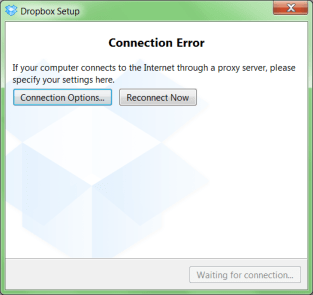
A while ago, I was working with a not so cooperative corporate firewall. All web browsers would work fine, but most other applications would not go through the proxy in a nice way.
For instance, DropBox would show the dreadfull “Connection Error” dialog shown on the right.
That dialog basically means “Dropbox has no clue what happens, try fiddling with your proxy or account settings, then press Reconnect Now” to retry.
Many other applications had issues (for instance Visual Studio connecting to Team Foundation System was very unreliable and the workarounds clumsy).
CNTLM: not the solution
I got inspired by the [WayBack] I code and code: Tutorial: How to use Dropbox behind a corporate proxy server using CNTLM, even though I was pretty sure the corporate firewall was not NTLM based.
And indeed, CNTLM -v -M http://google.com -c CNTLM.INI would give errors like this:
cntlm: Proxy returning invalid challenge!

headers_send: fd 4 warning -999 (connection closed)

Connection closed
HTTP Fiddler: looks promising
So I fired up my old buddy [WayBack] Fiddler 2 HTTP debugging proxy.
Further on, you will learn that Fiddler2 is much more, but right now it is enough to know that it basically sits as a local proxy between your applications and the outside world. Read the rest of this entry »
Posted in .NET, .NET 2.0, .NET 3.0, .NET 3.5, .NET 4.0, .NET 4.5, base64, Cntlm, Development, DropBox, Encoding, Fiddler, JavaScript/ECMAScript, NTLM, Power User, Scripting, SocialMedia, Software Development, Web Development, Windows, Windows 7, Windows 8, Windows Server 2000, Windows Server 2003, Windows Server 2003 R2, Windows Server 2008, Windows Server 2008 R2, Windows Vista, Windows XP, Windows-Http-Proxy | Leave a Comment »


 The Wiert Corner - irregular stream of stuff