The Wiert Corner – irregular stream of stuff

Jeroen W. Pluimers on .NET, C#, Delphi, databases, and personal interests

  • My badges

  • Twitter Updates

  • My Flickr Stream

  • Pages

  • All categories

  • Enter your email address to subscribe to this blog and receive notifications of new posts by email.

    Join 1,860 other subscribers

Archive for the ‘UI Design’ Category

Segoe Fluent Icons font – Windows apps | Microsoft Learn

Posted by jpluimers on 2025/08/28

For modern scaleable UI applications, it helps a lot when one has a consistently designed scalable icon set with icons having the same dimensions and features.

In more than just one sense, designing and developing such sets is a lot like developing and designing scaleable fonts. It is not surprising that by now many of these are available as fonts.

Ons of them is [Wayback/Archive] Segoe Fluent Icons font – Windows apps | Microsoft Learn which on the page has the complete list: an impressive one indeed and as such a leap from the old dingbat fonts like Zapf Dingbats fonts (yes, I am more than ITC Zapf Dingbats old; most glyphs ended up in the Dingbats (Unicode block) in 1991), Wingdings from Microsoft Windows 3.1 on, Wingdings 2 and Wingdings 3 in Microsoft Office versions until Office 2010, and the – now part of Core fonts for the webWebdings as of Internet Explore 4.

Those old fonts only had small sets of icons – usually no more than 230, some just dozens – and Segoe Fluent Icons has a huge set of icons.

Via Read the rest of this entry »

Posted in Development, Font, Icon Font, Musescore, Power User, Software Development, UI Design | Tagged: | Leave a Comment »

The Secret of Great Gradient – UX Planet

Posted by jpluimers on 2019/12/09

Gradients work best when “Inspired by Nature”, even if you live in the city.

–jeroen

Read the rest of this entry »

Posted in Development, Power User, Software Development, UI Design | Leave a Comment »

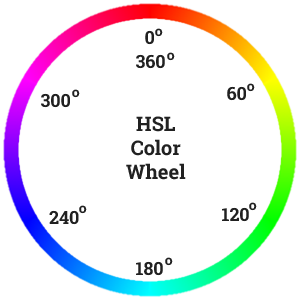
Practical Color Theory for People Who Code

Posted by jpluimers on 2018/06/18

Recommented reading and playing: [Archive.isPractical Color Theory for People Who Code which is not just about the colour wheel, but also about:

  • desaturation
  • mixing
  • contrast for tints and shades

Oh: don’t forge the “Party Mode” (:

–jeroen

PS:


Posted in Color (science), Color (software development), Development, LifeHacker, Power User, science, Software Development, UI Design | Leave a Comment »

Some links and references to IBM CUA: Common User Access which defines a lot of the UIs and UX we still use.

Posted by jpluimers on 2016/02/04

Back in the late 80s and early 90s of last century, engineers Richard E. Berry, Cliff J. Reeves set a standard that still influences the user interfaces and user experience of today: the IBM Common User Access.

I mentioned CUA a few times before, but since an old client of mine managed to throw away their paper originals in a “we don’t need that old stuff any more as we are now all digital” frenzy, I wanted to locate some PDFs. And I promised to write more about CUA.

If anyone has printed versions of the non-PDF documents below, please donate them to aek at bitsavers.org or scanning at archive.org as they are really hard to get.

A few search queries I used:

The PDFs I think are most interesting:

Read the rest of this entry »

Posted in BitSavers.org, Development, History, IBM SAA CUA, Keyboards and Keyboard Shortcuts, Power User, Software Development, UI Design, Usability, User Experience (ux) | 3 Comments »

Paletton and Kuler: very useful for creating colour palettes (via G+ Nick Butcher / Marie Schweiz)

Posted by jpluimers on 2014/08/29

Combile Paletton and Kuler and off you go!

Nick Butcher: Have found this site useful for creating colour palettes. Paletton – The Color Scheme Designer

Marie Schweiz: https://kuler.adobe.com and you can get the swatches :)

#Color

Thanks Nick Butcher and Marie Schweiz.

–jeroen

via: Have found this site useful for creating colour palettes..

Posted in Development, Power User, Software Development, UI Design, User Experience (ux) | Tagged: , | Leave a Comment »

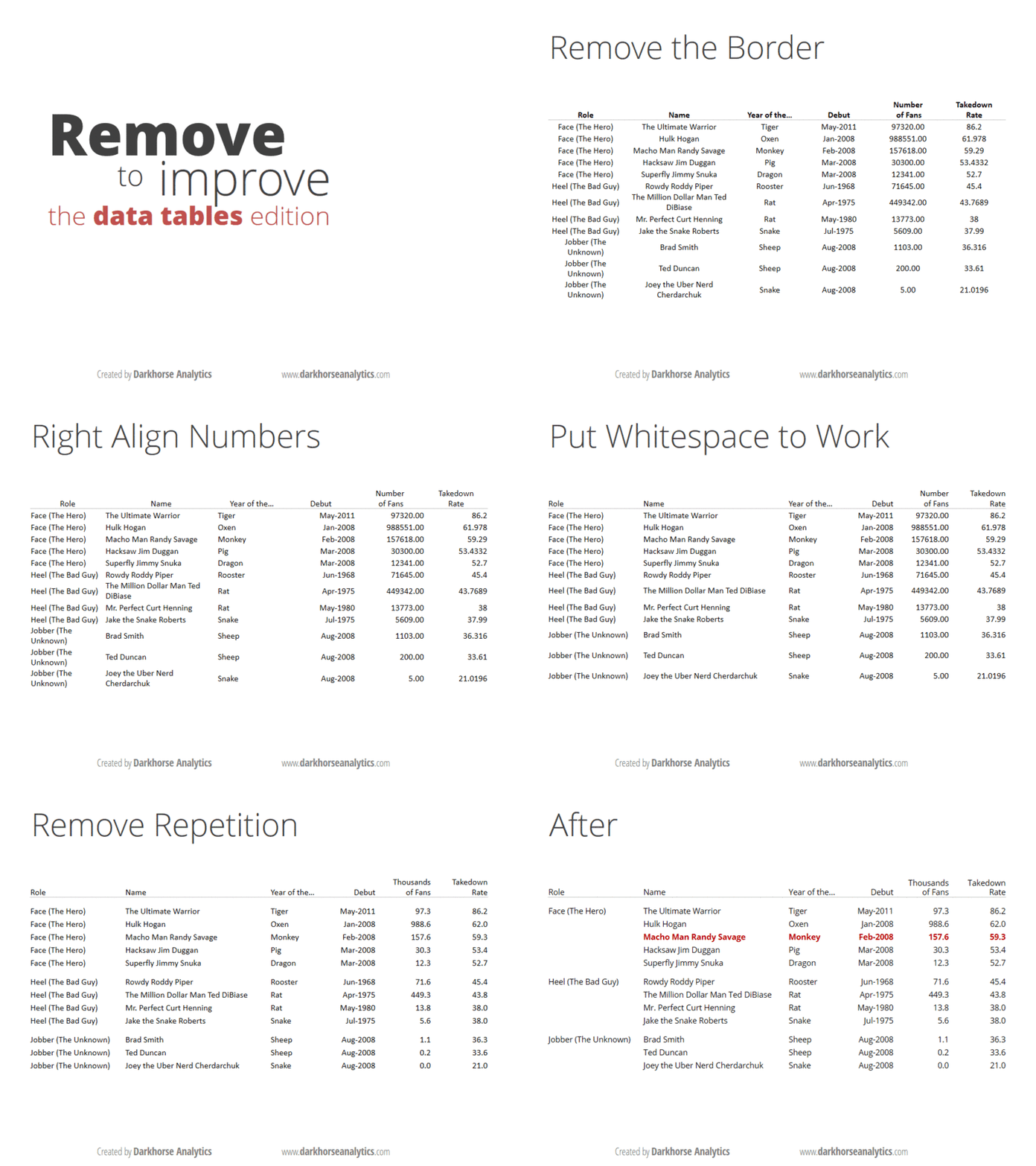
André Vatter – Google+ – Wie Tabellen eigentlich aussehen sollten: 

Posted by jpluimers on 2014/04/03

Below is how tables should look like.

Thanks Thomas Mueller (dummzeuch) for pointing me to André Vatter – Google+ – Wie Tabellen eigentlich aussehen sollten: .

–jeroen

André Vatter - Google+ - Wie Tabellen eigentlich aussehen sollten: 

Posted in Development, Software Development, UI Design | Leave a Comment »

Displaying formulas using HTML (via: More TVM–calculating the IRR : Algorithms for the masses – julian m bucknall)

Posted by jpluimers on 2012/10/04

I saw julian Bucknall post some beautiful formatted functions in a few of his Algorithms for the masses blog and wondered how he did it.

[a = P . r^N . \frac { (1 – r) } { (1 – r^N) }]

Why is his formula code looking so simple, and why doesn’t it display on my blog?

So I asked him (:

Hi response was “use MathJax“:

I’m loading the MathJax JavaScript library in my pages:
http://www.mathjax.org/

Here’s the post where I talk about it and how I tweak the expressions:
http://blog.boyet.com/blog/blog/tightening-the-feedback-loop-when-writing-latex-expressions-for-mathjax/

If you want to experiment writing such expressions, I have the page I’m describing in the above post online:
http://blog.boyet.com/blog/files/uploads/MathJaxFeedback.html

There are various ways to include the MathJax JavaScript, and if you do, you can use both LaTeX and MathML style formulas. Read all about it on the MathJax Getting Started page.

–jeroen

via:

Posted in Development, HTML, Software Development, UI Design, Web Development | 2 Comments »

Jazzy icons for Metropolis UI Applications that you can create with Delphi XE3

Posted by jpluimers on 2012/08/24

Now for some lighter Delphi XE3 related stuff:

These icons seem to go very well with the Metropolis UI Applications that you can create (and convert from VCL!) with Delphi XE3 (see the XE3 video at 0:30).

–jeroen

via:

Posted in Delphi, Delphi XE3, Development, Software Development, UI Design | 2 Comments »

Web 2.0 apps throwing away your user input #fail

Posted by jpluimers on 2010/06/30

It seems quite a few “web 2.0” apps too have the same glitch: they throw away user input when the first page finishes loading.
This is especially noticeable on slow connections (UMTS, DSL that is a long distance from the phone company, EDGE, GPRS, etc): the connection speeds that a lot of developers don’t seem to test on.

So, the sequence of events  goes like this:

  1. The data entry fields (in this case, from and to location) become visible
  2. You put the focus on the from field
  3. You type the from address (I do blind typing)
  4. You press the tab key to go to the to field (more and more Web 2.0 apps get their tab order right nowadays)
  5. You type the to address
  6. You wait until the “GO” button becomes visible
  7. The Web 2.0 app keeps loading
  8. It erases the “from” and “to” fields that you just typed

Or more general:
when you start typing in a Web 2.0 app which is still loading, almost all the times you loose your input.

And since there is usually no visual clue when the Web 2.0 app has finished loading, you have to wait until you feel comfortable not loosing your input.

Bad!

Examples that get this wrong:

Please add your own in the comments…

–jeroen

Posted in Development, Opinions, Software Development, UI Design, Web Development | 1 Comment »

VMware Virtual Infrastructure Client UI: why is the “edit…” on the top right, away from all other actions?

Posted by jpluimers on 2010/06/09

For almost all actions inside the VMware Infrastructure Client UI, you don’t need the “edit…” action.

The only place you need this is in the “Configuration” and “Users & Groups” tabs.

So when you want to enter your ESXi license, you might wonder how to do that.

Well: hit the “Edit…” action on the far right.
Indeed: far right, especially when running 1920×1200 or other high resolutions :-)

I wonder who did the UI design for the VMware Infrastructure Client, and what the reasoning for the placement of the “Edit…” action is.

–jeroen

via: VMware Communities: Where do I enter my ESXi license key? ….

Posted in Development, Software Development, UI Design | Leave a Comment »