Archive for the ‘Web Development’ Category
Posted by jpluimers on 2023/04/27
I want to check out how to do POST requests using bookmarklets in order to save URLs to the Wayback machine.
The reason is that every few months or so, saving a page the normal way through a something like https://web.archive.org/save/URL fails for one reason or the other, but going to https://web.archive.org/save, then entering URL, and pressing “SAVE PAGE” button works fine:
The the failing way above is using a GET request, the succeeding workaround will open https://web.archive.org/save/URL using the below POST request (where I omitted some HTTP cookies and HTTP header fields for brevity).
- POST request using
PowerShell:
$session = New-Object Microsoft.PowerShell.Commands.WebRequestSession
$session.UserAgent = "Mozilla/5.0 (Windows NT 10.0; Win64; x64) AppleWebKit/537.36 (KHTML, like Gecko) Chrome/96.0.4664.110 Safari/537.36"
Invoke-WebRequest -UseBasicParsing -Uri "https://web.archive.org/save/URL" `
-Method "POST" `
-WebSession $session `
-Headers @{
"method"="POST"
  "origin"="https://web.archive.org"
  "referer"="https://web.archive.org/save"
} `
-ContentType "application/x-www-form-urlencoded" `
-Body "url=URL&capture_outlinks=on&capture_all=on&capture_screenshot=on"
- POST request using cURL on
bash:
curl 'https://web.archive.org/save/URL' \
  -H 'origin: https://web.archive.org' \
  -H 'content-type: application/x-www-form-urlencoded' \
  -H 'referer: https://web.archive.org/save' \
  --data-raw 'url=URL&capture_outlinks=on&capture_all=on&capture_screenshot=on' \
  --compressed
- POST request using the fetch API in JavaScript:
fetch("https://web.archive.org/save/URL", {
  "headers": {
    "content-type": "application/x-www-form-urlencoded",
  },
  "referrer": "https://web.archive.org/save",
  "body": "url=URL&capture_outlinks=on&capture_all=on&capture_screenshot=on",
  "method": "POST",
  "mode": "cors"
});
BTW: Yes, I know that URL is not a valid URL, so it will return a page with “http://url/ URL syntax is not valid.“.
All links below via [Wayback/Archive] bookmarklet post request – Google Search:
I tried to put createFormSubmittingBookmarklets/createFormSubmitBookmarklets.js in a bookmarklet using both userjs.up.seesaa.net/js/bookmarklet.html and skalman.github.io/UglifyJS-online. That failed: somehow this code does not want to run as bookmarklet.
Running it from the console is fine though, and gave me this basic bookmarklet template:
javascript:function sf(ur,ty,fd){function me(tg,pr){var el=document.createElement(tg);for(const[nm,vl]of Object.entries(pr)){el.setAttribute(nm,vl);}return el}const fm=me("form",{action:ur,method:ty,style:"display:hidden;"});for(const[nm,vl]of Object.entries(fd)){fm.appendChild(me("input",{name:nm, value:vl}))}document.body.appendChild(fm);fm.submit()}sf("https://web.archive.org/save","post",{"url":"URL","capture_outlinks":"on","capture_all":"on","capture_screenshot":"on","wm-save-mywebarchive":"on","email_result":"on","":"SAVE PAGE"});
There bold URL there is the URL to be saved. I need to test this, then rework it to become parameterised.
–jeroen
Posted in Bookmarklet, Development, JavaScript/ECMAScript, Power User, Scripting, Software Development, Web Browsers, Web Development | Leave a Comment »
Posted by jpluimers on 2023/04/19
Having my background before the web-development era, and having lived mostly in back-ends or client-server front-ends, I sometimes need to really dig into things in order to understand them better.
CORS is such a thing, so below are some links to get started. My main interest is CORS proxies as they will force me do go deep and really get what is going on below the surface.
Defunct CORS proxy sites:
Used searches:
–jeroen
Posted in Communications Development, Development, HTTP, Internet protocol suite, REST, Software Development, TCP, Web Development | Leave a Comment »
Posted by jpluimers on 2023/03/15
Yup, web browser bookmarklets, though hardly published about any more, I still like them (and wrote about them before). With a little bit, usually unreadable, JavaScript, they can add magical functionality to your browser.
So here are some links on Twitter related bookmarklets:
- [Wayback/Archive] Send to Twitter Bookmarklet (uses document.title and URL as content) with this URI:
javascript:location.href='http://twitter.com/share?url='+encodeURIComponent(window.location.href)+'&text='+encodeURIComponent(document.title)
which I reworked into:
javascript:window.open('http://twitter.com/share?url='+encodeURIComponent(window.location.href)+'&text='+encodeURIComponent(document.title))
- These are all from the same author:
All code from the above links seemed to give corrupted tweets, which I thought was because of quote beautification, but was just me doing the whitespace removal wrong.
This is the right one:
javascript:(function(){n=getSelection().anchorNode;if(!n){t=document.title;}else{t=n.nodeType===3?n.data:n.innerText;}t='“'+t.trim()+'”\n\n';window.open(`https://twitter.com/intent/tweet?text=${encodeURIComponent(t)}${document.location.href}`)})();
which I reworked using «» quotes into:
javascript:(function(){n=getSelection().anchorNode;if(!n){t=document.title;}else{t=n.nodeType===3?n.data:n.innerText;}t='«'+t.trim()+'»\n\n';window.open(`https://twitter.com/intent/tweet?url=${document.location.href}&text=${encodeURIComponent(t)}`)})();
All via [Wayback/Archive] twitter bookmarklet – Google Search.
–jeroen
Posted in Bookmarklet, Development, JavaScript/ECMAScript, Power User, Scripting, Software Development, Web Browsers, Web Development | Leave a Comment »
Posted by jpluimers on 2023/01/10
A while ago I wrote about Setting up a GitHub project so it is served over https as a github.io and a custom subdomain.
Doing the full “host on your custom domain” route was a big tougher than I hoped for, so I totally forgot how easy it is to convert an existing HTML or markdown documentation repository to use GitHub pages without a custom domain.
I needed it for the Delphi version of the DeadLockEmpire (see links below, originally it was an interactive tutorial game focusing on the C# language and .NET runtime), as I am trying to get as much as my stuff published and hosted in a manner that will outlive me (I still have a pretty high chance of the rectum cancer metastases returning).
Enabling GitHub Pages on your repository is almost as easy as hosting a page through raw.githack.com (where I already hosted raw.githack.com/jpluimers/deadlockempire.github.io/feature/Delphi-language-and-Delphi-RTL/index.html as raw.githack.com/jpluimers/deadlockempire.github.io/feature/Delphi-language-and-Delphi-RTL/index.html and rawcdn.githack.com/jpluimers/deadlockempire.github.io/feature/Delphi-language-and-Delphi-RTL/index.html).
This is how easy it was to get it hosted as [Wayback/Archive] jpluimers.github.io/deadlockempire.github.io:
- In my [Wayback/Archive] jpluimers/deadlockempire.github.io: The Deadlock Empire: Slay dragons, learn concurrency! repository, go to the Settings tab, then click on Pages:
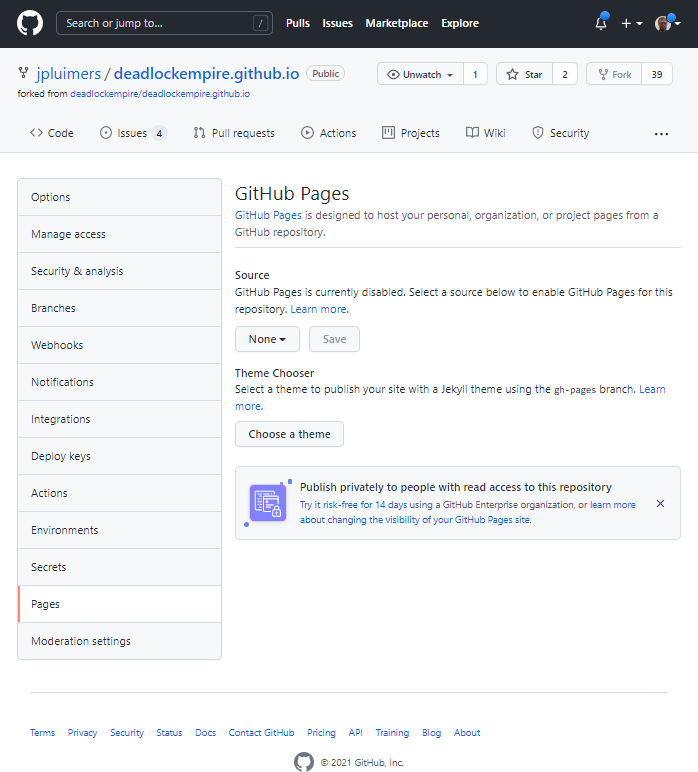
DeadLockEmpire Settings tab, Pages configuration None.
Here you see “None” as value for the branch to be published as GitHub Pages.
- Here I have chosen the Branch “feature/Delphi-language-and-Delphi-RTL” to be published, and am about to press “Save” (full screenshot below):

DeadLockEmpire Pages selecting the correct branch
- After pressing “Save“, the site gets published (it takes about a minute for that to complete) at [Wayback/Archive] jpluimers.github.io/deadlockempire.github.io:

DeadLockEmpire Pages the correct branch has been saved which will automagically publish it.
That was it. No more steps.
Each new commit in the selected branch will auto-publish as well.
Related DeadLockEmpire posts
- 2016 – If you thought you could do multi-threading, then play “The Deadlock Empire” games.
- 2017 – ThreadBarrier/ThreadBarrier.pas at master · lordcrc/ThreadBarrier
- 2020 – Davidlohr Bueso on Twitter: A programmer had a problem. He thought to himself, “I know, I’ll solve it with threads!”. has Now problems. two he
- [WayBack] One second code: Do YOU know how much your computer can do in a second? is a quiz version of the [WayBack] Numbers Every Programmer Should Know By Year. [WayBack] About this game revealed…Source: One second code: Do YOU know how much your computer can do in a second? « The Wiert Corner – irregular stream of stuff
Read the rest of this entry »
Posted in .NET, About, C#, Conference Topics, Conferences, Delphi, Development, Event, Personal, Software Development, Web Development | 1 Comment »
Posted by jpluimers on 2023/01/03
QR codes often are the quickest way to copy/paste some data to a smartphone.
So, via [Wayback/Archive] generate qr code site:github.io – Google Search, I found these two (the first is based on the JavaScript source in second, but has QR codes with larger blocks and is therefore easier to scan):
- [Wayback/Archive] QR Code Generator
- [Wayback/Archive] QR Code Generator
–jeroen
Posted in Development, HTML, JavaScript/ECMAScript, Scripting, Software Development, Web Development | Leave a Comment »
Posted by jpluimers on 2022/12/06
For my link archive for hosting private projects built using technology based on [Wayback/Archive] ASP.NET documentation | Microsoft Docs:
If you also are using other technologies than ASP.NET, Heroku might be an option:
–jeroen
Read the rest of this entry »
Posted in .NET, ASP.NET, ASP.NET core, C#, Development, Hosting, Power User, Software Development, Web Development | Leave a Comment »
Posted by jpluimers on 2022/12/01
With [Wayback/Archive] rawgit.com having sunset years ago, but still having a [Wayback/Archive] few links to it from my blog, it was time to take a closer look at the alternative [Wayback/Archive] htmlpreview.github.io.
First of all, htmlpreview needs more examples. I might submit a pull request for it later, as it is open source at [Archive/Archive] htmlpreview/htmlpreview.github.com: HTML Preview for GitHub Repositories.
Second, some actual example URLs, based on content I previously accessed through rawgit.com.
Read the rest of this entry »
Posted in Development, DVCS - Distributed Version Control, git, GitHub, HTML, Power User, rawgit, Software Development, Source Code Management, Versioning, Web Development | Leave a Comment »
Posted by jpluimers on 2022/11/29
For my link archive: [Wayback/Archive] google chrome devtools – Use JavaScript to set value of textbox when .value and events don’t seem to work – Stack Overflow
TL;DR
Sometimes fields are blocked from pasting values.
Normally a trick like this works in the chrome development panel console:
document.getElementById('nonPasteElementID').value = 'myValueFromTheClipboard'
With some web development environments this does not work.
For react, after finding the react render name for the input (in the case of the answer, it was “reactNameForInputElement“) this is a solution:
To make it work you will need this:
const input = document.getElementById('nonPasteElementID');
const event = new Event('reactNameForInputElement', { bubbles: true });
input.value = '1';
input.dispatchEvent(event);
–jeroen
Posted in Chrome, Chrome, Development, Google, JavaScript/ECMAScript, Power User, Scripting, Software Development, Web Browsers, Web Development | Leave a Comment »
Posted by jpluimers on 2022/11/23
 A long time ago, when just recovering from my december 2019 rectum cancer radiation treatments, I asked what Hugo was, to which tiara fan Jenn happily replied “[Archive] Jenn on Twitter: “It is a static website engine written in Go, … ““.
Like me, writing down or trying stuff is her way to remember things: [Archive] Jenn on Twitter: “For some reason, handwriting terminal commands helps to cement them in my head.… “
In 2021, Isotopp moved over to Hugo and I kindly asked if in the future he would help me out if I wanted to move from WordPress to Hugo.
The thread:
I will need to find a way to schedule posts though.
Note I archived Isotopp’s full thread at [Wayback/Archive] Thread by @isotopp on Thread Reader App – Thread Reader App.
–jeroen
https://twitter.com/geekgalgroks/status/1213574787785744384
It is a static website engine written in Go, https://t.co/msgP26rYRM
Related tweets in August 2020:
https://twitter.com/isotopp/status/1299319847617286146
Wo ich arbeite scheint alles auf ein Markdown im Git und eine Variante von Hugo, Jekyll oder ähnlich zu konvergieren.
https://twitter.com/mausdompteur/status/1299320903524851713
Gitlab Pages für Gitlab Häuser, die nicht schon Jira haben. Mit Web IDE ist das online und Inline zu bedienen.
Posted in Blogging, Development, Go (golang), SocialMedia, Software Development, Web Development | Leave a Comment »


 The Wiert Corner - irregular stream of stuff