


If your company manages your own infrastructure, be sure you have monitoring on all levels.
It saves you from customers discovering issues like this: [WayBack] Thread by @jpluimers: “The @EmbarcaderoTech docwiki is down due to an error in duobook2.[…]”:
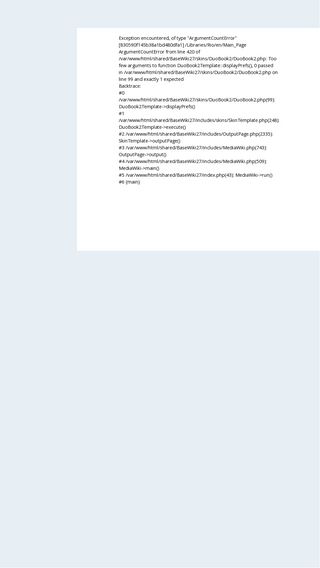
The @EmbarcaderoTech docwiki is down due to an error in duobook2. URLs pointing to wiki content fail, no matter the product. Examples for Rio and XE2 grabbed from docwiki.embarcadero.com/Libraries/Rio/… and docwiki.embarcadero.com/Libraries/XE2/…
This is the #1 reason for allowing archival of all your product documentation web-content in the @internetarchive, even for non-current products, as now only parts that have been allowed to save in the past are available.Apart from nobody noticing the outage yet, which is bad in it’s own way, I hope the cause is not somebody fiddling with duobook (3 year old and unmaintained) without testing the consequences. As that would make the cause of the outage embarrassing.
[WayBack] https://github.com/ElectricVersion/DuoBook
Finally it is rather odd to get a HTTP 200 SUCCESS code on a failure. A HTTP 500 or 503 would be far more appropriate.
I wonder if that is a @mediawiki thing; maybe they could shed some light on that.
References en.wikipedia.org/wiki/List_of_H… and en.wikipedia.org/wiki/List_of_H….
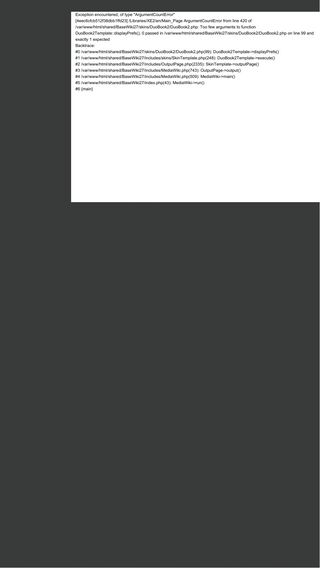
The cool thing is that the stack traces teach you a lot about how a framework is structured.
Related:
- [Archive.is/WayBack] RAD Studio API Documentation: Rio
Exception encountered, of type "ArgumentCountError" [6a5b64d3a502a9acff148fe1] /Libraries/Rio/en/Main_Page ArgumentCountError from line 420 of /var/www/html/shared/BaseWiki27/skins/DuoBook2/DuoBook2.php: Too few arguments to function DuoBook2Template::displayPrefs(), 0 passed in /var/www/html/shared/BaseWiki27/skins/DuoBook2/DuoBook2.php on line 99 and exactly 1 expected Backtrace: #0 /var/www/html/shared/BaseWiki27/skins/DuoBook2/DuoBook2.php(99): DuoBook2Template->displayPrefs() #1 /var/www/html/shared/BaseWiki27/includes/skins/SkinTemplate.php(248): DuoBook2Template->execute() #2 /var/www/html/shared/BaseWiki27/includes/OutputPage.php(2335): SkinTemplate->outputPage() #3 /var/www/html/shared/BaseWiki27/includes/MediaWiki.php(743): OutputPage->output() #4 /var/www/html/shared/BaseWiki27/includes/MediaWiki.php(509): MediaWiki->main() #5 /var/www/html/shared/BaseWiki27/index.php(43): MediaWiki->run() #6 {main} - [Archive.is/WayBack] XE2 API Documentation
Exception encountered, of type "ArgumentCountError"
[d3d353581c3915881b976ab6] /Libraries/XE2/en/Main_Page ArgumentCountError from line 420 of /var/www/html/shared/BaseWiki27/skins/DuoBook2/DuoBook2.php: Too few arguments to function DuoBook2Template::displayPrefs(), 0 passed in /var/www/html/shared/BaseWiki27/skins/DuoBook2/DuoBook2.php on line 99 and exactly 1 expected
Backtrace:
#0 /var/www/html/shared/BaseWiki27/skins/DuoBook2/DuoBook2.php(99): DuoBook2Template->displayPrefs()
#1 /var/www/html/shared/BaseWiki27/includes/skins/SkinTemplate.php(248): DuoBook2Template->execute()
#2 /var/www/html/shared/BaseWiki27/includes/OutputPage.php(2335): SkinTemplate->outputPage()
#3 /var/www/html/shared/BaseWiki27/includes/MediaWiki.php(743): OutputPage->output()
#4 /var/www/html/shared/BaseWiki27/includes/MediaWiki.php(509): MediaWiki->main()
#5 /var/www/html/shared/BaseWiki27/index.php(43): MediaWiki->run()
#6 {main}
–jeroen





 The Wiert Corner - irregular stream of stuff