Archive for the ‘Windows Development’ Category
Posted by jpluimers on 2025/01/14
For my link archive: below a series of articles my Raymond Chen on “The AArch64 processor (aka arm64)” in the order of appearance from a few years back and still very relevant today.
It is part of a few more series on processors that (were) supported by Windows. A good reference to find which version supported which processor architecture is the tables in List of Microsoft Windows versions – Wikipedia.
Read the rest of this entry »
Posted in AArch64/arm64, ARM, Assembly Language, Development, History, MIPS R4000, PowerPC, Software Development, The Old New Thing, Windows Development, x64, x86 | Leave a Comment »
Posted by jpluimers on 2025/01/08
(All below statements were run elevated as Administrator)
I had arp -d fail with any parameter combination on one of my systems always throwing the error The ARP entry deletion failed: The parameter is incorrect..
Luckily I found out that this did clear the ARP cache correctly:
netsh interface ip delete arpcache
I found that via [Wayback/Archive] “The ARP entry deletion failed: The parameter is incorrect.” – Recherche Google:
Read the rest of this entry »
Posted in Batch-Files, Development, Power User, Scripting, Software Development, Windows, Windows 10, Windows 11, Windows 7, Windows Development | Leave a Comment »
Posted by jpluimers on 2024/12/12
Simple (but fully working) code for NPLogonNotify(). The function obtains logon data, including cleartext password.
[Wayback/Archive] PSBits/PasswordStealing/NPPSpy at master · gtworek/PSBits has been used in the wild since about 2022 (the code is from 2020).
The code is a ~100 line C file resulting in a DLL exporting the NPGetCaps() and NPLogonNotify() functions.
Background/related:
Read the rest of this entry »
Posted in .NET, Blue team, C, CommandLine, Development, Power User, PowerShell, PowerShell, Red team, Scripting, Security, Software Development, Windows Development | Tagged: NPPSPY | 1 Comment »
Posted by jpluimers on 2024/12/05
For my link archive as this is environment variable override trick to override DLL loading is not just limited to executables shipping with Windows, but also with other products (likely: virus scanners that run privileged); another alternative is running a local process serving the WebDAV protocol.
Read the rest of this entry »
Posted in Development, Power User, Security, Software Development, Windows, Windows 10, Windows 11, Windows Development | Tagged: DEFCON30 | Leave a Comment »
Posted by jpluimers on 2024/12/04
Need to write a tool for this that sets/clears the ………… flag in the PE .EXE header.
Officially it is for this:
[Wayback/Archive] IMAGE_FILE_HEADER (winnt.h) – Win32 apps | Microsoft Learn
- IMAGE_FILE_UP_SYSTEM_ONLY
- 0x4000
|
The file should be run only on a uniprocessor computer. |
In practice, this sets the affinity to 1 single CPU core (which is kind of random, and could change each time you start the executable).
This is ideal for code that is known for causing trouble executing on multiple cores, or – more importantly – to disallow core-switching for programs that give best performance when executed on a single core.
Via: [Wayback/Archive] Thread by @0gtweet on Thread Reader App – Did you ever hear about IMAGE_FILE_UP_SYSTEM_ONLY flag in NtHeader->FileHeader->Characteristics of an exe file?
Read the rest of this entry »
Posted in Development, Software Development, Windows Development | Leave a Comment »
Posted by jpluimers on 2024/12/04
Interesting for both red teams and blue teams: [Wayback/Archive] Hijack Libs
This project provides an curated list of DLL Hijacking candidates. A mapping between DLLs and vulnerable executables is kept and can be searched via this website. Additionally, further metadata such as resources provide more context.
Read the rest of this entry »
Posted in Blue team, Development, Power User, Red team, Security, Software Development, Windows Development | Leave a Comment »
Posted by jpluimers on 2024/11/19
A while ago, within a week time, I got reminded of a project I did some 15 years ago involving low-latency audio using the .NET platform on Windows XP Embedded.
For that I used the BASS.NET wrapper classes and P/Invoke methods around the Un4seen BASS Audio Library.
Back in those days there was not much documentation about this, but now there is more.
Some starting points are:
Via:
Related:
--jeroen
Posted in .NET, Audio, Conference Topics, Conferences, Development, Event, LifeHacker, Media, Power User, Software Development, Windows Development | Leave a Comment »
Posted by jpluimers on 2024/11/05
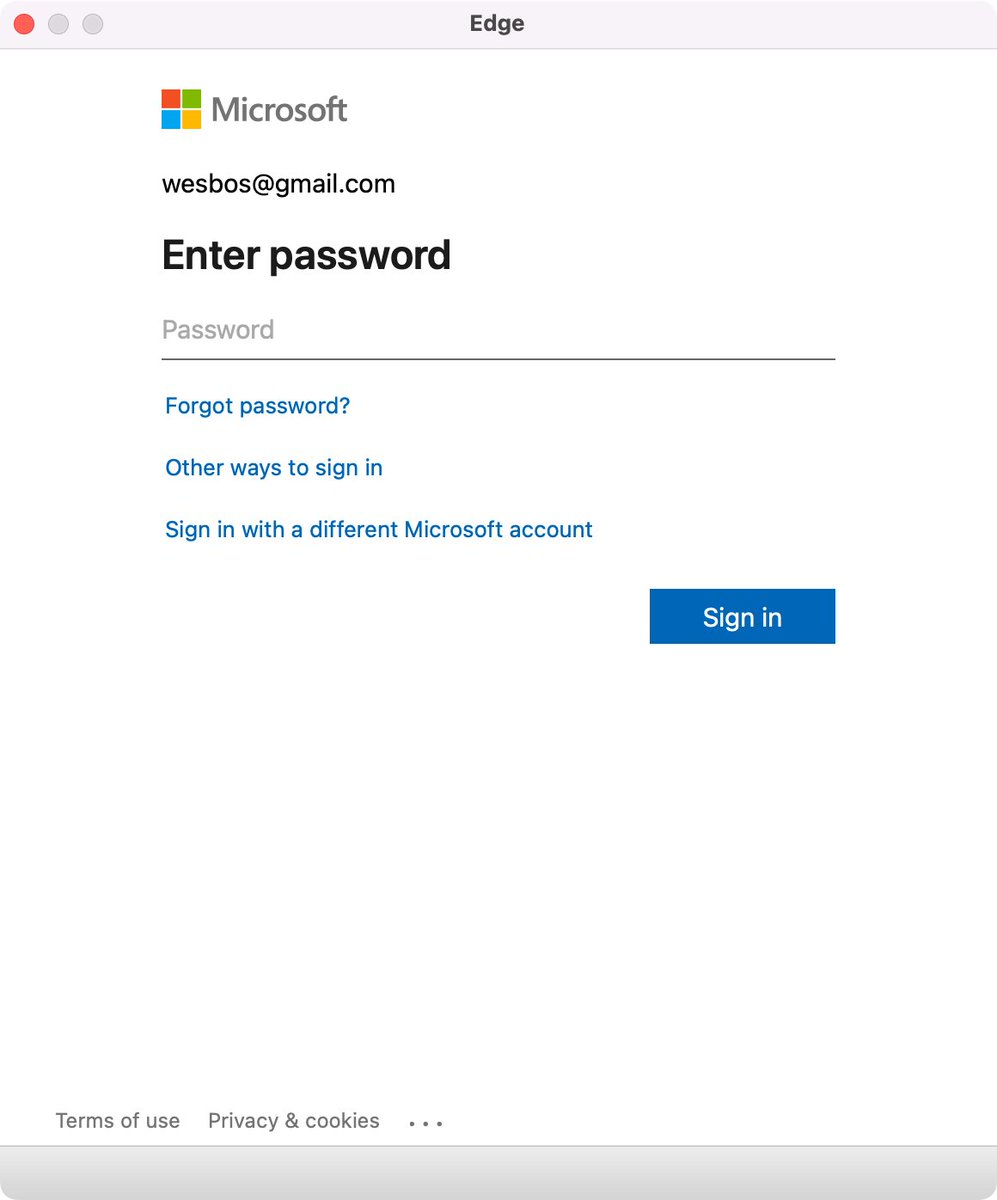
Edge browser Window without address bar of a Microsoft logon page for wesbos@gmail.com not indicating what the logon is for.
[Wayback/Archive] Thread by @wesbos on Thread Reader App
Every single app that uses a popup to sign in needs to stop hiding the address bar.
There is no way to test if its a legit website and 1Password doesn’t work
Without this, your logon borders on a dark pattern which can easily be abused by scammers.
Basically there are three things to make very clear for any logon page belonging to an actually executable: what you are actually logging on to, for and with.
Preferably your application also makes very clear that the logon page actually belongs to the application executable (despite users can figure out the application itself through for instance the Task Manager, or Process Explorer).
For web based logon, this last step is not possible, so for that it is really important to show the URL and the relation of the URL to the application (especially if you use a 3rd party logon like a Microsoft account – formerly Microsoft Passport, Google Account or Facebook account like was popular in OpenID heydays decade surrounding 2010).
Tweet:
Read the rest of this entry »
Posted in Dark Pattern, Development, Software Development, User Experience (ux), Web Development, Windows Development | Leave a Comment »
Posted by jpluimers on 2024/10/16
Posted in Conference Topics, Conferences, Development, Event, Power User, Security, Software Development, Windows, Windows 10, Windows 11, Windows 7, Windows 8, Windows 8.1, Windows Development | Leave a Comment »


 The Wiert Corner - irregular stream of stuff