Archive for the ‘Infrastructure’ Category
Posted by jpluimers on 2021/11/09
Mid 2020, I re-installed a Raspberry Pi 2 box based on OpenSuSE Tumbleweed.
To my susprise the yast2 module sudo could not write the configuration.
It appeared that /etc/sudoers had become readonly and a new /etc/sudoers.d was created.
You can use visudo to edit files in that directory without potentially losing changes in /etc/sudoers during upgrades. I think that is a good move.
To bad the yast module failed because of it.
More on visudo and the /etc/sudoers.d directory:
–jeroen
Posted in *nix, Development, DevOps, Infrastructure, Linux, openSuSE, Power User, SuSE Linux, Tumbleweed | Leave a Comment »
Posted by jpluimers on 2021/10/22
If you think download speeds are slow for large downloads (or multi-media playback is slow or quality is low) on a fast link, then consider your DNS.
Many people report that using one of the centralised DNS services (like Google/Cloudflare/…) causes slowness because they direct CDN lookups to a small pool of servers that get overloaded.
Some links:
Via [WayBack] How to check whether DNS is working through a browser? – Super User
Google DNS also allows for interactive querying, for example [WayBack] Google Public DNS
Read the rest of this entry »
Posted in Cloud, Cloudflare, DNS, Hardware, Infrastructure, Internet, Network-and-equipment, Power User | Leave a Comment »
Posted by jpluimers on 2021/09/08
Not sure why, bit if you want to force install a package, answering yes to all prompts, the chocolaty parameter order needs to be --yes --force instead of --force --yes.
This works:
choco install --yes --force git.install --params "/GitAndUnixToolsOnPath /NoGitLfs /SChannel /NoAutoCrlf /WindowsTerminal"
This fails:
choco install --force --yes git.install --params "/GitAndUnixToolsOnPath /NoGitLfs /SChannel /NoAutoCrlf /WindowsTerminal"
–jeroen
Posted in Chocolatey, Development, DevOps, Power User, Scripting, Software Development, Windows | Leave a Comment »
Posted by jpluimers on 2021/09/02
DNS over HTTPS
For my link archive:
JSON DNS output
Some DNS over HTTSP providers support dns-json, which Cloudflare delivers non-pretty printed.
Read the rest of this entry »
Posted in Cloud, Cloudflare, Communications Development, Development, DNS, Encryption, HTTP, https, HTTPS/TLS security, Infrastructure, Internet, Internet protocol suite, Power User, Security, Software Development, TCP, TLS | Leave a Comment »
Posted by jpluimers on 2021/08/10
SES mail servers at the time of writing
*n*x:
# nslookup -type=TXT amazonses.com | grep "v=spf1"
amazonses.com   text = "v=spf1 ip4:199.255.192.0/22 ip4:199.127.232.0/22 ip4:54.240.0.0/18 ip4:69.169.224.0/20 ip4:76.223.180.0/23 ip4:76.223.188.0/24 ip4:76.223.189.0/24 ip4:76.223.190.0/24 -all"I
Windows
C:\>nslookup -type=TXT amazonses.com | find "v=spf1"
Non-authoritative answer:
        "v=spf1 ip4:199.255.192.0/22 ip4:199.127.232.0/22 ip4:54.240.0.0/18 ip4:69.169.224.0/20 ip4:76.223.180.0/23 ip4:76.223.188.0/24 ip4:76.223.189.0/24 ip4:76.223.190.0/24 -all"
These addresses use a compact CIDR notation to denote ranges of networks containing ranges of network IPv4 addresses.
CIRD processing to sendmail access file
(this is linux sendmail only)
Converting the nslookup outout to a CIDR based sendmail /etc/mail/access excerpt goes via a pipe sequence of multiple sed commands:
# nslookup -type=TXT amazonses.com | grep "v=spf1" | sed 's/\(^.*"v=spf1 ip4:\| -all"$\)//g' | sed 's/\ ip4:/\n/g' | xargs -I {} sh -c "prips {} | sed 's/$/\tRELAY/g'"
199.255.192.0   RELAY
199.255.192.1   RELAY
...
76.223.190.254  RELAY
76.223.190.255  RELAY
What happens here is this:
- Filter out only
spf1 records using grep.
- Remove the head (
.*v=spf1 ip4:) and tail ( -all") of the output, see [WayBack] use of alternation “|” in sed’s regex – Super User.
- Replaces all
ip4: with newlines (so the output get split over multiple lines), see [WayBack] linux – splitting single line into multiple line in numbering format using awk – Stack Overflow.
- Convert the CIDR notation to individual IP addresses (as sendmail cannot handle CIDR),
- This uses a combination of
xargs with the sh trick to split the CIDR list into separate arguments, and prips (which prints the IP addresses for a CIDR); see:
- Alternatively, use
- Replaces all end-of-line anchor (
$) with a tab followed by RELAY, see
You can append the output of this command to /etc/mail/access, then re-generate /etc/mail/access.db and restart sendmail; see for instance [WayBack] sendmail access.db by example | LinuxWebLog.com.
Without the xargs, the output would look like this:
# nslookup -type=TXT amazonses.com | grep "v=spf1" | sed 's/\(^.*"v=spf1 ip4:\| -all"$\)//g' | sed 's/\ ip4:/\n/g'
199.255.192.0/22
199.127.232.0/22
54.240.0.0/18
69.169.224.0/20
76.223.180.0/23
76.223.188.0/24
76.223.189.0/24
76.223.190.0/24
Via
–jeroen
Posted in *nix, *nix-tools, Amazon SES, Amazon.com/.de/.fr/.uk/..., Cloud, Communications Development, Development, Infrastructure, Internet protocol suite, Power User, sendmail, SMTP, Software Development | Leave a Comment »
Posted by jpluimers on 2021/08/03
There are many reasons to disable DNS over HTTPS (DoH), of which enough are discussed in the links below.
Disabling DoH always talks about setting TTR (the abbreviation Mozilla uses for it) to 5 (like [WayBack] Thread by @isotopp: “Firefox is about to break DNS by enabling DNS-over-HTTP by default […]”), but hardly ever explains the meaning of 5, or any other potential values.
After some searching, I found [WayBack] Firefox disable trr | Knowledge Base:
0: Off by default1: Firefox chooses faster2: TRR default w/DNS fallback3: TRR only mode5: Disabled
I imagine the setting we’re all looking for is: user_pref(“network.trr.mode”, 5); (emphasis mine)
It pointed me to [WayBack] Trusted Recursive Resolver – MozillaWiki:
Read the rest of this entry »
Posted in Cloud, Cloudflare, Communications Development, Development, DNS, Firefox, Infrastructure, Internet protocol suite, Power User, TCP, Web Browsers | Leave a Comment »
Posted by jpluimers on 2021/07/26
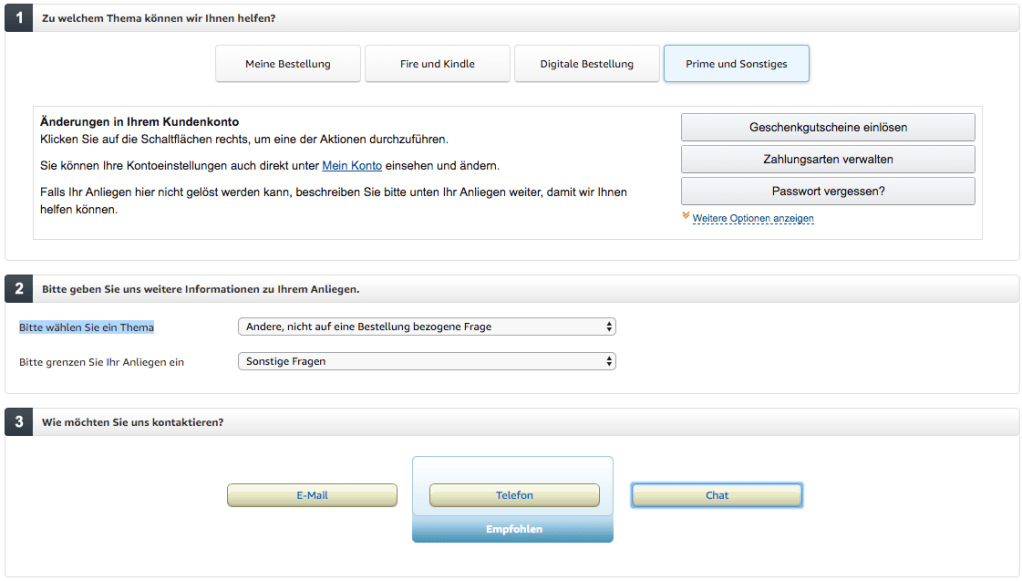
- Visit https://smile.amazon.de/gp/help/customer/contact-us/ref=hp_abgt_cu_cu?nodeId=508510
- Click “Prime und Sonstiges”
- In the “Bitte wählen Sie ein Thema” selector, choose “Andere, nicht auf eine Bestellung bezogene Frage”
- In the “Bitte grenzen Sie Ihr Anliegen ein” selector, choose “Sonstige Fragen”
- Now a “Chat” button appears:
–jeroen
Posted in Amazon.com/.de/.fr/.uk/..., Cloud, Infrastructure, Power User | Leave a Comment »


 The Wiert Corner - irregular stream of stuff