Archive for the ‘Apple’ Category
Posted by jpluimers on 2016/05/26
Thanks Adrian W for providing the below example in your answer about obtaining GLUE record information for a domain.
It is an excellent showcase for the $IFS Internal Field Separator available in any n x shell
In this case it is used to get the TLD (top-level domain ) from the domain name specified at the command-line .
After that, it obtains the name servers for that TLD, and queries the glue records there, both using dig .
Here is a little shell script which implements Alnitak’s answer :
#!/bin/sh
S=${IFS}
IFS=.
for P in $1; do
  TLD=${P}
done
IFS=${S}

echo "TLD: ${TLD}"
DNSLIST=$(dig +short ${TLD}. NS)
for DNS in ${DNSLIST}; do
  echo "Checking ${DNS}"
  dig +norec +nocomments +noquestion +nostats +nocmd @${DNS} $1 NS
done
Pass the name of the domain as parameter:
./checkgluerecords.sh example.org–jeroen
via domain name system – How to test DNS glue record? – Server Fault .
Posted in *nix , Apple , bash , Development , DNS , Linux , Mac , Mac OS X / OS X / MacOS , Mac OS X 10.4 Tiger , Mac OS X 10.5 Leopard , Mac OS X 10.6 Snow Leopard , Mac OS X 10.7 Lion , openSuSE , OS X 10.10 Yosemite , OS X 10.8 Mountain Lion , OS X 10.9 Mavericks , Power User , Scripting , Software Development , SuSE Linux | Leave a Comment »
Posted by jpluimers on 2016/04/25
For one of my USB backup drives, Time Machine was stuck showing “Preparing Backup”.
tmutil (which has a lot of undocumented parameters ) helped me out.
tmutil status
retinambpro1tb:~ root# tmutil status
Backup session status:
{
    BackupPhase = ThinningPreBackup;
    ClientID = "com.apple.backupd";
    DateOfStateChange = "2015-05-04 19:27:31 +0000";
    DestinationID = "01AE12C7-1D3E-469E-BE7E-32DA30F0030E";
    DestinationMountPoint = "/Volumes/Elements2TB1";
    Percent = "-1";
    Running = 1;
    Stopping = 0;
}
...
retinambpro1tb:~ root# tmutil status
Backup session status:
{
    BackupPhase = ThinningPreBackup;
    ClientID = "com.apple.backupd";
    DateOfStateChange = "2015-05-04 21:13:28 +0000";
    DestinationID = "01AE12C7-1D3E-469E-BE7E-32DA30F0030E";
    DestinationMountPoint = "/Volumes/Elements2TB1";
    Percent = "-1";
    Running = 1;
    Stopping = 0;
}
So I:
removed the .inProgress file found by ls -al /Volumes/Elements2TB1/Backups.backupdb/`scutil --get ComputerName`/*.inProgress
rebooted with the USB drive attached
waited for spotlight to complete
manually started a backup
verified it made progress using tmutil (you need to run that as root, for instance with sudo su -)
And it indeed made progress and finished:
Read the rest of this entry »
Posted in *nix , Apple , Mac , Mac OS X / OS X / MacOS , MacBook , MacBook Retina , MacBook-Air , MacBook-Pro , MacMini , OS X 10.8 Mountain Lion , Power User , SpotLight | Leave a Comment »
Posted by jpluimers on 2016/04/22
“We’re barbarians, not bureaucrats!”
Source: Hacking is Important — Medium
On hacking vs processes, being disruptive and how people think. Short stories about Borland, Apple, FaceBook and others.
–jeroen
via: Hacking is Important — Medium – David Berneda – Google+
Posted in Apple , Delphi , Development , Facebook , LifeHacker , Power User , SocialMedia , Software Development | Leave a Comment »
Posted by jpluimers on 2016/04/15
Recently homebrew reorganised on github:
Hi all!
The Homebrew/homebrew repository has been deprecated and split into two repositories:
This split helps the Homebrew maintainers in various ways but for users the main advantages should be increasing stability over time and a quicker development process.
The migration will be handled for you automatically when you `brew update`. If you have any migration issues please create an issue at https://github.com/Homebrew/brew/issues/new
If you have any questions: feel free to ask them.
Thanks for using Homebrew!
Mike McQuaidhttp://mikemcquaid.com
–jeroen
Source: Homebrew Core/Formulae Split – Google Groups
Posted in Apple , Home brew / homebrew , Power User | Leave a Comment »
Posted by jpluimers on 2016/04/01
IRC so: »i> Isotopp : Ich habe jetzt nen Mac als Arbeitsplatzrechner… Was will man als UNIX Hacker zuerst an Tools installieren?«
Source: IRC so: »i> Isotopp: Ich habe jetzt nen Mac als Arbeitsplatzrechner… Was will… by Kristian Köhntopp.
Since G+ is very bad at searching, I created this summary of the tools; read the full G+ post (Google Translate is quite OK), including comments on why.
Edit: 20160402 – I’m posting regular updates based on the comments for that G+ post. I’ve changed or added German iTunes store links to US-English ones.
Read the rest of this entry »
Posted in Apple , Audacity , Audio , Fusion , Hardware , Keybase , Keyboards and Keyboard Shortcuts , KVM keyboard/video/mouse , Mac , Mac OS X / OS X / MacOS , MacBook , MacBook Retina , MacBook-Pro , Media , OS X 10.10 Yosemite , OS X 10.11 El Capitan , Power User , Security , VirtualBox , Virtualization , VMware | Leave a Comment »
Posted by jpluimers on 2016/04/01
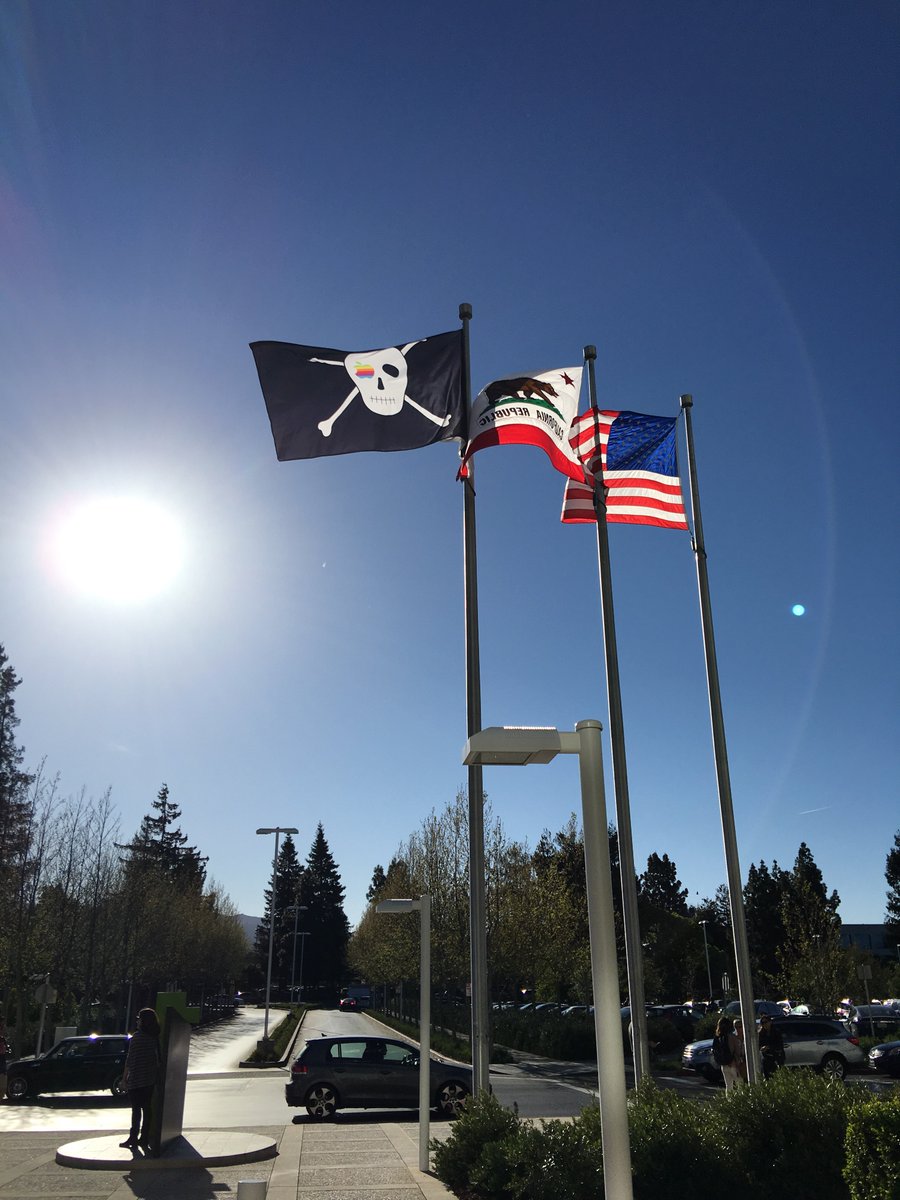
Apple Pirate Flag
Happy birthday Apple!
In homage to its history, Apple has hung a pirate flag at its Infinite Loop Headquarters (images via @twfarley and @mjisrawi). On April 1st, 40 years ago, Apple was founded…
Time lines:
–jeroen
VIDEO
Posted in Apple , Power User | Leave a Comment »
Posted by jpluimers on 2016/04/01
Apple Inc. just turned 40 today. Happy birthday!
Based on Mac@30 , here is my educated guess for Apple@40 .
(Boy what were they thinking when establishing Apple Computer Inc. on April 1st 1976 )
–jeroen
Posted in 6502 , Apple , Apple I , History , Power User | Leave a Comment »
Posted by jpluimers on 2016/03/18
Nice summary for just saying “Use Tunnelblick ”
This howto article explains how to obtain and setup a Mac openvpn client to connect to the OpenVPN Access Server.
Source: How to connect to Access Server from a Mac
–jeroen
Posted in Apple , Mac , Mac OS X / OS X / MacOS , Mac OS X 10.5 Leopard , Mac OS X 10.6 Snow Leopard , Mac OS X 10.7 Lion , MacBook , MacBook Retina , MacBook-Air , MacBook-Pro , MacMini , OpenVPN , OS X 10.11 El Capitan , OS X 10.8 Mountain Lion , OS X 10.9 Mavericks , Power User | Leave a Comment »
Posted by jpluimers on 2016/03/11
Mac SE/30’s nine-inch screen is ideal for font-wrangling, says dev, 16Mhz 68030 not so much
Wow, back in the days I used Fontographer too, at a client that also used Ikarus , but on even older Mac hardware. But that was early 1990s (:
–jeroen
Source: Motorola-powered Mac from 1989 used to write smartphone apps • The Register
Posted in Apple , Classic Macintosh , Font , History , Macintosh SE/30 , Power User | Leave a Comment »
Posted by jpluimers on 2016/03/11
Floppy Emu « Blondihacks tested this:
Plug-and-play disk emulation for your vintage Macintosh, Apple II, or Lisa! Floppy Emu is a floppy and hard disk emulator for classic Apple computers. It uses a removable SD memory card and custom hardware to mimic an Apple floppy disk and drive, or an Apple hard drive. The Emu behaves exactly like a real disk […]
Source: Floppy Emu Disk Emulator | Big Mess o’ Wires
–jeroen
via: This week, solid state storage for your 6502.
Posted in //e , Apple , Apple ][ , Classic Macintosh , Power User | Leave a Comment »



 The Wiert Corner - irregular stream of stuff